
-
 Hail, we're RedGuides. We want you to play six (yes, 6!) EverQuest characters at once. We have scripts and a friendly community to help, please join our playstyle and say hello! 👋
You are using an out of date browser. It may not display this or other websites correctly.
You should upgrade or use an alternative browser.
You should upgrade or use an alternative browser.
Resource icon
Release MQ2ToolTip
- Thread starter Redbot
- Start date


We have a NEW Plugin! MQ2ToolTip.
This Plugin Requires the HUD to be on. So you need to hit F11.
If you see the Ping bar up in the corner then you are good go.
A fun little plugin you may be familiar with if you every played World of Warcraft.
Mouse over any NPC or player to see MQ2 info about them in the Tooltip window.
Post your thoughts, likes, and dislikes here about the plugin.
Download the latest compile 07162015 and follow the instructions below.
Download and copy the MQUI_ToolTipWnd.xml file into your Evequest>UI>Default folder or Custom Ui folder
/plugin MQ2ToolTip
/loadskin - If you need to reload your UI
Attachments
Last edited:

tms
Member
It's nice.
I use something similar as an hud allready. Is there an way to configure the output ?
I would like an output like this:
p.s. I just realized that my Hud says distance to my current target is 110.81. MQ2ToolTip says it's 114.73. Which one is correct ? (same NPC of course)
I use something similar as an hud allready. Is there an way to configure the output ?
I would like an output like this:
Rich (BB code):
;TARGET DATA
TargetInfo=3,745,490,255,234,8,Target Information:
TargetNameHP=3,725,510,255,255,255,${If[${Target.ID},${Target.CleanName} ( ${Target.Race} ),]}
TargetGuage=3,725,520,255,0,0,${[====================].Left[${Int[${Math.Calc[${Int[${Target.PctHPs}]}*.2]}]}]}
NormGuage=3,725,520,255,255,255,${If[${Target.ID},====================  ${Target.PctHPs}%,]}
TargetLVLClass=3,725,530,0,255,0,${If[${Target.ID},${Target.Level} ${Target.Class},]}
GreenCon=3,725,545,0,255,0,${If[${Target.ID},${If[${Target.ConColor.Equal["GREEN"]},${Target.ConColor},]},]}
LightBlueCon=3,725,545,0,255,255,${If[${Target.ID},${If[${Target.ConColor.Equal["LIGHT BLUE"]},${Target.ConColor},]},]}
BlueCon=3,725,545,0,0,255,${If[${Target.ID},${If[${Target.ConColor.Equal["BLUE"]},${Target.ConColor},]},]}
WhiteCon=3,725,545,255,255,255,${If[${Target.ID},${If[${Target.ConColor.Equal["WHITE"]},${Target.ConColor},]},]}
YelllowCon=3,725,545,255,255,0,${If[${Target.ID},${If[${Target.ConColor.Equal["YELLOW"]},${Target.ConColor},]},]}
RedCon=3,725,545,255,0,0,${If[${Target.ID},${If[${Target.ConColor.Equal["RED"]},${Target.ConColor},]},]}
TDataD=3,790,545,255,255,255,${If[${Target.ID},Distance:  ${Target.Distance},]}
TargetMaxMeleeHeading=3,725,555,10,200,10,${If[${Target.ID},Max Melee: ${Target.MaxRangeTo}   Heading: ${Target.Heading},]}
p.s. I just realized that my Hud says distance to my current target is 110.81. MQ2ToolTip says it's 114.73. Which one is correct ? (same NPC of course)
This is for quick viewing so you don't have to invoke your hud. . Since it picks up info by mousing over the target instead of clicking on it.
Customization at the moment is limited. We are waiting to get more feed back to see if there are any lag issues first.
As for the distance I will check with our devs to see.
Customization at the moment is limited. We are waiting to get more feed back to see if there are any lag issues first.
As for the distance I will check with our devs to see.
MQ2ToolTip - Mouse over any NPC or player to see MQ2 info about them in the Tooltip window. Credit to Brainiac for the idea.
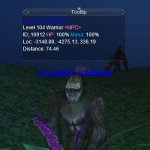

Make sure your hud is on either by hitting the F11 key or by typing /hud always
Commands
Download the latest compile.
Download and copy the MQUI_ToolTipWnd.xml file into your Evequest>UI>Default folder or Custom Ui folder
(You can also do this with the RGupdater. XML file is included in the compile in the UIFiles folder)
/plugin MQ2ToolTip
/loadskin - If you need to reload your UI
/tooltip on
Make sure your hud is on either by hitting the F11 key or by typing /hud always
Make sure your hud is on either by hitting the F11 key or by typing /hud always
Commands
Rich (BB code):
/tooltip on|off - {Enables or disables the Tooltip window)
/tooltip autoclear on|off - (clears the tooltip window if you move the mouse)
/tooltip cleartimer <ms> - (Sets the number of milliseconds tooltip shoud wait before if clears the window if autoclear is on
/tooltip follow on|off - (Will follow the mouse around)
/tooltip guild on|off - (Will display Guild tag in the tooltip as when mousing over playersl)
Download the latest compile.
Download and copy the MQUI_ToolTipWnd.xml file into your Evequest>UI>Default folder or Custom Ui folder
(You can also do this with the RGupdater. XML file is included in the compile in the UIFiles folder)
/plugin MQ2ToolTip
/loadskin - If you need to reload your UI
/tooltip on
Make sure your hud is on either by hitting the F11 key or by typing /hud always
Attachments
Last edited:

PurpleKitty
New member
So I'm playing with MQ2ToolTip and while I'm loving it, I'm noticing some oddities. If I have the tooltip set to follow and I move the mouse the tooltip completely goes away (window and all) regardless of my autoclear settings. If I have the tooltip set to not follow the mouse the tooltip window NEVER goes away, just the text in it if set to autoclear. Is that intended? I also don't seem to have any way to close that window when I'm not using it.
Also, is there anyway to manipulate the font size in that window? I hate to admit it but I had to up all my chatfontsizes by 1 upon this return to the game. This getting older shit can bite me.
Also, is there anyway to manipulate the font size in that window? I hate to admit it but I had to up all my chatfontsizes by 1 upon this return to the game. This getting older shit can bite me.
PurpleKitty
New member
Its a brand new download from today. The file date is 8-19. The icon hover date is 8-14. That machine had never had MQ2 on it until today. Now I'm on my laptop and trying to get it all configured also with a freshly downloaded compile and the tooltips don't appear at all. I've ensured that the MQ2ToolTip is loaded, HUD is on, tooltip is on, and I even set it to follow in case it was hiding behind something else. I can't get the tooltips to appear at all. Suggestions?
tms
Member
since i dont have the tooltip window also, i checked my uierrors.txt.
it's full of
maybe thats the reason it's not showing ?
And with full i mean full..
40.000 lines in 10 minutes.
it's full of
Rich (BB code):
[Sat Aug 22 21:40:17 2015] ScreenPiece ToolTipWnd referenced but not found in XML.
[Sat Aug 22 21:40:17 2015] ScreenPiece ToolTipWnd referenced but not found in XML.
[Sat Aug 22 21:40:17 2015] ScreenPiece ToolTipWnd referenced but not found in XML.
[Sat Aug 22 21:40:17 2015] ScreenPiece ToolTipWnd referenced but not found in XML.
[Sat Aug 22 21:40:17 2015] ScreenPiece ToolTipWnd referenced but not found in XML.
[Sat Aug 22 21:40:17 2015] ScreenPiece ToolTipWnd referenced but not found in XML.
[Sat Aug 22 21:40:17 2015] ScreenPiece ToolTipWnd referenced but not found in XML.
[Sat Aug 22 21:40:17 2015] ScreenPiece ToolTipWnd referenced but not found in XML.
[Sat Aug 22 21:40:17 2015] ScreenPiece ToolTipWnd referenced but not found in XML.
[Sat Aug 22 21:40:17 2015] ScreenPiece ToolTipWnd referenced but not found in XML.
[Sat Aug 22 21:40:17 2015] ScreenPiece ToolTipWnd referenced but not found in XML.
[Sat Aug 22 21:40:17 2015] ScreenPiece ToolTipWnd referenced but not found in XML.
[Sat Aug 22 21:40:17 2015] ScreenPiece ToolTipWnd referenced but not found in XML.
[Sat Aug 22 21:40:17 2015] ScreenPiece ToolTipWnd referenced but not found in XML.
[Sat Aug 22 21:40:17 2015] ScreenPiece ToolTipWnd referenced but not found in XML.
[Sat Aug 22 21:40:17 2015] ScreenPiece ToolTipWnd referenced but not found in XML.
[Sat Aug 22 21:40:17 2015] ScreenPiece ToolTipWnd referenced but not found in XML.
[Sat Aug 22 21:40:17 2015] ScreenPiece ToolTipWnd referenced but not found in XML.
[Sat Aug 22 21:40:17 2015] ScreenPiece ToolTipWnd referenced but not found in XML.
maybe thats the reason it's not showing ?
And with full i mean full..
40.000 lines in 10 minutes.
PurpleKitty
New member
Well, you probably did the same dumbass thing I did. I forgot to copy the window XML files to my default UI folder. And I was using the RGUpdater so I really have no good excuse for my brain freeze. Putting the window in the UI file solved the no showing up. I never checked my UIErrors.txt but the error you're getting is completely reasonable for the mistake.
As for the window clearing issue, that remains. I'm now updated to the very latest compile on all machines. If I don't use the follow feature the tooltip window never dissappears. The info blanks out but the window remains.
As for the window clearing issue, that remains. I'm now updated to the very latest compile on all machines. If I don't use the follow feature the tooltip window never dissappears. The info blanks out but the window remains.
tms
Member
Well, you probably did the same dumbass thing I did. I forgot to copy the window XML files to my default UI folder. And I was using the RGUpdater so I really have no good excuse for my brain freeze. Putting the window in the UI file solved the no showing up. I never checked my UIErrors.txt but the error you're getting is completely reasonable for the mistake.
As for the window clearing issue, that remains. I'm now updated to the very latest compile on all machines. If I don't use the follow feature the tooltip window never dissappears. The info blanks out but the window remains.
I have MQUI_TimerWnd.xml in my default & custom UI directory.

I have MQUI_TimerWnd.xml in my default & custom UI directory.
You need MQUI_ToolTipWnd.xml in your UI directories, see top of this forum to download it.
- - - Updated - - -
sounds like you have an old one. teh new one is in the compile.
I thought I was the only one that misspells 'the' as teh...
tms
Member
You need MQUI_ToolTipWnd.xml in your UI directories, see top of this forum to download it.
- - - Updated - - -
Yes, even if i wrote timerwnd, i ment TollTipWnd ;-)
Sometimes it shows, but most of the time not.
It's not really a problem.

cant get tooltip window to load at all have tried /plugin mq2hud then /plugin mq2tooltip but no luck so far
PurpleKitty
New member
Is the window not fading in non follow mode intended behavior? If so, I'll just make a; hole in my UI for it to call home. If not, I'll mention it so you can look at it. Thanks, btw, for the tooltip plugin. Immensely helpful.
PurpleKitty
New member
Tooltip is a normal EQ window you can set it fade.
Oh sure, state the obvious and bring logic into it. I'm not sure my INT level is high enough anymore for EQ. Too much WoW. /sigh
Did you put the MQUI_ToolTipWnd.xml in your everquest>ui>default folder?
did you hit the the f11 key to activate your hud?
yes actualy got it working on one toon on last compile and copied all his ui files over to others but still no luck and after having to load new compile its not working any more on him

still not getting this to work
I noticed on TLP that the mana percentage shown for NPCs is always my own. Is there something I need to toggle to fix this?
Will look into this

I'm in Plane of Health trying to farm collectibles. I wanted to steer clear of any mobs that are enchanters because the bastards charm you and cause you to kill your group. So ToolTip says a mob is a warrior. Silly me... I pulled it even though it has an enchanter rune buff on it (trusting ToolTip over my own brain) and immediately got charmed and the fun ensued.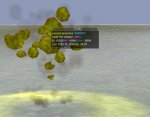


To be fair most enchanters think they are warriors so in a way it is correct...... lmao
You mean me...


I don't think so. eqmule's conspiracies usually only deal with bools.
Bah Mas.... I call boolcrap!!!!

- Commits
- 191
MQ2ToolTip
Mouse over any NPC or player to see MQ2 info about them in the Tooltip window. Credit to Brainiac for the idea.
Read more about this resource...
Mouse over any NPC or player to see MQ2 info about them in the Tooltip window. Credit to Brainiac for the idea.
Read more about this resource...
Austin1969
Member
This available on Next?
Users who are viewing this thread
Total: 1 (members: 0, guests: 1)
Share: