• You've discovered RedGuides, an EverQuest multi-boxing and scripting community 🧙‍♀️⚙️. We want you to play several EQ characters at once, come join us and say hello! 👋

  • A TLP without truebox has thawed (Very Vanilla ready)
    Frostreaver
MQ2SlotColors

Release MQ2SlotColors

Redbot

💻❤️
Moderator
Joined
Oct 15, 2004
RedCents
104,068¢
Pronouns
He/Him
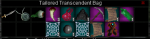
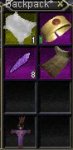
MQ2SlotColors.JPG

With our goal of bringing EQ in line with modern MMO's, eqmule has created MQ2SlotColors

Default colors
Tradeskill: yellow
Quest: purple

Installation:
Rich (BB code):
/plugin mq2slotcolors
/loadskin default

Commands:
/slotcolors queston - turns on quest item color
/slotcolors tradeskillon - turns on tradeskill item color
/slotcolors q | qr | ts | tsr - to change item colors

More colors to come when we hit 60 sales!
 
Last edited:
Ahh, I haven't updated in a lil over a week. I'll run that and see.

Just updated, there was an update. So I'm going to load in and try again :-)
 
All files it needs are embedded in the plugin as resources. It unpacks them to \uifiles\default on the fly if those files do not exist there.

(EQUI_Animations2.xml And window_piecesmq2.tga)
 
this is pretty awesome.

and being that i cant help mod things.

i made a new slotcolor graphic.

BagWithSlotColors.PNG

just activate the plugin as per instructions,once its running dump my 2 files into the defaul ui folder in everquest.
 

Attachments

Okay, so new thing for me happened with MQ2SlotColors today.

I loaded all of my boxes in before I realized that MQ2 wasn't loaded. So when I did load MQ2 none of my slot colors were functioning. Required I conduct a /loadskin on each box to get them to load the slot colors. Not sure if this is unexpected behavior or not since a /loadskin is required following loading the plugin for the first time. But something I noticed today and thought I would share.
 
Eqgame loads the xml long before u get in game. If you load MQ2 after that point, you will have to do a loadskin to force it to reload the xml files it uses.
So yeah it's expected behavior.
 
I loaded this plugin and did /loadskin default and crashed “Error in your GUI XML files. Check UIErrors.txt.” And now I crash and get same error on all my toons when I try and log on, even the ones I didn’t load the plugin on.
 
I loaded this plugin and did /loadskin default and crashed “Error in your GUI XML files. Check UIErrors.txt.” And now I crash and get same error on all my toons when I try and log on, even the ones I didn’t load the plugin on.
I ran it with ISBOXER going, I can still log in through patcher and I can still log in with ISBOXER, but I can’t log in with mq2 running.
 
Any ideas on how to fix this?
Should I delete mq2 and re download it?

Start Macroquest2. In the task-bar, right click macroquest2. Select INI file. Find MQ2SlotColors=1 and change it to MQ2SlotColors=0

My guess is that there's another program on your computer stopping you from running EQWire and SlotColors, most likely a graphics card optimization / settings program or anti-virus.
 
Start Macroquest2. In the task-bar, right click macroquest2. Select INI file. Find MQ2SlotColors=1 and change it to MQ2SlotColors=0

My guess is that there's another program on your computer stopping you from running EQWire and SlotColors, most likely a graphics card optimization / settings program or anti-virus.
I run CAM to monitor my cpu,gpu temp and usage. And use it to over lock my gpu. Could it be the overclock feature or CAM in general?
 
i think this needs recompiled or should i not be using the downloaded version after donating?
 
It would be great if this could have toggle functionality between functions. An idea I had would be to integrate it with loot.ini to show which is marked as loot, destroy, quest etc and that which is not marked. Would make farming/setting up loot.ini in a new area easier.
 
So ive been doing more and more reading on the forums recently. saw a screenshot of this plugin on something SiC posted for mq2berzerker.. purchased immediately!
 
The way the information for items is read means the item has to be in your possession. I'm not currently aware of a way to access the detailed information about an item in the advanced loot window to enable the items to be colored.
 
The way the information for items is read means the item has to be in your possession. I'm not currently aware of a way to access the detailed information about an item in the advanced loot window to enable the items to be colored.
Fair enogh, guess it would be there already if it was possible. Thanks anyway
 
Well I got it and I /plugin mq2slotcolors So far so good. I then did /loadskin default and got booted out of EQ.

I can no longer load this character. It gets to the character select screen and when the character is selected and hit play it crashes. I have looked in every INI file in EQ, the Release folder, and the Macros folder to see if it changed some setting. All the INI files look okay. I have not found anything in the files that suggests a setting for MQ2Slotcolors.

I sent a .dmp file to eqmule so he can have a look see. So I need a little help with this or a nudge toward the right place to start looking at. I don't want to try it on another character and have the same thing happen.
 
Does this plugin pull the files from the MQ2 UI folder to be used with a custom UI?
 
@Zebadiah Not sure what is causing your issue. But sounds like you'll want to unload the plugin at character select prior to loading into game to hopefully resolve the issue you're having until you can get a response from mule to correct the issue.
 
Last edited:
Will give it a try....(he has all my stuff )

I think I will try it all over again on a baby toon to see if I can recreate it.... I will let you know the results.
 
UpDate: Okay I got it running. Here is what I did. I first logged in character normally (nothing loaded from RG. and used the default settings for the EQ UI. My Character was able to load into the game. I then copied the setup from one of the stable character profile. Logged out of game completely (no fast log out).

Next I loaded up the Launcher and reinstalled the macros and plugins. Updated Nav maps as well. (never know). Then loaded my character up using Macroquest profile for that character. I then made it into the game. I had the copied profile working and then (once more) did a /plugin MQ2Slotcolors. I got a message to reload the ui. I logged out the character and relogged in. Everything came up and I checked my bags and low and behold I had pretty colors in the bags.

I think the problem came when I tried to use this /loadskin default <-----This was where I crashed. This time I didn't use it and it is now working....


Thanks
 
Release MQ2SlotColors

Users who are viewing this thread

Back
Top
Cart