
-
 Hail, we're RedGuides. We want you to play six (yes, 6!) EverQuest characters at once. We have scripts and a friendly community to help, please join our playstyle and say hello! 👋
You are using an out of date browser. It may not display this or other websites correctly.
You should upgrade or use an alternative browser.
You should upgrade or use an alternative browser.
Resource icon
Release MQ2PluginManager
- Thread starter grimmier
- Start date

Its been working fine for me, just ran the final fugue mission a couple of times.is this program not working for anyone else after the last update
Scornakira
New member
It is hit or miss if the plugin manager is up for me.

grimmier updated MQ2PluginManager with a new update entry:
07/11/2024
Read the rest of this update entry...
07/11/2024
Read the rest of this update entry...
Last edited by a moderator:
grimmier updated MQ2PluginManager with a new update entry:
07/11/2024
Read the rest of this update entry...
07/11/2024
Commits
(cd25565) ~brainiacClean up pass on the plugin code
- Moved accessors to the header so they can be inlined
- Return vector by const ref
- Removed a bunch of unused code
- Fixed parsing of filenames to include MQxxx plugins in addition to MQ2xxx
Read the rest of this update entry...
Last edited by a moderator:


Is there a way, once it is minimised, that you can get the window back. Clicking on the little o does not bring the window back. reloading the UI, nor doing an unload / reloading the pluginmanager will bring the window back.
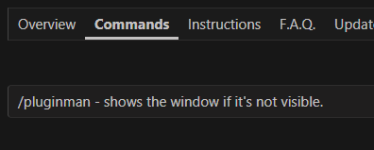
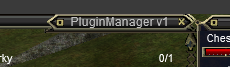
click the left corner you may have minimized itView attachment 63923
this is what I see, and if i unload it goes away, and when I load it again it comes back the same way
or grab the bottom and drag it to make it larger (if it isn't minimized)
restore the window, then you'll want to move your mouse around until then you grab it and drag it largerView attachment 63924 When I hover the mouse over the circle it is tell me to minimize the window,
View attachment 63925 and when I click on the circle. I cannot grab the window like you could make it bigger, that is not an option. Is there a way I could get a debug or something similar that would show what iti is trying to do??
there isnt really anything to debug, it is minimized (and shrunk)
you're welcome chizy, glad you got it sortedThis was a limitatioin of my screenreader software to try and describe the window and find that as an option. I am part blind and was unable to see that myself, but when I got a second pair of eyes, they found the dragable part tfor me.
Thanks,
grimmier updated MQ2PluginManager with a new update entry:
08/12/2024
Read the rest of this update entry...
08/12/2024
Removed and replaced the XML window with an ImGui one (#4)
* Removed and replaced the XML window with an ImGui one
* Removed the XML in game window.
* Added ImGui Window (same as the settings panel)
* Reworked the /pluginman command to toggle ImGui Window open | closed.
* Tossed a toggle button on the settings panel to toggle the main window.
* removed the toggle button
removed the...
Read the rest of this update entry...


You can roll back to the previous, XML version, but Imgui windows can be adjusted in size. The XML one had sync issue is why it was brought into Imgui.Is there a way to change it back to the small UI? this is too big for me
Hi yall,
since last patch, the plugin manager changed a lot, and while playing i closed that window... cant find a way to open it again, can someone give a hint ?
Thank you
since last patch, the plugin manager changed a lot, and while playing i closed that window... cant find a way to open it again, can someone give a hint ?
Thank you

Hi yall,
since last patch, the plugin manager changed a lot, and while playing i closed that window... cant find a way to open it again, can someone give a hint ?
Thank you
Code:
/pluginman
I am having all my selections on plugins change or not stay like for instance every time I start my healer I have to reselect cleric and most of the rest too
Nothing stays loaded All of them keep changing I have Nav loaded but no buttons also?
Any help would be appreciated? Is there perhaps a save somewhere I am missing?
Nothing stays loaded All of them keep changing I have Nav loaded but no buttons also?
Any help would be appreciated? Is there perhaps a save somewhere I am missing?
Not sure what specifically you're asking aboutI am having all my selections on plugins change or not stay like for instance every time I start my healer I have to reselect cleric and most of the rest too
Nothing stays loaded All of them keep changing I have Nav loaded but no buttons also?
Any help would be appreciated? Is there perhaps a save somewhere I am missing?
Mq2pluginmanager?
Macroquest.ini is what determines if a plugin is loaded when mq loads or not.
=1 is "load"
=0 is "don't load"
/Plugin <name> will change your macroquest.ini to =1 unless you /plugin <name> unload which changes it to =0Your best bet is to stop using mq2pluginmanager (assuming you are since you mentioned "clicking on cleric")
Normally when I load my accounts it keeps all the selected plugins, now I have to open pluginman and select each time, they don't stay loaded when I come back.Not sure what specifically you're asking about
Mq2pluginmanager?
Macroquest.ini is what determines if a plugin is loaded when mq loads or not.
=1 is "load"
=0 is "don't load"
/Plugin <name>will change your macroquest.ini to =1 unless you/plugin <name> unloadwhich changes it to =0
I am not doing anything different then I have before unless just using the /pluginman to select things changed how it runs?
I did bring it up once and turned a few things on and a few off before this started happening.
Without *something else* changing your MacroQuest.ini - like a .cfg file or a script unloading things, I'd just double check you don't have your macroquest.ini set to read only, or something like AV quarantining itNormally when I load my accounts it keeps all the selected plugins, now I have to open pluginman and select each time, they don't stay loaded when I come back.
I am not doing anything different then I have before unless just using the /pluginman to select things changed how it runs?
I did bring it up once and turned a few things on and a few off before this started happening.
Also I have nav turned on and it says loaded but suddenly all on one computer (I have 2) will not show the nav buttons follow and come and all that!Not sure what specifically you're asking about
Mq2pluginmanager?
Macroquest.ini is what determines if a plugin is loaded when mq loads or not.
=1 is "load"
=0 is "don't load"
/Plugin <name>will change your macroquest.ini to =1 unless you/plugin <name> unloadwhich changes it to =0
Your best bet is to stop using mq2pluginmanager (assuming you are since you mentioned "clicking on cleric")
thank you I will look up all that stuff.
My problems all seemed to start when I kept trying to run the tradeskill thing.I keep forgetting the names of things sorry
Those buttons are mq2groupinfo, not mq2nav that determine if those are there or notAlso I have nav turned on and it says loaded but suddenly all on one computer (I have 2) will not show the nav buttons follow and come and all that!
Thank you very much! Since all the plugins are changed I have not figured out what needs to be on!Those buttons are mq2groupinfo, not mq2nav that determine if those are there or not
I keep crashing.Without *something else* changing your MacroQuest.ini - like a .cfg file or a script unloading things, I'd just double check you don't have your macroquest.ini set to read only, or something like AV quarantining it
I checked the ini files are not read only
Is there supposed to be more than one?
Not sure what to do, nothing selected in plugin manager in game stays they change
like a .cfg file or a script unloading things, I'd just double check you don't have your macroquest.ini set to read only, or something like AV quarantining it
I am not sure what to do with this how to check.I don't have any added AV just windows 10.
I rememebr there was a Person who does not mind helping People who are computer illiterate but I failed to keep the name?
It started when I was trying to run the tradeskill lua, I unloaded all but a few plugins and nothing seems to work since.
Thank You
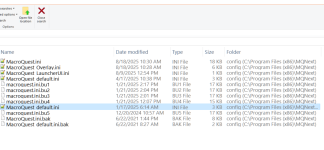
Is the 9009 like a hundred of them allowed through the windows defender for this website?Without *something else* changing your MacroQuest.ini - like a .cfg file or a script unloading things, I'd just double check you don't have your macroquest.ini set to read only, or something like AV quarantining it
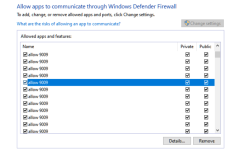

I think that person may be me.I keep crashing.
I checked the ini files are not read only
Is there supposed to be more than one?
Not sure what to do, nothing selected in plugin manager in game stays they change
like a .cfg file or a script unloading things, I'd just double check you don't have your macroquest.ini set to read only, or something like AV quarantining it
I am not sure what to do with this how to check.I don't have any added AV just windows 10.
I rememebr there was a Person who does not mind helping People who are computer illiterate but I failed to keep the name?
It started when I was trying to run the tradeskill lua, I unloaded all but a few plugins and nothing seems to work since.
Thank You
View attachment 71161
If not, I can make it me.
This seems like it may be a compound issue.
If you are crashing, that isn't good. It should probably be addressed as the higher priority, but maybe the two issues are linked together.
I know that you said you did not change anything, but my first observation here is that you seem to have MQ installed in a location that is often protected by the OS and can cause a host of issues with file accessing and saving.
My recommended first step would be moving the MQ folder or installing in another location.
If you are comfortable using Discord, I suggest that you visit us there and we can help you through it.
If not, or if you would prefer, you could message me here and we can figure out the best way to help you in real time, where all parties would be best focused on getting this solved.
I am happy to attempt that via forum posts, but I have generally found the above to work better at "getting the job done".
Thank you, I have not tried to use Discord, I am not good with People in general, I don't really understand sometimes, I have lived quite and isolated life.I think that person may be me.
If not, I can make it me.
This seems like it may be a compound issue.
If you are crashing, that isn't good. It should probably be addressed as the higher priority, but maybe the two issues are linked together.
I know that you said you did not change anything, but my first observation here is that you seem to have MQ installed in a location that is often protected by the OS and can cause a host of issues with file accessing and saving.
My recommended first step would be moving the MQ folder or installing in another location.
If you are comfortable using Discord, I suggest that you visit us there and we can help you through it.
If not, or if you would prefer, you could message me here and we can figure out the best way to help you in real time, where all parties would be best focused on getting this solved.
I am happy to attempt that via forum posts, but I have generally found the above to work better at "getting the job done".
I don't want to offend anyone by sounding in a way they may misunderstand and can happen when you are not used to chatting!
I will give it a shot if I can't fix this, I am still trying.
Where could I move this?I think that person may be me.
If not, I can make it me.
This seems like it may be a compound issue.
If you are crashing, that isn't good. It should probably be addressed as the higher priority, but maybe the two issues are linked together.
I know that you said you did not change anything, but my first observation here is that you seem to have MQ installed in a location that is often protected by the OS and can cause a host of issues with file accessing and saving.
My recommended first step would be moving the MQ folder or installing in another location.
If you are comfortable using Discord, I suggest that you visit us there and we can help you through it.
If not, or if you would prefer, you could message me here and we can figure out the best way to help you in real time, where all parties would be best focused on getting this solved.
I am happy to attempt that via forum posts, but I have generally found the above to work better at "getting the job done".
C:\Program Files (x86)\MQNext
I could not figure out how to message you?
I keep my MQ installs in a folder near the root of my drive.Where could I move this?
C:\Program Files (x86)\MQNext
I could not figure out how to message you?
For examples, C:\Games\Macroquest
I find it to be convenient for me.
For best results, ensure MQ and EQ are closed when you move it.
Also, once you copy or move the folder, you will need to start MQ directly from this folder, instead of using a button in the RG launcher or something similar.
Later on you can change the MQ install location path in that launcher, but we can focus on one thing at a time!
I am on my phone, but when I sit down at my computer, I will help you out with using messaging on this website.
I keep my MQ installs in a folder near the root of my drive.
For examples, C:\Games\Macroquest
I find it to be convenient for me.
For best results, ensure MQ and EQ are closed when you move it.
Also, once you copy or move the folder, you will need to start MQ directly from this folder, instead of using a button in the RG launcher or something similar.
Later on you can change the MQ install location path in that launcher, but we can focus on one thing at a time!
I am on my phone, but when I sit down at my computer, I will help you out with using messaging on this website.
Did the ini files look right above? And should I allow the 9009 thing through the firewall?
Not sure I could stop it anyway but is it the way redguides works?
C:\Games\Macroquest
Do you mean I should MAKE folders that say Games\Macroquest? Mine says next do I keep that and put it in Macroquest folder or change the name?
The ini file I saw looked correct. It looked like you may have and some backups from some years back and I'm not sure what did those, and I'm hopeful that given the age it is immaterial.
I don't know anything about 9009. I would ignore that for the moment. If you are using Windows defender firewall, it is very likely that you clicked a pop-up to allow MQ and/or EQ at some time in the past. In fact, you may get that pop up again, when you start MQ after you copy the folder.
Speaking of the folder, you could simply copy the mqnext folder to the root of your drive, so you would have c:\macroquestnext (or whatever your folder name is).
I use a folder I created named games to keep this and many other games organized, it is personal preference.
You are free to create folders and/or organize as you see fit.
I don't know anything about 9009. I would ignore that for the moment. If you are using Windows defender firewall, it is very likely that you clicked a pop-up to allow MQ and/or EQ at some time in the past. In fact, you may get that pop up again, when you start MQ after you copy the folder.
Speaking of the folder, you could simply copy the mqnext folder to the root of your drive, so you would have c:\macroquestnext (or whatever your folder name is).
I use a folder I created named games to keep this and many other games organized, it is personal preference.
You are free to create folders and/or organize as you see fit.
Did the ini files look right above? And should I allow the 9009 thing through the firewall?
Not sure I could stop it anyway but is it the way redguides works?
C:\Games\Macroquest
Do you mean I should MAKE folders that say Games\Macroquest? Mine says next do I keep that and put it in Macroquest folder or change the name?
Thank you that is very helpful!! Maybe I will not have as difficult of a time as i thought, I just need to know a few things like this.The ini file I saw looked correct. It looked like you may have and some backups from some years back and I'm not sure what did those, and I'm hopeful that given the age it is immaterial.
I don't know anything about 9009. I would ignore that for the moment. If you are using Windows defender firewall, it is very likely that you clicked a pop-up to allow MQ and/or EQ at some time in the past. In fact, you may get that pop up again, when you start MQ after you copy the folder.
Speaking of the folder, you could simply copy the mqnext folder to the root of your drive, so you would have c:\macroquestnext (or whatever your folder name is).
I use a folder I created named games to keep this and many other games organized, it is personal preference.
You are free to create folders and/or organize as you see fit.
I have had to learn pretty much everything on my own! My Son set up the whole thing years ago but after problems I have made a real mess of things and yet kept it running since the game began!

There might be some bumps along the way but I'm confident we can get you sorted.Thank you that is very helpful!! Maybe I will not have as difficult of a time as i thought, I just need to know a few things like this.
I have had to learn pretty much everything on my own! My Son set up the whole thing years ago but after problems I have made a real mess of things and yet kept it running since the game began!
If you've kept it running since it was called "MQNext", you'll probably be okay! I am worried about the crashes you mentioned but confident we can muddle through it. One thing at a time!
Should I have Macroquest instead of Next? i followed the instructions sometime back I had a big problem and tried starting over and this is what I ended up with is MQ2Next.There might be some bumps along the way but I'm confident we can get you sorted.
If you've kept it running since it was called "MQNext", you'll probably be okay! I am worried about the crashes you mentioned but confident we can muddle through it. One thing at a time!
"Next" is MQ is "MacroQuest" *and* MQ2 / MacroQuest2 doesn't exist anymore.Should I have Macroquest instead of Next? i followed the instructions sometime back I had a big problem and tried starting over and this is what I ended up with is MQ2Next.
you are using the correct thing.
it is MacroQuest, MQ, or sometimes called "Next" (it isn't next, it really is "now")
Than you! I was not looking forward to changing more things!!!"Next" is MQ is "MacroQuest" *and* MQ2 / MacroQuest2 doesn't exist anymore.
you are using the correct thing.
it is MacroQuest, MQ, or sometimes called "Next" (it isn't next, it really is "now")
If you can give me some more ideas as to why I need to reselect all the loaded plugins each time I bring them one that would be great.The ini file I saw looked correct. It looked like you may have and some backups from some years back and I'm not sure what did those, and I'm hopeful that given the age it is immaterial.
I don't know anything about 9009. I would ignore that for the moment. If you are using Windows defender firewall, it is very likely that you clicked a pop-up to allow MQ and/or EQ at some time in the past. In fact, you may get that pop up again, when you start MQ after you copy the folder.
Speaking of the folder, you could simply copy the mqnext folder to the root of your drive, so you would have c:\macroquestnext (or whatever your folder name is).
I use a folder I created named games to keep this and many other games organized, it is personal preference.
You are free to create folders and/or organize as you see fit.
I have to take each account and choose their plugins again every time I come on.
Thank you.
Have you already moved the MQ folder out of the program files folder?If you can give me some more ideas as to why I need to reselect all the loaded plugins each time I bring them one that would be great.
I have to take each account and choose their plugins again every time I come on.
Thank you.
Your macroquest.ini should be saving whether you start an addon by default or not, as soon as you load or unload a plugin... but please note, it is not character specific.
If that is not happening, this again may be indicative of not macroquest.ini not being able to save.
To be sure we are speaking about the same thing, could you explain how you are "reselect(ing) all the loaded plugins"?
Users who are viewing this thread
Total: 1 (members: 0, guests: 1)
Share: