• You've discovered RedGuides, an EverQuest multi-boxing and scripting community 🧙‍♀️⚙️. We want you to play several EQ characters at once, come join us and say hello! 👋

  • A TLP without truebox has thawed (Very Vanilla ready)
    Frostreaver

Problem - MQ2NAV and .ini issues

Jtrain87

New member
Joined
May 28, 2020
RedCents
Good morning everyone, I am very fresh to this but have watched videos and read everything I can but have yet to figure out what I am doing wrong so hopefully one of you are able to help. The first issue is MQ2NAV. I downloaded the meshes from the video numerous times but my COMETOME command continues to not work. The error code I receive is that there is no mesh available. POK is the only zone I have tried. Tried unloading and reloading but still have had no luck. The second issue is Kissassist with .ini files. So far my rogue and warrior have gone off without any issues whatsoever. I downloaded the .ini for my Shadowknight and cleric and can't seem to get it right. My Shadowknight ones ( Tried all the ones in the 110 free .ini search) say that you can not assist yourself. I have tried changing it to tank, puller tank, assist, everything, and still nothing. I drive with my SK but still want to make sure everything works. As for my cleric, I make sure my tank is targetted, like with all my toons, and I do not get any error messages but the cleric does nothing, no heals, no buffs, no nothing. My shaman works just fine.

The cleric is 110, Shadowknight is 111, and using the .ini free directory on this website.

Any help would be greatly appreciated. I am at work so I can not run anything currently and give you guys exacts on any questions until I get home. Thank you, everyone.
 
Good morning everyone, I am very fresh to this but have watched videos and read everything I can but have yet to figure out what I am doing wrong so hopefully one of you are able to help. The first issue is MQ2NAV. I downloaded the meshes from the video numerous times but my COMETOME command continues to not work. The error code I receive is that there is no mesh available. POK is the only zone I have tried. Tried unloading and reloading but still have had no luck. The second issue is Kissassist with .ini files. So far my rogue and warrior have gone off without any issues whatsoever. I downloaded the .ini for my Shadowknight and cleric and can't seem to get it right. My Shadowknight ones ( Tried all the ones in the 110 free .ini search) say that you can not assist yourself. I have tried changing it to tank, puller tank, assist, everything, and still nothing. I drive with my SK but still want to make sure everything works. As for my cleric, I make sure my tank is targetted, like with all my toons, and I do not get any error messages but the cleric does nothing, no heals, no buffs, no nothing. My shaman works just fine.

The cleric is 110, Shadowknight is 111, and using the .ini free directory on this website.

Any help would be greatly appreciated. I am at work so I can not run anything currently and give you guys exacts on any questions until I get home. Thank you, everyone.

howdy Jtrain and welcome to RG!

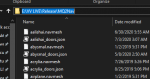
so with mq2nav the meshes go in your mq2nav folder (in your release folder)

then in game you want to make sure mq2nav is loaded and you can do that by doing a /plugin mq2nav load --- then you can do a /nav reload and you should get a message that mq2nav successfully loaded the mesh
1594212784995.png

if this didn't happen I would double check that you have your mesh files where you think you do
this is what mine looks like

E:\VV LIVE\Release\MQ2Nav

1594212876740.png

There is the meshupdater.exe in your release folder too - i would suggest giving that a quick run and see if that fixes you up
 
Thank you for your reply. I will definitely look into where I placed those files. As for the .ini issue with my characters. Is there some sort of plug in I'm missing?
 
You'll need to post your ini files for anyone to be able to hazard guesses at what may be wrong. You should probably make it a separate post in the KA support forum.
 
Problem - MQ2NAV and .ini issues

Users who are viewing this thread

Back
Top
Cart