• You've discovered RedGuides, an EverQuest multi-boxing and scripting community 🧙‍♀️⚙️. We want you to play several EQ characters at once, come join us and say hello! 👋

  • A TLP without truebox has thawed (Very Vanilla ready)
    Frostreaver
MQ2Mule

Release MQ2Mule

Status
Not open for further replies.
Are you running MQ2EQWire? The Remote button relies on the Windows preview feature (hover over a task bar icon). EQWire stops the drawing of those frames while in background so the remote won't work.
I am not. I also tried reloading the UI. Didn't work.

Also, windows preview works on the taskbar.
 
The pet buff window does not number spells and conditions correctly. First slot is Petspell. This is from memory... The second slot is PetBuffs1 and its condition is labeled PetCond2. anyone else notice this?
 
Yup, you're totally right!

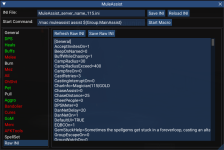
For others reading, make sure to look at the RAW tab after clicking save to make sure things are saved correctly.
 
I tried that. I also tried importing a working ini file (for the exact same character) from a different computer. Same problem. I've just been running the files with "/mac muleassist", but I miss the handy GUI. Today I discovered that this problem also presents for my magician. My warrior appears to have no issues.
I forgot to reply that I found my problem. There was a typo in my include path, and it looks like the program doesn't throw any errors when it can't find the directory you told it to look in. So it never created new ini files, nor could it find my existing ones.
 
Issue: Conflict with level 63 ranger spell "Frozen Wind." It says we can't use it in the Mule Window because we're not level 102 yet. Problematic, due to the fact that 102 won't be possible on Rizlona for... quite some time. :)
 
Hello all,

I am thinking that MQ2Mule is the gate that might bring a Light to different MQ2 plugins, it is suitable for Every class from what I've practiced using MQ2Mule, you can (turn on) buffs or burns or even clickers, or Cures and the list goes on. a Very powerful nice tweak Redguiders. Thanks a lot. Although I would like to practice it on classes that doesnt have plugins yet like Magician's or wizards.
 
Hello all,

I am thinking that MQ2Mule is the gate that might bring a Light to different MQ2 plugins, it is suitable for Every class from what I've practiced using MQ2Mule, you can (turn on) buffs or burns or even clickers, or Cures and the list goes on. a Very powerful nice tweak Redguiders. Thanks a lot. Although I would like to practice it on classes that doesnt have plugins yet like Magician's or wizards.
Is this a question? Statement? Not sure if you need help with something?
 
First attempt at running mq2mule for my Bard. Loading it up and hitting start I receive an error stating "[MQ2] ERROR: You cannot assist yourself! Please target Main Tank and restart macro." I have done this multiple times, but every time I target him it immediately re-targets my Bard and gives me the error. I have reloaded to no success. Please advise, any help would be appreciated. Don't really enjoy driving on my team with my Bard. I am running mq2eskay, rog, shm, mnk, and clr. as well, and I'm sure its a simple mistake (usually is) on my part.
 
First attempt at running mq2mule for my Bard. Loading it up and hitting start I receive an error stating "[MQ2] ERROR: You cannot assist yourself! Please target Main Tank and restart macro." I have done this multiple times, but every time I target him it immediately re-targets my Bard and gives me the error. I have reloaded to no success. Please advise, any help would be appreciated. Don't really enjoy driving on my team with my Bard. I am running mq2eskay, rog, shm, mnk, and clr. as well, and I'm sure its a simple mistake (usually is) on my part.
Are you using the MuleAssist GUI to try and start your Bard as a Puller?

I've just had a hotkey to start my Bard as a Puller, though I don't entirely remember why. Maybe to get around this problem?

Should be able to get it started by the following, without quotes:
/mac muleassist puller "tankname"

*Edit: fixed typoes
 
Last edited:
Thank you. I’ll try that. My Bard isn’t set as puller just trying to assist and following my team.
 
If I had to guess your bard is the group leader? If you use the bot button from the GUI I believe the first line is to target group leader and then /Mac muleassist.
If that’s the case you can always manually start it instead of the hot buttons. Just /mac muleassist or /Mac muleassist puller.
 
ISSUE:

I added all my spells to the UI. When I click on Mem Spells my character sits to do so, but then instantly stands back up.
 
I added all my spells to the UI. When I click on Mem Spells my character sits to do so, but then instantly stands back up.

MemSpells loads from [MySpells] in the ini. Can you verify it is populated?

Should look something like:
INI:
[MySpells]
Gem1=NULL
Gem2=Aria of Begalru
Gem3=Travenro's Song of Suffering
Gem4=Arcane Ballad
Gem5=Second Psalm of Veeshan
Gem6=War March of Dekloaz
Gem7=Kluzen's Spry Sonata
Gem8=Jembel's Lively Crescendo
Gem9=Slumber of Jembel
Gem10=Wave of Somnolence
Gem11=Pulse of Xigam
Gem12=Dissident Psalm
Gem13=NULL

Generally found near the end of the ini.
If using the GUI, then go to RAW, then Other, then MySpells
 
To add to this as well. Mem the spells you want and click the SaveGems button. That will populate the spells on the ini.
 
Ok Im confused... WHy does each tab have a ton of slots for spells but you can only have 8 in MySpells and Gems? At first I thought you just just add in all the buffs and it would auto switch gems to gets buffed.

Does it auto change them like the CWTN Class plugins for other classes? Cant wait for a Necro one.
 
Ok Im confused... WHy does each tab have a ton of slots for spells but you can only have 8 in MySpells and Gems? At first I thought you just just add in all the buffs and it would auto switch gems to gets buffed.

Correct, buffs do not need to be memmed beforehand. When not in combat, MuleAssist will check its buff list and swap out a spell in order to memorize, and cast, the buff.

To clear up a possible misunderstanding; when the macro starts it looks at MySpells (or loads a spell set, if configured) in order to mem spells to your gem slots. Same thing for MemSpells.
It does not look at the DPS section and parse which spells it should memorize, just goes off the defined list it was given.


When you said
I added all my spells to the UI. When I click on Mem Spells my character sits to do so, but then instantly stands back up.

My, limited, experience has been that my character doesn't load spells when I forget to populate MySpells (or have a downgraded spell that I forgot to upgrade), or the spells are already loaded.
I'm thinking there might be a difference in expectation at this point, that MuleAssist might/could handle the gem slots like CWTN's plugins.
 
Does it auto change them like the CWTN Class plugins for other classes?

MuleAssist doesn't automatically upgrade spells for you, however, it can be done fairly easily.

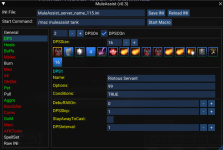
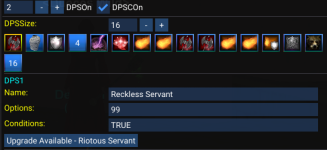
There is a button in the bottom left of the GUI labled "Upgrades?". It will look at the current tab and tell you (in the MQ window) if there are upgrades available to you.
Then you right-click the spell you want to upgrade and select Upgrade. It will list the name of the current spell and the spell you are upgrading too.

After all upgrades are made, click Save.
 
Thank you so very much for all your input. It has cleared up a few things. I will try to put this this practice tonight.
 
Under the raw tab and general(?) it will most a section for misc spell gem. That is where any buffs needing to be memed will be memed to cast. After it’s cast it will put the previous spell back in place. I believe it defaults to gem 8?
It reserves gem 7 for spells with a long refresh time so let’s say you want to cast avatar (shaman) in era it’s cool down is like 4min. It will place that spell in gem 7 instead of 8.
 
First attempt at running mq2mule for my Bard. Loading it up and hitting start I receive an error stating "[MQ2] ERROR: You cannot assist yourself! Please target Main Tank and restart macro." I have done this multiple times, but every time I target him it immediately re-targets my Bard and gives me the error. I have reloaded to no success. Please advise, any help would be appreciated. Don't really enjoy driving on my team with my Bard. I am running mq2eskay, rog, shm, mnk, and clr. as well, and I'm sure its a simple mistake (usually is) on my part.

Not sure if you fixed this as this is a couple months old but it would seem it doesn't use your selected target when clicking the start button but rather the leader of the group. Not sure if you have overwrite this some how or not. I usually have my sha as the leader for looting and inviting and only noticed it would deselect the target and select him every time I hit start.
 
Last edited:
Im running ranger on mule currently the trouble im having is sit to med. When i have sit to med turned on he will engage in combat turn autofire on then cast a spell then sit only to stand back up and not turn back on autofire. I can turn sit to med off and he does great till hes oom. Any one have this problem?
 
Hey guys , I took Sic's suggestion and went ahead and installed MQ Next but i noticed that when i login i no longer have access to Mule Assist? Is there a way to load it into MQ Next?

So I tried logging back out completely and shutting off mq next, now I cant get Mule Assist plugin to load at all.
 
Hey guys , I took Sic's suggestion and went ahead and installed MQ Next but i noticed that when i login i no longer have access to Mule Assist? Is there a way to load it into MQ Next?

So I tried logging back out completely and shutting off mq next, now I cant get Mule Assist plugin to load at all.
mq2mule is eqmule's plugin, and he doesn't appear to have any plans on migrating it over to mq next, MAUI, however, does have most of the functions and features
 
I just upgraded to MQNext, and completed the migration, all appears ok, except my bard who was using MQ2Mule no longer works, it does not load the plugin mq2mule, just wondering if it is coming?

I changed over to RGmercs for the bard, but loved the flexibility of MQ2Mule allowing me to choose some of my own customization ;)

thanks!
 
This resource has been removed and is no longer available. The following reason was provided:

Development has moved to a Lua script:
 
I play on a EMU server and had problems a few days back with an update not loading mq2. They have fixed and i can now login but I thought it was me at first and I did a full wipe and reinstall including ini's and now when i log in only one char out of all 6 of my chars with load mq2mule. The rest say there was a problem. I also had a plugin manager and they would crash on char login, stopped using it and can login but like a said only one will load mule. Did i miss something like one of the ini's and need to delete them again or could it be something else.
 
I play on a EMU server and had problems a few days back with an update not loading mq2. They have fixed and i can now login but I thought it was me at first and I did a full wipe and reinstall including ini's and now when i log in only one char out of all 6 of my chars with load mq2mule. The rest say there was a problem. I also had a plugin manager and they would crash on char login, stopped using it and can login but like a said only one will load mule. Did i miss something like one of the ini's and need to delete them again or could it be something else.
The emu build is now MQ and no longer mq2, and there is no mq2mule for MQ, you will want to look at Maui by aquietone, which does all the same stuff (nearly almost).

There are a couple of small, yet important changes with MacroQuest vs the old MQ2 as explained > HERE <

Moving to MacroQuest mental notes:
1. mq2map click is Control+Shift+Click
2. new easyfind self travel is Control+Click (reminder in find window title bar)
3. new easyfind group travel is Control+Shift+Click
4. If you selected a destination in your zone guide and want to activate it you /travelto activate
5. /yes and /no are now aliases
6. your ini configuration files (like for kissassist) now reside in your "Config" folder and not your "Macro" folder
7. if you want the functionality of the MQ2 "MQ2TargetInfo" - They are now in 3 separate plugins: /plugin groupinfo /plugin targetinfo /plugin xtarinfo
 
Last edited:
I don't know if this is the right place to post these questions, so forgive me if I'm wrong. How do I add mobs to ignore in Mule assist and I need a hot button to stop bard twist without out pausing or end command. If I missed a video about it forgive me, it is is so much information to research. Lastly can someone point me in the direction where I can learn conditions language?
 
I don't know if this is the right place to post these questions, so forgive me if I'm wrong. How do I add mobs to ignore in Mule assist and I need a hot button to stop bard twist without out pausing or end command. If I missed a video about it forgive me, it is is so much information to research. Lastly can someone point me in the direction where I can learn conditions language?
mq2mule no longer exists.

this is not the muleassist section, this is for the legacy "MQ2Mule" plugin

you want to post > here <
 
Release MQ2Mule
Status
Not open for further replies.

Users who are viewing this thread

Back
Top
Cart