I have that in blocked, but it still comes through unfortunately. (I also have tried #*#Disconnecting, no longer in game#*#)I block the following:Code:"#*#Disconnecting, no longer in game"

-
 Hail, we're RedGuides. We want you to play six (yes, 6!) EverQuest characters at once. We have scripts and a friendly community to help, please join our playstyle and say hello! 👋
You are using an out of date browser. It may not display this or other websites correctly.
You should upgrade or use an alternative browser.
You should upgrade or use an alternative browser.

Release MQ2Discord (1 Viewer)
- Thread starter alynel
- Start date


Knightly updated MQ2Discord with a new update entry:
01/06/2024
Read the rest of this update entry...
01/06/2024
Read the rest of this update entry...
Wrong forum
Getting MQ2discord error please fix them and /reload discord but i honestly dont know anything about mq2discord and where to fix it ?

I seem to have run in some overflow bug in MQ2Discord...if I trigger a "required file not found" by renamig the utils file from boxhud, I get this:
no MQ2Discord loaded
If I now load up my MQ2Discord config...
with running config
Straight to desktop, no crashdump
My Discord config looks like this:
no MQ2Discord loaded
Code:
>
> /plugin discord
[MQ2Discord]  Created a default configuration. Edit this, then do /discord reload
[MQ2Discord] Warning:  User id YourUserIdHere looks wrong
[MQ2Discord] Error:  Channel id YourChannelForTellsHere in all looks wrong
[MQ2Discord] Error:  Channel id YourCharacterChannelHere in character xxx looks wrong
[MQ2Discord] Error:  Channel id YourGroupChannelHere in group YourGroup looks wrong
[MQ2Discord]  Config not loaded due to errors, please fix them and /discord reload
Plugin 'MQ2Discord' loaded.
> /lua run boxhud
Running lua script 'boxhud' with PID 1
module 'utils.utils' not found:
    no field package.preload['utils.utils']
    no file 'C:\Users\Utente\AppData\Local\VeryVanilla\MacroQuest\Release\lua\boxhud\utils\utils\init.lua'
    no file 'C:\Users\Utente\AppData\Local\VeryVanilla\MacroQuest\Release\lua\boxhud\utils\utils.lua'
    no file 'C:\Users\Utente\AppData\Local\VeryVanilla\MacroQuest\Release\lua\utils\utils\init.lua'
    no file 'C:\Users\Utente\AppData\Local\VeryVanilla\MacroQuest\Release\lua\utils\utils.lua'
    no file 'C:\Users\Utente\AppData\Local\VeryVanilla\MacroQuest\Release\modules\2.1.1697887905\luarocks\share\lua\5.1\utils\utils.lua'
    no file 'C:\Users\Utente\AppData\Local\VeryVanilla\MacroQuest\Release\modules\2.1.1697887905\luarocks\share\lua\5.1\utils\utils\init.lua'
    no file 'C:\Users\Utente\AppData\Local\VeryVanilla\MacroQuest\Release\modules\luarocks\share\lua\5.1\utils\utils.lua'
    no file 'C:\Users\Utente\AppData\Local\VeryVanilla\MacroQuest\Release\modules\luarocks\share\lua\5.1\utils\utils\init.lua'
    no file 'C:\Users\Utente\AppData\Local\VeryVanilla\MacroQuest\Release\Macros/entropy/lua/utils\utils.lua'
    no file 'C:\Users\Utente\AppData\Local\VeryVanilla\MacroQuest\Release\macros/entropy/lua/utils\utils.lua'
    no file 'C:/Users/Utente/AppData/Local/VeryVanilla/MacroQuest/Release/Macros/entropy/lua/utils\utils.lua'
    no file 'C:\Users\Utente\AppData\Local\VeryVanilla\MacroQuest\Release\Macros\entropy\lua\utils\utils.lua'
    no file '.\utils\utils.lua'
    no file 'C:\Program Files (x86)\Steam\steamapps\common\Everquest F2P\lua\utils\utils.lua'
    no file 'C:\Program Files (x86)\Steam\steamapps\common\Everquest F2P\lua\utils\utils\init.lua'
    no file 'C:\Users\Utente\AppData\Local\VeryVanilla\MacroQuest\Release\lua\boxhud\utils\utils.dll'
    no file 'C:\Users\Utente\AppData\Local\VeryVanilla\MacroQuest\Release\modules\2.1.1697887905\luarocks\lib\lua\5.1\utils\utils.dll'
    no file '.\utils\utils.dll'
    no file 'C:\Program Files (x86)\Steam\steamapps\common\Everquest F2P\utils\utils.dll'
    no file 'C:\Program Files (x86)\Steam\steamapps\common\Everquest F2P\loadall.dll'
    no file 'C:\Users\Utente\AppData\Local\VeryVanilla\MacroQuest\Release\lua\boxhud\utils.dll'
    no file 'C:\Users\Utente\AppData\Local\VeryVanilla\MacroQuest\Release\modules\2.1.1697887905\luarocks\lib\lua\5.1\utils.dll'
    no file '.\utils.dll'
    no file 'C:\Program Files (x86)\Steam\steamapps\common\Everquest F2P\utils.dll'
    no file 'C:\Program Files (x86)\Steam\steamapps\common\Everquest F2P\loadall.dll'
stack traceback:
    [C]: in function 'require'
    ...Local\VeryVanilla\MacroQuest\Release\lua\boxhud\init.lua:46: in main chunk
Ending lua script 'boxhud' with PID 1 and status 2
If I now load up my MQ2Discord config...
with running config
Code:
> /discord reload
[MQ2Discord]  Ready
> /lua run boxhud
Straight to desktop, no crashdump
My Discord config looks like this:
Code:
token: x.x
user_ids:
  - xxx
characters:
  xxx:
    - name: CharChannel (This field is ignored)
      id: xxx
      allowed:
        []
      blocked:
        []
      notify:
        []
      prefix: ""
      send_connected: false
      allow_commands: true
      show_command_response: 2000
servers:
  {}
classes:
  {}
groups:
  - name: YourGroup
    characters:
      - xxx
      - server_OtherCharInGroup
      - server_OneMore
    channels:
      - name: Deaths
        id: xxx
        allowed:
          - You have been slain by
        blocked:
          []
        notify:
          []
        prefix: "[${Me.Name}]"
        send_connected: false
        allow_commands: false
        show_command_response: 0
all:
  - name: xxx
    id: xxx
    allowed:
      - tells you
    blocked:
      - "|${Me.Pet.DisplayName}| tells you#*#"
    notify:
      []
    prefix: "[${EverQuest.Server}_${Me.Name}]"
    send_connected: false
    allow_commands: false
show_command_response: 02670 Charactersno MQ2Discord loaded
Code:> module 'utils.utils' not found: no field package.preload['utils.utils']
Knightly updated MQ2Discord with a new update entry:
02/18/2024
Read the rest of this update entry...
02/18/2024
Read the rest of this update entry...

Rare Spawn
Well-known member
I am trying to repurpose the TellsChannel section of the "All" category for General chat, with out luck. Is this supported?
Discord.Yaml
Discord.Yaml
YAML:
all:
  - name: TellsChannel
    id: xxxxxxxxx
    allowed:
      - "#*#tells General:#*#"
    blocked:
      - "|${Me.Pet.DisplayName}| tells you#*#"
    notify:
      []
    prefix: "[${EverQuest.Server}_${Me.Name}]"
    send_connected: true
    allow_commands: false
    show_command_response: 0
Rare Spawn
Well-known member
I am trying to repurpose the TellsChannel section of the "All" category for General chat, with out luck. Is this supported?
Discord.Yaml
YAML:all: - name: TellsChannel id: xxxxxxxxx allowed: - "#*#tells General:#*#" blocked: - "|${Me.Pet.DisplayName}| tells you#*#" notify: [] prefix: "[${EverQuest.Server}_${Me.Name}]" send_connected: true allow_commands: false show_command_response: 0
It was a Discord permissions issue, resynced channel permissions to category fixed it.
shadowjake
Member
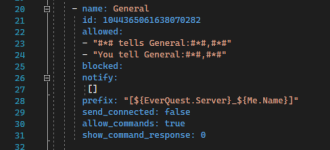
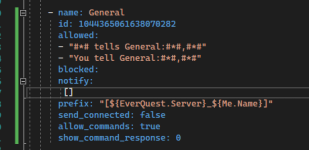
Not really sure what is causing the error here. I haven't changed that section of the file since I first made it and the problem has only started after the latest MQ patch. here is the error message and the section of the config causing the error. Any ideas on how to fix this?

Attachments
Rare Spawn
Well-known member
Is this not something already handled by the config yaml file?I'm sure this is a discord thing and not MQ2 thing but is there a way to stop the incessant spam of "Connected" by the bot every time I zone my toons?
ahhhhhh... looks like it. My bad lol. It's always the simplest thing right in front of meIs this not something already handled by the config yaml file?

Not really sure what is causing the error here. I haven't changed that section of the file since I first made it and the problem has only started after the latest MQ patch. here is the error message and the section of the config causing the error. Any ideas on how to fix this?
View attachment 59819
View attachment 59822
Notice line 27 for notify? []
You are missing this from your blocked section, its indicating that blocked is empty
So make blocked and notify sections look the same
Most of the configs in thread are old so I am sharing my config
This is what my personal server looks like
You can mute channels or do whatever to get notifications
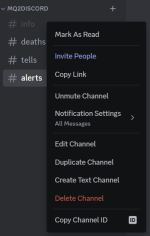
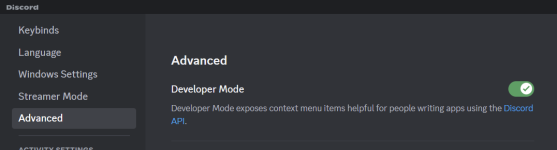
If you dont have the Copy Channel ID thing in your discord you need to go enable developer mode in your client under Settings>Advanced
MQ2Discord.yaml
This is what my personal server looks like
You can mute channels or do whatever to get notifications
If you dont have the Copy Channel ID thing in your discord you need to go enable developer mode in your client under Settings>Advanced
MQ2Discord.yaml
YAML:
#########################################################################################
# Setup the Discord bot, https://discord.com/developers/applications
#########################################################################################

token:  # paste authentication/token from website
user_ids:
  -  # paste application ID from website

#########################################################################################
# Not an EQ group, just a grouping of EQ toons. Used for monitoring global chat
#########################################################################################
groups:
  - name: Specific toons watching global chat
    characters:
      - vox_Tankname # 1 toon per line, can add multiple lines/toons as server_Name
    channels:
      - name: Alerts
        id:  # paste Discord channel id
        allowed: []
        blocked:
          - "#*#Disconnecting#*#"
          - "You are#*#A.F.K. (Away From Keyboard)"
          - "You told #*#, '"
        notify:
          - "#*# AFK#*#"
          - "#*#keyboard#*#"
        prefix: "** ${Zone.ShortName} | ${Me.Name} **"
        send_connected: false

#########################################################################################
# All toons monitor this
#########################################################################################
all:
  - name: Info
    id:  # paste Discord channel id
    allowed: []
    blocked: []
    notify: []
    prefix: "** ${Zone.ShortName} | ${Me.Name} **"
    send_connected: true

  - name: Tells
    id:  # paste Discord channel id
    allowed:
      - "#1# tells you,#*#"
    blocked:
      - "#*#Disconnecting#*#"
      - "|${Me.Pet.DisplayName}| tells you#*#"
      - "|${Me.Name}| tells you#*#"
    notify: []
    prefix: "** ${Zone.ShortName} | ${Me.Name} **"
    send_connected: false

  - name: Deaths
    id:  # paste Discord channel id
    allowed:
      - "You have been slain by "
    blocked:
      - "#*#Disconnecting#*#"
    notify: []
    prefix: "** ${Zone.ShortName} | ${Me.Name} **"
send_connected: false@alynel @Knightly could you add a config flag to not report disconnect messages or to specify a channel for GAMESTATE ?

 gitlab.com
Cant filter disconnect messages because they tied to GAMESTATE (#3) · Issues · Alynel / MQ2Discord · GitLab
Unable to filter the client->enqueueAll("Disconnecting, no longer in game"); message. This occurs on zone very often and spams multiple channels Would be nice to...
gitlab.com
C++:
PLUGIN_API void SetGameState(int GameState)
{
    if (GameState == GAMESTATE_INGAME)
    {
        Reload();
    }
    else
    {
        if (client)
        {
            client->enqueueAll("Disconnecting, no longer in game");
            client.reset();
        }
    }
}
Last edited:
Knightly updated MQ2Discord with a new update entry:
06/13/2024
Read the rest of this update entry...
06/13/2024
Read the rest of this update entry...
hector_red
Well-known member
Was messing around with this and got it to work fairly well, but I notice the Discord bot in my Discord will frequently show the "xxx user is typing" indicator, even when no matched messages are pending. Not a huge deal, but is there any way to disable this behavior? Or is this a config on the Discord bot side of it?
Edit: nvm, I see this is a keep alive thing.
Edit: nvm, I see this is a keep alive thing.
LamahHerder, random question but in the snippet below from your config, what exactly does "Specific toons watching global chat" and the line under "characters" mean? Should they be the same? Like, should it be "name: foromoro" and "characters: server_foromoro" ?? I'm sure it's very simple but the usage of both "toons" and "characters" is throwing me offMost of the configs in thread are old so I am sharing my config
(STUFF)
C++:
groups:
  - name: Specific toons watching global chat
    characters:
      - vox_Tankname # 1 toon per line, can add multiple lines/toons as server_Name
    channels:
- name: AlertsKnightly updated MQ2Discord with a new update entry:
06/04/2025
Read the rest of this update entry...
06/04/2025
Commits
(71b5ae0) ~KnightlyFix classes config overwriting servers
- Classes config was being loaded into the server config
- Classes and servers can now peacefully coexist
Read the rest of this update entry...
Just putting down a template that make it easier to maintain your allowed and blocked sections in one place versus in each toon section. All you have to do is add to the Allowed section or blocked section and than each of your channels reference it as you can see in the code below. Just need to put in your discord channel information.
token: Token{discordToken}
user_ids:
- {yourUserID}
allowed: &allowed_chat
- "[MQ2Discord] #*#"
- "[MQ2]#*#"
- "#*# tells you,#*#"
- "#*#tells the group,#*#"
- "#*# sent a tell#*#"
- "#*# says out of character, #*#"
- "#*# shouts,#*#"
- "#*# says,#*#"
- "#*#|${Me.Name}|#*#"
- "#*# tells the guild,#*#"
blocked: &blocked_chat
- "#*#s familiar tells you,#*#"
- "#*# corpse tells you,#*#"
- "#*#|${Me.CleanName}|'s pet#*#"
- "#*#|${Me.Pet.CleanName}| says,#*#"
- "#*#|${Me.Pet.CleanName}| tells you,#*#"
- "#*#|${Me.Pet.CleanName}| told you,#*#"
- "#*# #*# says,#*#"
- "#*# #*# tells you,#*#"
- "#*# #*# told you,#*#"
- "#*#You will not evade me#*#"
- "Crusader Vraket #*#"
- "#*# tries to #*#"
- "#*# is cured of #*#"
- "#*# pet #*#"
- "You healed #*#"
- "Txiki says, #*#"
- "Txiki is #*#"
- "#*# warder #*#"
- "#*# warder's #*#"
- "#*# DPS: #*#"
- "#*# gained an AA, #*#"
- "#*# has been awakened #*#"
- "#*# has awakened #*#"
- "#*# goes into a berserker #*#"
- "#*# is no longer berserk."
- "#*# StuckGem Data#*#"
- "#*# rattles and strikes #*#"
- "#*# due to an improved taunt."
characters:
server_Character1:
- name: {server_character1}
id: {discordID1}
allowed: *allowed
blocked: *blocked
notify:
- "[AlertMaster]#*#"
prefix: ""
send_connected: true
allow_commands: true
show_command_response: 2000
server_Character2:
- name: {server_character2}
id: {discordID2}
allowed: *allowed
blocked: *blocked
notify:
- "[AlertMaster]#*#"
prefix: ""
send_connected: true
allow_commands: true
show_command_response: 2000
# ...repeat for each character...
servers:
{}
classes:
{}
groups:
- name: YourGroup
characters:
- {characterName1}
- {characterName2}
- {characterName3}
channels:
- name: Deaths
id: {channelID1}
allowed:
- You have been slain by
- "#*#tells the party,#*#"
blocked: []
notify: []
prefix: "[${Me.Name}]"
send_connected: true
allow_commands: false
show_command_response: 0
all:
- name: TellsChannel
id: {channelID2}
allowed:
- tells you
- "#*#tells the party,#*#"
blocked:
- "|${Me.Pet.DisplayName}| tells you#*#"
notify: []
prefix: "[${EverQuest.Server}_${Me.Name}]"
send_connected: true
allow_commands: false
show_command_response: 0
token: Token{discordToken}
user_ids:
- {yourUserID}
allowed: &allowed_chat
- "[MQ2Discord] #*#"
- "[MQ2]#*#"
- "#*# tells you,#*#"
- "#*#tells the group,#*#"
- "#*# sent a tell#*#"
- "#*# says out of character, #*#"
- "#*# shouts,#*#"
- "#*# says,#*#"
- "#*#|${Me.Name}|#*#"
- "#*# tells the guild,#*#"
blocked: &blocked_chat
- "#*#s familiar tells you,#*#"
- "#*# corpse tells you,#*#"
- "#*#|${Me.CleanName}|'s pet#*#"
- "#*#|${Me.Pet.CleanName}| says,#*#"
- "#*#|${Me.Pet.CleanName}| tells you,#*#"
- "#*#|${Me.Pet.CleanName}| told you,#*#"
- "#*# #*# says,#*#"
- "#*# #*# tells you,#*#"
- "#*# #*# told you,#*#"
- "#*#You will not evade me#*#"
- "Crusader Vraket #*#"
- "#*# tries to #*#"
- "#*# is cured of #*#"
- "#*# pet #*#"
- "You healed #*#"
- "Txiki says, #*#"
- "Txiki is #*#"
- "#*# warder #*#"
- "#*# warder's #*#"
- "#*# DPS: #*#"
- "#*# gained an AA, #*#"
- "#*# has been awakened #*#"
- "#*# has awakened #*#"
- "#*# goes into a berserker #*#"
- "#*# is no longer berserk."
- "#*# StuckGem Data#*#"
- "#*# rattles and strikes #*#"
- "#*# due to an improved taunt."
characters:
server_Character1:
- name: {server_character1}
id: {discordID1}
allowed: *allowed
blocked: *blocked
notify:
- "[AlertMaster]#*#"
prefix: ""
send_connected: true
allow_commands: true
show_command_response: 2000
server_Character2:
- name: {server_character2}
id: {discordID2}
allowed: *allowed
blocked: *blocked
notify:
- "[AlertMaster]#*#"
prefix: ""
send_connected: true
allow_commands: true
show_command_response: 2000
# ...repeat for each character...
servers:
{}
classes:
{}
groups:
- name: YourGroup
characters:
- {characterName1}
- {characterName2}
- {characterName3}
channels:
- name: Deaths
id: {channelID1}
allowed:
- You have been slain by
- "#*#tells the party,#*#"
blocked: []
notify: []
prefix: "[${Me.Name}]"
send_connected: true
allow_commands: false
show_command_response: 0
all:
- name: TellsChannel
id: {channelID2}
allowed:
- tells you
- "#*#tells the party,#*#"
blocked:
- "|${Me.Pet.DisplayName}| tells you#*#"
notify: []
prefix: "[${EverQuest.Server}_${Me.Name}]"
send_connected: true
allow_commands: false
show_command_response: 0
Last edited:

Just putting down a template that make it easier to maintain your allowed and blocked sections in one place versus in each toon section. All you have to do is add to the Allowed section or blocked section and than each of your channels reference it as you can see in the code below. Just need to put in your discord channel information.
allowed: *allowed
blocked: *blocked
I couldn't get that to work. I would get an error message that "the referenced anchor is not defined: allowed"

- Commits
- 1
Seeing it as well, have not spent any time looking into it yetDid MQ2Discord break for anyone else with most recent patch today?
Getting "Failed to send message to:"


- Commits
- 1
If I recall correctly, EQLogParser has the ability to push text to Discord.
You won't get all the features of this plugin, so it all depends on what/how you use it. You cannot send commands back to the EQ client.
I ended disabling it from loading in the MacroQuest.ini until the devs get time to look at it.
You won't get all the features of this plugin, so it all depends on what/how you use it. You cannot send commands back to the EQ client.
I ended disabling it from loading in the MacroQuest.ini until the devs get time to look at it.

Sorry I did not get back sooner but I had missed one vital piece and I have added it in so it works.... after Allowed: at the top is should look like allowed: &allowed_chat and also than blocked: &blocked_chat. I have corrected the template also. Thank you for pointing that out.I couldn't get that to work. I would get an error message that "the referenced anchor is not defined: allowed"
and yes it did break I have been looking into the code some just to see what might be able to be done to update it since it is very outdated. Hoping some re-vamping could help. I love this plugin.
Re: this worked through this problem today.
Summary:
- Fixed C++20 compile error — added explicit string cast for Snowflake comparison on line 246
- Added WinHTTP-based SendMessage() function that bypasses libcurl (which is broken inside EQ due to Winsock hook conflict)
- Replaced client.sendMessage() with WinHttpDiscord::SendMessage() for outgoing messages
- Removed sendTyping/updateStatus keepalive calls (also used broken libcurl)
there may be a cleaner solution but this worked.
https://gitlab.com/mmdab86/mq2discord/-/tree/c20-fix?ref_type=heads until someone can do this proper
Summary:
- Fixed C++20 compile error — added explicit string cast for Snowflake comparison on line 246
- Added WinHTTP-based SendMessage() function that bypasses libcurl (which is broken inside EQ due to Winsock hook conflict)
- Replaced client.sendMessage() with WinHttpDiscord::SendMessage() for outgoing messages
- Removed sendTyping/updateStatus keepalive calls (also used broken libcurl)
there may be a cleaner solution but this worked.
https://gitlab.com/mmdab86/mq2discord/-/tree/c20-fix?ref_type=heads until someone can do this proper

I suppose part of the things you're fixing are already fixed since we moved to https://github.com/redguides/MQ2Discord
Well unfortunately it seems that this is just a copy paste of the existing plugins code so I really have zero idea what you really changed. Next time fork the plugin and make changes to the existing code.
https://gitlab.com/mmdab86/mq2discord/-/tree/c20-fix?ref_type=heads until someone can do this proper
Well unfortunately it seems that this is just a copy paste of the existing plugins code so I really have zero idea what you really changed. Next time fork the plugin and make changes to the existing code.
I threw it into a diff viewer. Replacing curl with something else would work but a lot of the assumptions your ai bot made are pretty obviously incorrect (there are no curl/winsock hooks for example) -- i would expect this to do some dangerous/unexpected things if you tried to unload the plugin.
I think theres some sort of issue with https in the curl library. i heard @Knightly is going to look into it!
I think theres some sort of issue with https in the curl library. i heard @Knightly is going to look into it!
looks like it was related to https://github.com/curl/curl/issues/13958
8.9.0 resolves.
I sent to knightly.
8.9.0 resolves.
I sent to knightly.
Users who are viewing this thread
Total: 2 (members: 0, guests: 2)
Share: