
-
 Hail, we're RedGuides. We want you to play six (yes, 6!) EverQuest characters at once. We have scripts and a friendly community to help, please join our playstyle and say hello! 👋
You are using an out of date browser. It may not display this or other websites correctly.
You should upgrade or use an alternative browser.
You should upgrade or use an alternative browser.

Release MQ2DanNet
- Thread starter dannuic
- Start date

I noticed a tiny bug with DanNet whenever one of my toons crash, and once it comes back in. Here are the details:
Using grouper to see the invis status of my group, all toons are invised and IVU. I zone out of an instance doing a mission, and one of the toons crashes. Once the other toons land, I look to see what toon itnst there, and use AutoLogin to log them back in. When they get back into game, after kicking their LD doppleganger out of the game, when they get back in, they will not update their Invis or IVU state in Grouper. I normally then have to reset the dannet plugin on all of my toons, then it starts updating correctly.
I tried adding a reset to dannet on the ingame.cfg, trying to see if it is an issue with the LD character, or the driver running the grouper. I will do some more testing to see if I can pinpoint the issue a bit more, just wanted to see if anyone else is experiencing this type of issue. I also did a test (not conclusive yet) this morning, and if I allowed enough time for the LD character to get kicked out of the game completely (a couple hours this time as I had to leave) then when the character came back into game, their status was immediately visible to the dannet toon running grouper. So I am thinking it has to do with the fact that it doesn't reset some type of pointer when the character is basically immediately being replaced with a new instance of the character session without that delay for dannet to recognize it was replaced. It could also be a grouper issue, as I know I have seen BoxHud removing stale data from its toons when they switch out like that.
Using grouper to see the invis status of my group, all toons are invised and IVU. I zone out of an instance doing a mission, and one of the toons crashes. Once the other toons land, I look to see what toon itnst there, and use AutoLogin to log them back in. When they get back into game, after kicking their LD doppleganger out of the game, when they get back in, they will not update their Invis or IVU state in Grouper. I normally then have to reset the dannet plugin on all of my toons, then it starts updating correctly.
I tried adding a reset to dannet on the ingame.cfg, trying to see if it is an issue with the LD character, or the driver running the grouper. I will do some more testing to see if I can pinpoint the issue a bit more, just wanted to see if anyone else is experiencing this type of issue. I also did a test (not conclusive yet) this morning, and if I allowed enough time for the LD character to get kicked out of the game completely (a couple hours this time as I had to leave) then when the character came back into game, their status was immediately visible to the dannet toon running grouper. So I am thinking it has to do with the fact that it doesn't reset some type of pointer when the character is basically immediately being replaced with a new instance of the character session without that delay for dannet to recognize it was replaced. It could also be a grouper issue, as I know I have seen BoxHud removing stale data from its toons when they switch out like that.

Sure as heck sounds like an issue with whatever script you are using.I noticed a tiny bug with DanNet whenever one of my toons crash, and once it comes back in. Here are the details:
Using grouper to see the invis status of my group, all toons are invised and IVU. I zone out of an instance doing a mission, and one of the toons crashes. Once the other toons land, I look to see what toon itnst there, and use AutoLogin to log them back in. When they get back into game, after kicking their LD doppleganger out of the game, when they get back in, they will not update their Invis or IVU state in Grouper. I normally then have to reset the dannet plugin on all of my toons, then it starts updating correctly.
I tried adding a reset to dannet on the ingame.cfg, trying to see if it is an issue with the LD character, or the driver running the grouper. I will do some more testing to see if I can pinpoint the issue a bit more, just wanted to see if anyone else is experiencing this type of issue. I also did a test (not conclusive yet) this morning, and if I allowed enough time for the LD character to get kicked out of the game completely (a couple hours this time as I had to leave) then when the character came back into game, their status was immediately visible to the dannet toon running grouper. So I am thinking it has to do with the fact that it doesn't reset some type of pointer when the character is basically immediately being replaced with a new instance of the character session without that delay for dannet to recognize it was replaced. It could also be a grouper issue, as I know I have seen BoxHud removing stale data from its toons when they switch out like that.
Also find the thing causing your onzone crash if this happens often enough to be a thing IMO (it is not normal in my book).
Good luck.
The crashing is fairly constant when zoning out of the TOB missions. I will try to narrow it down further, but considering it is a client crash, there isn't any debug info to submit. I basically do a Kick task hotkey, wait the 30 seconds, and one of the toons will crash about 10-20% of the time. The toon varies also, so its hard to pinpoint. My mage and cleric are probably the most common ones who crash though.
Actually I forgot there is a crash message, so i will try to capture it next time and submit it. Thansk for the push
Actually I forgot there is a crash message, so i will try to capture it next time and submit it. Thansk for the push
- Commits
- 1
For anyone who has NordVPN, you may notice that even when not connected to VPN that computers on same router cant send dannet commands. This is because NordVPN loads NordLynx which acts as your connection. I am not sure how to disable this function or allow dannet connection through it but if you open taskmaster and end all NordVPN tasks, dannet will work again and NordLynx will not show-up as the dnet interface.
Possible Fix
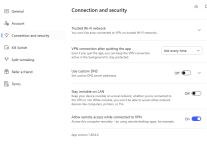
I went into settings and clicked on connection and made sure to turn off stay invisible on LANand Allow remote access while connected to VPN. I am able to send dannet commands to another computer on my network. I did this after closing all Nord tasks on taskmaster after changing these settings in the NordVPN app. I restarted computer and turned off Allow remote access while connected to VPN. I was still connected so only need to turn stay invisible on LAN off.
I will see if it works after turning off computers. Fingers crossed.
Possible Fix
I went into settings and clicked on connection and made sure to turn off stay invisible on LAN
I will see if it works after turning off computers. Fingers crossed.
Last edited:

a quick google search on "allowing local traffic on nord vpn" returns:For anyone who has NordVPN, you may notice that even when not connected to VPN that computers on same router cant send dannet commands. This is because NordVPN loads NordLynx which acts as your connection. I am not sure how to disable this function or allow dannet connection through it but if you open taskmaster and end all NordVPN tasks, dannet will work again and NordLynx will not show-up as the dnet interface.
Possible Fix
I went into settings and clicked on connection and made sure to turn off stay invisible on LAN and Allow remote access while connected to VPN. I am able to send dannet commands to another computer on my network. I did this after closing all Nord tasks on taskmaster after changing these settings in the NordVPN app.
I will see if it works after turning off computers. Fingers crossed.
View attachment 72058
google said:On Windows and macOS, the NordVPN app allows you to manage local network permissions through the Meshnet feature. If you are using the direct download version of the app (not the App Store version), you can enable access to your local network while routing traffic by toggling the "Access to your local network when routing traffic through your device" option in the Meshnet settings. This permission must be enabled for each device individually, and it is recommended to only grant it to trusted devices to maintain network security.
- Commits
- 1
Meshnet is going away on Dec 1. I was going to use that but the fix I posted still works after restarting both computers.a quick google search on "allowing local traffic on nord vpn" returns:

 Commits
I operate a few Router based VPN tunnels and slew of Router based VPN routing rules for select network clients (TVs, IoT devices, etc.) and stopped using client based VPN solutions, like NordVPN, earlier this year. It's defiantly easy to fall into the VPN (and DNS) rabbit hell hole, but I wanted to share this, incase you were not familiar. NordLynx is Nord's implementation of the WireGuard VPN protocol versus their use of the OpenVPN protocol (they use both). Earlier this year I switched to the WireGuard protocol for all my VPN tunnels, it's not as established as OpenVPN, but it's more efficient using less overhead.For anyone who has NordVPN, you may notice that even when not connected to VPN that computers on same router cant send dannet commands. This is because NordVPN loads NordLynx which acts as your connection. I am not sure how to disable this function or allow dannet connection through it but if you open taskmaster and end all NordVPN tasks, dannet will work again and NordLynx will not show-up as the dnet interface.
Possible Fix
I went into settings and clicked on connection and made sure to turn off stay invisible on LANand Allow remote access while connected to VPN. I am able to send dannet commands to another computer on my network. I did this after closing all Nord tasks on taskmaster after changing these settings in the NordVPN app. I restarted computer and turned off Allow remote access while connected to VPN. I was still connected so only need to turn stay invisible on LAN off.
I will see if it works after turning off computers. Fingers crossed.
View attachment 72058
Anyway, not sure this will be helpful for you, but some VPN Windows client applications, like Nord, tend to auto start services (which I hate), so if you don't want Nord loading stuff at startup in the background, check both Windows Auto-Start AND Windows Services. When I used the NordVPN Windows client (I still use Nord servers for one of my Router based VPN tunnels), I looked for their Services and changed them from Automatic to Manual.

I've been using dannet successfully on two computers for years. I don't know what changed in my setup, but it wont find the other computers anymore. I'm not using a VPN on either and I'm out of ideas to try and troubleshoot. Two windows 11 boxes, private network w/sharing enabled


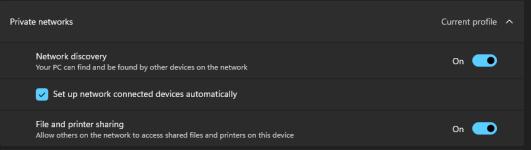

I've been using dannet successfully on two computers for years. I don't know what changed in my setup, but it wont find the other computers anymore. I'm not using a VPN on either and I'm out of ideas to try and troubleshoot. Two windows 11 boxes, private network w/sharing enabled
View attachment 72852 View attachment 72853
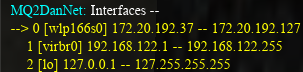
Those IP addresses would indicate you have a "weird" local network setup. Any chance you had Win11 25H2 install recently and reset your network adapters? The 2nd address is your broadcast address and since it's in a different octet that would require you to have a custom IP range and subnet mask like 255.255.252.0 rather than the more normal class C which would be 255.255.255.0.
I'm not saying what's right or wrong in your case and it's been a long time since I did subnetting calculations. But if you review previous posts you find every picture displays a traditional class C subnet. Yours would require custom addressing either in the DHCP server for your router and/or in your local IP addressing on the PC.
Thanks! It looks like they did install 25h2 last month and that is right around when my issues started. I can dig into that.

https://github.com/dannuic/MQ2Dan is the git for it with some info.
but there isn't really anything to download (it is included in the build)
there isn't really an install or setup - you just load the plugin.
if for some reason you don't see everyone when you do a/dnet info
then you do want to make sure that when you do a/dnet interfaceall of your toons are using the same interface.
for the purposes of multiple boxes on the same pc, the loopback interface is fine
The arrow is pointing to your currently selected interface device - if you have no arrow, you have nothing selected.
View attachment 37616
/dnet interface "Loopback Pseudo-Interface 1"with quotes is what i would do
you can use the number as well, but dannuic (who is the namesake, says to use the name when you can)
after you do that on everyone, you want to unload and reload the plugin on everyone, all the characters logged on at the time
/plugin mq2dannet unload
/plugin mq2dannet load
then doing a/dnet interfaceyou can verify everyone sees the same one, and then a/dnet infoshould show all your toons
For multiple computers you won't want "loopback" you'll want your network device - Ethernet 3 for me, in the above image
you will want to ensure everyone is using their network device - if you have no arrow, you have nothing selected.
Thank you, DanNet dropped randomly for some reason but this got it back up.
I am a Gentoo Linux user and this is intended for other Linux users :P
I don't usually box a bunch of accounts at the same time so the practical use for dannet (for me) is limited. This is my first go for a specific instance where I needed 6 toons for something. A little rocky setup and worried it may be related to my "weird" network setup lol. I never used a 'default' IP addresses for a network because I'm old school and there is an obvious risk with default configs on conusmer electronics.
Anyway... I found that I had to load/unload dannet in-game several times. Swapping interfaces and completely reloading everyting (macroquest and game clients, full send). Somehwere in the process I disabled my firewall (basically throwing darts at a board blind folded). Not exactly sure what worked but it's working now.
I was toggling between my wireless interface and the local loopback. Again, not sure what fixed it but maybe this will help someone one day lol
End of the day it's a single PC sniffing the wireless inteface and not the local loopback with firewall enabled. YMMV /shrug
I'm using wine-proton with dxvk if that matters.
I don't usually box a bunch of accounts at the same time so the practical use for dannet (for me) is limited. This is my first go for a specific instance where I needed 6 toons for something. A little rocky setup and worried it may be related to my "weird" network setup lol. I never used a 'default' IP addresses for a network because I'm old school and there is an obvious risk with default configs on conusmer electronics.
Anyway... I found that I had to load/unload dannet in-game several times. Swapping interfaces and completely reloading everyting (macroquest and game clients, full send). Somehwere in the process I disabled my firewall (basically throwing darts at a board blind folded). Not exactly sure what worked but it's working now.
I was toggling between my wireless interface and the local loopback. Again, not sure what fixed it but maybe this will help someone one day lol
End of the day it's a single PC sniffing the wireless inteface and not the local loopback with firewall enabled. YMMV /shrug
I'm using wine-proton with dxvk if that matters.
Fleshpuller
SUSPENDED
New here, hope this is the right place for my questions about Dannet not working for me.
6 Pc's, 6 accounts.
All on same Wi-Fi.
5/6 are on Nordvpns, Command/Driver PC is not. (atm)
All Nordvpn Pc's have the exact same Nord settings. (no Meshnet)
5 are Win11, 1 is Win10.
2 are HP elitedesk Win11 tiny PC's and have been running EQ and Nag for over a year nps.
These 2 both have usb Wi-Fi adapters.
Now I'm trying out MQ again after being gone over 10 years.
4/6 Pc's are seeing and communicating and accepting commands as they should.
The 2 HP elitedesk are NOT, though 1 did work when i first set it up and set the interface right, then 10mins later it just stopped.
I have reset, moved, changed, the interface on all 6, (they are all on Wi-Fi) I've reloaded MQ and EQ multiple times on all 6, I've unloaded and reloaded the dannet plugin multiples times on all 6 (the 4 continue to see each other and work fine)
The 2 HP elitedesk just do not see any others and so do not accept commands.
I am at a loss here after reading all of this thread and any other info I can find online, appreciate any help.
6 Pc's, 6 accounts.
All on same Wi-Fi.
5/6 are on Nordvpns, Command/Driver PC is not. (atm)
All Nordvpn Pc's have the exact same Nord settings. (no Meshnet)
5 are Win11, 1 is Win10.
2 are HP elitedesk Win11 tiny PC's and have been running EQ and Nag for over a year nps.
These 2 both have usb Wi-Fi adapters.
Now I'm trying out MQ again after being gone over 10 years.
4/6 Pc's are seeing and communicating and accepting commands as they should.
The 2 HP elitedesk are NOT, though 1 did work when i first set it up and set the interface right, then 10mins later it just stopped.
I have reset, moved, changed, the interface on all 6, (they are all on Wi-Fi) I've reloaded MQ and EQ multiple times on all 6, I've unloaded and reloaded the dannet plugin multiples times on all 6 (the 4 continue to see each other and work fine)
The 2 HP elitedesk just do not see any others and so do not accept commands.
I am at a loss here after reading all of this thread and any other info I can find online, appreciate any help.
New here, hope this is the right place for my questions about Dannet not working for me.
6 Pc's, 6 accounts.
All on same Wi-Fi.
5/6 are on Nordvpns, Command/Driver PC is not. (atm)
All Nordvpn Pc's have the exact same Nord settings. (no Meshnet)
5 are Win11, 1 is Win10.
2 are HP elitedesk Win11 tiny PC's and have been running EQ and Nag for over a year nps.
These 2 both have usb Wi-Fi adapters.
Now I'm trying out MQ again after being gone over 10 years.
4/6 Pc's are seeing and communicating and accepting commands as they should.
The 2 HP elitedesk are NOT, though 1 did work when i first set it up and set the interface right, then 10mins later it just stopped.
I have reset, moved, changed, the interface on all 6, (they are all on Wi-Fi) I've reloaded MQ and EQ multiple times on all 6, I've unloaded and reloaded the dannet plugin multiples times on all 6 (the 4 continue to see each other and work fine)
The 2 HP elitedesk just do not see any others and so do not accept commands.
I am at a loss here after reading all of this thread and any other info I can find online, appreciate any help.
My one guess is that the 2 HP Elite Desk have the wrong Workgroup assigned, or have one assigned at all. It'll keep them from seeing and communicating with other PCs on the same local area network.
Fleshpuller
SUSPENDED
Thank you I will check this out, though it seems unlikely.My one guess is that the 2 HP Elite Desk have the wrong Workgroup assigned, or have one assigned at all. It'll keep them from seeing and communicating with other PCs on the same local area network.
1 main PC was in custom workgroup, other 3 working PC's in default "WORKGROUP" and 2 PC's not working also in default.
Changed them all to the custom workgroup and rebooted, ZERO change, same 2 HP PC's still don't see the other 4 or communicate using dannet.
This is SO frustrating.
Thank you I will check this out, though it seems unlikely.
1 main PC was in custom workgroup, other 3 working PC's in default "WORKGROUP" and 2 PC's not working also in default.
Changed them all to the custom workgroup and rebooted, ZERO change, same 2 HP PC's still don't see the other 4 or communicate using dannet.
This is SO frustrating.

Release - MQ2DanNet
Yes they are on the same pc thanks for the info I will try it as soon as I can. I will try the load command. I'm still a noob with this and trying to learn. sweet it worked thanks!
 www.redguides.com
did you follow that? that is the link in the "Instructions" tab
especially and particularly about the arrow
Fleshpuller
SUSPENDED
Thank you kindly for that guidance.Release - MQ2DanNet
Yes they are on the same pc thanks for the info I will try it as soon as I can. I will try the load command. I'm still a noob with this and trying to learn. sweet it worked thanks!
did you follow that? that is the link in the "Instructions" tab
especially and particularly about the arrow
Yes I have done all that, multiple times.
All on same interface, all on same workgroup reloaded plugins rebooted all of it many times
Also Nordvpn does not have an option for "allow local traffic", and I am NOT using Meshnet, none of my PC's are using that and 4 of them work fine as stated.
This doesn't make any sense...
then yeah sounds like a nordvpn issue with local trafficThank you kindly for that guidance.
Yes I have done all that, multiple times.
All on same interface, all on same workgroup reloaded plugins rebooted all of it many times
Also Nordvpn does not have an option for "allow local traffic", and I am NOT using Meshnet, none of my PC's are using that and 4 of them work fine as stated.
This doesn't make any sense...
Fleshpuller
SUSPENDED
Ok I switched over to eqbc and now all 6 connected and see each other, but don't respond to commands like /chase on "name"then yeah sounds like a nordvpn issue with local traffic
Is /chase dannet or kissassist?
I need to go lookup eqbc commands and how that works with kissassist...

those buttons default to dannet. if you look at the resourse, it tells you how to edit ini to use eqbcs.Ok I switched over to eqbc and now all 6 connected and see each other, but don't respond to commands like /chase on "name"
Is /chase dannet or kissassist?
I need to go lookup eqbc commands and how that works with kissassist...

im returning after a few years and cant get my accounts talking to each other again to function. is there a new way that i need to do this or new commands or something? please help I'm Jonesing Hehe
issue the following command on all toons.
/plugin dannet load
Dannet is an MQ resource that connects all clients together and allows you to issue and share commands across those clients.
Maybe, just guessing, you might have run EQBC in the past.
Dannet is easier from a plug n play perspective, but tassumes you are running all toons on the same machine, or on the same network and subnet.
if your toon/client topology is not ‘simple’ then you have to run and EQBC ‘broadcast’ server such that instructions from your driver toon can be heard by your minion toons
/plugin dannet load
Dannet is an MQ resource that connects all clients together and allows you to issue and share commands across those clients.
Maybe, just guessing, you might have run EQBC in the past.
Dannet is easier from a plug n play perspective, but tassumes you are running all toons on the same machine, or on the same network and subnet.
if your toon/client topology is not ‘simple’ then you have to run and EQBC ‘broadcast’ server such that instructions from your driver toon can be heard by your minion toons
Last edited:
thank you, could you possible tell me a command to activate an aa on dannet? i want my mage to activate group invis and my necro to activate group undead invis
There are a couple ways to do this. It really depends on timing and what cast time each spell takes, and when it has to land on the group. You would probably have to play around with the timing on these, as they are specific to my group. I also have a dblinvis Lua script I cribbed from a bunch of sources I normally use now, as it seems to be pretty good at doing the job. I also use grouper or invisdisplay to make sure it has taken hold on all the toon in the group.
Code:
/timed 5 /dex ShamanName/multiline ; /stopcast ; /alt act 630
/timed 7 /dex ClericName /multiline ; /stopcast; /alt act 1212
/timed 2 /dex Wizard /multiline ; /stopcast;  /alt act 1210
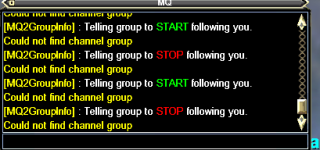
Just got back to playing EQ But I need help everything was working fine... now my come to me and follow me wont work Now I get this message
"Could not find channel group"
I tried to relog and I still getting it, tried to unload and re inject while in game and its still the same issue,
i also attempted to unload Damnet on all instances and reload them and still the same issue.

"Could not find channel group"
I tried to relog and I still getting it, tried to unload and re inject while in game and its still the same issue,
i also attempted to unload Damnet on all instances and reload them and still the same issue.
There are a few other threads mentioning the same error. Are you actually in a group?
problem fixed, i just disbanded everybody from the group and re invite them and it fixed the problem. hehe, the hell.
Was doing a bit of poking around to explore options for transferring XTarget info to a character outside of group. In essence, I have an enchanter outside of group that I want cc'ing adds. Not sure what I'm doing wrong, but I can't seem to get Me.XTarget[#].ID to return a value. Me.XTarget returns number of xtargets and Me.XTarget[1] returns the name (string). Me.XTarget[1].ID returns NULL. Feel like I'm missing a minor detail.
Works:
NULL Return:
Works:
Code:
/dobserve charname -q Me.XTarget
/echo ${DanNet[<charname>].O[ME.XTarget]}
Code:
/dobserve charname -q Me.XTarget[1]
/echo ${DanNet[<charname>].O[ME.XTarget[1]]}
NULL Return:
Code:
/dobserve charname -q Me.XTarget[1].ID
/echo ${DanNet[<charname>].O[ME.XTarget[1].ID]}no - that's not really a thingis dan net down atm?
check the instructions tab to ensure it is setup in the ways you expect it to be
I am running two separate groups at the same time and if I use some of my key binds, it sends the command to both groups through the eqbc/dannet or whatever the window is now. Not sure what settings or commands I used recently to make that happen, so my question is. How do I remove players from the opposite group to not also use the same binds at the same time when I use it.
Example: I'm using Sic's Bard invis hotkey, and I have a bard in both groups. So both groups are using the hotkey and going invis.
Example: I'm using Sic's Bard invis hotkey, and I have a bard in both groups. So both groups are using the hotkey and going invis.
Please dont necro post - you should post in dannet discussion thread ( i moved it for you)
/dga/dgae is everyone on dannet
/dgge/dgga is just your group
doing /dg brd /brd aainvis means you're saying "anyone who is in the bard dannet group, do /brd aainvis"
you should just change it to /dex bardname /brd aainvis or /dgge /brd aainvis (this second one will have everyone in your group try to issue "/brd aainvis" but it doesn't hurt anything
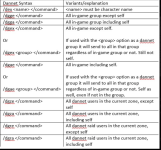
/dga/dgae is everyone on dannet
/dgge/dgga is just your group
doing /dg brd /brd aainvis means you're saying "anyone who is in the bard dannet group, do /brd aainvis"
you should just change it to /dex bardname /brd aainvis or /dgge /brd aainvis (this second one will have everyone in your group try to issue "/brd aainvis" but it doesn't hurt anything
My bad on the necro post!Please dont necro post - you should post in dannet discussion thread ( i moved it for you)
/dga/dgae is everyone on dannet
/dgge/dgga is just your group
doing /dg brd /brd aainvis means you're saying "anyone who is in the bard dannet group, do /brd aainvis"
you should just change it to /dex bardname /brd aainvis or /dgge /brd aainvis (this second one will have everyone in your group try to issue "/brd aainvis" but it doesn't hurt anything
View attachment 76041
I did the /dex and it appears to be working fine now, thank you!
Users who are viewing this thread
Total: 1 (members: 0, guests: 1)
Share: