
I chalked it up to getting older hahahaHonestly it seemed to be really really picky about where you could click to drag in my experience

-
 Hail, we're RedGuides. We want you to play six (yes, 6!) EverQuest characters at once. We have scripts and a friendly community to help, please join our playstyle and say hello! 👋
You are using an out of date browser. It may not display this or other websites correctly.
You should upgrade or use an alternative browser.
You should upgrade or use an alternative browser.

Utility - MQ2CWTNCommons
- Thread starter ChatWithThisName
- Start date

- Commits
- 191
Possibly it was related, but I had to turn the DPI on my mouse way down sometimes otherwise it took forever to line it up what seemed pixel perfect.I chalked it up to getting older hahaha
I noticed with the change that the tabs with the clicky keep adding mounts back in. I saw there was an update regarding the stat mount. Would that possibly be related? The issue I'm seeing is I have a different mount I want to use visually vs my stat mount. I've tried removing the stat mount in the window, but it appears to get readded when I log back in.

then you will want to disable the mounts in your downtime --- tho we will no longer use a mount in downtime if you have a stat mount and it doesn't match.I noticed with the change that the tabs with the clicky keep adding mounts back in. I saw there was an update regarding the stat mount. Would that possibly be related? The issue I'm seeing is I have a different mount I want to use visually vs my stat mount. I've tried removing the stat mount in the window, but it appears to get readded when I log back in.

Isnt that what the stat mount window is for? you can click any mount you wish but the stat comes from the mount in the window. Or am I not understanding your promblem?I noticed with the change that the tabs with the clicky keep adding mounts back in. I saw there was an update regarding the stat mount. Would that possibly be related? The issue I'm seeing is I have a different mount I want to use visually vs my stat mount. I've tried removing the stat mount in the window, but it appears to get readded when I log back in.
I had an old mount in my downtime window that I removed a while back. It is my stat mount. I added another mount to use in its place. Did the typical /removeclicky for the stat mount. When the change over happened to IMGui I noticed that my stat mount was in my list for downtime. So I removed it on the IMGui, but when I logged back in today it was back on the list and all of my characters casted that mount. I certainly did not add it back, so wasn't sure if it was added since it was my stat mount or not.Isnt that what the stat mount window is for? you can click any mount you wish but the stat comes from the mount in the window. Or am I not understanding your promblem?
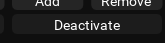
anything you don't want used you can "deactivate".I had an old mount in my downtime window that I removed a while back. It is my stat mount. I added another mount to use in its place. Did the typical /removeclicky for the stat mount. When the change over happened to IMGui I noticed that my stat mount was in my list for downtime. So I removed it on the IMGui, but when I logged back in today it was back on the list and all of my characters casted that mount. I certainly did not add it back, so wasn't sure if it was added since it was my stat mount or not.
We look for mounts that have the "best" mount blessing and automatically add that to your downtime clickies.
if you have something in your stat box in your keyring, we will only cast a mount that matches that stat item
Thanks! I'll try to deactivate the button next time I log them in/out if it reappears. I just removed them again when I logged in instead.anything you don't want used you can "deactivate".
We look for mounts that have the "best" mount blessing and automatically add that to your downtime clickies.
if you have something in your stat box in your keyring, we will only cast a mount that matches that stat item
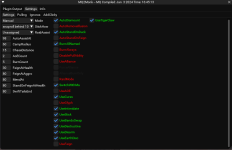
Posted previously on Test server forum. However, I'll try here.
I watched the new CWTN plugin video and there definitely is a pause button that should be on my UI. I'm sure I am missing some command to add it. Ill post a screenshot. No pause.
View attachment 55482

Bogreaper
Member
I just resized the ctwn window, then tried casting any spell at all, or clicking any item or hot key it would not work... once I clicked the ctwn window again, then back into the viewport everything worked again.
Seems to be a focus window issue. the CTWN is keeping focus even when not clicked... if you alt tab, or do anything off the main player, it loses focus and when you come back CTWN grabs focus and you have to get it off.
Seems to be a focus window issue. the CTWN is keeping focus even when not clicked... if you alt tab, or do anything off the main player, it loses focus and when you come back CTWN grabs focus and you have to get it off.
this bug occurs when you have something on your cursor (assuming you're talking about what im talking about). it will be fixed next buildI just resized the ctwn window, then tried casting any spell at all, or clicking any item or hot key it would not work... once I clicked the ctwn window again, then back into the viewport everything worked again.
Seems to be a focus window issue. the CTWN is keeping focus even when not clicked... if you alt tab, or do anything off the main player, it loses focus and when you come back CTWN grabs focus and you have to get it off.

BlueBug
Seasoned veteran member
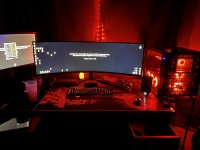
I previously ran all my imgui on a second monitor without issues. In the EQ button go to the MQ settings under overlay you can tick to allow imgui to be displayed outside of the game window.Any way to fix lua windows so they can be better and not take over my UI, or require a 2nd monitor to operate?
Before the RedGuides gang made my 49” dreams come true I had ALL the imgui on a second monitor except on my driver toon. I saw that Sic said he didn’t recommend dragging the imgui off the game window but I never had issues.
see pic below for how I had it set up.
Attachments

Boring
Well-known member
I am in LOVE with this new window !!!!! You built in the clickies and the FAQ and the commands!! WOW
But I am an idiot: I accidently made the cwtn window spread across the entire top of my screen and I cannot figure out how to resize it again. Help? (it's maximized. cannot drag any corner, click on anything, etc. Nothing allows me to resize it smaller. I can drag the bottom bar to make it bigger/smaller but that's all I seem to be able to do.)
But I am an idiot: I accidently made the cwtn window spread across the entire top of my screen and I cannot figure out how to resize it again. Help? (it's maximized. cannot drag any corner, click on anything, etc. Nothing allows me to resize it smaller. I can drag the bottom bar to make it bigger/smaller but that's all I seem to be able to do.)

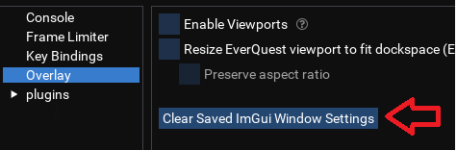
EQ button, MQ button, MQ settings, reset ImGui overlays.I am in LOVE with this new window !!!!! You built in the clickies and the FAQ and the commands!! WOW
But I am an idiot: I accidently made the cwtn window spread across the entire top of my screen and I cannot figure out how to resize it again. Help? (it's maximized. cannot drag any corner, click on anything, etc. Nothing allows me to resize it smaller. I can drag the bottom bar to make it bigger/smaller but that's all I seem to be able to do.)

juice999
the Degenerate
ctrl+shift+~ then drag the window also works.I am in LOVE with this new window !!!!! You built in the clickies and the FAQ and the commands!! WOW
But I am an idiot: I accidently made the cwtn window spread across the entire top of my screen and I cannot figure out how to resize it again. Help? (it's maximized. cannot drag any corner, click on anything, etc. Nothing allows me to resize it smaller. I can drag the bottom bar to make it bigger/smaller but that's all I seem to be able to do.)
Absolutely love the new UI and the possibilities it brings. Love the attention to detail.
Boring
Well-known member
THANK YOU!! That workedEQ button, MQ button, MQ settings, reset ImGui overlays.

I tried this first and it did not work but ty for replyingctrl+shift+~ then drag the window also works.
Absolutely love the new UI and the possibilities it brings. Love the attention to detail.

you must have not clicked the correct thingI tried this first and it did not work but ty for replying
this clears all imgui window settings (saved locations etc)
- Commits
- 191
ChatWithThisName updated MQ2CWTNCommons with a new update entry:
01/05/2024
Read the rest of this update entry...
01/05/2024
-- Forcing imgui focus now only happens while your cursor has something on your icon AND is over the cwtn class plugin window as intended.
-- this behavior exists so if you click on a tab, you can still see the item on your cursor when you're going to add it using the addclicky "add" button
-- the force focus will be removed at a later update
Read the rest of this update entry...
- Commits
- 191
ChatWithThisName updated MQ2CWTNCommons with a new update entry:
01/05/2024b
Read the rest of this update entry...
01/05/2024b
- no longer stealing focus to draw icon image on top of everything
-- yay
Read the rest of this update entry...
Bogreaper
Member
Because of the graphics of some mounts, they put in the keyring where we could use the stats of one mount and the visual of another.
This new CTWN is ignoring this, and every time I load in, its using the visuals of a mount that is too large for where I hunt.
is there a way for you to check that keyring and us the one we want?
I have removed the mount each time in the addclicky and it puts it back each time I log in.
Not a real big deal but would be a nice quality of life.
Thank you.
This new CTWN is ignoring this, and every time I load in, its using the visuals of a mount that is too large for where I hunt.
is there a way for you to check that keyring and us the one we want?
I have removed the mount each time in the addclicky and it puts it back each time I log in.
Not a real big deal but would be a nice quality of life.
Thank you.
disable (deactivate) it if you don't it to be used - if you remove something that will automatically be added --- guess what, we're going to re-add it since it isn't there the very next time you load the pluginBecause of the graphics of some mounts, they put in the keyring where we could use the stats of one mount and the visual of another.
This new CTWN is ignoring this, and every time I load in, its using the visuals of a mount that is too large for where I hunt.
is there a way for you to check that keyring and us the one we want?
I have removed the mount each time in the addclicky and it puts it back each time I log in.
Not a real big deal but would be a nice quality of life.
Thank you.
if you have something in your stat slot, we only use a clicky that matches it - so make sure you're patched and such.
we (as in the cwtn plugins) do not have the ability to "ignore the stat slot and use a graphic of another mount instead"
no.By the Way.
Loving the improvements, they are GREAT... was not trying to say anything bad, just a suggestion, it's not a problem to just remove it each time I log in, just a suggestion.
Keep up the great work!
just disable it.
delete it = incorrect
disable it = correct

we (as in the cwtn plugins) do not have the ability to "ignore the stat slot and use a graphic of another mount instead"
Previously I had the same mount (Anizok's Steam Escalator) in the downtime for my guys and the plugins would summon that mount. Since clicking on any mount automatically uses the stat mount buff in the keyring, they would have the right buff and use the visual mount in the downtime section.
What I found before I went to work was that I had the Anizok's Steam Escalator in the downtime still as well as the stat mount that was also automatically added. I disabled the stat one in the window but since I guess I had another mount in the downtime, it was still summoning the stat mount I had disabled and that was showing visually.
To get the same function now I will have to disable the keyring stat mount and then manually click the mount I want to use?
Or can I just make the one I want to use as the stat mount and since the stat on that mount will not overwrite the permanent one it will be the visual one I want?
correct. we're not going to use a mount, familiar, or illusion if you have something in the stat slot and the item that is added does not match that itemPreviously I had the same mount (Anizok's Steam Escalator) in the downtime for my guys and the plugins would summon that mount. Since clicking on any mount automatically uses the stat mount buff in the keyring, they would have the right buff and use the visual mount in the downtime section.
What I found before I went to work was that I had the Anizok's Steam Escalator in the downtime still as well as the stat mount that was also automatically added. I disabled the stat one in the window but since I guess I had another mount in the downtime, it was still summoning the stat mount I had disabled and that was showing visually.
To get the same function now I will have to disable the keyring stat mount and then manually click the mount I want to use?
Or can I just make the one I want to use as the stat mount and since the stat on that mount will not overwrite the permanent one it will be the visual one I want?
correct. we're not going to use a mount, familiar, or illusion if you have something in the stat slot and the item that is added does not match that item
Thanks! I am loving the new UI by the way and how changes made are persistent now.
Boring
Well-known member
you must have not clicked the correct thing
this clears all imgui window settings (saved locations etc)
View attachment 55528
What you posted did work. I was replying to the person who suggested that "ctrl+shift+~ then drag the window also works." would work - that did not.

eqsubi15
Ultimate seasoned veteran member
Anyone else having problems getting the CWTN Plugins UI to save placement and sizing? Ever since the update, I'm experiencing intermittent issues where it resets back to default sizing and location. This has been happening with War, Mag, Clr, Ber, SK, etc. I've tried following the FAQ steps to close the UI after sizing and placing, then do a "show" to bring it back. Also tried doing a /reload, and also tried The EQ options to "Load UI Skin".
Is there any other step(s) that can help save this so I don't have to waste so much time resizing and placing the UI on multiple toons daily.
Is there any other step(s) that can help save this so I don't have to waste so much time resizing and placing the UI on multiple toons daily.
the "close and reopen" thing only was for the old xml ui window.Anyone else having problems getting the CWTN Plugins UI to save placement and sizing? Ever since the update, I'm experiencing intermittent issues where it resets back to default sizing and location. This has been happening with War, Mag, Clr, Ber, SK, etc. I've tried following the FAQ steps to close the UI after sizing and placing, then do a "show" to bring it back. Also tried doing a /reload, and also tried The EQ options to "Load UI Skin".
Is there any other step(s) that can help save this so I don't have to waste so much time resizing and placing the UI on multiple toons daily.
the new window MacroQuest saves in your MacroQuest_overlay.ini file - it isn't something the plugins are doing
eqsubi15
Ultimate seasoned veteran member
Is there anything in there that could cause the default sizing/location to take priority over the custom setting per toon?the "close and reopen" thing only was for the old xml ui window.
the new window MacroQuest saves in your MacroQuest_overlay.ini file - it isn't something the plugins are doing
Scaramongus
New member
Wrong forum
The window behaves weirdly and I cannot click on or access the settings button on the window.

Just an oddity, my Shaman is adding its cloak as a downtime clicky when I log in and then spam clicking it. The buff from the cloak is just one of the permanent AA mana regen buffs. The first time I logged in I removed it, the second time I disabled it. Just an odd thing to get added.
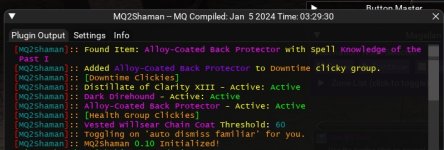
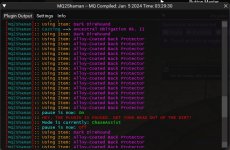
The window behaves weirdly and I cannot click on or access the settings button on the window.
Here is psy explaining it
I had this same issue months back with all imgui windows and after a week of communucation with isboxer techs, they told me there was nothing that could be done. When the windows swap in isboxer, they do reduce the resolution and when that happens, all imgui windows reset to remain on the smaller screen. When you bring it back to the forefront with larger screen size, the imgui windows do not have an anchor built into them so they move to the top left.
End result, I stopped using isboxer and only use boxhud to manage the team and move toons between windows.
Maybe Sic/CWTN have a different solution for the new plugin's imgui's that I am not aware of, but this was the issue for me several months ago.
Users who are viewing this thread
Total: 1 (members: 0, guests: 1)
Share: