I am looking for help with mq2nav and fixing a few meshes that have breaks in them and im getting frustrated with the nav builder and not being able to fix these breaks in the nav meshs, Im currently useing the VV ones that come with the updater and am running into certain caves that have breaks in them to where my puller will not pull mobs in these rooms. Any help with this will be appreciated please.

-
 Hail, we're RedGuides. We want you to play six (yes, 6!) EverQuest characters at once. We have scripts and a friendly community to help, please join our playstyle and say hello! 👋
You are using an out of date browser. It may not display this or other websites correctly.
You should upgrade or use an alternative browser.
You should upgrade or use an alternative browser.
Question - mq2 nav help
- Thread starter minniemmee24
- Start date

It would be helpful if you let folks know what zones and perhaps what areas / locs you're having issues withI am looking for help with mq2nav and fixing a few meshes that have breaks in them and im getting frustrated with the nav builder and not being able to fix these breaks in the nav meshs, Im currently useing the VV ones that come with the updater and am running into certain caves that have breaks in them to where my puller will not pull mobs in these rooms. Any help with this will be appreciated please.
Great divide, velks ( both tov) only 2 on the top of my head atm Kodiak caves loc (-3709.26 2076.45 -18.41) kodiak cave loc with break
well again, its going to be much more helpful if you provide some more information to folks so we can address the specific challenges you're having.Great divide, velks ( both tov) only 2 on the top of my head atm Kodiak caves
can you give us some locs or at least some *general* area of those zones you're having issues with?
in GD the tizzy caves are definitely a pita, so i suspect that might be one spot you're having challenges with.
try my velks mesh
Attachments
i will try your velks one later when im in there, but i was really interested in knowing how in the nav generator i could try to fix these so i dont have to ask for help with it every time i run into this.

- Commits
- 2
I usually open the map in meshgenerator, navigate through the areas of interest and use the mark areas tool (walkable area) to fix any broken areas, if you can't get it to turn blue, the I use the connection tool and make a two way connection between the two areas i want to travel. then save the mesh, after saving it should update in game real time.
I made a post here showing how to edit out a section - adding in a section is the same just you would add "Walkable" instead of "Not Walkable" / "Avoid"i will try your velks one later when im in there, but i was really interested in knowing how in the nav generator i could try to fix these so i dont have to ask for help with it every time i run into this.
> HERE <
locate meshgenerator.exe in your release folder
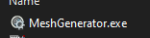
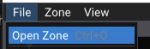
then file->open zone
then you can move to the location you want to mark, either by your keyboard/mouse or by putting in the location in the window
Here is some random rock in EW
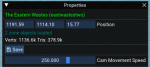
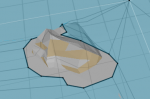
Now let's say that I wanted to ensure that entire rock i don't go on instead of how it is now, where some of it i would walk on.
I like to use the Mark Area tools where i can and avoid "re rendering the mesh" if i don't need to.
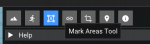
Once I click on the Mark Area Tool i can select the dropdown for what type of area i would like to create.
Not Walkable will mean if you end up on it some how (mob knocks you back, or you stick on to it or whatnot, that you would not be able to nav back off it - avoid means it is weighted higher for the nav calculations but you can still nav on it).
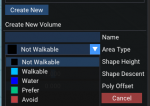
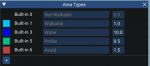
You can also create/adjust the weights of areas to make them "more avoidable" etc. some zones i will create a MEGAAVOID area type and give it a crazy weight like 50
Let's say i just want to avoid this
I would click my 4 points
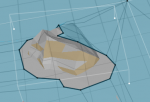
and then create volume

Now this area is "avoided"
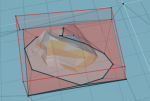
for something like a tree I would just use the not-walkable avoid type
Which would make it look like this
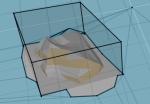
once you have your tree marked off you just click save
if you are currently in-game it should auto-reload the map for you - if it didn't you can
/nav reloadyou can check in game that it got added by doing the
/nav ui and clicking that "render navigation mesh" - you will see the marked out areaback to profit
- Commits
- 2
Wouldn't want a good in depth guide to go to waste. Nice job SIC. 
Users who are viewing this thread
Total: 1 (members: 0, guests: 1)
Share: