
• You've discovered RedGuides, an EverQuest multi-boxing and scripting community 🧙‍♀️⚙️. We want you to play several EQ characters at once, come join us and say hello! 👋

  • A TLP without truebox has thawed (Very Vanilla ready)
    Frostreaver

Problem - MQ2 Bar Problem

Status
Not open for further replies.

bmars06

Well-known member
Joined
Mar 8, 2019
RedCents
739¢
Hey Guys,

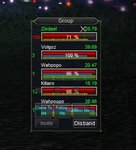
See the attached image. For some reason as soon as I loaded up MQ2 (Very Vanilla) for the very first time this happened to my group bar. I can't seem to get those blue buttons to move off my group window. I followed the MQ window and did /loadskin default and I think that the blue bars popped up once I did that.

Does anyone have an idea how I can move or get rid of the blue buttons that are covering my group window?

Thanks!Annotation 2019-03-08 224543.jpg
 
https://www.redguides.com/community/resources/mq2targetinfo.191/
if you read about the help on that page it will tell you how to get rid of them
/groupinfo help
display help screen and current setting status
/groupinfo show/hide mimicme
will show or hide the mimicme button
/groupinfo show/hide extdistance
will show or hide distance for targets on the extended target window
/groupinfo show/hide distance
will show or hide the distance display
/groupinfo show/hide hot
will show or hide the hot button
/groupinfo show/hide followme
will show or hide the followme button
/groupinfo show/hide cometome
will show or hide the cometome button
/groupinfo reload
will reload mq2targetinfo.ini
/groupinfo reset
will reset all settings to default. Old settings will be saved in a backup file
/groupinfo save
save groupwindow size and location to mq2targetinfo.ini
/groupinfo mimicme on/off
command-line version of the button
/groupinfo followme on/off
command-line version of the button
/groupinfo cometome
command-line version of the button

you just need to do /groupinfo hide mimicme
/groupinfo hide followme
/groupinfo hide cometome
 
Awesome, thank you so much for your help! I imagine I can just make my own hotkey for those commands (come/follow/mimic) right?
 
Yes, what EQMule said. Just click the very bottom of the window and pull it down to make space for the buttons! Don't sweat the small stuff! :):)

Left click and hold the very bottom edge line of the window, the drag the window to the size you want...it will give you space for those buttons which you will find will come in handy later!
 
Problem - MQ2 Bar Problem
Status
Not open for further replies.

Users who are viewing this thread

Back
Top
Cart