• You've discovered RedGuides, an EverQuest multi-boxing and scripting community 🧙‍♀️⚙️. We want you to play several EQ characters at once, come join us and say hello! 👋

Question - MQ Icon Not Showing in Sys Tray (3 Viewers)

Joined
Oct 30, 2022
RedCents
385¢
Hello folks,

It's been awhile since I have started playing with redguides. I am trying to follow the quick start guides but I am stuck at the autologin step. I do not see that icon on the bottom right of my screen for some reason.

Context: I was able to follow the guide and clicked on redfetch to get all the latest file.

Operating System: Windows 11 pro.

Thanks all for your help
 
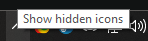
if you have this icon here
1789991871040.png
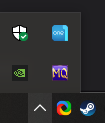
click it, mq might be hiding in the hidden tray like so

1789991911878.png


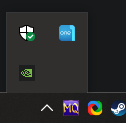
You can drag it out of the hidden tray next to the hidden icon chevron and it should appear there in the future
1789991985080.png
 
Thanks @kaen01
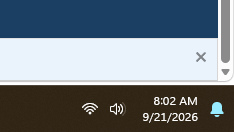
but i do not see this in my tray.
1789992190056.png

This is very strange and was not a problem in windows 10 as I had ran this before at least a year ago.

Is there anything else missing I need to do with regards to macroquest?

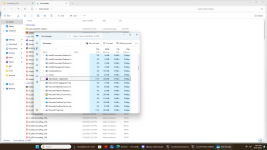
I verified in task manager that macroquest is in fact running.

1789992278812.png
 
Thanks @kaen01
but i do not see this in my tray.
View attachment 78796

This is very strange and was not a problem in windows 10 as I had ran this before at least a year ago.

Is there anything else missing I need to do with regards to macroquest?

I verified in task manager that macroquest is in fact running.

View attachment 78797
do other things show in your sys tray? things in your task manager I would expect to be showing are not based on the image you provided.
 
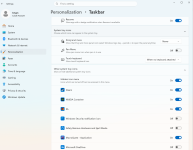
it seems you can accidently turn off the overflow icon in win11, not sure if that is something you can check by right clicking the taskbar and selecting taskbar settings
 
Yes, I was running steam and it does show. Is there something I need to do to authorize macroquest icon to show up there?
your windows settings you can add/hide/remove various icons from your sys tray, but this isn't usually a "i need to add it here" step.

have you:
- double check you didn't get rid of systray icons/population in your windows settings as mentioned above
- ran windows updates
- driver updates
- checks antivirus isn't doing anything to your eq/mq/rg folders/sub-folders
- i'd also check you don't have any other overlays running like nahimic, afterburner, overwolf, xbox overlay, discord overlay etc
- rebooted

i'm suspicious that you have *nothing* in your image for sys tray
 
Thank you all!!! I was going crazy and trying to see if I am missing some other kind of download such as .NET framework, etc...

For future reference, this is the hidden icon menu!! This is a brand new windows 11 feature I think. Sorry all. I am going back to the guides now. Hopefully, this will help any future person encountering the same issue I did.

1789994113055.png
 
Question - MQ Icon Not Showing in Sys Tray

Users who are viewing this thread

  • B
  • N
Back
Top
Cart