• Hail, we're RedGuides. We want you to play six (yes, 6!) EverQuest characters at once. We have scripts and a friendly community to help, please join our playstyle and say hello! 👋
  • We've added LLM sections to our Terms & Rules and Resource Rules, for everyone's sanity & in-game safety.
    Read more
    a. Do not replace your voice with an LLM. This goes for your posts and your scripts. Drafting and editing with a tool is fine, but don't take you out of what you share.
    b. Do not replace your EQ character's voice with an LLM. We don't want scripts that speak over /ooc, /shout or other public channels. This has been an unwritten rule that's kept casino scripts off the site for decades, but we're now compelled to make it clear: keep automated communication private.

    Why Does RG Review Scripts?
    Nearly every LLM-written Lua script we see is making your character do impossible things, and rarely in a way that's beneficial to you. We've seen heavy server hammering, /target over impossible distances when /nav spawn would passively accomplish the same thing, a spawn search that fires 20+ times per second, and other pointless actions that are likely annoying GMs.

    You are welcome to use LLMs as a tool to structure, draft, and edit your work, but please read critically before hitting /lua run

Question - MQ Chat Window XML?

Lord Sivion

Ultimate seasoned veteran member
I did a search but came up empty handed for this particular question:

I was looking through the MQ files to see if I can modify something to make the MQ chat/feedback window appear graphically the same as the rest of my UI windows, so it doesn't stick out like a sore thumb in the middle of my UI. I'm sure I am missing it somewhere. Any advice to achieve what I am looking to do?
 
hrm, i thought mq2chatwnd just made all the stuff in mq2chatwnd.cpp, don't think there is an xml for it
So is there no way to graphically change it?

Right Click MQ in Sys Tray -> Folders -> Resources -> uifiles -> default

Check there. MQ likes to load some windows from there.
Right, I did find that folder. I just didn't see anything about the Chat window in there.
 
This, for example, removes the title bar.

MQ2ChatWnd.cpp line 48
Diff:
- SetWindowStyle(CWS_CLIENTMOVABLE | CWS_USEMYALPHA | CWS_RESIZEALL | CWS_BORDER | CWS_MINIMIZE | CWS_TITLE);
+ SetWindowStyle(CWS_CLIENTMOVABLE | CWS_USEMYALPHA | CWS_RESIZEALL | CWS_BORDER | CWS_MINIMIZE);
 
This, for example, removes the title bar.

MQ2ChatWnd.cpp line 48
Diff:
- SetWindowStyle(CWS_CLIENTMOVABLE | CWS_USEMYALPHA | CWS_RESIZEALL | CWS_BORDER | CWS_MINIMIZE | CWS_TITLE);
+ SetWindowStyle(CWS_CLIENTMOVABLE | CWS_USEMYALPHA | CWS_RESIZEALL | CWS_BORDER | CWS_MINIMIZE);
Thanks for the response Sic
 
Are you talking about the MQ Console or the MQ2ChatWnd plugin? The MQ Console is done in imgui, it doesn't use xml files. The MQ2ChatWnd plugin styles based off of EQUI_ChatWindow.xml.
there are some differences in what shows from what your equi_chatwindow.xml does tho, like the titlebar thing i mentioned above. my "eq chat windows" don't have title bars, for example, but the mq2chatwnd slaps a titlebar on it
 
But you already pointed that out -- it's just because it's hardcoded instead of handling the styling. That's not a difference in the xml.
I think whatever i'm trying to explain i'm doing poorly - the original question was how to make the mq chat window match the rest of the eq windows so I was pointing out that some of it is just handled directly by the plugin versus matching directly what the xml tells it to do

you would know how to explain that better than i would, so certainly not in disagreement, and appreciate the clarification
 
Yeah, that was why my question about the specifics. Other than the items that are hardcoded, it should inherit the UI items, so for it to be sticking out like a sore thumb -- I was wondering if maybe Doc James was talking about the MQ window and not MQ2ChatWnd. Otherwise, it should look a lot like the skin in use (assuming the skin styles the ChatWindow specifically).
 
Yeah, that was why my question about the specifics. Other than the items that are hardcoded, it should inherit the UI items, so for it to be sticking out like a sore thumb -- I was wondering if maybe Doc James was talking about the MQ window and not MQ2ChatWnd. Otherwise, it should look a lot like the skin in use (assuming the skin styles the ChatWindow specifically).
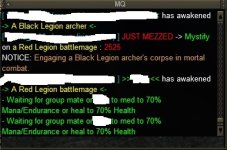
The thing I am talking about is where all commands and messages are echo'd. Looks like a chat window. See image example.

MQ_Window.jpg
 
Question - MQ Chat Window XML?

Users who are viewing this thread

Back
Top
Cart