does it print any error or anything? it enables fine from the ui? It is called ManaCheck in the UI? with that casing?Thanks for the pointers. I found a blank condition in one of my character's ini files (one that was added vai the LEM GUI itself) and removing that resolved the "bind" errors. However, I'm still unable to enable/disable the following "Condition Event". I've tried using "/lem cond ManaCheck 1" (on/off,true,false,0,1, etc) and I can't enable or disable it via the command-line. I tried adding the condition name in double-quotes, but that didn't work either. Any suggestions?
ManaCheck
Code:local mq = require('mq') -- Do not edit this if condition if not package.loaded['lem.events'] then print('This script is intended to be imported to Lua Event Manager (LEM). Try "-t/lua run lem-t"') end local function on_load() -- Perform any initial setup here when the event is loaded. end ---@return boolean @Returns true if the action should fire, otherwise false. local function condition() return mq.TLO.Group.LowMana(60)() > 0 end local function action() if mq.TLO.Group.LowMana(60)() > 0 then --print("mana not ideal, resting") if (mq.TLO.Me.Standing() and not mq.TLO.Me.Casting.ID()) then mq.TLO.Me.Sit() end end end return {onload=on_load, condfunc=condition, actionfunc=action}

-
 Hail, we're RedGuides. We want you to play six (yes, 6!) EverQuest characters at once. We have scripts and a friendly community to help, please join our playstyle and say hello! 👋
You are using an out of date browser. It may not display this or other websites correctly.
You should upgrade or use an alternative browser.
You should upgrade or use an alternative browser.

Release (Mighty) Lua Event Manager 12/13/2024
- Thread starter aquietone
- Start date
Edit: Your question prompted me to realize that the Event Name and the Category name were both called "ManaCheck". I renamed the condition event to "GetMana" and now it toggles just fine. I didn't even think of that at first. Sorry for the confusion here. I really appreciate the prompt replies!does it print any error or anything? it enables fine from the ui? It is called ManaCheck in the UI? with that casing?
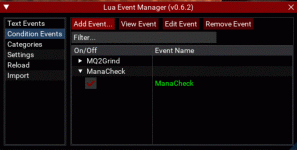
It does not print any errors and it executes fine if I enable it via the GUI. Here is a screenshot showing it is indeed called ManaCheck in the UI.
Well, I've gotten myself back in the same situation and I'm not sure what to do to fix it. I updated my condition code and it had some errors in it and now, every time I launch lem, I get the "bind" errors again. I can (again) manually enable/disable the condition in the GUI, but since /lem isn't getting "bound" correctly, I can't call "/lem cond" anymore. I fixed the code and everything works fine on a 2nd character that had not previously launched the "bad" version of the code, however the character that did is now stuck with those bind errors. I took the "characters/<charname>.lua" file from the "good" character and copied the contents to the "bad" one, but it's not resolving the issue. I also searched everywhere I could find in the base "lem" directory and can't see where it's causing this to happen on one character and not the other. It's like something outside the "lem" directory is getting updated and I can't clear it. I've attached the contents of the "characters/<charname>.lua" file that works on one char and not the other. Any suggestions of where to look? It's driving me crazy that every time I make a syntax error in a condition that this happens.
LEM characters LUA file
LEM characters LUA file
Code:
-- Persistent Data
local multiRefObjects = {

} -- multiRefObjects
local obj1 = {
    ["events"] = {
    };
    ["conditions"] = {
        ["GetMana"] = true;
    };
}
return obj1
Last edited:
Brainiac to the rescue. The underlying issues are fixed now in MQ so whenever RG gets those changes and rebuilds VV the broken binds and the cannot delay error should go away.Well, I've gotten myself back in the same situation and I'm not sure what to do to fix it. I updated my condition code and it had some errors in it and now, every time I launch lem, I get the "bind" errors again. I can (again) manually enable/disable the condition in the GUI, but since /lem isn't getting "bound" correctly, I can't call "/lem cond" anymore. I fixed the code and everything works fine on a 2nd character that had not previously launched the "bad" version of the code, however the character that did is now stuck with those bind errors. I took the "characters/<charname>.lua" file from the "good" character and copied the contents to the "bad" one, but it's not resolving the issue. I also searched everywhere I could find in the base "lem" directory and can't see where it's causing this to happen on one character and not the other. It's like something outside the "lem" directory is getting updated and I can't clear it. I've attached the contents of the "characters/<charname>.lua" file that works on one char and not the other. Any suggestions of where to look? It's driving me crazy that every time I make a syntax error in a condition that this happens.
LEM characters LUA file
Code:-- Persistent Data local multiRefObjects = { } -- multiRefObjects local obj1 = { ["events"] = { }; ["conditions"] = { ["GetMana"] = true; }; } return obj1
aquietone updated (Mighty) Lua Event Manager with a new update entry:
20230803
Read the rest of this update entry...
20230803
0.6.3
- Print require stacktrace when event fails to load
Read the rest of this update entry...
Okay, that's good to hear. Just as some more background info, in case you need it. I just created a fresh toon and did a "/Lua run lem". I received the stacktrace errro and lem crashed. I then ran "/Lua run lem" again and it dumped out the bind errors and the lem gui then came up. I have attached a screenshot to show the sequence of events. Hope that helps. Just let me know if you need anything else.aquietone updated (Mighty) Lua Event Manager with a new update entry:
20230803
Read the rest of this update entry...
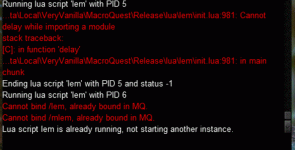
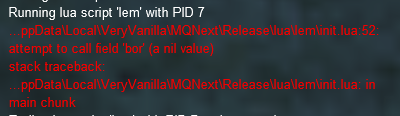
Getting this all of a sudden when trying to launch Lem. Any ideas what I messed up?
Have tried redownloading the file already but still not wokring
sounds like you probably named a file imgui or something in your Lua folder. don't do that.View attachment 51187
Getting this all of a sudden when trying to launch Lem. Any ideas what I messed up?
Have tried redownloading the file already but still not wokring
Was something to do with the mq-definitions-master file. deleted it and everything works again. Not to sure what caused it thosounds like you probably named a file imgui or something in your lua folder. don't do that.


gpag
Active member
Importing any strings into import function is failing for me currently. It worked once upon a time, but its been awhile since I have imported so I can't pinpoint what change affected this. It occurs even when I export my own event, delete the event, then import again. LEM works just fine if I add an event and put in the code, its just importing events/string. Thanks for any potential help!

cjswanson1355
Member
How do you start this? The download doesn't include the lem file.
/Lua run lem bg
No lem file to run......
/Lua run lem bg
No lem file to run......


Can anyone confirm this is a widespread issue or something only some of us are experiencing? Could be a test only thing as well. Haven't tried it on live.Importing any strings into import function is failing for me currently. It worked once upon a time, but its been awhile since I have imported so I can't pinpoint what change affected this. It occurs even when I export my own event, delete the event, then import again. LEM works just fine if I add an event and put in the code, its just importing events/string. Thanks for any potential help!
View attachment 53609
seems to work ok for me on the latest code.. paste an event here that is failing to import? it fails to import if loadstring returns an error or the result is not a Lua table. so for some reason what you're importing doesn't seem to meet those conditionsCan anyone confirm this is a widespread issue or something only some of us are experiencing? Could be a test only thing as well. Haven't tried it on live.
Can't get any of them to import and several others in my guild can't either. But just tried this one for reference.
Condition Event: shackle root bane Added by: aquietone
Has me wondering if it's just a test only thing now. At least 6+ of us are all getting the same error importing any and all of them.
Condition Event: shackle root bane Added by: aquietone
Code:
cmV0dXJuIHsKIGxvYWQgPSB7CiAgYWx3YXlzID0gZmFsc2UsCiAgY2xhc3MgPSAiIiwKICB6b25lID0gIiIsCiB9LAogY29kZSA9ICJiRzlqWVd3Z2JYRWdQU0J5WlhGMWFYSmxLQ2R0Y1NjcENncHNiMk5oYkNCbWRXNWpkR2x2YmlCamIyNWthWFJwYjI0b0tRb2dJQ0FnY21WMGRYSnVJRzF4TGxSTVR5NVRjR0YzYmtOdmRXNTBLQ2RrWVhScFlYSWdlR2tnZEdGMmRXVnNhVzBnYm5Cakp5a29LU0ErSURBS1pXNWtDZ3BzYjJOaGJDQm1kVzVqZEdsdmJpQmhZM1JwYjI0b0tRb2dJQ0FnYkc5allXd2diWGxmWTJ4aGMzTWdQU0J0Y1M1VVRFOHVUV1V1UTJ4aGMzTXVVMmh2Y25ST1lXMWxLQ2s2Ykc5M1pYSW9LUW9nSUNBZ2JHOWpZV3dnYzJoaFkydHNaU0E5SUcxeExsUk1UeTVUY0dWc2JDZ25VMmhoWTJ0c1pTY3BMbEpoYm10T1lXMWxLQ2tLQ2lBZ0lDQnRjUzVqYldSbUtDY3ZKWE1nY0dGMWMyVWdiMjRuTENCdGVWOWpiR0Z6Y3lrS0lDQWdJR2xtSUcxeExsUk1UeTVVWVhKblpYUXVRMnhsWVc1T1lXMWxLQ2tnZmowZ0oyUmhkR2xoY2lCNGFTQjBZWFoxWld4cGJTY2dkR2hsYmdvZ0lDQWdJQ0FnSUcxeExtTnRaQ2duTDIxeGRHRnlJR1JoZEdsaGNpQjRhU0IwWVhaMVpXeHBiU0J1Y0dNbktRb2dJQ0FnSUNBZ0lHMXhMbVJsYkdGNUtEVXdLUW9nSUNBZ1pXNWtDaUFnSUNCcFppQnRjUzVVVEU4dVRXVXVVM0JsYkd4U1pXRmtlU2h6YUdGamEyeGxLU2dwSUdGdVpDQnViM1FnYlhFdVZFeFBMazFsTGtOaGMzUnBibWNvS1NCMGFHVnVDaUFnSUNBZ0lDQWdiWEV1WTIxa1ppZ25MMk5oYzNRZ0pYTW5MQ0J6YUdGamEyeGxLUW9nSUNBZ0lDQWdJRzF4TG1SbGJHRjVLREV3TURBcmJYRXVWRXhQTGxOd1pXeHNLSE5vWVdOcmJHVXBMazE1UTJGemRGUnBiV1VvS1NrS0lDQWdJR1Z1WkFvZ0lDQWdiWEV1WTIxa1ppZ25MeVZ6SUhCaGRYTmxJRzltWmljc0lHMTVYMk5zWVhOektRcGxibVFLQ25KbGRIVnliaUI3WTI5dVpHWjFibU05WTI5dVpHbDBhVzl1TENCaFkzUnBiMjVtZFc1alBXRmpkR2x2Ym4wPSIsCiBjYXRlZ29yeSA9ICJUb0wiLAogdHlwZSA9ICJjb25kaXRpb25zIiwKIG5hbWUgPSAic2hlaXJvb3QiLAp9Are you on the latest version? Tried on both live and emu and don't receive that error with that same event.Can't get any of them to import and several others in my guild can't either. But just tried this one for reference.
Condition Event: shackle root bane Added by: aquietone
Code:cmV0dXJuIHsKIGxvYWQgPSB7CiAgYWx3YXlzID0gZmFsc2UsCiAgY2xhc3MgPSAiIiwKICB6b25lID0gIiIsCiB9LAogY29kZSA9ICJiRzlqWVd3Z2JYRWdQU0J5WlhGMWFYSmxLQ2R0Y1NjcENncHNiMk5oYkNCbWRXNWpkR2x2YmlCamIyNWthWFJwYjI0b0tRb2dJQ0FnY21WMGRYSnVJRzF4TGxSTVR5NVRjR0YzYmtOdmRXNTBLQ2RrWVhScFlYSWdlR2tnZEdGMmRXVnNhVzBnYm5Cakp5a29LU0ErSURBS1pXNWtDZ3BzYjJOaGJDQm1kVzVqZEdsdmJpQmhZM1JwYjI0b0tRb2dJQ0FnYkc5allXd2diWGxmWTJ4aGMzTWdQU0J0Y1M1VVRFOHVUV1V1UTJ4aGMzTXVVMmh2Y25ST1lXMWxLQ2s2Ykc5M1pYSW9LUW9nSUNBZ2JHOWpZV3dnYzJoaFkydHNaU0E5SUcxeExsUk1UeTVUY0dWc2JDZ25VMmhoWTJ0c1pTY3BMbEpoYm10T1lXMWxLQ2tLQ2lBZ0lDQnRjUzVqYldSbUtDY3ZKWE1nY0dGMWMyVWdiMjRuTENCdGVWOWpiR0Z6Y3lrS0lDQWdJR2xtSUcxeExsUk1UeTVVWVhKblpYUXVRMnhsWVc1T1lXMWxLQ2tnZmowZ0oyUmhkR2xoY2lCNGFTQjBZWFoxWld4cGJTY2dkR2hsYmdvZ0lDQWdJQ0FnSUcxeExtTnRaQ2duTDIxeGRHRnlJR1JoZEdsaGNpQjRhU0IwWVhaMVpXeHBiU0J1Y0dNbktRb2dJQ0FnSUNBZ0lHMXhMbVJsYkdGNUtEVXdLUW9nSUNBZ1pXNWtDaUFnSUNCcFppQnRjUzVVVEU4dVRXVXVVM0JsYkd4U1pXRmtlU2h6YUdGamEyeGxLU2dwSUdGdVpDQnViM1FnYlhFdVZFeFBMazFsTGtOaGMzUnBibWNvS1NCMGFHVnVDaUFnSUNBZ0lDQWdiWEV1WTIxa1ppZ25MMk5oYzNRZ0pYTW5MQ0J6YUdGamEyeGxLUW9nSUNBZ0lDQWdJRzF4TG1SbGJHRjVLREV3TURBcmJYRXVWRXhQTGxOd1pXeHNLSE5vWVdOcmJHVXBMazE1UTJGemRGUnBiV1VvS1NrS0lDQWdJR1Z1WkFvZ0lDQWdiWEV1WTIxa1ppZ25MeVZ6SUhCaGRYTmxJRzltWmljc0lHMTVYMk5zWVhOektRcGxibVFLQ25KbGRIVnliaUI3WTI5dVpHWjFibU05WTI5dVpHbDBhVzl1TENCaFkzUnBiMjVtZFc1alBXRmpkR2x2Ym4wPSIsCiBjYXRlZ29yeSA9ICJUb0wiLAogdHlwZSA9ICJjb25kaXRpb25zIiwKIG5hbWUgPSAic2hlaXJvb3QiLAp9
Can also paste it here https://www.base64decode.org/ and hit decode and should see it looks normal.
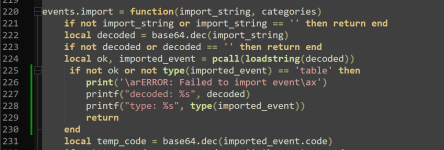
Can you try adding this to lem/events.Lua around line 226
Lua:
    if not ok or not type(imported_event) == 'table' then
        print('\arERROR: Failed to import event\ax')
        printf("decoded: %s", decoded)
        printf("type: %s", type(imported_event))
        return
    end
This is wht popped up after adding that to the events.Lua ....assuming I added it correctly, hah. Also, I downloaded the newest zip to make sure I was up to date.
Code:
decoded: yd?|q?'z?'k?hc?<z !hk?hx?'<?m`?zd? !jk?zr?<!)+?'ynm?'<?)!? ~+ ?jn?l>'!?N8?Xv?na?Lf?Za?Yw?8`?Ik?Jc?jr?wb?wr?9m?ib?lc?<i?Nk?ih?ia?<j?Wq?i1?nj?nf?J`?jl?7c?It?N0?Kk?Ls?<s?Ne?ij?}c?</JJc?Xw?wx?Hf?Nj?kf?9c?]r?^/fim?ii?jn?Z`?Hc?Jy?<j?nori1?ga?Il?^4?kf?}a?Ig?:q?i1?nj?nf?J`?if?ix?~f?Wk?X1?gb?Lf?Za?jr?\s?7t?^t?X1?gb?Lt?9g?jm?Nx?8k?Jj?if?:y?Hn?Xn?Hb?na?8i?^v?j1?gx?{r?Z`?Hf?wk?Yl?x4?jf?za?nm?9g?X1?zy?joMki?il?Nx?8k?Jj?Jh?nh?Is?Z4?iv?lj?ju?Wl?jf?8b?\f?93?Kb?{d?8i?Ne?jx?Jh?Hf?Nk?Hf?wk?Yl?x4?Xw?my?Xt?9w?Xv?Nx?8k?Jj?mi?ni?Yg?Nk?jh?;`?I/ZWy?Yv?wa?jf?Ng?if?nh?Hf?J`?Hf?wk?Ms?Jf?K1?wc?Mx?Nq?kf?gb?I3?Za?Xw?8y?woaZa?jf?mj?nf?J`?Hb?nh?8w?lq?if?<j?\v?Xn?Hb?ny?<j?h`?Hb?wy?Is?Z4?[d?|s?\t?:a?if?Zy?Mj?Zg?hf?i`?wk?Zf?Hf?|y?It?:p?iw?|u?woMj0?Kj?gb?Yoalb?Jr?7`?]t?h`?Hb?nh?Hf?Wd?X1?jy?nm?9m?j2?ni?Lm?Ja?hf?i`?wk?Xn?Hb?nh?Hf?N0?Kl?ka?M4?Kd?Lc?ya?Lt?Lw?Kk?~y?wr?Gm?Xv?ya?\oMj0?X1?yc?Yoa^t?Jr?Jh?Hf?Nu?Y`?nh?Hf?Wd?X1?jy?nm?xu?Hg?gc?Mk?N8?Yh?zh?84?9m?Xw?yj?wk?lp?Jm?kc?]x?ha?X1?|y?Y0?ll?X1?|y?k/b^8?Kb?gx?Yoa94?kv?ioVMi?Nk?im?<!? bhs?nn?x>'!?nk?+ ?{x?l>'!?nm?hs?nm?)+?'m?ld?<!zg?hq?ns?+ ?that seems like it tried to base64 decode something that wasn't base64 encoded.. i'm not sure why test would behave differently, this is just Lua encode/decode code that shouldn't make a difference what eq its running on.This is wht popped up after adding that to the events.lua ....assuming I added it correctly, hah. Also, I downloaded the newest zip to make sure I was up to date.
View attachment 54412Code:decoded: yd?|q?'z?'k?hc?<z !hk?hx?'<?m`?zd? !jk?zr?<!)+?'ynm?'<?)!? ~+ ?jn?l>'!?N8?Xv?na?Lf?Za?Yw?8`?Ik?Jc?jr?wb?wr?9m?ib?lc?<i?Nk?ih?ia?<j?Wq?i1?nj?nf?J`?jl?7c?It?N0?Kk?Ls?<s?Ne?ij?}c?</JJc?Xw?wx?Hf?Nj?kf?9c?]r?^/fim?ii?jn?Z`?Hc?Jy?<j?nori1?ga?Il?^4?kf?}a?Ig?:q?i1?nj?nf?J`?if?ix?~f?Wk?X1?gb?Lf?Za?jr?\s?7t?^t?X1?gb?Lt?9g?jm?Nx?8k?Jj?if?:y?Hn?Xn?Hb?na?8i?^v?j1?gx?{r?Z`?Hf?wk?Yl?x4?jf?za?nm?9g?X1?zy?joMki?il?Nx?8k?Jj?Jh?nh?Is?Z4?iv?lj?ju?Wl?jf?8b?\f?93?Kb?{d?8i?Ne?jx?Jh?Hf?Nk?Hf?wk?Yl?x4?Xw?my?Xt?9w?Xv?Nx?8k?Jj?mi?ni?Yg?Nk?jh?;`?I/ZWy?Yv?wa?jf?Ng?if?nh?Hf?J`?Hf?wk?Ms?Jf?K1?wc?Mx?Nq?kf?gb?I3?Za?Xw?8y?woaZa?jf?mj?nf?J`?Hb?nh?8w?lq?if?<j?\v?Xn?Hb?ny?<j?h`?Hb?wy?Is?Z4?[d?|s?\t?:a?if?Zy?Mj?Zg?hf?i`?wk?Zf?Hf?|y?It?:p?iw?|u?woMj0?Kj?gb?Yoalb?Jr?7`?]t?h`?Hb?nh?Hf?Wd?X1?jy?nm?9m?j2?ni?Lm?Ja?hf?i`?wk?Xn?Hb?nh?Hf?N0?Kl?ka?M4?Kd?Lc?ya?Lt?Lw?Kk?~y?wr?Gm?Xv?ya?\oMj0?X1?yc?Yoa^t?Jr?Jh?Hf?Nu?Y`?nh?Hf?Wd?X1?jy?nm?xu?Hg?gc?Mk?N8?Yh?zh?84?9m?Xw?yj?wk?lp?Jm?kc?]x?ha?X1?|y?Y0?ll?X1?|y?k/b^8?Kb?gx?Yoa94?kv?ioVMi?Nk?im?<!? bhs?nn?x>'!?nk?+ ?{x?l>'!?nm?hs?nm?)+?'m?ld?<!zg?hq?ns?+ ?
On the bright side, I can reproduce it on test. I've no idea on the why at this point though. Works as expected on live and emu with exact same code.I'm going to backup my whole lem folder and nuke it try with a fresh one. I'll report back.
Edit: Same error with fresh lem folder.
Edit2: It's working fine on live with my same original lem folder copied over.
Ha! You know how it goes with test. Always something funky under the hood going on. Thanks for taking the time to check into it. Just glad to know it wasn't just us.On the bright side, I can reproduce it on test. I've no idea on the why at this point though. Works as expected on live and emu with exact same code.
We are just manually adding any new ones we make to the settings.Lua for now. Minor inconvenience until it's fixed.
aquietone updated (Mighty) Lua Event Manager with a new update entry:
12/12/2023
Read the rest of this update entry...
12/12/2023
0.7.0
- Remove persistence.lua and use mq.pickle
- Handle rounding errors on base64 encode/decode
- Try a fix for stale event code after failed registrations
Read the rest of this update entry...
Let me know if this latest update resolves the import/export for you. Seemed to work consistently across live, test and emu now for me.Ha! You know how it goes with test. Always something funky under the hood going on. Thanks for taking the time to check into it. Just glad to know it wasn't just us.
We are just manually adding any new ones we make to the settings.lua for now. Minor inconvenience until it's fixed.
aquietone updated (Mighty) Lua Event Manager with a new update entry:
12/13/2023
Read the rest of this update entry...
12/13/2023
0.7.1
- Switch back to persistence.lua for saving settings files
Read the rest of this update entry...
Make sure to click watch on the overview tab and not the discussion. If you downloaded it manually and put it in the right place then its just /Lua run lemI've manually downloaded/added to my Lua folder & also watched it but it still won't show up in my launcher or run with the command, am i missing something?
What's it say if you try to run it?

diazepam
Well-known member
you were right, I clicked watch in the discussion lol but clicking it in the overview page made it show up, sorry for being an idiot lol thanksMake sure to click watch on the overview tab and not the discussion. If you downloaded it manually and put it in the right place then its just /lua run lem
What's it say if you try to run it?
aquietone updated (Mighty) Lua Event Manager with a new update entry:
12/17/2023
Read the rest of this update entry...
12/17/2023
0.7.2
- Unregister mq event when importing over an existing event
Read the rest of this update entry...

I noticed the search for a event name is case sensitive, ie, aa does not find AAEXP, I have to type AA to find it
Do I need to download Lua to my computer before I can use LEM?
I have LEM showing as "INSTALLED" in my redguides launcher but when I attempt to use any of the commands in the instructions for LEM I get... " That is not a valid command"...
If I type /Lua run lem I get the following " Ending Lua script "lem" with PID 2 and Status. The lem folder is in MQ/Release/Lua...
Anyone have any ideas?
I have LEM showing as "INSTALLED" in my redguides launcher but when I attempt to use any of the commands in the instructions for LEM I get... " That is not a valid command"...
If I type /Lua run lem I get the following " Ending Lua script "lem" with PID 2 and Status. The lem folder is in MQ/Release/Lua...
Anyone have any ideas?
If it says it is ending when you try and run it then it must be saying something more before that about why it is ending? Is it spitting out some red error text?Do I need to download LUA to my computer before I can use LEM?
I have LEM showing as "INSTALLED" in my redguides launcher but when I attempt to use any of the commands in the instructions for LEM I get... " That is not a valid command"...
If I type /lua run lem I get the following " Ending lua script "lem" with PID 2 and Status. The lem folder is in MQ/Release/lua...
Anyone have any ideas?
You don't have to download anything extra.
the file is there. its trying to execute line 5 of the LEM init.Lua, which isloop or previous error loading module "mq" stack traceback
[C]: in function require owner\app dat\LOCAL\VERY VANILLA/macroquest \release\lua\lem\init.lua:5: in main chunk
It seems like it is saying the file isnt there but it IS in there...
Code:
local mq = require 'mq'Do you have something else in your Lua folder which would somehow be causing it to break when it tries to run that line?
I downloaded this and was looking at it, and I couldn't find any events in there. Do I need to import events into it? Is there a video on this explaining how to use it?
Thank you.
Thank you.
Users who are viewing this thread
Total: 1 (members: 0, guests: 1)
Share: