
-
 Hail, we're RedGuides. We want you to play six (yes, 6!) EverQuest characters at once. We have scripts and a friendly community to help, please join our playstyle and say hello! 👋
You are using an out of date browser. It may not display this or other websites correctly.
You should upgrade or use an alternative browser.
You should upgrade or use an alternative browser.

Release (Mighty) Lua Event Manager (2 Viewers) 12/13/2024
- Thread starter aquietone
- Start date
i thought the $ stuff wasnt Lua. it certainly didnt work earlier when i was doing things.you can test by doing /echo ${Cursor.ID} to get the ID, or /echo ${Cursor} to get the name of it
so some sort of /if ${Cursor} statement would maybe work?
it is but you can change anything thats macro into a Lua command..i thought the $ stuff wasnt LUA. it certainly didnt work earlier when i was doing things.
so in Lua =
Code:
mq.TLO.Cursor()and you could test it like the echo with =Code:/lua parse mq.TLO.Cursor()
so, would I do this:
item_on_cursor
or
item_on_cursor
or what is significantly more likely... neither do something else.
item_on_cursor
Code:
local mq = require('mq')

---@return boolean @Returns true if the action should fire, otherwise false.
local function condition()
    local itemonhand = mq.TLO.Cursor()
end

local function action()
    if itemonhand == true then
        mq.cmd('/2 I have an item on my cursor, dumping it in 20 seconds')
        mq.cmd('/timed 200 /dgza /autoinventory')
   end
end

return {condfunc=condition, actionfunc=action}
or
item_on_cursor
Code:
local mq = require('mq')

---@return boolean @Returns true if the action should fire, otherwise false.
local function condition()
    local itemonhand = mq.TLO.Cursor()
end

local function action()
   mq.cmd('/2 I have an item on my cursor, dumping it in 20 seconds')
   mq.cmd('/timed 200 /dgza /autoinventory')

return {condfunc=condition, actionfunc=action}
or what is significantly more likely... neither do something else.
if this is just for mod rods, a couple thoughts..so, would I do this:
1. if its a toon you don't use rods on you can just take the rods and place them in your real estate, then because there lore when people cast that spell it wont land on you.
2. if you still want mod rods, you will need to make the condition to only fire if it's one of the type's of mod rods, otherwise you wont be able to put anything on your cursor at all.
People AE summon all kinds of crap in my guild hall.... bread, food, water, mod rods.... If i am paying attention I can just shut the event off, if Im not, thats the problem. I put a 20 second delay on it to help give time to do things without shutting off the event. I need the mod rods, I have a mage :Pif this is just for mod rods, a couple thoughts..
1. if its a toon you don't use rods on you can just take the rods and place them in your real estate, then because there lore when people cast that spell it wont land on you.
2. if you still want mod rods, you will need to make the condition to only fire if it's one of the type's of mod rods, otherwise you wont be able to put anything on your cursor at all.
I will attempt to make a more comprehensive list of things to autoinventory, however, i do need to know if Im on the right track with the code itself.
Maybe this be a good start for you:People AE summon all kinds of crap in my guild hall
Code:
local mq = require('mq')

local function condition()
    return mq.TLO.Cursor.ID() ~= nil
end

local function action()
    mq.cmd('/dgt --> Item on cursor, auto inventory in 20s.')
    mq.delay(20000)
    if mq.TLO.Cursor.ID() ~= nil then
        mq.cmd('/autoinv')
    end
end

return {condfunc=condition, actionfunc=action}
I don't usually use the Timed feature, and then I also used /dgt rather then a channel so you don't spam a wrong channel some day.
Good luck.
@1
the #2 channel is my channel I use so i can send items links to myself and see when my events say stuff. Its all good :P Thank you for getting back to me on this. Appreciate the help!
Maybe this be a good start for you:
Code:local mq = require('mq') local function condition() return mq.TLO.Cursor.ID() ~= nil end local function action() mq.cmd('/dgt --> Item on cursor, auto inventory in 20s.') mq.delay(20000) if mq.TLO.Cursor.ID() ~= nil then mq.cmd('/autoinv') end end return {condfunc=condition, actionfunc=action}
I don't usually use the Timed feature, and then I also used /dgt rather then a channel so you don't spam a wrong channel some day.
Good luck
the #2 channel is my channel I use so i can send items links to myself and see when my events say stuff. Its all good :P Thank you for getting back to me on this. Appreciate the help!
another thing you could do to not overwhelm your chat is put the channel command only when its actually going to inventory the item, so you don't get spammed all the time unless something got inventoried. though you mentioned having time to interrupt it.the #2 channel is my channel
check the name of stuff on xtarget
Code:
mq.TLO.Me.XTarget(1).Name()the number is which slot xtar your looking at.
aquietone updated (Mighty) Lua Event Manager with a new update entry:
20230218
Read the rest of this update entry...
20230218
0.5.0
- Add enable/disable for all options to right click menu
- This will use dga, dgga or dgga to enable or disable the event based on whether it is currently enabled or disabled for the toon using the menu.
Read the rest of this update entry...
what if i want to look at all of them? I want to make my pet classes kill their swarm pets when their swarm pets end up on xtarget. a while loop?Code:mq.TLO.Me.XTarget(1).Name()
the number is which slot xtar your looking at.
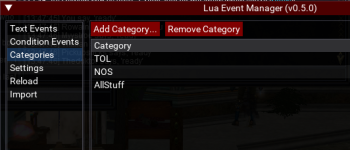
May have missed info on it somewhere, but just as an aside, if you start LEM for the first time, and try to create a category when you have no text events, the add category button didn't do anything for me. Once I created an initial event, I was then able to create a category.
can create categories here and then assign your event to them while you do them.May have missed info on it somewhere, but just as an aside, if you start LEM for the first time, and try to create a category when you have no text events, the add category button didn't do anything for me. Once I created an initial event, I was then able to create a category.


LorDeth
<<NO GIF ATTACHED>>
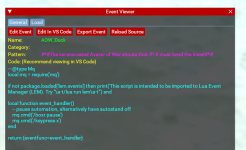
my version of that shows instead of '/keypress x' , it shows '/keypress DUCK'I used the template for aow_duck and stand changing only the duck key to x instead of d, but it doesn't seem to work 'cause I've got wiped a couple of times. Am I supposed to add something to it, or do you see something that I may be missing?
View attachment 48037
maybe try that? i know mine works.. and i am 99% sure I got it from this same thread...

Shadow
Ultimate seasoned veteran member
As someone else mentioned above, keypress DUCK is key. However, what everyone is missing if you are using it on spellcasters with longer cast times, is a stopcast command. The LEM will fail if in the middle of a longer cast time when the event is triggered.I used the template for aow_duck and stand changing only the duck key to x instead of d, but it doesn't seem to work 'cause I've got wiped a couple of times. Am I supposed to add something to it, or do you see something that I may be missing?
View attachment 48037
What I have done was change the option for the keyboard command to Stop Casting A Spell, and include that in my LEM as well. Z is my key of choice.
Code:
local mq = require('mq')

local my_class = mq.TLO.Me.Class.ShortName()

local function event_handler(line, name)
    if name == mq.TLO.Me.CleanName() and not mq.TLO.Me.Ducking() then
        if my_class == 'BER' and mq.TLO.Me.ActiveDisc.Name() == mq.TLO.Spell('Frenzied Resolve Discipline').RankName() then
            mq.cmd('/stopdisc')
        end
        mq.cmd('/dgt Ducking to avoid AoW wrath!')
        mq.cmd('/cwtns autostandonduck off')
        mq.cmd('/boxr Pause')
        mq.cmd('/keypress Z')
        mq.cmd('/twist stop')
        mq.delay(10)
        mq.cmd('/keypress Duck')
    end
end

return {eventfunc=event_handler}
Last edited:
Cryptonomicon
Member
For the LEM coding purposes, would adding a code of 'MOB Name01-02' work to target those specific mobs instead of all of the named mob using 'Mob Name'?
aquietone updated (Mighty) Lua Event Manager with a new update entry:
20230513
Read the rest of this update entry...
20230513
0.6.0
- Add sub-categories (1 level only)
- Prevent deleting a category if it contains any events or sub-categories
- Add broadcast setting for local, dannet, eqbc for event load/unload messages
- Add debug option to right click menu on events, will try to /lua run the event script
Read the rest of this update entry...
Both look like they work ok to me,Nor even the commands to Load events
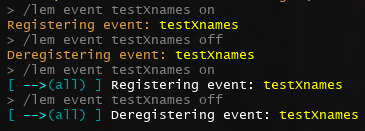
aquietone updated (Mighty) Lua Event Manager with a new update entry:
20230513
Read the rest of this update entry...
20230513
0.6.1
- Add Write.lua and update a couple examples to use it
Read the rest of this update entry...
Deleted the post because i found the error. Thanks for replying though.Both look like they work ok to me,
View attachment 48532
aquietone updated (Mighty) Lua Event Manager with a new update entry:
20230704
Read the rest of this update entry...
20230704
0.6.2
- Remove "'s Corpse" from name when reading/writing character config
Read the rest of this update entry...


I guess you must be dragging them outside of the eq window? Their focus is linked to the eq client that created them either way so if you click one, it would bring that client to the foreground even if its outside the eq window.When you are running Lua on 6+ accts, how do you know which Lua GUIbelongs to who? Can the name be added into the GUI title bar? This happens to me on Overseer's, etc.. Am I missing something?
View attachment 49525
but you can also broadcast commands around to enable/disable LEMs or right click in the list to broadcast etc, so having to go to the ui for each toon probably isn't really necessary.
Been struggling to figure this out, any help would be appreciated.
If I didn't want to cast a buff on a pet, how would I use a TLO statement to determine if the target was a pet so I could skip it? This local function seems to be including pets.
This returns if a target is a pet in events:
If I didn't want to cast a buff on a pet, how would I use a TLO statement to determine if the target was a pet so I could skip it? This local function seems to be including pets.
Code:
Local function partyMemberNotBuffed()
    for idx=1,mq.TLO.Group.Members() do
        local charName = mq.TLO.Group.Member(idx)
        mq.cmdf('/target %s', charName)
        mq.delay(500)
        if not mq.TLO.Target.Buff(mediation).SpellID() then
            return true
        end
    end
    mq.cmd('/mqp off')
    mq.delay("2m")
    return false
end
This returns if a target is a pet in events:
Code:
${Target.Type.Equal[Pet]}
check if the spawn has a Master.IDBeen struggling to figure this out, any help would be appreciated.
If I didn't want to cast a buff on a pet, how would I use a TLO statement to determine if the target was a pet so I could skip it? This local function seems to be including pets.
Code:Local function partyMemberNotBuffed() for idx=1,mq.TLO.Group.Members() do local charName = mq.TLO.Group.Member(idx) mq.cmdf('/target %s', charName) mq.delay(500) if not mq.TLO.Target.Buff(mediation).SpellID() then return true end end mq.cmd('/mqp off') mq.delay("2m") return false end
This returns if a target is a pet in events:
Code:${Target.Type.Equal[Pet]}
Id say its because your targeting a name, and the pet has the name of owner in it and is closer. the way I would go at it is target the ID.TLO statement to determine if the target was a pet so I could skip it
something like:
Code:
local function partyMemberNotBuffed()
    for idx = 1,mq.TLO.Group.Members() do
        local charID = mq.TLO.Group.Member(idx).ID()
        mq.cmdf('/mqtarget ID %i', charID)
        mq.delay(500)
        if not mq.TLO.Target.Buff(mediation).SpellID() then
            return true
        end
    end
    mq.cmd('/mqp off')
    mq.delay("2m")
    return false
endYou can also use mq.TLO.Group.Member(I).DoTarget(), but ya targeting by id or adding PC should work tooBeen struggling to figure this out, any help would be appreciated.
If I didn't want to cast a buff on a pet, how would I use a TLO statement to determine if the target was a pet so I could skip it? This local function seems to be including pets.
Code:Local function partyMemberNotBuffed() for idx=1,mq.TLO.Group.Members() do local charName = mq.TLO.Group.Member(idx) mq.cmdf('/target %s', charName) mq.delay(500) if not mq.TLO.Target.Buff(mediation).SpellID() then return true end end mq.cmd('/mqp off') mq.delay("2m") return false end
This returns if a target is a pet in events:
Code:${Target.Type.Equal[Pet]}
I'm just getting started with LEM and can't figure out what I did wrong after installing. Every time I launch lem with "/Lua run lem", I get the error messages in the attached screenshot. I can't call lem with either "/lem" or "/mlem". I modified the code to add a third binding with "mq.bind('/mylem', cmd_handler)" and can then call lem with "/mylem" and add a Condition Event, however I can't toggle it on and off with any of the variations of "/mylem cond <Condition Name> 0/true/false", etc.. If enabled, the condition stays enabled when I do a "/mylem cond >Condition Name> false" and if not enabled, it never enables with "/mylem cond <Condition Name> true" I also tried right-clicking on the event and toggling it for group and all and it never toggles either. What do I need to do in order to be able to launch this on multiple toons and toggle it back and forth, without individually going to each window and manually checking and un-checking the condition box?
Attachments

Do you have some reliable way to get LEM into this situation? Do you have some event setup that is making the script crash, and it gets into this state upon restarting it? Is it happening the first time you start LEM after logging in?I'm just getting started with LEM and can't figure out what I did wrong after installing. Every time I launch lem with "/lua run lem", I get the error messages in the attached screenshot. I can't call lem with either "/lem" or "/mlem". I modified the code to add a third binding with "mq.bind('/mylem', cmd_handler)" and can then call lem with "/mylem" and add a Condition Event, however I can't toggle it on and off with any of the variations of "/mylem cond <Condition Name> 0/true/false", etc.. If enabled, the condition stays enabled when I do a "/mylem cond >Condition Name> false" and if not enabled, it never enables with "/mylem cond <Condition Name> true" I also tried right-clicking on the event and toggling it for group and all and it never toggles either. What do I need to do in order to be able to launch this on multiple toons and toggle it back and forth, without individually going to each window and manually checking and un-checking the condition box?
I did in fact have an error on initial install that only happens the first time I call "/Lua run lem". I was able to replicate it and have pasted a screenshot here. After receiving this error, I then receive the other "bind" error I attached earlier. Just let me know if there is any additional information I can provide.Do you have some reliable way to get LEM into this situation? Do you have some event setup that is making the script crash, and it gets into this state upon restarting it? Is it happening the first time you start LEM after logging in?
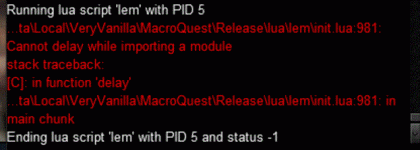
There's a MQ bug to be fixed around errors that come up after a file fails to be loaded. You have an event which has some kind of syntax error or something and so LEM fails to load it, which then leads to this error. You can look at lem/characters/<charactername>.Lua and see what events are enabled and try to narrow down which is failing to load and share the code for it.I did in fact have an error on initial install that only happens the first time I call "/lua run lem". I was able to replicate it and have pasted a screenshot here. After receiving this error, I then receive the other "bind" error I attached earlier. Just let me know if there is any additional information I can provide.
View attachment 50097
Thanks for the pointers. I found a blank condition in one of my character's ini files (one that was added vai the LEM GUI itself) and removing that resolved the "bind" errors. However, I'm still unable to enable/disable the following "Condition Event". I've tried using "/lem cond ManaCheck 1" (on/off,true,false,0,1, etc) and I can't enable or disable it via the command-line. I tried adding the condition name in double-quotes, but that didn't work either. Any suggestions?
ManaCheck
ManaCheck
Code:
local mq = require('mq')

-- Do not edit this if condition
if not package.loaded['lem.events'] then
    print('This script is intended to be imported to Lua Event Manager (LEM). Try "-t/lua run lem-t"')
end

local function on_load()
    -- Perform any initial setup here when the event is loaded.
end

---@return boolean @Returns true if the action should fire, otherwise false.
local function condition()
    return mq.TLO.Group.LowMana(60)() > 0
end

local function action()
     if mq.TLO.Group.LowMana(60)() > 0 then
         --print("mana not ideal, resting")
         if (mq.TLO.Me.Standing() and not mq.TLO.Me.Casting.ID()) then
            mq.TLO.Me.Sit()
        end
    end
end

return {onload=on_load, condfunc=condition, actionfunc=action}Users who are viewing this thread
Total: 3 (members: 0, guests: 3)
Share: