• You've discovered RedGuides, an EverQuest multi-boxing and scripting community 🧙‍♀️⚙️. We want you to play several EQ characters at once, come join us and say hello! 👋

  • A TLP without truebox has thawed (Very Vanilla ready)
    Frostreaver

Problem - Melee classes running directly beneath mob

Rompar

Member
Joined
Sep 2, 2020
RedCents
60¢
I've been experiencing this problem since the new version of KA came out. Nothing changed in my INI's.

What seems to be happening is my melee classes while using Kissassist try to constantly nav directly underneath raids mobs and regular mob. This hurts my rogues because they're unable to backstab and also allows my characters to be riposted sometimes from hard hitting mobs.

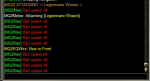
In my MQ window it will spam [mq2nav] Navigating to spawn: Avatar of War 5 or 6 times. My melee won't set up behind it like they used to.

When I brought it up in the Redguides discord someone said they had the same problem but I'm wondering if anyone else is experiencing this as well.

Currently playing on a TLP using Kissassist with mq2melee active in the ini.

This picture if from a single goblin I was killing in Droga.
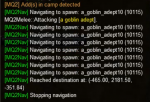
1611087074018.png
 
Last edited:
[Melee]
AssistAt=99
MeleeOn=1
FaceMobOn=1
MeleeDistance=100
StickHow=snaproll
AutoFireOn=0
UseMQ2Melee=1
TargetSwitchingOn=1
 
Last edited:
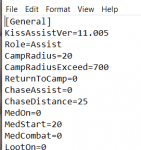
What is your CampRadius. Since you have UseMq2Melee turned on. That means that kiss has turned over all /attacking and sticking to MQ2melee and all kiss does is issue the /killthis command. The only reason you keep seeing the /nav messages is the mob is getting to far away and kiss thinks it needs to move you closer. If you have MQ2Melee setup correctly, your character should be sticking to the mob properly.
 
1611155739823.png

Here is my camp radius. Should I make the radius bigger?

The weird thing is that it's never happened before and started happening without me changing anything in my INI's.
 
Tears my rogues DPS up, they end up facing the mob more than 50% of the time. Chase also causes the same issue so it's a constant battle to chase and unchase them at the right time or manually spin them - only to have them track back to 0 at the center of the mob several times per fight.
 
Make sure you are running kiss 12. Kiss 12 now uses /nav to move you to the mob before attacking and then lets /stick take over. So if your running under the mob on your initial move, and just standing there, then what is your StickHow entry set too?
 
Make sure you are running kiss 12. Kiss 12 now uses /nav to move you to the mob before attacking and then lets /stick take over. So if your running under the mob on your initial move, and just standing there, then what is your StickHow entry set too?

This all started when I updated to KA 12. I've tried multiple variations of stickhow and nothing changes this problem.
 
I've been looking into how to get around this issue as I, and a few others in my guild have been running into it.

From what I can understand the process is this:
/nav to target, default distance is 0 so end up inside the mob
/killthis to engage, which lets MQ2Melee takeover, stickcmd used to position, etc

For me, this causes a few things to happen. Sometimes the character will go to the center of the mob, and then reposition properly to where they need to be. Sometimes they will go to the center, but never really reposition at all, usually this is when they nav to the mob when its facing away so they are already "behind".

Setting MQ2Nav stop distance from something not 0 helps a little. You will stop far enough away that once MQ2Melee takes over you should be far enough away for it to not freak out. Downside is all your navs now stop at that distance, unless you change the setting back and forth.

I am assuming stick freaking out from being insanely close range to the mob is mostly a configuration issue of either MQ2Melee or MQ2MoveUtils. Also assuming like me, most people probably haven't touched their MoveUtil config from the defaults. Kinda curious if there is a configuration to get the expected behavior, or if setting nav distance is the only way.

Here is my KA ini Melee Section
Code:
[Melee]
AssistAt=95
MeleeOn=1
FaceMobOn=1
MeleeDistance=75
StickHow=snaproll behind 10 moveback uw
AutoFireOn=0
UseMQ2Melee=1
TargetSwitchingOn=0

Here is my MQ2Melee stick settings
Code:
stickbreak=1
stickcmd=snaproll behind 10 moveback uw
stickdelay=0
stickmode=1
stickrange=75
 
I encountered this too on my bard. After you start Kissassist, enter /chaseoff. Then move the toon to wherever, it will then assist when you engage with tank.
 
The problem is how MQ2Melee is handling /stick once kiss releases movement control to the plugin.

OK so if you want to test a change. Go into the Combat routine and search for:
Code:
/nav id ${MyTargetID}

and change it to:

Code:
/nav id ${MyTargetID}|dist=${Spawn[id ${MyTargetID}].MaxRangeTo.Int}

There are 3 places you will need to change it, but only make the change in the Combat Routine. Also this has not been tested other than is does stop you away from the mob and not right under/ontop of the mob.
 
Having the same issue melee dps is under the mob , totally bugged, spinning or doing nothing , stuck while trying to navigate into the mob. Not switching to stick at all
 
Hi,

I've had the same issue with KA also with melee characters. I've made the changes advised however and now my rogue is behaving as expected, using Nav to chase my main assist, but then sticking behind the mob as expected until it's dead, then back to nav to follow my main assist.

There is still a bit of spam in the MQ2 window about a bad spawn, but i'm guessing this is how it's stopping the continuous navigation? Think i did the changes correctly :)

mq2window.png
 
I'm having this issue as well with my rogue. Where exactly do I find the Combat Routine to make the changes mentioned?
 
Try this instead, space is required between the nav id and the | (pipe)
Code:
/nav id ${MyTargetID} | dist=${Spawn[id ${MyTargetID}].MaxRangeTo.Int}
 
@ctaylor22 That change to the nav command has been working great for me (with the spaces around the pipe). Gets to the mob just fine with room for stick to take over correctly and not freak out due to being inside the mob.
 
Thanks for the reply. I have been playing with it and running into some issues with navigation spitting out errors when the mob is closing in to fast for /nav to figure where to stop. So I made a few changes to just stop /nav when you get in range. It is not perfect, but if the mob is standing still or not running straight at you it works fine.
 
Try this instead, space is required between the nav id and the | (pipe)
Code:
/nav id ${MyTargetID} | dist=${Spawn[id ${MyTargetID}].MaxRangeTo.Int}

Where can I find the folder to put this information into?
 
Where can I find the folder to put this information into?

You'd be looking at editing kissassist.mac at line 906, 936, and 995. As ctaylor22 said above there are still some things to work out.

An easier temp fix would be to disable MQ2Melee (UseMQ2Melee=0 in Melee section of ini). Disabling allows KA to take care of stick, but if you rely on MQ2Melee for anything you'll need to add it into your ini.
 
Yea, this has become quite a PITA. I may need to talk to @brainiac and see what he suggests, but the biggest issue is using the /nav id # | dist=# format. This will kick out an error if the mob is running towards you and you towards the mob.
 
the pipe is only needed when separating a /nav spawn <spawn arguments> | <nav arguments>
if you're using /nav id or /nav target, you don't actually need a pipe at all.............
 
Problem - Melee classes running directly beneath mob

Users who are viewing this thread

Back
Top
Cart