
-
 Hail, we're RedGuides. We want you to play several EverQuest characters at once. We have scripts and a friendly community to help, please join our playstyle and say hello! 👋
You are using an out of date browser. It may not display this or other websites correctly.
You should upgrade or use an alternative browser.
You should upgrade or use an alternative browser.
Resource icon
Release Map (core plugin)
- Thread starter Teichou
- Start date


Each resource on RG has an Overview / Discussion Thread and either a link to their wiki or tabs with FAQ, Commands, Etc.I am wondering this morning mq2map was working under my SK and now see nothing i have reloaded it and make sure setrtings are set to show all my other charcs can see everything just not my sk any ideas what might be wrong?
Please make sure to post in the respective discussion thread, and check the FAQ/Commands/Wiki for information before posting.

whytdrumer
Well-known member
WIth all the recent speculation as to why characters might get banned, I was wondering, is it possible to disable the map "hack" that shows all the mobs on the map? If so, how would I go about disabling this feature so it doesn't even load on the autologin? Thanks.
/plugin mq2map unloadWIth all the recent speculation as to why characters might get banned, I was wondering, is it possible to disable the map "hack" that shows all the mobs on the map? If so, how would I go about disabling this feature so it doesn't even load on the autologin? Thanks.

Soandso2
Well-known member
I am re-wording this entire post:
I have an old computer and a new computer. Both have EQ and MQ. On both I have and use MQ2Map. I have copied MQ2Map.ini from the old computer to the new computer. When I log in on Toon1 on the old computer the map looks like I want. When I log in on Toon1 on the new computer, the map looks different. It is not that the MQ2Map plugin does not work at all, I just see different things. On the old computer I see mobs and their con colors. On the new computer I do not. I have copied the old MQ2Map.ini to the new computer. I have unloaded and loaded the plugin. I have checked the settings and it says "NPC show" and "NPCConColor show". I have the same EQ map buttons pressed. The same layers are visible, and so on. Everything is identical, still I see different things on the maps. Any ideas? Any advice?
Never mind! I just read that having NAMED set to show, hides all other NPCs. Problem solved. Move along, nothing to see here!
I have an old computer and a new computer. Both have EQ and MQ. On both I have and use MQ2Map. I have copied MQ2Map.ini from the old computer to the new computer. When I log in on Toon1 on the old computer the map looks like I want. When I log in on Toon1 on the new computer, the map looks different. It is not that the MQ2Map plugin does not work at all, I just see different things. On the old computer I see mobs and their con colors. On the new computer I do not. I have copied the old MQ2Map.ini to the new computer. I have unloaded and loaded the plugin. I have checked the settings and it says "NPC show" and "NPCConColor show". I have the same EQ map buttons pressed. The same layers are visible, and so on. Everything is identical, still I see different things on the maps. Any ideas? Any advice?
Never mind! I just read that having NAMED set to show, hides all other NPCs. Problem solved. Move along, nothing to see here!
Last edited:
hi all,
sorry if this has been asked before but...
could somebody give an example of the command to show certain mobs
I am finding that there is just too much data on the map so cant see anything
/mapfilter npc hide takes them off so you can see the map, but that doesent help, because then cant see any mobs
so I was hoping to for example
/mapfilter wolf show
to show all mobs with wolf in their name.. that doesent work, so what is the correct syntax to do something like that please
sorry if this has been asked before but...
could somebody give an example of the command to show certain mobs
I am finding that there is just too much data on the map so cant see anything
/mapfilter npc hide takes them off so you can see the map, but that doesent help, because then cant see any mobs
so I was hoping to for example
/mapfilter wolf show
to show all mobs with wolf in their name.. that doesent work, so what is the correct syntax to do something like that please

/mapfilter custom wolfhi all,
sorry if this has been asked before but...
could somebody give an example of the command to show certain mobs
I am finding that there is just too much data on the map so cant see anything
/mapfilter npc hide takes them off so you can see the map, but that doesent help, because then cant see any mobs
so I was hoping to for example
/mapfilter wolf show
to show all mobs with wolf in their name.. that doesent work, so what is the correct syntax to do something like that please
Wrong forum
Hi
Used to have the Mobs show on my maps,1 the best things I thought,didnt need a tracker anymore,Some how got in a fix and was freaking out clicking to avoid a death and Lost the ability to see Mobs on the maps now.
Cant recreate the freak out was FULL panic mode :-p,so no idea what I hit .
Been a week trying look around google and here to find the fix,nothing I found works,still no Mobs on my maps.
Hopefully this is the right forum to ask the question and thanks for any help.
Used to have the Mobs show on my maps,1 the best things I thought,didnt need a tracker anymore,Some how got in a fix and was freaking out clicking to avoid a death and Lost the ability to see Mobs on the maps now.
Cant recreate the freak out was FULL panic mode :-p,so no idea what I hit .
Been a week trying look around google and here to find the fix,nothing I found works,still no Mobs on my maps.
Hopefully this is the right forum to ask the question and thanks for any help.

Each resource on RG has an Overview / Discussion Thread and either a link to their wiki or tabs with FAQ, Commands, Etc.
Please make sure to post in the respective discussion thread, and check the FAQ/Commands/Wiki for information before posting.
it is one of the following:
- mq2maps isn't loaded
- you have your filters set to something you didnt' expect
- you have clicked on your map filter layers in a way that now they're not visible
- you clicked off labels and see the dots, just not the names
Please make sure to post in the respective discussion thread, and check the FAQ/Commands/Wiki for information before posting.
it is one of the following:
- mq2maps isn't loaded
- you have your filters set to something you didnt' expect
- you have clicked on your map filter layers in a way that now they're not visible
- you clicked off labels and see the dots, just not the names
If you haven't yet and have the ability, hop in the Discord. Lots of good folks in there that are great at answering questions for you.Figured it out ...as for right posting spot I thought Probelms would be it.
Need ask few more questions about making vanilla work,as figured I would learn more about it if played with it,BUT no idea where to post said questions.

Hey folks. Just a general usage question here.
I just restarted redguides and playing again after a long break. I have a memory of being able to move to a spot on the map just by some combination of clicking on it. Like CTRL Right Click or something similar. I can not remember which plugin allows that so I can not even start to search for the wiki file for it. Does anyone know what I am referring to and what plugin allows that to happen? I stumbled across a mq2map article and /mapclick but setting all of that up does not ring a bell for me. Any help would be appreciated.
I just restarted redguides and playing again after a long break. I have a memory of being able to move to a spot on the map just by some combination of clicking on it. Like CTRL Right Click or something similar. I can not remember which plugin allows that so I can not even start to search for the wiki file for it. Does anyone know what I am referring to and what plugin allows that to happen? I stumbled across a mq2map article and /mapclick but setting all of that up does not ring a bell for me. Any help would be appreciated.

MQ2Map has a few nifty features that aren't well documented. The first is you can see what click commands are active as follows:
/mapclick list <-- lists the commands associated with the Right mouse button + key combos
/mapclick left list <-- lists the commands associated with the Left mouse button + key combos
For example, on my setup:
/mapclick list:
ctrl: /maphide id %i
lalt: /highlight id %i
/mapclick left list:
shift: /bcga //nav locyxz %y %x %z
shift+ctrl: /nav locxy %x %y
The 3 non-bold entries are default, I believe (and shows you ctrl+shift+left click was what you were looking for). I added the bolded line by editing the MQ2Map.ini file and adding the following:
[Left Click]
KeyCombo1=/bcga //nav locyxz %y %x %z
This lets me move my whole group to where I click on the map - very useful when they are not chasing (e.g., paused).
Note that you would think a section [Right Click] would work for the right mouse button, but I could not make it do anything.
I did some testing, and here are the KeyComboX values I discovered:
KeyCombo1=SHIFT
KeyCombo2=CTRL
KeyCombo3=CTRL+SHIFT
KeyCombo4=L-ALT
KeyCombo5=SHIFT+L-ALT
KeyCombo6=CTRL+L-ALT
KeyCombo7=CTRL+SHIFT+L-ALT
KeyCombo8=R-ALT
KeyCombo9=SHIFT+R-ALT
KeyCombo10=SHIFT+R-ALT
KeyCombo11=CTRL+SHIFT+R-ALT
I don't know exactly what % parameters are passed to the command, but I can surmise at least the following:
%i - ID of the mob clicked on
%x, %y, %z - coordinates of the click
Having done this exercise to answer your question, I now know why my shift-click and shift-ctrl-click actions do different things in zones with multiple levels - one includes Z and the other does not. I think I will try setting up combos that use X,Y and X,Y,Z for both myself and group so I can use the appropriate one depending on the zone. For those interested, here is what I switched to (now to get used to it):
[Left Click]
KeyCombo1=/nav locyxz %y %x %z <-- SHIFT, just me
KeyCombo3=/bcga //nav locyxz %y %x %z <-- CTRL-SHIFT, whole group
KeyCombo4=/nav locyx %y %x <-- L-ALT, just me
KeyCombo6=/bcga //nav locyx %y %x <-- CTRL+L-ALT, whole group
Anyway, sorry for the long post. Hope it helps someone.
/mapclick list <-- lists the commands associated with the Right mouse button + key combos
/mapclick left list <-- lists the commands associated with the Left mouse button + key combos
For example, on my setup:
/mapclick list:
ctrl: /maphide id %i
lalt: /highlight id %i
/mapclick left list:
shift: /bcga //nav locyxz %y %x %z
shift+ctrl: /nav locxy %x %y
The 3 non-bold entries are default, I believe (and shows you ctrl+shift+left click was what you were looking for). I added the bolded line by editing the MQ2Map.ini file and adding the following:
[Left Click]
KeyCombo1=/bcga //nav locyxz %y %x %z
This lets me move my whole group to where I click on the map - very useful when they are not chasing (e.g., paused).
Note that you would think a section [Right Click] would work for the right mouse button, but I could not make it do anything.
I did some testing, and here are the KeyComboX values I discovered:
KeyCombo1=SHIFT
KeyCombo2=CTRL
KeyCombo3=CTRL+SHIFT
KeyCombo4=L-ALT
KeyCombo5=SHIFT+L-ALT
KeyCombo6=CTRL+L-ALT
KeyCombo7=CTRL+SHIFT+L-ALT
KeyCombo8=R-ALT
KeyCombo9=SHIFT+R-ALT
KeyCombo10=SHIFT+R-ALT
KeyCombo11=CTRL+SHIFT+R-ALT
I don't know exactly what % parameters are passed to the command, but I can surmise at least the following:
%i - ID of the mob clicked on
%x, %y, %z - coordinates of the click
Having done this exercise to answer your question, I now know why my shift-click and shift-ctrl-click actions do different things in zones with multiple levels - one includes Z and the other does not. I think I will try setting up combos that use X,Y and X,Y,Z for both myself and group so I can use the appropriate one depending on the zone. For those interested, here is what I switched to (now to get used to it):
[Left Click]
KeyCombo1=/nav locyxz %y %x %z <-- SHIFT, just me
KeyCombo3=/bcga //nav locyxz %y %x %z <-- CTRL-SHIFT, whole group
KeyCombo4=/nav locyx %y %x <-- L-ALT, just me
KeyCombo6=/bcga //nav locyx %y %x <-- CTRL+L-ALT, whole group
Anyway, sorry for the long post. Hope it helps someone.

Wrong forum
So I have no clue how I messed this all up but here I am with current maps that are not populated with mobs. I was working just fine until about a week ago. It's happening across all my accounts (only 4) so I believe I clicked something somewhere that shut it off. I reloaded MQ2Maps and that didn't change anything. It's a setting somewhere. HELP!

@mark805 …So I have no clue how I messed this all up but here I am with current maps that are not populated with mobs. I was working just fine until about a week ago. It's happening across all my accounts (only 4) so I believe I clicked something somewhere that shut it off. I reloaded MQ2Maps and that didn't change anything. It's a setting somewhere. HELP!


Bu bye
thanks Sic... I did all that stuff.
I am figuring since it changed across all my active accounts it's a global setting somewhere. I made my height filter 100 up / down .. all combos of map layer settings.
I should add I don't know if it's plug-in thing.. hence my posting in general posts.
I am figuring since it changed across all my active accounts it's a global setting somewhere. I made my height filter 100 up / down .. all combos of map layer settings.
seems helpful in your mind eh?
I should add I don't know if it's plug-in thing.. hence my posting in general posts.
Mq2maps stuff goes in mq2maps discussion. Mobs on your map is from mq2maps.I should add I don't know if it's plug-in thing.. hence my posting in general posts.

- Commits
- 191
make sure layer 2 is turned on. If i recall correctly having layer 2 off will disable showing NPCs.So I have no clue how I messed this all up but here I am with current maps that are not populated with mobs. I was working just fine until about a week ago. It's happening across all my accounts (only 4) so I believe I clicked something somewhere that shut it off. I reloaded MQ2Maps and that didn't change anything. It's a setting somewhere. HELP!
and of course make sure the plugin is loaded. /plugin map

Wrong forum
2 days ago, literally while I was playing, my maps stopped showing most mobs. This happened on all 6 toons.
It still showed PC's and Named NPC, just not regular ones.
Still showed all ground spawns
Showed NPCs when I targeted them
I reloaded Goods map pack
I reinstalled KA and MQ from the RG Launcher
I have tried all configurations of 1/2/3 of both active and visible layers
I'm at a loss
It still showed PC's and Named NPC, just not regular ones.
Still showed all ground spawns
Showed NPCs when I targeted them
I reloaded Goods map pack
I reinstalled KA and MQ from the RG Launcher
I have tried all configurations of 1/2/3 of both active and visible layers
I'm at a loss
mq2map is not kissassist
kissassist is not mq2map
this is not a kissassist issue
maps displaying stuff need to check:
- filters (this is all but certainly your problem)
- layers
- height filter
for mq2map filters
/mqsettings -> plugins -> map
and then adjust your filters/layers
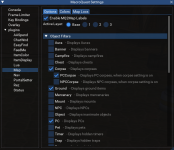
for your eqmap stuff
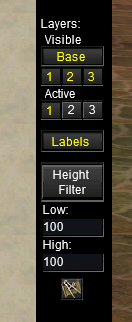
kissassist is not mq2map
this is not a kissassist issue
maps displaying stuff need to check:
- filters (this is all but certainly your problem)
- layers
- height filter
for mq2map filters
/mqsettings -> plugins -> map
and then adjust your filters/layers
for your eqmap stuff
NPC is checked...nothing else that I can see...

is that checked under "Options"
also, you didn't respond about the other stuff i listed.
if you show named you are saying you only want to display named (imo that should be in filter and not options but i didn't make that)Ha! I unchecked Show Named and all the mobs came back...
but that's what is happening
@Sic translation…go click the right shit back onmq2map is not kissassist
kissassist is not mq2map
this is not a kissassist issue
maps displaying stuff need to check:
- filters (this is all but certainly your problem)
- layers
- height filter
for mq2map filters
/mqsettings -> plugins -> map
and then adjust your filters/layers
View attachment 73688
for your eqmap stuff
View attachment 73689

That was my problem too... the show named was checked. I believe thats a global setting so thats why it happened to all the OP accounts.if you show named you are saying you only want to display named (imo that should be in filter and not options but i didn't make that)
but that's what is happening
Sic thanks again for all your help. How about you make an app that can directly message you 24/7 please? I won't abuse it much.

Yes, MQ2map has that abilityI often use Easyfindui and /travelto commands. However, what If I see a mob on the map, maybe in a dungeon i don't know how to navigate. I can click the mob and it will give me a redline, but is there a way to auto travel to it?
Yes, MQ2map has that ability
Thanks Sic, I'm clicking on the mob, but its not giving me an option to run to it. Can you tell me what I'm doing wrong or not doing?
NM, i see you provide a link for the commands. Thank youYes, MQ2map has that ability
Yes, MQ2map has that ability
Ok, even after looking at the link I still don't know how to do it. IF you could give me an idea i would appreciate it.
the default is ctrl+shift+left_click - it issues aOk, even after looking at the link I still don't know how to do it. IF you could give me an idea i would appreciate it.
/nav lockxy x y at the location x y you are clicking"/nav locxy %x %y", // CTRL|SHIFT
the default is ctrl+shift+left_click - it issues a/nav lockxy x yat the location x y you are clicking
"/nav locxy %x %y", // CTRL|SHIFT
Thank you!!
Users who are viewing this thread
Total: 1 (members: 0, guests: 1)
Share: