• You've discovered RedGuides, an EverQuest multi-boxing and scripting community 🧙‍♀️⚙️. We want you to play several EQ characters at once, come join us and say hello! 👋

  • A TLP without truebox has thawed (Very Vanilla ready)
    Frostreaver

Bug - Main Window

Dutch_SK

Member
Joined
Aug 21, 2013
RedCents
1,713¢
Hey guys,

When my puller or tank are not in the main window they are moving around akwardly.

For instance if my tank is in the main window my puller strifes after pulling a mob and dies and when my puller is in the main window my tank has a really hard time to find the right position even when close to a mob.

Is this a hardware problem or does this sound familiar to someone?

I started recently so all downloads and installs are fresh.
 
That worked, awesome man =)

EDIT: Hmm it only worked for a few pulls, now it does the same thing again. Do I need to relog after unloading mq2fps?
 
Yeah, I thought I did that, but I will double check tomorrow... thanks for the assistence so far guys, you rock as always /cheer
 
Did you get this fixed Dutch? Having same problem with 2 melee chars on one pc
 
Nope not fixed :S

Keeping tank in mainwindow and in huntmode is the solution for now hehe.
 
Yeah I am afraid so too. It's weird though, cause I used to box 6 toons and now only 5.

Biggest change is I am using WinEQ instead of ISBoxer and my visuals could be tuned down a bit.
 
Dutch_SK,

WinEQ2 uses it's own frame limiting as well, similar to what mq2FPS does. You may need to make some fine tuned adjustments in that as well.

On your task bar there should be an icon for Wineq2

WinEQ2Icon.png

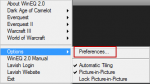
Right click on the icon and a menu will appear:

WinEQ2-1.png

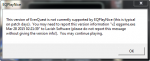
Once in the menu select preferences and window with all the settings and function of wineq2 will be visible. Select EQPlayNice(which I believe they still have not updated since the recent patches, but I could be wrong, close out any sessions, and re-launch software to be sure)"

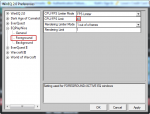
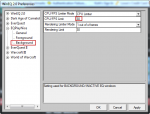
Lastly in the Foreground and Background areas make adjustments to the frame limiting. Default is 40 FPS for Foreground and Background is 30 FPS.

WinEQ2-2.png

WinEQ2-3.png

Maybe making Foreground 30 and Background 20 will help?
 
Thanks for that post man, but I already did that. Even tried with 15FPS in the background :S

Think the only thing left for me is to lower graphics a lot, that might hopefully do the trick =)
 
Yeah if you drop graphic quality and turn off spell effects etc that would probably help.

May I make a recommendation? Create a copy of EQ to another location, run your non-main bots from this copy and drop the graphics in that copy's installation(point your WinEQ2 shortcuts/profiles to this copy location for your non-main bots) , turn off luclin graphics models(unless you use mounts to med) on the copy's install, spell effects, particles, etc. and leave your main install of EQ for your main boxer leaving graphics as normal on that. You will be able to play fairly cleanly on your main without having to impact it, only the bots. I think this will help a great deal without too much impact to your visual enjoyment on your main window.
 
Sounds like you're having the lag-type issues I have been having on toons running kiss. If you pause kiss do you see any lag?
 
Yeah I already done that for all my alts, only my main is running on high visuals so will have to lower that for sure.

/em crossing fingers
 
On an additional note as well Dutch_SK it appears that WINEQ2 still has not updated to function with the most recent set of patches. Perhaps once those patches come into play things will improve.

EQPlayNice.png
 
Sounds like you're having the lag-type issues I have been having on toons running kiss. If you pause kiss do you see any lag?

I only see lag when my tank or puller is not in the main window, if I pause it's all good.
 
Bug - Main Window

Users who are viewing this thread

Back
Top
Cart