• You've discovered RedGuides, an EverQuest multi-boxing and scripting community 🧙‍♀️⚙️. We want you to play several EQ characters at once, come join us and say hello! 👋

  • A TLP without truebox has thawed (Very Vanilla ready)
    Frostreaver

Question - Lua for dum-dumies... getting started

DadBod

Active member
Joined
Nov 28, 2013
RedCents
1,238¢
So, I installed MQNext, and saw people being excited about Lua, so I got the terrible idea that I wanted to try it out for myself.

Last time I was programming, it was early 2000s, I studied it at uni (computer science), and worked a couple of years as a dev (php, asp, Java, windows), before turning to the dark side (powerpoint & excel).

So I am quite useles when it comes to setting up a stack with IDE, compiler, etc. Git was not around back then where I worked :-).

I was thinking that I would like to make a simple script, copy somebody else's code for a simple hello world or similar, and then build up slowly from there.

Having to configure a dev stack, component for component, will break my feeble spirit, so a sub-optimal but ultra simple start suggestion would be much apreciated.

I have Note++ (yay), is there something I can do to create a Lua script, and try to make MQNext run it as is?

Help would be much apreciated, but also, let me know if you think I need to revise my expectations and not expect to be able to anything without a full dev stack.
 
If you're setting stuff up from scratch you might try VS Code instead of notepad++. Note that VS Code is not Visual Studio.
There's some example Lua scripts included with the Next download in Lua/examples that you could run as is, or tweak to try out different things.
There's also the /lua parse ... command to try out Lua directly in the console.
Otherwise, there's a handful of Lua scripts you can check out already on RG as well.

Also, the MQ2 discord has a Lua channel with useful info as well.

If you do get VS Code, @Coldblooded also wrote some nice stuff to provide autocompletion of MQ TLOs. I've also got this guide that covers some macro vs Lua comparisons if you're more familiar with writing macros already: https://www.redguides.com/community/resources/macroscript-to-lua.2197/
 
Thank you very much!
  • I downloaded VS Code downloaded and launched it with no issues
  • I imported the example files
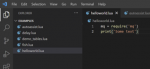
  • I created a hello world .Lua file and pasted two lines of code:
Picture4.png
-->

My next question: How do I run it from MQ2 in Everquest?

I tried:

There's also the /lua parse ... command to try out lua directly in the console.

Wrt "the console", I assumed it was the MQ console in-game?

Picture2.png

This did not work for me :-). Is it a different console?

I gave your guide a quick look, i saw all the good stuff regarding syntax, loops, including libraries, etc etc, I will be trying out everything, as soon as I have my helloworld.Lua running from EQ/MQ2, however, I did not see or understand how to make the /Lua parse command work in-game, or how to run a script in-game :-).

Thanks in advance!
 
Thank you very much!
  • I downloaded VS Code downloaded and launched it with no issues
  • I imported the example files
  • I created a hello world .lua file and pasted two lines of code:
View attachment 33910
-->

My next question: How do I run it from MQ2 in Everquest?

I tried:


Wrt "the console", I assumed it was the MQ console in-game?

View attachment 33909

This did not work for me :-). Is it a different console?

I gave your guide a quick look, i saw all the good stuff regarding syntax, loops, including libraries, etc etc, I will be trying out everything, as soon as I have my helloworld.lua running from EQ/MQ2, however, I did not see or understand how to make the /lua parse command work in-game, or how to run a script in-game :-).

Thanks in advance!
/Lua run name


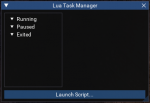
you can do a /Lua gui and see running, paused, and exited scripts, as well as launch

1634060192166.png
 
/lua run name


you can do a /lua gui and see running, paused, and exited scripts, as well as launch

View attachment 33911

Still no effect, I tried both
Code:
/lua gui
/lua run helloworld.lua

This gave me the below outcome (last two lines):

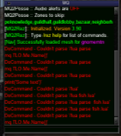
Lua-05.png

I got the Couldn't parse error message.

1) Am I doing it in the right window?
2) Do I need to activate something special, like Lua?
3) I am pretty sure I am launching MQNext:

Lua-06.png
Lua-07.png

I feel like I am almost there :-)
 
Still no effect, I tried both
Code:
/lua gui
/lua run helloworld.lua

This gave me the below outcome (last two lines):

View attachment 33921

I got the Couldn't parse error message.

1) Am I doing it in the right window?
2) Do I need to activate something special, like Lua?
3) I am pretty sure I am launching MQNext:

View attachment 33922
View attachment 33923

I feel like I am almost there :-)
you need to load mq2lua to use Lua stuff

/plugin mq2lua
 
Thanks, @aquietone and @Sic :-)

For posteriority:

Lua-noob-guide for having a Hello World experience in Lua
  1. Upgrade to MQNext (tutorials on this forum)
  2. Run EQ, MQNext
  3. In the MQ-window (in Everquest, with MQNext running), type
    /plugin mq2lua
    and pres enter. This will start the Lua-engine
  4. In the MQ-window, type
    /lua parse print('this appears to be working')
    --> this will lead to a text being printed in the MQ window saying "this appears to be working". Now your Lua-engine is running.
  5. Install VS Code (free DL from Microsoft)
  6. go to the folder C:\Users\<replace with you username>\AppData\Local\VeryVanilla\MQNext\Release\lua (. It will have a subfolder called examples), and this is the folder you will be needing to place your .Lua script files in (in lua not in examples)
  7. To this location, copy the file called fish.lua . It resides in the subfolder called examples. (You will have to write your own user name in the path, or more probably, just navigate there in the file explorer by double clicking the right folders).
  8. In the MQ window, type
    /lua run fish.lua
    This will run the script, it will terminate because you are not holding a fishing pole or something
  9. Now make a new file called hw.lua and double-click it; it should open in your VS Code
  10. In that file, using the VC code as editor, write print('Hello World') on the first line of the file, and save the file
  11. in the MQ window, type
    /lua run hw.lua
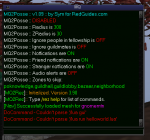
    This should run your script, and output Hello World to your screen. Also, there will be a message saying that the script ended, its process ID, and a status indicator. I have no idea how this works yet, but for now, it doesn't matter, you have just run your first Hello World in EQ in Lua :-)


Lua-08.png
 
Last edited:
Thanks, @aquietone and @Sic :-)

For posteriority:

Lua-noob-guide for having a Hello World experience in Lua
  1. Upgrade to MQNext (tutorials on this forum)
  2. Run EQ, MQNext
  3. In the MQ-window (in Everquest, with MQNext running), type
    /plugin mq2lua
    and pres enter. This will start the Lua-engine
  4. In the MQ-window, type
    /lua parse print('this appears to be working')
    --> this will lead to a text being printed in the MQ window saying "this appears to be working". Now your Lua-engine is running.
  5. Install VS Code (free DL from Microsoft)
  6. go to the folder C:\Users\<replace with you username>\AppData\Local\VeryVanilla\MQNext\Release\lua . It will have a subfolder called examples, and this is the folder you will be needing to place your .lua script files in
  7. To this location, copy the file called fish.lua . It resides in the subfolder called examples. (You will have to write your own user name in the path, or more probably, just navigate there in the file explorer by double clicking the right folders).
  8. In the MQ window, type
    /lua run fish.lua
    This will run the script, it will terminate because you are not holding a fishing pole or something
  9. Now make a new file called hw.lua and double-click it; it should open in your VS Code
  10. In that file, using the VC code as editor, write print('Hello World') on the first line of the file, and save the file
  11. in the MQ window, type
    /lua run hw.lua
    This should run your script, and output Hello World to your screen. Also, there will be a message saying that the script ended, its process ID, and a status indicator. I have no idea how this works yet, but for now, it doesn't matter, you have just run your first Hello World in EQ in Lua :-)


View attachment 33924
I ran out of RedCent, but I'll get you later, I really like your guide, ty.
 
Question - Lua for dum-dumies... getting started

Users who are viewing this thread

Back
Top
Cart