• You've discovered RedGuides, an EverQuest multi-boxing and scripting community 🧙‍♀️⚙️. We want you to play several EQ characters at once, come join us and say hello! 👋

  • A TLP without truebox has thawed (Very Vanilla ready)
    Frostreaver
Resource icon

Release lootnscoot (for emu) (1 Viewer) 05/16/2026

No permission to download
Joined
Sep 13, 2019
RedCents
15,633¢
aquietone submitted a new resource:

lootnscoot (for emu) - like ninjadvloot, but not

Loot N Scoot is a port of NinjAdvLoot.inc for looting on EMU servers. It loots items directly from corpses, as EMU doesn't have advanced looting like live.
The script can also be run in a standalone mode, where it will loot nearby corpses while not in combat, or you can embed it into some other automation script similar to how ninjadvloot.inc is used.

Start the script alongside other automation: /lua run lootnscoot standalone

Set an item to be looted and sold to vendors: /lootutils sell...

Read more about this resource...
 
One issues. Not sure if I am setting a value wrong.
1. It is looting during combat.
I have set combat looting to false and Spam loot Info to false. I even increase the range of mobs too close with no luck.
INI:
    AddNewSales = true,
    LootForage = true,
    DoLoot = true,
    CorpseRadius = 100,
    MobsTooClose = 60,
    ReportLoot = false,
    LootChannel = "",
    SpamLootInfo = false,
    LootForageSpam = false,
    GlobalLootOn = true,
    CombatLooting = false,
    GMLSelect = true,
    ExcludeBag1 = "Santug Claugg's Sack",
    QuestKeep = 10,
    StackPlatValue = 0,
    NoDropDefaults = "Ignore",
    LootLagDelay = 0,
    SaveBagSlots = 3,
    MinSellPrice = -1,
    StackableOnly = false,
    CorpseRotTime = "440s",
    Terminate = true,
 

Attachments

  • 1677182276189.png
    1677182276189.png
    51.6 KB · Views: 5
Last edited:
Im wanting to use lootnscoot for project Lazarus emu server, but I have no idea what I should do to get it working. I watched it, and its in my Lua section on the launcher, but thats about it LOL. Im totally ungah bungah with computer stuff. Any help using step by step directions would be greatly appreciated.
 
Im wanting to use lootnscoot for project Lazarus emu server, but I have no idea what I should do to get it working. I watched it, and its in my lua section on the launcher, but thats about it LOL. Im totally ungah bungah with computer stuff. Any help using step by step directions would be greatly appreciated.
Each resource on RG has an Overview / Discussion Thread and either a link to their wiki or tabs with FAQ, Commands, Etc.
Please make sure to post in the respective discussion thread, and check the FAQ/Commands/Wiki for information before posting.

I merged your thread into the resource discussion for ya

The instructions tab says:

Install it from the launcher.

Option 1: Run /Lua run lootnscoot standalone
Option 2: Embed it to your own automation with local lootutils = require('lootnscoot') and loot mobs by calling lootutils.lootMobs()
 
Option 1: Run /lua run lootnscoot standalone
Option 2: Embed it to your own automation with local lootutils = require('lootnscoot') and loot mobs by calling lootutils.lootMobs()

I saw that. Tried /Lua run lootnscoot standalone.... nothing. Im unclear as to what I would embed it into. A Kissassist ini?
 
Option 1: Run /lua run lootnscoot standalone
Option 2: Embed it to your own automation with local lootutils = require('lootnscoot') and loot mobs by calling lootutils.lootMobs()

I saw that. Tried /lua run lootnscoot standalone.... nothing. Im unclear as to what I would embed it into. A Kissassist ini?
The embedding option is intended for if someone were to write their own assist automation script in Lua, they could include this in with it to handle the looting.
The standalone option starts the script separately alongside whatever else you might be running, and loots when it thinks it is safe to. Note that it might interfere with whatever you run it alongside, if that isn't expecting some other script to be running around looting stuff.
I didn't package anything with this script and iirc it has a dependency on Write.lua so it won't work unless that's already in Lua/lib.
 
Ah thats probably my problem, Thank you. So to be clear, I should have both lootnscoot and write.Lua in the Lua folder? Then I can run it as standalone correct?
 
Ah thats probably my problem, Thank you. So to be clear, I should have both lootnscoot and write.lua in the lua folder? Then I can run it as standalone correct?
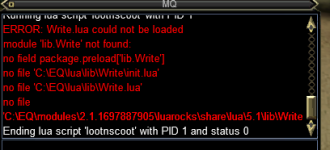
Did you have any luck with getting this to work on Lazarus? I'm also trying to get it to work with no luck. I put both files in the Lua folder but get an error(attached). I tried multiple things but no luck.
 

Attachments

  • lootnscoot error.png
    lootnscoot error.png
    17.9 KB · Views: 1
Nope I did not. Getting the same error. I even took ninja loot out of the kiss macro to see if they were conflicting with each other.
 
After playing with this for a few hours I finally got it to work! It did not install to the correct location for me. I had to create a lib folder under my main Lua folder in my eq directory(C:\EQ\Lua\lib). Then I put both files inside the lib folder and it worked. The looting is fast and great, saves so much time. I hope this helps you ! :)
 
I can't seem to get this to work. I really want to use it. I made a file named it lib in the Lua file then I placed the lootinscoot.Lua and write.Lua in it. Went into /Lua gui to run it and nothing happened. Anyone know what I am doing wrong?
 
I can't seem to get this to work. I really want to use it. I made a file named it lib in the lua file then I placed the lootinscoot.lua and write.lua in it. Went into /lua gui to run it and nothing happened. Anyone know what I am doing wrong?
INI:
lua/
  lib/
    Write.lua
  lootnscoot.lua

[URL='https://www.redguides.com/docs/projects/macroquest/lua/']/lua[/URL] run lootnscoot standalone

try starting it this way instead of Lua gui
 
It gives me warning: can not find lootnscoot in the file system

If I try with /Lua gui it gives me
Running Lua script lib/lootnscoot with PID 1
Ending Lua script lib/lootnscoot with PID 1 and status 0
 
Last edited:
to get the above lootnscoot for emu to work. you need to:
  1. Download the Lua file.
  2. Make a folder in your Lua folder named lootnscoot
  3. Put the downloaded lootnscoot.Lua into the folder you just made.
  4. rename the file from lootnscoot.Lua to init.Lua
  5. Make another folder in the lootnscoot folder named lib
  6. grab a copy of Write.Lua from https://gitlab.com/Knightly1/knightlinc/-/blob/master/Write.lua
  7. download Write.Lua and put it inside the newly created Lua\lootnscoot\lib folder
  8. in game run /lua run lootnscoot standalone
these steps put it into standard format for Lua scripts. the foldername is what you call with /Lua run.
I use this on Lazarus. just make sure you have LootOn set to 0 in your INI's for automation like KA
 
It gives me warning: can not find lootnscoot in the file system

If I try with /lua gui it gives me
Running lua script lib/lootnscoot with PID 1
Ending lua script lib/lootnscoot with PID 1 and status 0
it sounds like you probably just had the files in the wrong place, anyways updated how its packaged.
 
quick hack to add NoDrop looting.
  • Checks if lore first.
  • if LootNoDrop is true and its not a lore item we already have we try and loot it.
to enable add LootNoDrop=true to your loot.ini settings.

@jimbo30217 tested this on Lazarus for me since I am still to low to do HC content.
 

Attachments

quick hack to add NoDrop looting.
  • Checks if lore first.
  • if LootNoDrop is true and its not a lore item we already have we try and loot it.
to enable add LootNoDrop=true to your loot.ini settings.

@jimbo30217 tested this on Lazarus for me since I am still to low to do HC content.
feel free to raise a PR https://github.com/aquietone/lootnscoot/compare

not sure if i have this resource hooked up to the github repo though.
 
is it possible to set this up so that certain PCs loot certain things so I can run it on multiple toons? IE Toon1 loots just gems, Toon2 loots just tradeskill stuffs
 
New Features:

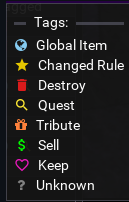
  • Tribute Flags
    • You can mark an item for tribute
    • Calling the tributestuff routine with the tribute master will:
      • run you to them if out of range
      • open tribute window
      • open bags
      • tribute any items flagged as Tribute in the loot.ini
    • AddNewTribute setting will auto tag items for Tribute when you tribute something that isn't already flagged.
    • MinTributeValue setting, if the item has a higher tribute than this and a lower sell value than MinSellPrice mark as Tribute
    • TributeKeep either keep items marked as tribute or ignore them.
  • GLOBALITEM flags.
    • You can now list items in the loot.ini under the [GlobalItems] setion.
    • items are listed the same as anywhere else. itemname=action
    • global rules trump any other rule set below. With the excption being Quest items after we have looted the Qty we want.
  • AlwaysEval setting
    • turning this on will always re-evaluate items when looting unless they are marked quest.
      • this is handy if you change your keep parameters based on sell price or tribute value.
  • AlwaysDestroy Setting
    • will always destroy any item marked, or evaluated as Ignore.
    • requires DoDestroy to be enabled.
  • Quest Items
    • Items can be tagged as Quest with optional max Qty.
      • you can also have the item on cursor and do /lootutils quest #
      • if you don't supply a # we just store the value as Quest. otherwise its stored as Quest|#
      • Quest Items with no qty will use the default QuestKeep value from the settings.
      • LootQuest enables looting quest items otherwise we Ignore them.
  • BankTradeskills will mark any tradeskill items as Bank and loot them to bank later with /lootutils bank
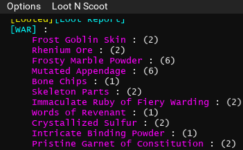
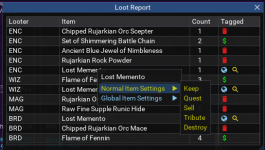
  • Integrated Looted console with LootNScoot,
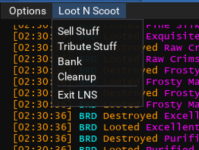
    • Added a loot n scoot menu for easy access to some /lootutils commads
    • Adds reporting of all looted items in a table by who looted them and how many, with item links.
    • You can toggle showing either player names or class names.
  • BAGS CLEANUP
    • Added function to cleanup bags of any items marked Destroy
  • Combat Looting flag will now loot if enabled while you are in combat or mobs are closer than your set range.

COMMANDS

Run as a standalone script
  • /lua run lootnscoot standalone
    • Will keep the script running, checking for corpses once per second.
  • /lua run lootnscoot once
    • Will run one iteration of loot.lootMobs().
  • /lua run lootnscoot sell
    • Will run one iteration of loot.sellStuff().
  • /lua run lootnscoot tribute
    • Will run one iteration of loot.tributeStuff().
  • /lua run lootnscoot cleanup
    • Will run one iteration of loot.cleanupBags().
The script will setup a bind for "/lootutils":
/lootutils <action> "${Cursor.Name}"
Set the loot rule for an item. "action" may be one of:
- Keep
- Bank
- Sell
- Tribute
- Ignore
- Destroy
- Quest|#
  • /lootutils reload
    • Reload the contents of Loot.ini, and Settings.ini
  • /lootutils bank
    • Put all items from inventory marked as Bank into the bank
  • /lootutils tsbank
    • Mark all tradeskill items in inventory as Bank
If running in standalone mode, the bind also supports:
  • /lootutils sellstuff
    • Runs lootutils.sellStuff() one time
  • /lootutils tributestuff
    • Runs lootutils.tributeStuff() one time
  • /lootutils cleanup
    • Runs lootutils.cleanupBags() one time
  • /lootutils config
    • Prints out your Current Settings
  • /lootutils hidenames
    • Toggles between Names and ClassNames on the Looted reports
  • /lootutils gui
    • Toggles the display of the Looted console

I have attached a commented default_settings ini.
that explains each of the settings that have a function currently.
I go over some of this stuff as well in this video.


1710577855230.png1710577893042.png
 

Attachments

Last edited:
ooh sweet.

Item Buying added:

save items you wish to buy per character in their settings ini section [BuyItems]
item name=qty

Buy Commands:
/lootutils buy # will add item on cursor to list of buy items and set its qty.
/lootutils buy "item name" qty will set item name and qty in buy list when no item on cursor.
/lootutils restock will attempt to buy any items in the list for that character, refilling anything up to the qty specified.

Kept this in the settings ini and not loot.ini so you can set it per character. my warrior doesn't need tiny daggers or malachite =)
 
Downloaded the new version and ran it and I am getting error that it cannot find module "themes" and then errors surrounding that.
 
oops when

if you also have looted installed it uses that instead of the included loot_hist file. when i added the new features from looted in i updated loot_hist.Lua from looted i forgot to remove the theme stuff.

you can just toss this into your lootnscoot folder
 

Attachments

Does anyone have an issue with this just randomly stopping? Like 2 or 3 times my looter has decided he just doesn't wanna loot anymore, bags are 3/4 empty, no messages, just nothing. Not sure if this is a Looted issue or lootnscoot?
 
updated and not working at all now
Seems to be working ok here, just did
Code:
/lua run lootnscoot standalone
and then
Code:
/lootutils gui

and ran around killing some mobs and watched it loot the corpses and populate the ui with what was looted.

Can you be more descriptive on what isn't working, what you're expecting, what was working before, anything to go off of?

There are several settings that could impact things, like
CorpseRadius, - defaults to 100 for radius to look for corpses
MobsTooClose - defaults to 40 for radius to check for nearby mobs before looting
SaveBagSlots - defaults to 3 so won't loot if you're down to 3 slots
CombatLooting - defaults to false so you don't loot while fighting
 
Last edited:
Release lootnscoot (for emu)

Users who are viewing this thread

  • Back
    Top
    Cart