• You've discovered RedGuides, an EverQuest multi-boxing and scripting community 🧙‍♀️⚙️. We want you to play several EQ characters at once, come join us and say hello! 👋

  • A TLP without truebox has thawed (Very Vanilla ready)
    Frostreaver

Question - Looting nodrop items on the EMU, and other loot questions.

jaspen

Member
Joined
Apr 6, 2011
RedCents
91¢
I have searched and searched without an answer to this. I play on a private server. Right now I am keeping it simple. I have 1 real character and running 5 bots. To clarify, when I say bot I mean the ones the client creates using the ^botcreate command, sort of like mercs. This is an EMU only feature. Because of this, I want to loot all nodrop items with my main and later hand them out to my bots since you can hand them nodrop items. In the loot.ini I have NoDropDefault=Keep and that doesn't appear to be working. What am I missing?

The other issue I am having is, according to the ninadvloot page, which appears to be outdated, you are supposed to be able to have an item on your cursor and type /lootdestroy as an example and have it flag that item to destroy. It tells me that command doesn't exist. Anyone know if there is a new command for handling this?

EDIT: To clarify, it can loot nodrop items that are already setup as keep. The issue is that when it sees a new nodrop item, it automatically adds it to loot.ini as ignore. I thought NoDropDefault=Keep was supposed to make it add them as keep?

EDIT: Check a later post of mine to see a workaround for the automatic assignment of keep to newly discovered nodrop items for those that may be helpful. I don't claim this to be the best solution, just the only one I was able to come up with.
 
Last edited:
the commands for the ninjadvloot system, requires that a macro is active that uses the system else the commands are not recognized

which means you probably want to run the kissassist.mac on your main or the loot.mac
 
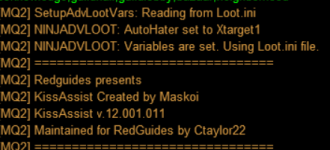
I run the kissassist on the main, he does loot, but does not loot nodrop and while this is running the commands I mentioned do not work. It uses the ninjadvloot.inc.

EDIT: I attached a picture of part of text when using /mac kissassist .
 

Attachments

  • Annotation 2022-04-15 011401.png
    Annotation 2022-04-15 011401.png
    41.3 KB · Views: 8
Last edited:
I run the kissassist on the main, he does loot, but does not loot nodrop and while this is running the commands I mentioned do not work. It uses the ninjadvloot.inc.

EDIT: I attached a picture of part of text when using /mac kissassist .
Do you have confirmations for No Drop items turned off? If not, go to Options -> Confirmations and select Never from the No Drop Item: dropdown list.

Its possible that ninjadvloot is getting tripped up with the confirmation window, and isn't actually able to loot the items.
 
Do you have confirmations for No Drop items turned off? If not, go to Options -> Confirmations and select Never from the No Drop Item: dropdown list.

Its possible that ninjadvloot is getting tripped up with the confirmation window, and isn't actually able to loot the items.
I already have it set to Never. What happens is ninjadvloot automatically adds a new nodrop item to loot.ini and marks it as ignore as default. It seems to be ignoring the NoDropDefault=Keep settings in loot.ini. If I manually set a nodrop item to keep, it will loot it so the act of looting isn't the issue, just the default behavior of marking it ignore is. I assume NoDropDefault=Keep is supposed to make it flag unknown nodrop items as keep and then loot them?
 
Unfortunately I'm not too familiar with looting on EMU - I know it can be pretty buggy, but thats about it. Yes, NoDropDefault should work that way. My only other suggestion would be to make sure the Loot.ini file you are editing is the one actually being used
 
Unfortunately I'm not too familiar with looting on EMU - I know it can be pretty buggy, but thats about it. Yes, NoDropDefault should work that way. My only other suggestion would be to make sure the Loot.ini file you are editing is the one actually being used
The loot.ini is definitely being used.

I lack any programming skills but I took a loot at the ninjadvloot.inc and noticed the following section which appears to assign Quest/Ignore/Keep based on what you enter after NoDropDefault=. You will see I changed all instances to say keep and that didn't work. It still defaults to assigning Ignore to all newly discovered notrade items. This is obviously assuming I read the below correctly. Once again, I am not a programmer.
INI:
| add nodrop items to ini file
            /if (${AdvLoot.SList[${i}].NoDrop} && !${Select[${IniEntry},Ignore,Keep,Destroy,Sell,Quest]}) {
                /if (${NoDropDefault.Arg[1,|].Equal[Quest]}) {
                    /ini "${NinjaIniFile}" "${ITPName.Left[1]}" "${ITPName}" Quest|1
                    /varset IniEntry Quest
                    /echo NINJADVLOOT: Adding NoDrop item ${ITPName}=Keep to ${NinjaIniFile} file.
                } else /if (${NoDropDefault.Arg[1,|].Equal[Keep]}) {
                    /ini "${NinjaIniFile}" "${ITPName.Left[1]}" "${ITPName}" Keep
                    /varset IniEntry Keep
                    /echo NINJADVLOOT: Adding NoDrop item ${ITPName}=Keep to ${NinjaIniFile} file.
                } else {
                    /ini "${NinjaIniFile}" "${ITPName.Left[1]}" "${ITPName}" Ignore
                    /varset IniEntry Ignore
                    /echo NINJADVLOOT: Adding NoDrop item ${ITPName}=Keep to ${NinjaIniFile} file.
                }
 
Last edited by a moderator:
The loot.ini is definitely being used.

I lack any programming skills but I took a loot at the ninjadvloot.inc and noticed the following section which appears to assign Quest/Ignore/Keep based on what you enter after NoDropDefault=. You will see I changed all instances to say keep and that didn't work. It still defaults to assigning Ignore to all newly discovered notrade items. This is obviously assuming I read the below correctly. Once again, I am not a programmer.
INI:
| add nodrop items to ini file
            /if (${AdvLoot.SList[${i}].NoDrop} && !${Select[${IniEntry},Ignore,Keep,Destroy,Sell,Quest]}) {
                /if (${NoDropDefault.Arg[1,|].Equal[Quest]}) {
                    /ini "${NinjaIniFile}" "${ITPName.Left[1]}" "${ITPName}" Quest|1
                    /varset IniEntry Quest
                    /echo NINJADVLOOT: Adding NoDrop item ${ITPName}=Keep to ${NinjaIniFile} file.
                } else /if (${NoDropDefault.Arg[1,|].Equal[Keep]}) {
                    /ini "${NinjaIniFile}" "${ITPName.Left[1]}" "${ITPName}" Keep
                    /varset IniEntry Keep
                    /echo NINJADVLOOT: Adding NoDrop item ${ITPName}=Keep to ${NinjaIniFile} file.
                } else {
                    /ini "${NinjaIniFile}" "${ITPName.Left[1]}" "${ITPName}" Ignore
                    /varset IniEntry Ignore
                    /echo NINJADVLOOT: Adding NoDrop item ${ITPName}=Keep to ${NinjaIniFile} file.
                }
The entry you want to change is the "/varset IniEntry" part. For what you are trying to do, all three instances should say "/varset IniEntry Keep". Hopefully that works. You could also try just deleting the Ignore and Quest Parts (I'm also not a programmer, but I mess around with .mac files quite often):

| add nodrop items to ini file
/if (${AdvLoot.SList[${i}].NoDrop} && !${Select[${IniEntry},Ignore,Keep,Destroy,Sell,Quest]}) {
/ini "${NinjaIniFile}" "${ITPName.Left[1]}" "${ITPName}" Keep
/varset IniEntry Keep
/echo NINJADVLOOT: Adding NoDrop item ${ITPName}=Keep to ${NinjaIniFile} file.
}
 
The entry you want to change is the "/varset IniEntry" part. For what you are trying to do, all three instances should say "/varset IniEntry Keep". Hopefully that works. You could also try just deleting the Ignore and Quest Parts (I'm also not a programmer, but I mess around with .mac files quite often):

| add nodrop items to ini file
/if (${AdvLoot.SList[${i}].NoDrop} && !${Select[${IniEntry},Ignore,Keep,Destroy,Sell,Quest]}) {
/ini "${NinjaIniFile}" "${ITPName.Left[1]}" "${ITPName}" Keep
/varset IniEntry Keep
/echo NINJADVLOOT: Adding NoDrop item ${ITPName}=Keep to ${NinjaIniFile} file.
}
Ah, yes, I was modifying an echo line. I appreciate the help, but it is still setting first find nodrops to ignore. I really thought the above code is what was doing it as the comment in the file definitely suggests so. There must be another section of the code causing it, or it is simply bugged. If anyone else has any other ideas on this or the /lootdestroy and other commands not working, feel free to chime in. Until then, everyone enjoy your day!
 
For those the limited that may find this useful, here is how I fixed one of the problems. The following line I will past below, line 263 in the ninjadvloot.inc, I changed to keep. It now marks newly discovered nodrops as keep. No idea what the code I pasted before is supposed to do then. For those similar to me, this should prove useful so you don't miss anything good while you sleep and you do not have to add items beforehand! Now to solve why the slash commands do not work. So far it appears the code on what they are supposed to do isn't there, at least to my ignorant eyes.


Change line 263
/if (${Corpse.Item[${i}].NoDrop}) /ini "${NinjaIniFile}" "${FirstLetter}" "${Corpse.Item[${i}]}" Ignore

To
/if (${Corpse.Item[${i}].NoDrop}) /ini "${NinjaIniFile}" "${FirstLetter}" "${Corpse.Item[${i}]}" Keep
 
Question - Looting nodrop items on the EMU, and other loot questions.

Users who are viewing this thread

Back
Top
Cart