


I am currently working on rewriting lootnscoot and the loot module to be more robust and allow for more advanced looting options in line with live.
Current Status:
MEDIA
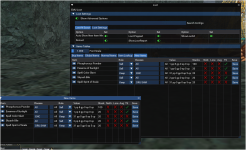
Current Status:
- Items Table DB Changes
- the items DB will auto add / update items as you and your party loot them.
- the items table has been changed to include more details about the items
- items are not key'd by the items ID
- using item ID we can now deal with items where there are more than one with the same name but different stats/flags
- the DB will also store link information so you can access the loot information from the table with a right click.
- ADV Loot Rules DB
- new rules DB to account for using item ID's sadly this means the old rules table is invalid because we never had the ID data.
- Config and DB locations
- the Config files now will reside in
mqfolder\config\LootNScoot\ServerName\- this should help keep things organized.
- Changed then config file to a
.luafile so its easier to load and save- the DB files reside in
mqfolder\resources\LootNScoot\ServerName\ - again this will keep things organized, especially if you play on more than one emu server. you won't have to worry about overwriting data
- the DB files reside in
- the Config files now will reside in
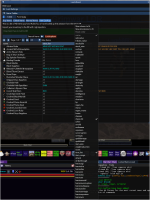
- New loot pop up / tab
- Displays information so you can decide on a rule for items looted that we do not have a rule for already in the DB.
- item name, sell price, stack size, nodrop, lore, augment, tradeskill
- the first time we loot we will still enter the decision made based on our settings, this will show you those settings and allow you to change them.
- if enabled you can have a window pop up with this information and all of the new items you have yet to decide on for the session.
- It will also show up as a new items tab on the loot window.
- The button on the left with the Eye on it will open the inspect window so you can see the item stats.
- Displays information so you can decide on a rule for items looted that we do not have a rule for already in the DB.
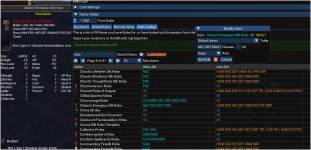
- Item Lookup tab
- you can look up any item from your DB
- this tab will only show items you have rules for already or items you have looked up.
- using a fully exported DB from eqemulator there are over 117k items before custom items depending on the server.
- Right clicking an item will open the inspect window
- Left clicking an item will open the ModifyItem Rule Window and allow you to add a rule for this item
- Right clicking on the table headers you can toggle fields on or off. as well as drag them to change the order.
- Drag and Drop items to add them to the table if you have something that is missing.
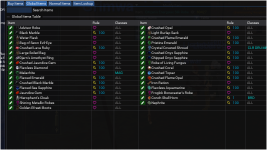
- Rules Tables
- The rules tables are searchable by item name or rule type. so you can filter to only see Quest items if you wanted or Bank etc.
- Right clicking on an item will open the inspect window in game
- Rules Table stores the links as well incase you deleted your items DB or copied the rules DB from another server
- Edit Item Button
- The button on the left will be green with a pencil if the item also exists in your main items DB
- This will be a red button with an X if the item is missing from the Items DB but you have a rule for it.
- clicking on the button in either state will open the ModifyItem Rule window
- Import items
- you can import the items from your characters inventory\bank with
/rgl importinv- Bank data may or may not be fresh, it should refresh when you zone or if you are at the bank.
- this is useful when you are starting with an empty DB
- also useful when you migrate a db to a new server, as some items may not match the db's data and we want to update the db to match without waiting to loot.
- you can import the items from your characters inventory\bank with
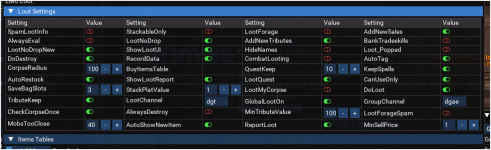
- Loot Settings
- loot corpse once. will keep track of the corpses we have looted and not try to loot the same one again.
- changing a rule if it was a new item will unlock the corpse incase the item was originally flagged ignore and we changed it.
- Can Use Only flag
- this will only try to loot items you CanUse \ wear and are flagged KEEP either already as a rule or because of the evaluations
- if the item is flagged sell, bank, quest etc it will just use that rule and not care about can use.
- this is meant to really be helpful if you have
lootnodropandlootnodropnewenabled.
- KeepSpells
- as the name suggests will keep all spell drops regardless of the rules and sell values.
- loot corpse once. will keep track of the corpses we have looted and not try to loot the same one again.
MEDIA

