
Install the app
How to install the app on iOS
Follow along with the video below to see how to install our site as a web app on your home screen.
Note: This feature may not be available in some browsers.
-
 You've discovered RedGuides, an EverQuest multi-boxing and scripting community 🧙♀️⚙️. We want you to play several EQ characters at once, come join us and say hello! 👋
You are using an out of date browser. It may not display this or other websites correctly.
You should upgrade or use an alternative browser.
You should upgrade or use an alternative browser.
Problem - Loading issue
- Thread starter rbf3
- Start date
Solution

Adjust your autologin options so your delay between toons is greater.When i load up 4 or more accounts at the same time, sometimes one or more will load with all in game options on. I log that account out and back in and it will be back to normal. Its only a big deal when im loading my raid set of 42 toons.
RBFIII
What is happening is something like your eqclient is locked due to another instance using it, so eq loads default values

Adjust your autologin options so your delay between toons is greater.When i load up 4 or more accounts at the same time, sometimes one or more will load with all in game options on. I log that account out and back in and it will be back to normal. Its only a big deal when im loading my raid set of 42 toons.
RBFIII
What is happening is something like your eqclient is locked due to another instance using it, so eq loads default values
I will do that. Thank youAdjust your autologin options so your delay between toons is greater.
What is happening is something like your eqclient is locked due to another instance using it, so eq loads default values
Could you tell me how to do that please ? If its not to much trouble .Adjust your autologin options so your delay between toons is greater.
What is happening is something like your eqclient is locked due to another instance using it, so eq loads default values

- Joined
- Dec 1, 2006
- RedCents
- 1,889¢
If you right click the mq icon in your tooltray, then select Open Config, it will open a screen to the profiiles you have setup. On the left side, select Settings, then you can change the Client Launch Delay to make it longer between launching each session. I think 30 is the default, and I have just left it set that way.
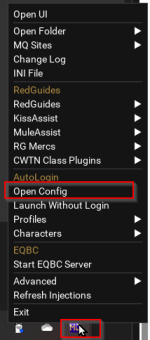
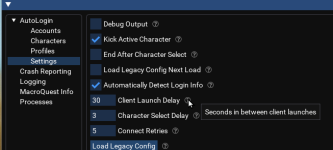
Thank you very muchIf you right click the mq icon in your tooltray, then select Open Config, it will open a screen to the profiiles you have setup. On the left side, select Settings, then you can change the Client Launch Delay to make it longer between launching each session. I think 30 is the default, and I have just left it set that way.
View attachment 70255
View attachment 70254

30 seems excessive, I would start at about 10 and dial a little up or down as needed to find the balance between speed and no client load errors.
Ofc I don't stay logged in and I don't immediately go poop after I start my toons so ofc one's time is one's own!
Ofc I don't stay logged in and I don't immediately go poop after I start my toons so ofc one's time is one's own!
Users who are viewing this thread
Total: 1 (members: 0, guests: 1)
Share: