schmoodawg33
Member
Aye was a typo... Nothing seems to be working. I watched tutorial vids several times... tried diff toons on diff servers all get same message


Not a surprise, the issue is one of the programs you're running isn't updated.Aye was a typo... Nothing seems to be working. I watched tutorial vids several times... tried diff toons on diff servers all get same message
what was it?I got it sorted.. thanks though!
Just the Mq2 chat window? Or are you saying you don't think mq2 is loading? (i think you're saying mq2 as a whole)Game crashed today with blue screen, restarted fine, able to log into EQ and play fine,but MQ2 window not present and does not appear to be loaded.
Restarted, repaired red guide installation, rebooted, completely uninstalled and reinstalled.
Any ideas on what could be the cause/fix?
Nothing in the event logs
Red guide launch folder and EQ folder in AV exclusion list.
HKEY_CURRENT_USER\Software\Microsoft\WindowsNT\CurrentVersion\AppCompatFlags\Layers
and
HKEY_LOCAL_MACHINE\Software\Microsoft\WindowsNT\CurrentVersion\AppCompatFlags\Layers
[/code\your sys tray date is always going to be the eq date are you sure you don't mean September? as the eq date is September 13th for the last eq patch.Hey guys. Been interesting things happening since the last patch on my end. I patch eq with the launchpad and dont bypass it. i update mq with the launcher and launch from there. it takes a few tries to not get it to keep reverting back to the august patch when i hover over the mq icon in my system tray. if i try to load eq, it just says date and time are not in sync. fine. i can deal with reinstalling several times to get it to work, np.
but now, my magician keeps crashing. i dont use next or anything fancy, just mq2mage and mq. i cant get a .dmp file because even after all the crashes in the last month, nothing is being put in that folder after sept 10th. i says its created when i get the pop up error message when i crash, but there is nothing there. under settings in the launchpad, i do have it being directed to the release folder, as i saw someone else was using their eq folder, so i double checked.
tonight, every time i try and right click a clickie for a quest, its crashing me, and i dont know what to do at this point. i have eq and mq on exclusion from windows defender, and like i said, it just started after the last patch. i dont have mq2melee on and i dont use autoloot or anything. just some plugins and boxr and spawnmaster. thats about it.
thanks in advance for your help.
"Next" is going to be the single supported version that RG offers in the near future. the only better time than right now to swap, was yesterday.i dont use next or anything fancy
your downloads show you downloaded the 9/22 build a few minutes ago. you would have to go out of your way to download a previous versionnope, definitely shows august as the last patch until i keep reinstalling a few times

you aren't launching the version you are updating.
you aren't launching the version you are updating.i keep downloading and reinstalling, whichever it says to do. its all current
check your install location and compare it to the location for the mq2 button you're launching.View attachment 33751
i dont understand how i am doing this wrong after 3 years of using mq and all of a sudden after the last patch, things are funny
i would delete them both and get next setupwhile youre here sic, i wanna say i appreciate your time. and if i do find 2 installs, which would i keep? does it matter?
 but that's me.
"Next" is going to be the single supported version that RG offers in the near future. the only better time than right now to swap, was yesterday.if my group is efficient and i do well now, what benefits are there (in your opinion) to going through the upgrade process to next?
Oct 20 2021
- Updated for LIVE
Oct 19 2021
- Updated for BETA
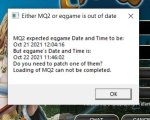
ayeWas there a hotfix/patch released today thus why MQ2 is complaining about EQ version no matching as expected?

 www.redguides.com
Oct 21 2021
- Updated for LIVE

they just took down the servers again just now, so will require another rebuild for mq and mq2Ugggh...work all day and ready to get into some EQ action....and nope...freaking EQ rolling hot patches today too so no sync with the number one tool on the market! I'm waiting patiently like a fat kid sucking on an Everlasting Gobstopper!
Thanks, Sic. I dread playing old school once the servers come back up...until the kick-ass team at RG tweaks what the EQ devs have deployed. I appreciate the hard work you all are doing!they just took down the servers again just now, so will require another rebuild for mq and mq2
they just took down the server for an unannounced eq patch.Any idea when things will be working properly? How long does it take for MQ2/redguides to be updated on patch days?
Oct 22 2021
- Updated for LIVE #3
Oct 22 2021
- Updated for BETA
Oct 22 2021
- Updated for LIVE #2
there isn't one, but you should just keep both installs separate - the live -> next migrator just moves stuff around to their new (if needed) locationsI keep switching back to live to avoid issues like alt tab, kiss not working right etc. in Next. I have to always hpe i'm moving the right files back and forth now... Is there a guide for switching back to live?
i don't understand. the migrator tool is something that (currently) you run to migrate and overwrite files --- if you don't want to run migrator to migrate files, don't run it. unless if you're asking to move files that are missing but not overwrite files that are not missing - I don't believe there are plans to make that adjustment. the migrator was made to be a "quick and dirty way to copy files from mq2 to next".Thanks but the PS migration tool is one way to next and won't overwrite files. Maybe I have the wrong version, i don't know. but the next time i switch to next it will be at gun point and the migrator should ask if i want to over write files, please.
I'm currently just moving my edited ini files back and forth manually and I'm never sure if i got them all...
all good dude, things can be frustrating when you spend more time trying to do the thing, than enjoy the thing, so i getcha.Thanks again. When I try and run the migrator PS it won't overwrite files in the next folders. I'd like it to do so.
If there is an option for this that I've missed I apologize. I'm also sorry for my frustrations. The alt tab issue combine with having to learn how to and then edit ini files all while just wanting to chill...