
-
 Hail, we're RedGuides. We want you to play six (yes, 6!) EverQuest characters at once. We have scripts and a friendly community to help, please join our playstyle and say hello! 👋
You are using an out of date browser. It may not display this or other websites correctly.
You should upgrade or use an alternative browser.
You should upgrade or use an alternative browser.
Resource icon
Legacy MacroQuest2 (Live Servers) (1 Viewer) 2022-01-19
- Thread starter Redbot
- Start date
- Status
- Not open for further replies.


nope, waiting for updates and then the rebuild can happen, but you can get notified when its back in action.do we have an ETA yet? and keep up the good work sic
VeryVanilla LIVE:
Use this URL to get notified: https://www.redguides.com/community/resources/very-vanilla-mq2-live-servers.61/watch


That's a good thing!!!And I thought I broke it... betting @Sic glad I actually read all the previous posts this time and have no questions and patiently waiting and have watch turned on


Redbot updated Very Vanilla MQ2 (Live Servers) with a new update entry:
20210721a
Read the rest of this update entry...
20210721a
quick fix thanks to Sic and brainiac
Read the rest of this update entry...
tlp? yes MQ2 and VV work on non-truebox TLP serversTLP?
It just updated thank you!tlp? yes MQ2 and VV work on non-truebox TLP servers
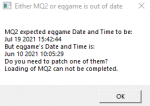
did you not update your everquest? everquest was patched and this picture says your eqgame date is from last month.I just updated from the launcher and did a reboot. I keep getting the date and time error. Is this not the patch update?
View attachment 31703

Dulieguy
Member
I always forget to do that with the auto login. Thanks Sic, its working again.did you not update your everquest? everquest was patched and this picture says your eqgame date is from last month.


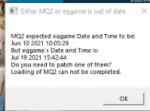
you need to patch your very vanilla. it tells you in there that "mq2 is expecting a june 10th date but eq is giving it a july 19th date) which means your mq2 is out of date. it even says "do you need to patch one of them"
Redbot updated Very Vanilla MQ2 (Live Servers) with a new update entry:
20210722
Read the rest of this update entry...
20210722
Jul 22 2021
- Fixed a crash in _SPELL
- Added /resize command - Idea cred: MacQ
- Usage: /resize min
- Usage: /resize max
- Usage: /resize restore
- Usage: /resize pos 100 100
Will move the window to x 100 and y 100
- Usage: /resize size 800 640
Will resize it to 800x640
- Usage: /resize all 100 100 800 640
will move window to x 100 and y 100 and size it to 800x640
Read the rest of this update entry...
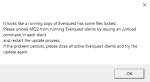
What about this message? It happens in the middle of updating Very Vanilla. I patched EQ, am getting the time/date mismatch, and I get the following message when I update Very Vanilla.
It looks like a running copy of Everquest has some files locked.
Please unload MQ2 from running Evrquest clients by issuing an /unload command in each client and restart the update process.
If the problem persists, please close all activate Everquest clients and try the update again.
So I closed all EQ Clients, even looked for tasks running in Task Manager just to make sure. Closed all MQ2 related apps. Restarted Launcher, update Very Vanilla, and still this message about EQ locking up files.
Thoughts?
-Duff-
It looks like a running copy of Everquest has some files locked.
Please unload MQ2 from running Evrquest clients by issuing an /unload command in each client and restart the update process.
If the problem persists, please close all activate Everquest clients and try the update again.
So I closed all EQ Clients, even looked for tasks running in Task Manager just to make sure. Closed all MQ2 related apps. Restarted Launcher, update Very Vanilla, and still this message about EQ locking up files.
Thoughts?
-Duff-
Attachments
What about this message? It happens in the middle of updating Very Vanilla. I patched EQ, am getting the time/date mismatch, and I get the following message when I update Very Vanilla.
It looks like a running copy of Everquest has some files locked.
Please unload MQ2 from running Evrquest clients by issuing an /unload command in each client and restart the update process.
If the problem persists, please close all activate Everquest clients and try the update again.
So I closed all EQ Clients, even looked for tasks running in Task Manager just to make sure. Closed all MQ2 related apps. Restarted Launcher, update Very Vanilla, and still this message about EQ locking up files.
Thoughts?
-Duff-
Bring up Task Manager and look for all instances of eqmain.exe. Terminate them all. Try the update again (do not need to restart the RG launcher).
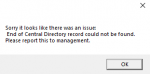
Good morning everyone. When I try to load up MQ, I get the attached error message. When I try to do a search for the file MQ2AUTH.exe that the message says to run, I cannot locate it anywhere. It should be noted that I accidentally clicked install for MQ2NEXT because I did not realize it was selected, and thought it was an update to regular MQ2. Does anyone know how to resolve this issue?
Any help would be greatly appreciated!
Any help would be greatly appreciated!
Attachments
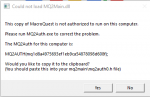
howdy eqman,Good morning everyone. When I try to load up MQ, I get the attached error message. When I try to do a search for the file MQ2AUTH.exe that the message says to run, I cannot locate it anywhere. It should be noted that I accidentally clicked install for MQ2NEXT because I did not realize it was selected, and thought it was an update to regular MQ2. Does anyone know how to resolve this issue?
Any help would be greatly appreciated!
did you accidentally install mqnext over your existing mq2 directory? - if so you probably want to hit the reinstall button and if you are looking to try mqnext, install that to another place (if you wanted to keep both working that is). Based on what you said, I suspect your issue is you installed mq next over your mq2 or vice versa.
awesome! thanks for letting me know you got sorted out.Thanks! Reinstalling MQ2 worked. As for mqnext, I honestly have no idea, since I didn't even mean to download it. Thanks so much!
have a good one, eqman
Redbot updated Very Vanilla MQ2 (Live Servers) with a new update entry:
20210818
Read the rest of this update entry...
20210818
Aug 18 2021 by RedGuides
- MQ2Mage (ChatWithThisName, Sic) has been removed from beta and is now premium.
Aug 18 2021
- Updated for LIVE
Aug 13 2021
- Updated for TEST
Read the rest of this update entry...


I just wanted to reference my post from July 23rd with the "it looks like a running copy of everquest has some files locked" pop up message just in case anyone gets this again, because it kept happening today while trying to update. I took rouneq's advice and dug through task manager. I found an EQBCS task running in there, killed it, and solved. This was after several reboots, several nuclear kills in MQ2... tried everything. Finally found that in task manager. Hope no one else get's stuck on this like me.
-Duff-
-Duff-

- Commits
- 1
You likely have it running as a service, had that happen a few times myself. Sorry i had not seen your July post, I could have been more useful
that doesn't really tell us anything except there is/was a crash. this appears to be an eq crash and not an mq2 crash?i can log on any other character on my account except my sk who i am using as my main tank it gives me this messege when i try to
c:\users\public\daybreakgamecompany\installed\games\eqgame.exe crashed at address 0x502e2e
if it is an MQ2 crash, and you would like for me to take a look at it, you can PM me the .dmp file
it would be in your MQ2->Release->Logs folder
Keep in mind dmps may have personal information like character names or your server
Please don't duplicate posts.when i try to log in the character i use to tank i get this messege
c:\users\public\daybreakgamecompany\installed\games\eqgame.exe crashed at address 0x502e2e
keep in mind i cna log in ANY other toon on that account except my main any help please on what to do
I already responded to you, sent you a notification i was merging your thread into the mq2 thread, and then responded to you.
that doesn't really tell us anything except there is/was a crash. this appears to be an eq crash and not an mq2 crash?
if it is an MQ2 crash, and you would like for me to take a look at it, you can PM me the .dmp file
it would be in your MQ2->Release->Logs folder
Keep in mind dmps may have personal information like character names or your server
if it is unrelated to mq2, it might be something like bad character files - which happens sometimes, but rarely. so you might have to clean out your character files in your eq install
or you may be using an out of date UI on just that toon in particular in which case you'll want to update that ui, or delete your character files so you don't try and load an out of date ui
or you may be using an out of date UI on just that toon in particular in which case you'll want to update that ui, or delete your character files so you don't try and load an out of date ui
this is now the 3rd time you've posted this same exact msg.when i try to log in the character i use to tank i get this messege
c:\users\public\daybreakgamecompany\installed\games\eqgame.exe crashed at address 0x502e2e
keep in mind i cna log in ANY other toon on that account except my main any help please on what to do
I've a: given a few suggestions on what it might be, b: asked a few questions to try and get clarification, c: offered to look at your dmp if you are generating an mq2 dmp.
it looks like you read the part on character files, but maybe didn't read the rest?
Let's try and cover a few more bases. Please read and respond to the questions.
what server is this character on?
- MQ/MQ2 does not work and is not supported for truebox servers. so if this SK of yours is on a truebox server, it will not work.
do you have an mq2 dmp? it would be in your MQ2->Release->Logs folder
- if so, and would like for me to look at it, pm it to me. as mentioned it might have character names or other information in it.
can you log in without mq2 loaded?
- if you can log in without mq2 loaded, what happens if you load mq2 after you are in game? does it still crash?
Last edited:
- Status
- Not open for further replies.
Users who are viewing this thread
Total: 2 (members: 0, guests: 2)
Share: