• You've discovered RedGuides, an EverQuest multi-boxing and scripting community 🧙‍♀️⚙️. We want you to play several EQ characters at once, come join us and say hello! 👋

  • A TLP without truebox has thawed (Very Vanilla ready)
    Frostreaver

Question - Lag when Kiss Running

Joined
Feb 22, 2014
RedCents
2,707¢
I've talked to several people in PMs about this problem I'm having before I posted this. I just need a little help. With Kiss 8 I'm getting so much lag it's almost unusable for me. I can't pinpoint what's causing it either. Here is what I've tried...

Is it your computer? I can't imagine that being the issue, because I can login and box 6 toons without any lag.
Is it the zone? No, I go to the most basic zone and as soon as kiss is running it's back to lag.
Is it Kiss or Mq2? Just kiss. If I pause it, lag is gone. If I unpause, back to lag.
You need a new MQ2 install. Done that several times. Completely new folder and only copied the INI files.
Unload/Delete MQ2FPS Done that. Tried running FPS and completely removing it and the DLL from the computer.
Is it one toon or every toon? Every toon that runs Kiss. Lags when it's running, stops when it's not. Even with just one acct loaded.
You're making this up! I swear I'm not. :)
Is Kiss working? Yes, it's working fine other than the lag.
Are you running the most recent? Yes of course. 8.1.2

Not sure what else to try.... open to suggestions.
 
Here try this.

Load up all your boxes, but only load MQ2 on one of the toons. Is there any Lag on the toon running MQ2? If there is what about the other Toons?

Now run KA on the 1 toon. Is there Lag on the 1 toon? What about the other toons not running MQ2?

What this will help determin is this an MQ2/KA issue or System issue. Even if it only happens with MQ2 running it could still be a system issue. There could be something that MQ2/KA is causing your system to do.

Here is something else I would do. You will have to be patient cause this will take some time to do. I would go to the following code:
Rich (BB code):
| -------------------------------------------------------------------------------------
| Main Loop
| -------------------------------------------------------------------------------------
        :MainLoop
            /doevents
            /if (${ChainPull}!=2) {
                /call CampfireBack
                /call AFKTools
                /call CheckForCombat 1 MainLoop
                /call AECheck
                /call DoMezStuff
                /call WriteDebuffs
                /call CheckHealth
                /call CheckCures
                /call DoWeMove
                /call RezCheck
                /call Campfire
                /call DoMiscStuff
                /call CanIDoStuff
                /call MercsDoWhat
                /call CastMount
                /call CastMana
                /call DoPetStuff
                /call CheckPetBuffs
                /call WriteBuffs
                /call WriteBuffsMerc
                /call CheckBuffs
                /call DoBardStuff
                /call DoWeMed
                /call GroupWatch
            }
            /if (!${Defined[PlayTimeCountDown]} || (${Defined[PlayTimeCountDown]} && ${PlayTimeCountDown})) /call FindMobToPull 1
            /call DoTaskStuff
            /call CheckForCombat 0 MainLoop
            /call LootStuff
             /if (${DebugHeal}) /delay 5
        /goto :MainLoop
    /return

Make these changes.

Rich (BB code):
| -------------------------------------------------------------------------------------
| Main Loop
| -------------------------------------------------------------------------------------
        :MainLoop
            |/doevents
            /if (${ChainPull}!=2) {
            |    /call CampfireBack
            |    /call AFKTools
            |    /call CheckForCombat 1 MainLoop
            |    /call AECheck
            |    /call DoMezStuff
            |    /call WriteDebuffs
            |    /call CheckHealth
            |    /call CheckCures
            |    /call DoWeMove
            |    /call RezCheck
            |    /call Campfire
            |    /call DoMiscStuff
            |    /call CanIDoStuff
            |    /call MercsDoWhat
            |    /call CastMount
            |    /call CastMana
            |    /call DoPetStuff
            |    /call CheckPetBuffs
            |    /call WriteBuffs
            |    /call WriteBuffsMerc
            |    /call CheckBuffs
            |    /call DoBardStuff
            |    /call DoWeMed
            |    /call GroupWatch
            }
            |/call FindMobToPull 1
            |/call DoTaskStuff
            |/call CheckForCombat 0 MainLoop
            |/call LootStuff
             /if (${DebugHeal}) /delay 5
            /delay 10
        /goto :MainLoop
    /return

Make sure you add the /delay 10 at the bottom or you will lag like crazy.

Now run the macro? Give it a minute to load everything. Are you Lagging?

If yes then there is something with MQ2 causing a problem, But Not sure what.

If No. Stop the macro, Then go back into the above code and starting at the bottom Remove the "|" from in front of the line. Make sure you save the macro. Restart the macro. Do this 1 line at a time. Do not remove the "|" from more than 1 line for each test. Rinse and repeat until you start lagging. This will help us pin point what routine is causing you to lag.

I know when I first start my box team I have to wait a few minutes for everything to load and stop lagging, but after a few minutes everything works fine.

So give this a try and report back.
 
I'm trying these things and will report back. What I mean by lag is that if I try to stand in place and just turn left or right, it is not smooth. When I pause it and do the same, it's smooth as silk. Then when I try to walk anywhere, it's laggy until I pause it again.

- - - Updated - - -

Found the area.

/call CheckBuffs

Here is what I have now and it's running smooth:

Rich (BB code):
| -------------------------------------------------------------------------------------
| Main Loop
| -------------------------------------------------------------------------------------
        :MainLoop
            /doevents
            /if (${ChainPull}!=2) {
                /call CampfireBack
                /call AFKTools
                /call CheckForCombat 1 MainLoop
                /call AECheck
                /call DoMezStuff
                /call WriteDebuffs
                /call CheckHealth
                /call CheckCures
                /call DoWeMove
                /call RezCheck
                /call Campfire
                /call DoMiscStuff
                /call CanIDoStuff
                /call MercsDoWhat
                /call CastMount
                /call CastMana
                /call DoPetStuff
                /call CheckPetBuffs
                /call WriteBuffs
                /call WriteBuffsMerc
            |    /call CheckBuffs
                /call DoBardStuff
                /call DoWeMed
                /call GroupWatch
            }
            /call FindMobToPull 1
            /call DoTaskStuff
            /call CheckForCombat 0 MainLoop
            /call LootStuff
             /if (${DebugHeal}) /delay 5
            /delay 10
        /goto :MainLoop
    /return
 
It is still a matter of what is eating up your CPU when your running MQ2/KA .VS. NOT Running it, we may need to do some additional checking with your system. May want to try and load Performance Monitor from Task manager(Windows 7/Windows 8) Load up your crew with nothing running and check to see what Performance monitor says is going on, then load up MQ2 and KA and then check Performance Monitor again, if you start seeing increased disk I/O, then most likely there is a memory issue, as in not enough. Performance Monitor will show you what is eating up your resources and when running EQ With MQ2/KA you want as minimal disk access as possible. You will always have some, but if your system starts using virtual memory things will come to a crawl fast.

- - - Updated - - -

Kewl, let me look at it and see what our next step is..

- - - Updated - - -

Ok. Remove the "|" from the /call CheckBuffs line and save the macro. Now before we go and do a full out Debug lets try this. Load up your crew Load MQ2 on all of them, We want to run KA on just one of your toons, but first we want to go in and remove any of the Buffs in the Buffs section, of the toons ini file, that have the MA designation. save the ini file, start KA and wait about 30 seconds before testing for Lag? Did that make a difference?
 
Ok here is where I am...

I don't have any buffs with MA in it. Here are my buffs:

Rich (BB code):
[Buffs]
BuffsOn=1
Buffs1=Mana Reverberation Aura Rk. II|Aura
Buffs2=Shield of the Pellarus
Buffs3=Precognition|Caster
Buffs4=Hastening of sviir Rk. II
Buffs5=Mulch Fiber Belt
Buffs6=Divine Sigil of Prexus
Buffs7=Perfected Levitation
Buffs8=Deepwater Shawl
Buffs9=Rockweave Cloak
Buffs10=Ring of Stolen Graves
Buffs11=Mana Draw|mana|30
Buffs12=Speed of Prokev|Melee
Buffs13=Shield of Fate Rk. II
Buffs14=Twincast Aura|Aura
Buffs15=Phantasmal Unity Rk. II|dual|polyiridescent rune Rk. II
Buffs16=Ward of the Mastermind Rk. II|Me
Buffs17=Reactive Rune
Buffs18=veil of mindshadow
Buffs19=Azure Mind Crystal|summon|Azure Mind Crystal|1
Buffs20=Summoned: Large Modulation Shard|Mana|75
Buffs21=Summoned: Azure Mind Crystal|Mana|65
Buffs22=NULL
Buffs23=NULL
Buffs24=NULL
Buffs25=NULL

I run smooth when I have the first few buffs up, but I think it starts lagging the more I have.
 
Your Buffs section looks good, we may need to do some benchmarking on your PC. This will help us locate what is causing your system to lag.
 
Unload/Delete MQ2FPS Done that. Tried running FPS and completely removing it and the DLL from the computer.?

Unloading mq2fps will DEGRADE your performance greatly specially if you are running 4+ account on the same computer.

Make sure your toons are not writing to logs MQ2 or EQ. Multiple toon writing to logs will greatly decrease performance

/bcaa //mlog off
/bcaa //log off

Check all of your toons clip planes in Display tab. If it 100% make them all 80.
If the are all on high graphics turn it down to medium.
Make sure shadows are off. Shadows super bog down the computer.

In your ini file

What is ChecKBuffsTimer=20 set to increase it to 30 so the buffs section only writes every 30 secs.
 
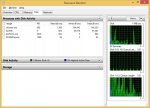
Open up Resource Monitor (Ctrl-Alt-Esc for Task Manager and click on Res Monitor ) and click on Disk Tab.

resource_mon.jpg

See if you see excessive disk activity from eqgame etc. You will still have to use the other suggestions in this thread to find the actual culprit.
 
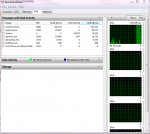
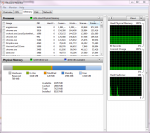
Last night I checked disk frag and there were no issues of fragment. I have 8 gig of memory. so here are my screens with Kiss running. I changed checkbuffs to 30, then 40. It's a little better, but still lags.

2015-02-24 09_05_10-Question - Lag when Kiss Running.png

2015-02-24 09_06_23-Resource Monitor.png
 
Do you use a 3rd party source to run EQ like WinEQ2? Maybe the MQ2FPS and WinEQ2 settings are conflicting since I believe WINEQ2 also has a built in Frame limiter.

----UPDATE----

I came across a post from years ago about lagging using MQ2 and KA etc.

Laggy-when-running-MQ2

It mentions having cleared out all HUD files and MQ2FPS files completely from the MQ2 folder. The last post in this thread says it appears to have worked to resolve the issue. I don't know if this will work for your problem EQgeek but I hope it points in some direction of a possible fix!


Also read somewhere MQ2Hud can sometimes cause issue so if you have that loaded, try removing it or disabling it.

----UPDATE----

Eqgeek, I would like to help anyway I can as well.

Is there anyway you can package up your MQ2 folder with the macros and Kiss INIs in them into a zip file (normal zip is like 4 to 8MB unless you have all the meshes included from EQNavi) so I can test your compile on my PC? PLEASE if you decide to do this, copy all the content into a different folder and rename the INI files to not have your character names listed, if you use macros like autologin be sure to remove all account information from it(or omit the INI), and check your copied base MQ2 folder and rename the MQ2 charcter INI files (or omit) there as well so no character or account information is listed as well. You can even omit the INIs from the zip just copy the settings of each character INI file and what class they are to a text file and I can recreate them as best I can. Also if you can supply me with the base stats of your PC I can create a virtual machine and test on it to see if there are any conflicts there (which I doubt if all things worked before 8.1.2 but eliminating it as a possible root cause helps)

You can send me the info in a PM or let me know and I can try to coordinate something with you. I work in the IT Systems Admin realm and sometimes trying another location to test from is incredibly helpful to determine where the root cause is occurring. I am not asking for any account information or account details please keep your EQ to yourself :) I just want to help by testing your compile out if you will allow me. If you are using the most recent Vanilla compile of MQ2 (and you have no specialized changes) you could try just sending me your KissAssist.mac and I can do a text compare between it and my own.

You don't use any special recompiles listed on this site for plugins or macs do you? Perhaps you had a specialized plugin that isn't part of the Vanilla Recompile and it is conflicting when KA tries to use it? Just spilling out thoughts. I used a MQ2Melee.dll (This is just an example) for a time that Maskoi provided that wasn't part of the Vanilla Compile and over wrote the vanilla MQ2Melee.dll (again just an example).
 
I have noticed on my warrior that MQ2Melee causes me lag. Even if I am NOT running KISS. I can be attacking a combat dummy in the guild hall and MQ2Melee will bog down my cpu a bit (fx8350). Any thoughts or tips on this would be wonderful.
 
Your screencaptures of Resource Monitor look pretty normal.
Disk is not being tasked heavily.

I did notice your memory use is a bit high for eqgame.
Working Set(this is what is actually being used by eqgame right now) shows over 1000M.

My eqgame.exe memory use never goes over 800M in POK, usually around 500M-600M in most zones, but I play in older zones with many models turned off, so this might be normal.

Could be a misbehaving plugin as others said.
 
I'll unload MQ2Melee and see if that makes a change. I'm not sure if it would since I get NO LAG if I turn buffs off. I believe that HUD is required for Kiss, and considering I started from a brand new folder, only moving a few INI's into it, I'd think that all plugins and their files should be fresh and new, including HUD.

The only other thing I can think is that my eqclient.INI file needs some work?

Rich (BB code):
[VideoMode]
Width=1600
Height=1200
WindowedWidth=1600
WindowedHeight=848
FullscreenBitsPerPixel=32
FullscreenRefreshRate=0
[Defaults]
WindowedModeXOffset=-8
WindowedModeYOffset=-8
WindowedMode=TRUE
AllowResize=1
Maximized=1
RestoredXOffset=-6
RestoredYOffset=-6
RestoredWidth=1600
RestoredHeight=878
AlwaysOnTop=0
GraphicsMemoryModeSwitch=1
APVOptimizations=TRUE
DisableWestBugFix=0
Sound=TRUE
CPUAffinity0=0
CPUAffinity1=1
CPUAffinity2=1
CPUAffinity3=3
TextureQuality=3
VertexShaders=TRUE
20PixelShaders=1
14PixelShaders=1
1xPixelShaders=TRUE
MultiPassLighting=0
PostEffects=0
UseLitBatches=TRUE
ItemPlacementShowOverlay=TRUE
InspectOthers=FALSE
Log=FALSE
AttackOnAssist=FALSE
ShowInspectMessage=TRUE
LockWindows=FALSE
InvWinLabels=TRUE
HidePlayerWin=FALSE
HidePartyWin=FALSE
HideTargetWin=FALSE
HideSpellsWin=FALSE
HideHotboxWin=FALSE
HideChatWin=FALSE
HideMainMenuWin=FALSE
ChatLineSpacing=0
ShowDynamicLights=FALSE
ChatFontSize=3
ShowNamesLevel=4
VideoMode=0
MousePointerSpeedMod=0
ShowSpellEffects=0
CombatMusic=0
MixAhead=8
ServerFilter=0
TrackPlayers=FALSE
TrackPets=FALSE
TrackMercs=FALSE
TrackSortType=CONSIDER
TrackFilterType=0
ShowGrass=FALSE
DisableTattoos=1
UseArrowCamera=FALSE
NetStat=FALSE
DoProperTinting=FALSE
Sound44k=0
SpeakerType=0
AutoAFKOn=0
AutoAFKOff=FALSE
AutoMercPassive=FALSE
IgnoreNumLockState=FALSE
HideAFK=0
HideAFKPets=0
HideAFKMercs=0
LoadSocialAnimations=FALSE
AllLuclinPcModelsOff=FALSE
UseLuclinHumanMale=TRUE
UseLuclinHumanFemale=TRUE
UseLuclinBarbarianMale=TRUE
UseLuclinBarbarianFemale=TRUE
UseLuclinEruditeMale=TRUE
UseLuclinEruditeFemale=TRUE
UseLuclinWoodElfMale=TRUE
UseLuclinWoodElfFemale=TRUE
UseLuclinHighElfMale=TRUE
UseLuclinHighElfFemale=TRUE
UseLuclinDarkElfMale=TRUE
UseLuclinDarkElfFemale=TRUE
UseLuclinHalfElfMale=TRUE
UseLuclinHalfElfFemale=TRUE
UseLuclinDwarfMale=TRUE
UseLuclinDwarfFemale=TRUE
UseLuclinTrollMale=TRUE
UseLuclinTrollFemale=TRUE
UseLuclinOgreMale=TRUE
UseLuclinOgreFemale=TRUE
UseLuclinHalflingMale=TRUE
UseLuclinHalflingFemale=TRUE
UseLuclinGnomeMale=TRUE
UseLuclinGnomeFemale=TRUE
UseLuclinIksarMale=TRUE
UseLuclinIksarFemale=TRUE
UseLuclinVahShirMale=TRUE
UseLuclinVahShirFemale=TRUE
UseLuclinElementals=TRUE
LoadVeliousArmorsWithLuclin=FALSE
DefaultChannel=8
LastCharSel=3
Music=0
SoundVolume=0
Gamma=6
SpellParticleOpacity=0.000000
EnvironmentParticleOpacity=0.000000
ActorParticleOpacity=0.000000
TrackAutoUpdate=FALSE
CPUAffinity1=1
EnvSounds=0
LeftClickTargetHelp=0
AutojoinHelp=1
SpellParticleDensity=0.000000
SpellParticleCastFilter=1
EnvironmentParticleDensity=0.000000
ActorParticleDensity=0.000000
ActorParticleCastFilter=2
SkyUpdateInterval=60000
TerrainTextureQuality=0
WaterSwap=1
Bloom=0
HideAltAdvWin=TRUE
HasViewedHotBarHelp1=true
UseD3DTextureCompression=TRUE
MipMapping=FALSE
TextureCache=FALSE
SpellParticleNearClipPlane=2.000000
EnvironmentParticleNearClipPlane=2.000000
EnvironmentParticleCastFilter=24
ActorParticleNearClipPlane=2.000000
ActorNewArmorFilter=24
ShowBuffTimer=1
ShowBuffCounters=0
ShowBuffLimitUse=0
ShowSongTimer=0
ShowSongLimitUse=0
ShowSongCounters=0
StreamItemTextures=1
GraphicsMemoryMode=0
TargetGroupBuff=1
ScreenshotNumber=24
AcceptKickRequests=1
CPUAffinity4=0
 
I have noticed on my warrior that MQ2Melee causes me lag. Even if I am NOT running KISS. I can be attacking a combat dummy in the guild hall and MQ2Melee will bog down my cpu a bit (fx8350). Any thoughts or tips on this would be wonderful.

Drop a copy of your ini entries for MQ2Melee and let us take a look, could be something in the Holy/Down shits if you have any.
 
EQGeek

So I did a side by side compare of my eqclient.ini versus yours and noticed some differences. Obviously we, you and I, would likely set up our eq a bit differently.

So my first suggestion would be to rename your eqclient.ini file to a different name. Run the Launcher to ensure you get a new copy, and try that if you think it is suspect.

Secondly I did notice an oddity that may be a culprit, which you will see in my attached screenshot. CPU Affinitys are skewed/off.

Perhaps what may be happening is when you run KA it is attempting to leverage a portion of your CPU Cores incorrectly and thus causing lag as it tries to work around the issue but still process the request, or the core it is trying to leverage is already over taxed by some other portion of work, basically too much work on the back of a single processor, thus causing a lag effect.

Your CPUAffinity2=1 might be the culprit. As a request comes in to process on CPUAffinity2 it routes that traffic back to CPU1 and causes lag since CPU1 is already being used for other tasks. Just a thought since I am not sure how these settings leverage Affinity in EQ. I will check the net further to confirm how EQ Affinity settings work.

EQINI.jpg

----UPDATE----

Also your CPUAffinity4=0

My thought is that if you set CPUAffinity to the below format, it might help(Fingers Crossed):
Rich (BB code):
CPUAffinity0=0
CPUAffinity1=1
CPUAffinity2=2
CPUAffinity3=3
CPUAffinity4=4

If you make the changes just be sure to search your ini for all CPUAffinity references since yours are scattered across your ini file a bit
 
Drop a copy of your ini entries for MQ2Melee and let us take a look, could be something in the Holy/Down shits if you have any.

Here is the one for my chanter:

Rich (BB code):
[MQ2Rez]
Accept=1
[MQ2Log]
Enabled=0
[MQ2Melee]
downflag1=1
downflag2=1
downflag3=1
downflag4=1
downflag5=1
downflag6=1
downflag7=1
enrage=0
facing=1
infuriate=0
melee=1
petassist=0
petengagehps=98
petrange=75
plugin=1
resume=75
stickbreak=1
stickrange=75
synergy=0
downshit0=/if (${Me.CombatState.Equal[COMBAT]} && ${Me.PctHPs}<20 && ${Me.AltAbilityReady[Self Stasis]}) /alt act 1120
downshit1=/if (${Me.CombatState.Equal[COMBAT]} && ${Target.Named} && ${Me.AltAbilityReady[Fundament: Third Spire of Enchantment]}) /alt act 1382
downshit2=/if (${Me.CombatState.Equal[COMBAT]} && ${Target.Named} && ${Me.AltAbilityReady[Improved Twincast]}) /alt act 515
downshit3=/if (${Me.CombatState.Equal[COMBAT]} && ${Target.Named} && ${Target.PctHPs}>70 && ${Target.PctHPs}<95 && ${Me.AltAbilityReady[Phantasmal Opponent]}) /alt act 1122
downshit4=/if (${Me.CombatState.Equal[COMBAT]} && ${Target.Named} && ${Target.PctHPs}>70 && ${Target.PctHPs}<95 && ${Me.AltAbilityReady[Chromatic Haze]}) /alt act 2205
downshit5=/if (${Me.CombatState.Equal[COMBAT]} && ${Me.PctHPs}<70 && ${Me.AltAbilityReady[Veil of Mindshadow]}) /alt act 791
downshit6=/if (!${Me.CombatState.Equal[COMBAT]} && ${Me.SpellReady[Phantasmal Unity Rk. II]} && !${Me.Buff[Polyiridescent Rune Rk. II].ID} && !${Me.Invis} && ${Me.PctMana}>10 && !${Polyiridescent Rune Rk. II].ID} && !${Me.Moving}) /cast "Phantasmal Unity Rk. II"
downshit7=/if (${Me.CombatState.Equal[COMBAT]} && ${Target.PctHPs}>80 && ${Target.PctHPs}<95 && ${Me.AltAbilityReady[Phantasmal Opponent]}) /alt act 1122
downshit8=/if (${Me.CombatState.Equal[COMBAT]} && ${Me.SpellReady[Ward of the mastermind Rk. II]} && !${Me.Buff[Ward of the mastermind Rk. II].ID} && !${Me.Invis} && !${ward of the mastermind Rk. II].ID} && !${Me.Moving}) /cast "Ward of the mastermind Rk. II"
version=7.050

- - - Updated - - -

Also your CPUAffinity4=0

My thought is that if you set CPUAffinity to the below format, it might help(Fingers Crossed):

Do I need to log in order to recheck the CPUAffinity? I made those changes
 
Drop a copy of your ini entries for MQ2Melee and let us take a look, could be something in the Holy/Down shits if you have any.

Rich (BB code):
[MQ2Rez]
Soundfile=C:\Games\Macroquest2\mq2rez.wav
Accept=1
[MQ2Melee]
aggro=1
bash=1
begging=1
callchallenge=1
commanding=20
defense=0
disarm=1
enrage=1
facing=1
fieldarm=0
gutpunch=0
holyflag0=1
holyflag2=1
holyflag3=1
infuriate=1
kick=1
kneestrike=0
melee=1
opportunisticstrike=20
plugin=1
provoke1=28021
provokeend=20
provokemax=1
provokeonce=1
resume=75
stickbreak=1
stickrange=75
synergy=0
taunt=1
holyshit0=/if (!${Me.Buff[Defensive Proficiency].ID}) /alt act 687
holyshit1=/if (${Melee.Combat} && ${SpawnCount[npc radius 50 zradius 10]}>2 && ${Me.AltAbilityReady[area taunt]} && ${Melee.AggroMode}) /alt activate 110
holyshit2=/if (!${Me.Buff[Sneering Grin].ID}) /alt act 2001
holyshit3=/if (!${Me.Song[Field Guardian].ID}) /disc Field Guardian
version=7.050
[MQ2Log]
Enabled=0

I am very new to the holy/down stuff this is as far as I've gotten on my first toon trying it out on. I am curious about the cpu affinity thing because I use ISBoxer and it is supposed to take care of that stuff and I am usually about 47fps with 8 accounts going sometimes until combat starts. But sometimes I will get lag I'm guessing when looking for a pull/buff not sure on this one.
 
Nothing in the ini is jumping out at me at the moment.

Rich (BB code):
[MQ2Rez]
Soundfile=C:\Games\Macroquest2\mq2rez.wav
Accept=1
[MQ2Melee]
aggro=1
bash=1
begging=1
callchallenge=1
commanding=20
defense=0
disarm=1
enrage=1
facing=1
fieldarm=0
gutpunch=0
holyflag0=1
holyflag2=1
holyflag3=1
infuriate=1
kick=1
kneestrike=0
melee=1
opportunisticstrike=20
plugin=1
provoke1=28021
provokeend=20
provokemax=1
provokeonce=1
resume=75
stickbreak=1
stickrange=75
synergy=0
taunt=1
holyshit0=/if (!${Me.Buff[Defensive Proficiency].ID}) /alt act 687
holyshit1=/if (${Melee.Combat} && ${SpawnCount[npc radius 50 zradius 10]}>2 && ${Me.AltAbilityReady[area taunt]} && ${Melee.AggroMode}) /alt activate 110
holyshit2=/if (!${Me.Buff[Sneering Grin].ID}) /alt act 2001
holyshit3=/if (!${Me.Song[Field Guardian].ID}) /disc Field Guardian
version=7.050
[MQ2Log]
Enabled=0

I am very new to the holy/down stuff this is as far as I've gotten on my first toon trying it out on. I am curious about the cpu affinity thing because I use ISBoxer and it is supposed to take care of that stuff and I am usually about 47fps with 8 accounts going sometimes until combat starts. But sometimes I will get lag I'm guessing when looking for a pull/buff not sure on this one.
 
Someone mentioned that abilities cast by both melee and kiss might cause a conflict. Seems like it would have to be one hell of a conflict to slow down a pc.

Which is odd since KA leverages MQ2Melee, they don't run independently of one another. A loop in a script might make more sense i.e. some script line wasn't enclosed properly in " or ) or {or ] and it caused the script to just roll out of control. Just not sure how KA is causing lag, afterall it's just a script executing a group of commands.

----UPDATE----

That's why I pointed out the CPU affinity since MQ2 is not built into EQ it runs as it's own process, it may be starting up the execution of scripts in a already used and taxed CPU, but it's just speculation at this point.

----UPDATE----

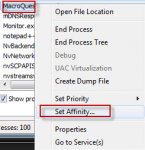
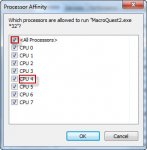
So maybe another thing to test eqgeek is setting your MacroQuest2.exe to a specific CPU Affinity.. You can do this by opening task manager clicking on the process tab, find Macroquest2.exe and right click the process, select "Set Affinity" and uncheck all processors and then pick one to run it off and see if lag improves

Affinity.jpg CPU.jpg
 
Ok, I am retarded, lol. Found out the lag I was getting was due in part to my cpu slowing itself down from some bios settings. I am guessing that this happened when I installed new ram and when I checked some settings had mysteriously re-enabled themselves...
 
Which is odd since KA leverages MQ2Melee, they don't run independently of one another. A loop in a script might make more sense i.e. some script line wasn't enclosed properly in " or ) or {or ] and it caused the script to just roll out of control. Just not sure how KA is causing lag, afterall it's just a script executing a group of commands.

----UPDATE----

That's why I pointed out the CPU affinity since MQ2 is not built into EQ it runs as it's own process, it may be starting up the execution of scripts in a already used and taxed CPU, but it's just speculation at this point.

----UPDATE----

So maybe another thing to test eqgeek is setting your MacroQuest2.exe to a specific CPU Affinity.. You can do this by opening task manager clicking on the process tab, find Macroquest2.exe and right click the process, select "Set Affinity" and uncheck all processors and then pick one to run it off and see if lag improves

View attachment 7043 View attachment 7044

I will try this tomorrow. I have tried to set it to a high priority and didn't seem to change it. I tried starting one toon and turning everything OFF on my computer like antivirus and memory hog Chrome. No help. it is puzzling. I was busy in meetings today and don't have time to get much done. Tomorrow I can test more things! Appreciate all the help from you all!
 
Interesting enough when I try to set affinity to macroquest, I get access denied ;)
 
You might have to elevate your permissions either through command line or some other method to run task manager as admin. Windows 7 and higher OS' love making people run programs as admin in order for full functionality to be accessible. That or you can go to start>search and type msconfig, select the tools tab, select the option change UAC settings and click the launch button, it will likely prompt you to confirm entering this with a yes or no, then drop the slider all the way to never, click ok, and reboot your machine. This should fix your accessed denied issue.

Interesting enough when I try to set affinity to macroquest, I get access denied ;)
 
Question - Lag when Kiss Running

Users who are viewing this thread

Back
Top
Cart