- Joined
- Mar 24, 2018
- RedCents
- 5,569¢
I installed using Redfetch and it might have had an issue due to my firewall requiring confirmation of everything which took me a few seconds. It had some problems with downloading / updating and then didn't work in game. So I reinstalled using the standard folder instead of a custom folder. Still getting the same problem.
With the new install Redfetch seems to have updated everything and macroquest runs in the tray. Autologin even works and gets me into the game. I have a MQNearBy window and a MQSearchItem window.
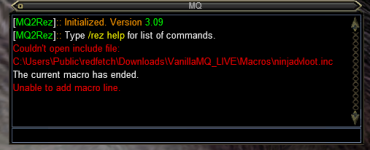
I have an MQ window but it only says:
MQ2Rez Initiated Version 3.09
Type /rez help for list of commands
Thanks for using MQNearBy. You have ~24 days left until you need to re-patch with the RedGuides.
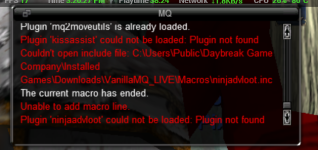
Then when I try /mac kissassist it says:
Couldn't open include file:
c:\users\public\redfetch\Downloads\vanillaMQ_EMU\Macros\Ninjadvloot.inc
The current macro ended.
Unable to add macro line.
With the new install Redfetch seems to have updated everything and macroquest runs in the tray. Autologin even works and gets me into the game. I have a MQNearBy window and a MQSearchItem window.
I have an MQ window but it only says:
MQ2Rez Initiated Version 3.09
Type /rez help for list of commands
Thanks for using MQNearBy. You have ~24 days left until you need to re-patch with the RedGuides.
Then when I try /mac kissassist it says:
Couldn't open include file:
c:\users\public\redfetch\Downloads\vanillaMQ_EMU\Macros\Ninjadvloot.inc
The current macro ended.
Unable to add macro line.