



If you guys haven't figured it out by now I'm a huge fan of LinqPad it let's you write C# scripts that compile at run time, etc etc etc.
This is a quick little utility to make sure you Ini files are well formed / valid. I also added the ability to mass update Section/Key/Value across all of your ini files.
I dump the file name as text for easy Copy & Paste along with any errors found.
1 - Download Linqpad
2 - Download KA-MassUpdate.txt and save it as KA-MassUpdate.linq (Couldn't upload .linq files )
3 - Open KA-MassUpdate.linq with Linqpad
4 - Update: var MacroPath = @"C:\MQ2\Macros"; to wherever your Macro folder is located
5 - Press F5
6 - Fix Errors || Have pretty printed Ini Files w/ updated values
Screenshots:
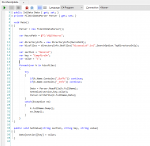
What it should look like inside LinqPad
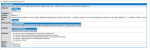
Sample of Error Found: (Line 31 inside the Ini file is where your error is)
- - - Updated - - -
It's amazing how much faster KA starts up when you have zero errors in your Ini file :P
This is a quick little utility to make sure you Ini files are well formed / valid. I also added the ability to mass update Section/Key/Value across all of your ini files.
I dump the file name as text for easy Copy & Paste along with any errors found.
1 - Download Linqpad
2 - Download KA-MassUpdate.txt and save it as KA-MassUpdate.linq (Couldn't upload .linq files
)3 - Open KA-MassUpdate.linq with Linqpad
4 - Update: var MacroPath = @"C:\MQ2\Macros"; to wherever your Macro folder is located
5 - Press F5
6 - Fix Errors || Have pretty printed Ini Files w/ updated values
Screenshots:
What it should look like inside LinqPad
Sample of Error Found: (Line 31 inside the Ini file is where your error is)
- - - Updated - - -
It's amazing how much faster KA starts up when you have zero errors in your Ini file :P
