
I am having an issue not being able to see my own characters name or any pc name or anything above there head. I tried loading default UI, switching window modes, going into general options to check an uncheck show names. This happens on all my accounts I have logged in only when using MQ. If I launch EQ normally I do not have this issue. Has anyone else experienced this? It only started since this latest patch. There is no crash, everything works normal, just cant see pc names. Oh if I cast invis it does not show I am invisible even if I target my self. Yes if I target my self it shows my name. I only see anyone's name if I target that pc. Thank you for time everyone. Any suggestions would be great.

-
 Hail, we're RedGuides. We want you to play six (yes, 6!) EverQuest characters at once. We have scripts and a friendly community to help, please join our playstyle and say hello! 👋
You are using an out of date browser. It may not display this or other websites correctly.
You should upgrade or use an alternative browser.
You should upgrade or use an alternative browser.
Problem - Issue with mq captions / names Sep 21, 2023
- Thread starter SGT-Trexter
- Start date


names go away after clicking someone again is there a command to make this not happen by chance ?

ty ill try that
did work but has a 2 second delay
did work but has a 2 second delay
I just checked I am not running captions.
I tried everything has to be something I am missing. I reinstalled mq and the issue is still there. I will keep trying, thank you everyone.
Your command worked /caption mqcaptions off, It was my spelling error. You guys are great thank you all so much.
I tried everything has to be something I am missing. I reinstalled mq and the issue is still there. I will keep trying, thank you everyone.
Your command worked /caption mqcaptions off, It was my spelling error. You guys are great thank you all so much.
This is an old thread -- not sure if this is still relevant. Based on the Caption wiki, it seems to be still.
Down to the issue. Something got fubared. The default behavior with the names stopped working. I am not sure what the source of the problem is. I have confirmed NPC names coloring works properly.
I created a new folder to download a barebone, clean install to dig through configuration files. The MacroQuest.ini created when logging in, does not have a [Captions] section or any entries like:
macroquest.ini created when running 1st time does not contain [Captions]
but it does display colored names and notations like LDR. I am left wondering why my install is fubared because my [Captions] section is also blank like the initial MacroQuest.ini. Are there any other configuration files regarding the display of names? It is going to take time to get this sorted (fixing what is broken or setting a new one up and trying to configure everything again). I was hoping I could fix the existing install.
Down to the issue. Something got fubared. The default behavior with the names stopped working. I am not sure what the source of the problem is. I have confirmed NPC names coloring works properly.
I created a new folder to download a barebone, clean install to dig through configuration files. The MacroQuest.ini created when logging in, does not have a [Captions] section or any entries like:
macroquest.ini created when running 1st time does not contain [Captions]
Code:
[Captions]
MQCaptions=1
Update=35
Player1=${If[${NamingSpawn.Mark},${NamingSpawn.Mark} - ,]}${If[${NamingSpawn.Trader},Trader ,]}${If[${NamingSpawn.Invis},(${NamingSpawn.DisplayName}),${NamingSpawn.DisplayName}]}${If[${NamingSpawn.AFK}, AFK,]}${If[${NamingSpawn.Linkdead}, LD,]}${If[${NamingSpawn.LFG}, LFG,]}${If[${NamingSpawn.GroupLeader}, LDR,]}
Player2=${If[${NamingSpawn.Mark},${NamingSpawn.Mark} - ,]}${If[${NamingSpawn.Trader},Trader ,]}${If[${NamingSpawn.Invis},(${NamingSpawn.DisplayName}),${NamingSpawn.DisplayName}]}${If[${NamingSpawn.Surname.Length}, ${NamingSpawn.Surname},]}${If[${NamingSpawn.AFK}, AFK,]}${If[${NamingSpawn.Linkdead}, LD,]}${If[${NamingSpawn.LFG}, LFG,]}${If[${NamingSpawn.GroupLeader}, LDR,]}
Player3=${If[${NamingSpawn.Mark},${NamingSpawn.Mark} - ,]}${If[${NamingSpawn.Trader},Trader ,]}${If[${NamingSpawn.Invis},(${NamingSpawn.DisplayName}),${NamingSpawn.DisplayName}]}${If[${NamingSpawn.Surname.Length}, ${NamingSpawn.Surname},]}${If[${NamingSpawn.AFK}, AFK,]}${If[${NamingSpawn.Linkdead}, LD,]}${If[${NamingSpawn.LFG}, LFG,]}${If[${NamingSpawn.GroupLeader}, LDR,]}${If[${NamingSpawn.Guild.Length},\n<${If[${NamingSpawn.GuildStatus.NotEqual[member]},${NamingSpawn.GuildStatus} of ,]}${NamingSpawn.Guild}>,]}
Player4=${If[${NamingSpawn.Mark},${NamingSpawn.Mark} - ,]}${If[${NamingSpawn.Trader},Trader ,]} ${If[${NamingSpawn.AARank}, ${NamingSpawn.AATitle} ,]} ${If[${NamingSpawn.Invis},(${NamingSpawn.DisplayName}),${NamingSpawn.DisplayName}]}${If[${NamingSpawn.Surname.Length}, ${NamingSpawn.Surname},]}${If[${NamingSpawn.Suffix.Length}~${If[${NamingSpawn.Suffix.Left[1].Equal[,]}~${NamingSpawn.Suffix}~ ${NamingSpawn.Suffix}]}~]}${If[${NamingSpawn.AFK}, AFK,]}${If[${NamingSpawn.Linkdead}, LD,]}${If[${NamingSpawn.LFG}, LFG,]}${If[${NamingSpawn.GroupLeader}, LDR,]}${If[${NamingSpawn.Guild.Length},\n<${If[${NamingSpawn.GuildStatus.NotEqual[member]},${NamingSpawn.GuildStatus} of ,]}${NamingSpawn.Guild}>,]}
NPC=${If[${NamingSpawn.Mark},${NamingSpawn.Mark} - ,]}${If[${NamingSpawn.Assist},>> ,]}${NamingSpawn.DisplayName}${If[${NamingSpawn.Assist}, - ${NamingSpawn.PctHPs}%<<,]}${If[${NamingSpawn.Surname.Length},\n(${NamingSpawn.Surname}),]}
Corpse=${NamingSpawn.DisplayName}'s corpse
Pet=${If[${NamingSpawn.Mark},${NamingSpawn.Mark} - ,]}${If[${NamingSpawn.Assist},>> ,]}${NamingSpawn.DisplayName}${If[${NamingSpawn.Assist}, - ${NamingSpawn.PctHPs}%<<,]}${If[${NamingSpawn.Master.Type.Equal[PC]},\n(${NamingSpawn.Master}),]}
but it does display colored names and notations like LDR. I am left wondering why my install is fubared because my [Captions] section is also blank like the initial MacroQuest.ini. Are there any other configuration files regarding the display of names? It is going to take time to get this sorted (fixing what is broken or setting a new one up and trying to configure everything again). I was hoping I could fix the existing install.
This is an old thread -- not sure if this is still relevant. Based on the Caption wiki, it seems to be still.
Down to the issue. Something got fubared. The default behavior with the names stopped working. I am not sure what the source of the problem is. I have confirmed NPC names coloring works properly.
I created a new folder to download a barebone, clean install to dig through configuration files. The MacroQuest.ini created when logging in, does not have a [Captions] section or any entries like:
macroquest.ini created when running 1st time does not contain [Captions]
Code:[Captions] MQCaptions=1 Update=35 Player1=${If[${NamingSpawn.Mark},${NamingSpawn.Mark} - ,]}${If[${NamingSpawn.Trader},Trader ,]}${If[${NamingSpawn.Invis},(${NamingSpawn.DisplayName}),${NamingSpawn.DisplayName}]}${If[${NamingSpawn.AFK}, AFK,]}${If[${NamingSpawn.Linkdead}, LD,]}${If[${NamingSpawn.LFG}, LFG,]}${If[${NamingSpawn.GroupLeader}, LDR,]} Player2=${If[${NamingSpawn.Mark},${NamingSpawn.Mark} - ,]}${If[${NamingSpawn.Trader},Trader ,]}${If[${NamingSpawn.Invis},(${NamingSpawn.DisplayName}),${NamingSpawn.DisplayName}]}${If[${NamingSpawn.Surname.Length}, ${NamingSpawn.Surname},]}${If[${NamingSpawn.AFK}, AFK,]}${If[${NamingSpawn.Linkdead}, LD,]}${If[${NamingSpawn.LFG}, LFG,]}${If[${NamingSpawn.GroupLeader}, LDR,]} Player3=${If[${NamingSpawn.Mark},${NamingSpawn.Mark} - ,]}${If[${NamingSpawn.Trader},Trader ,]}${If[${NamingSpawn.Invis},(${NamingSpawn.DisplayName}),${NamingSpawn.DisplayName}]}${If[${NamingSpawn.Surname.Length}, ${NamingSpawn.Surname},]}${If[${NamingSpawn.AFK}, AFK,]}${If[${NamingSpawn.Linkdead}, LD,]}${If[${NamingSpawn.LFG}, LFG,]}${If[${NamingSpawn.GroupLeader}, LDR,]}${If[${NamingSpawn.Guild.Length},\n<${If[${NamingSpawn.GuildStatus.NotEqual[member]},${NamingSpawn.GuildStatus} of ,]}${NamingSpawn.Guild}>,]} Player4=${If[${NamingSpawn.Mark},${NamingSpawn.Mark} - ,]}${If[${NamingSpawn.Trader},Trader ,]} ${If[${NamingSpawn.AARank}, ${NamingSpawn.AATitle} ,]} ${If[${NamingSpawn.Invis},(${NamingSpawn.DisplayName}),${NamingSpawn.DisplayName}]}${If[${NamingSpawn.Surname.Length}, ${NamingSpawn.Surname},]}${If[${NamingSpawn.Suffix.Length}~${If[${NamingSpawn.Suffix.Left[1].Equal[,]}~${NamingSpawn.Suffix}~ ${NamingSpawn.Suffix}]}~]}${If[${NamingSpawn.AFK}, AFK,]}${If[${NamingSpawn.Linkdead}, LD,]}${If[${NamingSpawn.LFG}, LFG,]}${If[${NamingSpawn.GroupLeader}, LDR,]}${If[${NamingSpawn.Guild.Length},\n<${If[${NamingSpawn.GuildStatus.NotEqual[member]},${NamingSpawn.GuildStatus} of ,]}${NamingSpawn.Guild}>,]} NPC=${If[${NamingSpawn.Mark},${NamingSpawn.Mark} - ,]}${If[${NamingSpawn.Assist},>> ,]}${NamingSpawn.DisplayName}${If[${NamingSpawn.Assist}, - ${NamingSpawn.PctHPs}%<<,]}${If[${NamingSpawn.Surname.Length},\n(${NamingSpawn.Surname}),]} Corpse=${NamingSpawn.DisplayName}'s corpse Pet=${If[${NamingSpawn.Mark},${NamingSpawn.Mark} - ,]}${If[${NamingSpawn.Assist},>> ,]}${NamingSpawn.DisplayName}${If[${NamingSpawn.Assist}, - ${NamingSpawn.PctHPs}%<<,]}${If[${NamingSpawn.Master.Type.Equal[PC]},\n(${NamingSpawn.Master}),]}
but it does display colored names and notations like LDR. I am left wondering why my install is fubared because my [Captions] section is also blank like the initial MacroQuest.ini. Are there any other configuration files regarding the display of names? It is going to take time to get this sorted (fixing what is broken or setting a new one up and trying to configure everything again). I was hoping I could fix the existing install.
I found a relevant post (Guide) describing captions and posted it there. That post seemed to be an authoritative post regarding how to use Caption. My post is lacking that context since it was excised from it and brought here.
At any rate, it must have been the update yesterday that broke this. I have a brand new clean install and PC names, LDR, etc. is still not showing. Whatever it was before yesterday, worked without needing to set it to anything in MacroQuest.ini or use /caption.
Last edited:

DEADCiTiES
Well-known member
I have this same issue since the recent and most recent-recent patch. You can toggle captions off/on, everything looks like it's working until new player information shows up or you zone. There are also times where other players guild tags are showing <Unknown Guild>. It's all happening with /shownames 4.

Nope, not KA. See thread belowhaving a issue not sure if its Kissassist or something else.. the names above some of my charactors randomly decided to disappear.. and the ones that are visable when i go Invisible they dont put a ( ) around the name any ideas?
Yup! The guru's with far more knowledge than us have been made aware and I'm sure will look into it. Lots going on for them since the last patch and they're working hard looking into all of it.strange how that just randomly happened

Hiya Ycleptjah,
There is a thread on it =)
There is a thread on it =)
there is also an issue on the mq sauce https://github.com/macroquest/macroquest/issues/755
Nailed it thank you!Hiya Ycleptjah,
There is a thread on it =)
Man I searched, couldn't find anything. Seems like everything has been posted before, lol.
Hello,
with MQ running the names of my character and the names of my group memebers are gone. They appear when i click on a toon. This is a bit annoying because i use this as a fast invisible check.
I know i could use /invisdisplay but i was not able to fix it on my desired position, and everytime i swap my window, the position is gone (with unlock and lock).
I am not sure, but i think this behaviour was starting since the last EQ patch (and MQ patch) and everything is fine without MQ
i tried it with all variations of /shownames but that didnt fix it. Any other ideas, or is that maybe a problem with mq?
thank you!
with MQ running the names of my character and the names of my group memebers are gone. They appear when i click on a toon. This is a bit annoying because i use this as a fast invisible check.
I know i could use /invisdisplay but i was not able to fix it on my desired position, and everytime i swap my window, the position is gone (with unlock and lock).
I am not sure, but i think this behaviour was starting since the last EQ patch (and MQ patch) and everything is fine without MQ
i tried it with all variations of /shownames but that didnt fix it. Any other ideas, or is that maybe a problem with mq?
thank you!

Lord Sivion
Ultimate seasoned veteran member
I wanted to know where this config file is. It isn't in the MQ config folder. I looked around, but I couldn't seem to locate a config ini for this plugin.
Lord Sivion
Ultimate seasoned veteran member
Doesn't seem to be. Only MQ2Rez options there.Believe it in your server_toonname.ini
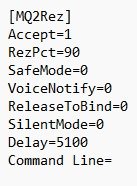
hrm, mq2labels doesn't have any ini.
are you mixed up with mq2captions?
labels just allows you to make some UI pieces display mq data
Lord Sivion
Ultimate seasoned veteran member
Well, I'm not sure actually. I thought MQ2labels had something to do with tags above the character heads in game? I know in-game this is handled as well. But I am having an intermittent issue where no tags are showing above player names only. No names, no guild tags. Toggling options on or off in the display options in EQ has no effect. If /unloading MQ and then re-injecting it, everything will show up again. So, I started searching for something that may be happening to cause this behavior. Although I am considering it's highly likely that this still may be due to a random bug from the changes DBG have been implementing with the UI lately as well.hrm, mq2labels doesn't have any ini.
are you mixed up with mq2captions?
labels just allows you to make some UI pieces display mq data
Edit: Also if the player is clicked, the name shows up until you clear the target in this particular problem.
no, that is mq2captions. which has a bug currently.Well, I'm not sure actually. I thought MQ2labels had something to do with tags above the character heads in game? I know in-game this is handled as well. But I am having an intermittent issue where no tags are showing above player names only. No names, no guild tags. Toggling options on or off in the display options in EQ has no effect. If /unloading MQ and then re-injecting it, everything will show up again. So, I started searching for something that may be happening to cause this behavior. Although I am considering it's highly likely that this still may be due to a random bug from the changes DBG have been implementing with the UI lately as well.
there's an active thread on it (to which several other threads have been merged into it)
Lord Sivion
Ultimate seasoned veteran member
Thanks Sic. I will give that a readno, that is mq2captions. which has a bug currently.
there's an active thread on it (to which several other threads have been merged into it)
Edit: The computer this was happening on had MQ2Captions set to on. I just set it to off like on the other computers I use with /caption mqcaptions off. And now the issue is resolved. Thanks again for the help
It also turns out the settings for the captions are in the Macroquest ini. This is why I could not find a file for it when searching for that one as well.
Last edited:

not a cwtn plugin error, and already a thread (and multiple other threads that were merged into the main thread).Not sure what changed, but any toon that is running CWTN Plugin doesn't display any toon's name unless they're targetted. Doesn't appear to be an issue with /shownames since that command didn't change anything.
I opened a bug ticket > here <

Tonydews
Well-known member
So there's this setting in-game that makes the target's remaining health % appear above it, it is currently checked in my settings and it used to work yesterday. Today it just isn't, despite still being checked. I don't know where else to ask as nothing online could be found about it after a good 15 minutes of searching.
Is it possible something caused by MQ2 and some plugins? I tried unloading the MQ2HUD plugin, but to no avail.
I have a screenshot here to prove my point. Even during combat it doesn't show.
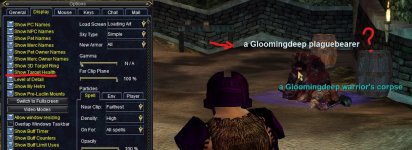
Is it possible something caused by MQ2 and some plugins? I tried unloading the MQ2HUD plugin, but to no avail.
I have a screenshot here to prove my point. Even during combat it doesn't show.
Lord Sivion
Ultimate seasoned veteran member
There is a bug. Refer to this thread
https://www.redguides.com/community...captions-names-sep-21-2023.87701/#post-574605
https://www.redguides.com/community...captions-names-sep-21-2023.87701/#post-574605
Users who are viewing this thread
Total: 1 (members: 0, guests: 1)
Share: