• You've discovered RedGuides, an EverQuest multi-boxing and scripting community 🧙‍♀️⚙️. We want you to play several EQ characters at once, come join us and say hello! 👋

  • A TLP without truebox has thawed (Very Vanilla ready)
    Frostreaver

Issue launching MQ with elevated permissions

Sic

Administrator
Moderator
Joined
May 5, 2016
RedCents
49,476¢
Pronouns
He/Him
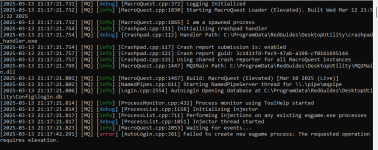
if you're having issues with autologin/mq "connecting/injecting" to everquest, you can toggle on the debug console

1739497662652.png

if after you turn that on and try and launch eq - and you get either of these, it means something is having an issue with running as administrator

1739497694983.png
or
1739497761262.png

you don't want eq run as administrator.

if you're just launching EQ / MQ through MQ loader then you need to check your eqgame.exe isn't set to "Run as Administrator"
if you launch eq/mq through something else, like isboxer you want to disable that in the settings for that program.


how to check if eqgame.exe is set to being launched as admin:
- open your everquest directory
- find eqgame.exe

1739452306747.png

Right click and click "Properties" - if you don't see properties click "Show more options" and then click "Properties"
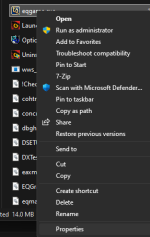
1739452349307.png

You do not want the "Run this program as an administrator" checked.
You also do NOT want compatibility mode
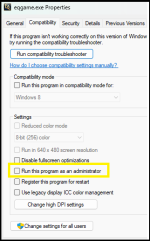
1739452435365.png


If you are using ISBoxer
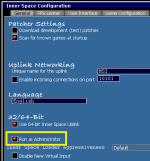
you want to open your Inner Space Configuration, and under the General Tab you want to have deselected "Run as Administrator"
in this screenshot it is selected, you don't want the red dot on that option.

Make sure to hit save after making this change
1739452502500.png

If you are being PROMPTED asking for elevated permission - like using Joeboxer - you also don't want to give it, because that is also doing the elevated administrator permission.
 
Last edited:
Thank you!!! This worked for me as well!!

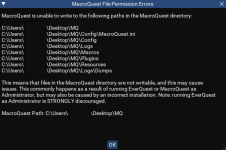
Below is what my box was showing me.
Was an easy fix. Check the properties of your Vanilla folder and uncheck "read-only". After that, I don't get that message anymore. Guessing something recent enabled that checkbox.
 
Gonna take a guess that it isn't just autologin, that MQ as a whole isn't.

Did you check this thread

 
Getting the following issue as well.
EQ is not admin. RG Launcher is not admin. MQ / obfuscated MQ is not admin. VErified them all, changed to admin and back. Still having write issues.

Not sure what else to check to fix this.

1741834547924.png

Followup:
While none of the executables or RG launcher are flagged run as admin in compatibility, the debug console has the following:

Code:
[2025-03-12 22:54:53.130] [MQ] [debug] [MacroQuest.cpp:372] Logging Initialized
[2025-03-12 22:54:53.135] [MQ] [info] [MacroQuest.cpp:1822] Starting MacroQuest Loader (Elevated). Built Wed Mar 12 09:53:22 2025
[2025-03-12 22:54:53.136] [MQ] [info] [MacroQuest.cpp:1857] I am a spawned process
[2025-03-12 22:54:53.145] [MQ] [warning] [MacroQuest.cpp:1752] No write access to path: C:\Users\----\Desktop\MQ
[2025-03-12 22:54:53.145] [MQ] [warning] [MacroQuest.cpp:1752] No write access to path: C:\Users\----\Desktop\MQ\Config\MacroQuest.ini
[2025-03-12 22:54:53.146] [MQ] [warning] [MacroQuest.cpp:1752] No write access to path: C:\Users\----\Desktop\MQ\Config
[2025-03-12 22:54:53.146] [MQ] [warning] [MacroQuest.cpp:1752] No write access to path: C:\Users\----\Desktop\MQ\Logs
[2025-03-12 22:54:53.146] [MQ] [warning] [MacroQuest.cpp:1752] No write access to path: C:\Users\----\Desktop\MQ\Macros
[2025-03-12 22:54:53.146] [MQ] [warning] [MacroQuest.cpp:1752] No write access to path: C:\Users\----\Desktop\MQ\Plugins
[2025-03-12 22:54:53.147] [MQ] [warning] [MacroQuest.cpp:1752] No write access to path: C:\Users\----\Desktop\MQ\Resources
[2025-03-12 22:54:53.147] [MQ] [warning] [MacroQuest.cpp:1752] No write access to path: C:\Users\----\Desktop\MQ\Logs\Dumps
[2025-03-12 22:54:53.156] [MQ] [error] [MacroQuest.cpp:1949] Permission Error with Crashpad path, not initializing crashpad

I have nothing telling it to run elevated - but it apparently is anyway. Double/triple checked shortcuts/executables/launchers. write seems related toc rashpad perhaps?

Followup #2
When launching MQ through the RG Launcher, it's giving elevated comments (see above) in the debug console. The RG utility folder also is not running as admin, none of those executable are nor the shortcut.

When launching MQ directly from mq.exe or the obfuscated executable, the elevation is gone, but the write permissions persist.

Unsure if this is helpful or not.
 
Having this same issue. Have gone in and checked Administration settings and nothing seems to be catching my eye. Getting the warning’s and 1 error message on files. :f5:
 
I changed everquest to not run as administrator (not sure why this was set that way) and no compatoability - now when I launch it brings up the debug screen as per screenshot - to click on the mq compatability it come sback with that the path is incorrect - it was working fine before teh patch - thanks for your help 1741838050731.png
 
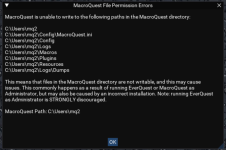
i appear to have an issue with VV launching as well. Looks like the files are unwritable. Go to C disk, Users, Mq2 folder and right click, properties, and it's "Checked" for Read only. I un check it, apply, let it run, and once it completes the same issue happens again.

Virus turned off.

MQ launches (So maybe im a false positive??) but toon never makes it in game after character select.
Oh well, going to bed and will try again tomorrow.


1.png2.png
 
Last edited:
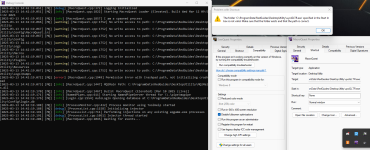
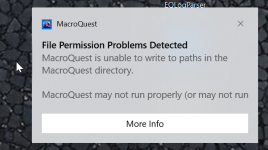
So just ran the latest update, eqgame is not set as run as administrator and compatability not ticked, same for RG launcher file , rebooted and Im still getting this - no luck with autologin but if I manually log each character in via eq launchpad and use MQ2 on my toons. So just need my autologin to be fixed. Oh and when I hover over my macroquest icon is says its elevated 1741861499947.png
1741861175845.png
 
So just ran the latest update, eqgame is not set as run as administrator and compatability not ticked, same for RG launcher file , rebooted and Im still getting this - no luck with autologin but if I manually log each character in via eq launchpad and use MQ2 on my toons. So just need my autologin to be fixed. Oh and when I hover over my macroquest icon is says its elevated View attachment 68892
View attachment 68891

This was happening to me, i started by checking eqgame.exe which was not running as admin, but apparently my RedGuides Launcher was running as admin. Once i unchecked that, everything worked fine.
 
So just ran the latest update, eqgame is not set as run as administrator and compatability not ticked, same for RG launcher file , rebooted and Im still getting this - no luck with autologin but if I manually log each character in via eq launchpad and use MQ2 on my toons. So just need my autologin to be fixed. Oh and when I hover over my macroquest icon is says its elevated View attachment 68892
View attachment 68891
and did you check that your macroquest isn't being launched as admin? because as you show, mq is elevated

you will want to determine that and change it.
 
and did you check that your macroquest isn't being launched as admin? because as you show, mq is elevated

you will want to determine that and change it.
checked everything one final time, and rglauncher had run as administrator - thank you so much for your patience - the rg launcher on the start bar was the problem - you guys are great and I can go back to enjoying the game.
 
Completely baffled. Starts OK, updates fine. Try to load a profile, all errors: [2025-08-11 11:54:48.109] [MQ] [error] [AutoLogin.cpp:361] Failed to create new eqgame process: The requested operation requires elevation. I am SURE nothing is running elevated. This IS new, was working good in the recent past. The only complication I can remember is I installed RedFetch. I prefer Loader, more informative, so removed Rfetch.
 

Attachments

Completely baffled. Starts OK, updates fine. Try to load a profile, all errors: [2025-08-11 11:54:48.109] [MQ] [error] [AutoLogin.cpp:361] Failed to create new eqgame process: The requested operation requires elevation. I am SURE nothing is running elevated. This IS new, was working good in the recent past. The only complication I can remember is I installed RedFetch. I prefer Loader, more informative, so removed Rfetch.
this isn't redguides launcher problem (other than you might be running RG launcher as admin) (so i'm going to move this out of the rg launcher discussion)

I know you said you are SURE nothing is elevated - but it CLEARLY is

INI:
[2025-08-11 11:54:02.603] [MQ] [info] [MacroQuest.cpp:1830] Starting MacroQuest Loader (Elevated). Built Wed Mar 12 21:53:32 2025
[2025-08-11 11:54:02.968] [MQ] [info] [MacroQuest.cpp:1467] Build: MacroQuest (Elevated) [Jul 18 2025 (Live)]

for some reason MQ is launching elevated

check you don't have the RG launcher running as admin
check that you don't have your mq running as admin
 
this isn't redguides launcher problem (other than you might be running RG launcher as admin) (so i'm going to move this out of the rg launcher discussion)

I know you said you are SURE nothing is elevated - but it CLEARLY is

INI:
[2025-08-11 11:54:02.603] [MQ] [info] [MacroQuest.cpp:1830] Starting MacroQuest Loader (Elevated). Built Wed Mar 12 21:53:32 2025
[2025-08-11 11:54:02.968] [MQ] [info] [MacroQuest.cpp:1467] Build: MacroQuest (Elevated) [Jul 18 2025 (Live)]

for some reason MQ is launching elevated

check you don't have the RG launcher running as admin
check that you don't have your mq running as admin
As advised when coming to RedGuides Sic is excellent info source and 99.998 always correct. Sic you were 100% correct. But there is a twist too, there are some folder problems, and was why I missed the admin/elevated. Too much wasted time by all on this. I'm going to remove the loader AND the files in incorrect folders, then reinstall. Sic, I truly apologize for wasting your time. And pray you will forgive my error...
 
As advised when coming to RedGuides Sic is excellent info source and 99.998 always correct. Sic you were 100% correct. But there is a twist too, there are some folder problems, and was why I missed the admin/elevated. Too much wasted time by all on this. I'm going to remove the loader AND the files in incorrect folders, then reinstall. Sic, I truly apologize for wasting your time. And pray you will forgive my error...
that's kind of an awkward reply, hope you're doing alright.

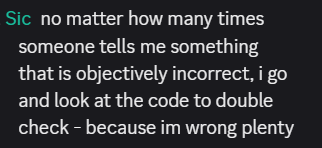
best piece of advice i can give you is “Strong opinions, weakly held,” which i first heard and usually say "Strong convictions, loosely held" - but the idea is the same.

for *everyone* the idea of being 100% super duper certain with absolute immutability is 100% prohibitive towards resolving whatever the issue is, and often feels for both parties combative.

I was pretty sure that me all-capsing the "CLEARLY" was going to be taken as intended: slightly sarcastic mirroring your all-capsed SURE - or taken as me being a dick --- it sounds like you might have taken it as me being a dick, I'm sorry about that, definitely wasn't *trying* to do that, but i definitely *was* trying to illustrate the point

for folks like me, or algar, or kaen, or cwtn, or hytiek, or durango, or greg or ams, or ryn or brainiac any of the "regular helpers" it is far more important to us to help you resolve your issue, than to get into a tangle due to personalities and miscommunication due to the nature of text/discord/forum communication.

"I am SURE of xyz" - sounds like you're not open to suggestions/changes or willing to check
"Man, I'm pretty sure, but I'm obviously missing something, can i get a second set of eyes to tell me im crazy/notcrazy" - sounds like you definitely 100% tried, but understand that *something* is missing still.

I can't tell you the amount of times that anyone_who_has_been_here_a_while has run into that - without vigorous intentional actions we all still sometimes still run into that fully knowing better.

1754935421453.png
anyhow - thanks for posting your issue (so you can get help), and thanks for coming back with the results.

as a complete side --- what about redfetch didn't you like? it has some mega benefits current and future, it would be a shame for it to be something that sucks for you if we can do better


just for the record - you didn't waste my time, I'm happy to help you bud

also for the record - definitely not 99.998
 
that's kind of an awkward reply, hope you're doing alright.

best piece of advice i can give you is “Strong opinions, weakly held,” which i first heard and usually say "Strong convictions, loosely held" - but the idea is the same.

for *everyone* the idea of being 100% super duper certain with absolute immutability is 100% prohibitive towards resolving whatever the issue is, and often feels for both parties combative.

I was pretty sure that me all-capsing the "CLEARLY" was going to be taken as intended: slightly sarcastic mirroring your all-capsed SURE - or taken as me being a dick --- it sounds like you might have taken it as me being a dick, I'm sorry about that, definitely wasn't *trying* to do that, but i definitely *was* trying to illustrate the point

for folks like me, or algar, or kaen, or cwtn, or hytiek, or durango, or greg or ams, or ryn or brainiac any of the "regular helpers" it is far more important to us to help you resolve your issue, than to get into a tangle due to personalities and miscommunication due to the nature of text/discord/forum communication.

"I am SURE of xyz" - sounds like you're not open to suggestions/changes or willing to check
"Man, I'm pretty sure, but I'm obviously missing something, can i get a second set of eyes to tell me im crazy/notcrazy" - sounds like you definitely 100% tried, but understand that *something* is missing still.

I can't tell you the amount of times that anyone_who_has_been_here_a_while has run into that - without vigorous intentional actions we all still sometimes still run into that fully knowing better.

View attachment 71101
anyhow - thanks for posting your issue (so you can get help), and thanks for coming back with the results.

as a complete side --- what about redfetch didn't you like? it has some mega benefits current and future, it would be a shame for it to be something that sucks for you if we can do better


just for the record - you didn't waste my time, I'm happy to help you bud

also for the record - definitely not 99.998

Nope, no dicks involved or assumed. Just giving acknowledgement :golfclap:and praise as deserved. I'll get back about Fetch, I'd like to word it properly/clearly. ;) Plus, still need to finish with RGL!
 
Nope, no dicks involved
Seth Meyers Lol GIF by Late Night with Seth Meyers
 
Issue launching MQ with elevated permissions

Users who are viewing this thread

Back
Top
Cart