Warl0ck45
Well-known member
This is not to nix folks from trying out the new MQ2Targetinfo plugin with it's hotbuttons. I have been waiting for thing to simmer down some before giving it a try myself, but I generally prefer window with out the outside trim. Hm, wonder if I can do that... after the holidays...
I just know how it feels to be like "I like this BUT..." and did this myself some time back, and it has not broken for 6-7 expansions. The target window is close and it seems some folks wanted just the target window, so thought I would put it out for those folks who want to give it a try.
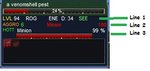
Target Window. It is a modified version of the default one... took the trim off the edges so the sides are slim. You can adjust the size by grabbing a corner and moving it. Obviously this has some MQ enhancement =)
The target name background will reflect it's con color
Line 1 = Target level, Target Class, Target direction, Target distance, Line of Sight indicator.
Line 2 = Your aggro percentage, secondary aggro holder, secondary aggro percentage
Line 3 = HoTT (Health of Target's Target) and of course, the HoTT's name.
https://drive.google.com/open?id=0BxTGRVEV87-5RWdHUTFTMEFnbUU
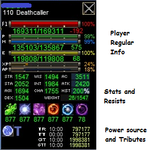
Next is a player window with no MQ enhancement, but is a ton of info for those folks weird like me and want to know what that baddy just did to the toon at a glance. (this window requires the file players.dds to work properly)
As you can see the player regular info is there and then some. All the numbers are in green on black... but they reflect the bar they are under (except pet bar) with color coded percentages at the end of the bar. This includes the HP regen rate, mana regen rate, and endurance regen rate. (all taken from EQ, not MQ) along with your player state (rest, combat, ect...)
Stats and resistance... along with haste percentage and weight. Same as if you were looking at your stat screen, they will go red if you are debuffed and lose something.
Bottom section holds the timer and amount for Tribute, Trophy Tribute, Guild Tribute, and Guild Trophy Tribute, along with power source, email indicator and the giant T will open tribute window.
The outside edge of the window will flash red when melee'ing.
window----> https://drive.google.com/open?id=0BxTGRVEV87-5Ty1FZGVxOTBrQ0U
player.dds-> https://drive.google.com/open?id=0BxTGRVEV87-5OGlDNjMwZHNPUjg
I just know how it feels to be like "I like this BUT..." and did this myself some time back, and it has not broken for 6-7 expansions. The target window is close and it seems some folks wanted just the target window, so thought I would put it out for those folks who want to give it a try.
Target Window. It is a modified version of the default one... took the trim off the edges so the sides are slim. You can adjust the size by grabbing a corner and moving it. Obviously this has some MQ enhancement =)
The target name background will reflect it's con color
Line 1 = Target level, Target Class, Target direction, Target distance, Line of Sight indicator.
Line 2 = Your aggro percentage, secondary aggro holder, secondary aggro percentage
Line 3 = HoTT (Health of Target's Target) and of course, the HoTT's name.
https://drive.google.com/open?id=0BxTGRVEV87-5RWdHUTFTMEFnbUU
Next is a player window with no MQ enhancement, but is a ton of info for those folks weird like me and want to know what that baddy just did to the toon at a glance. (this window requires the file players.dds to work properly)
As you can see the player regular info is there and then some. All the numbers are in green on black... but they reflect the bar they are under (except pet bar) with color coded percentages at the end of the bar. This includes the HP regen rate, mana regen rate, and endurance regen rate. (all taken from EQ, not MQ) along with your player state (rest, combat, ect...)
Stats and resistance... along with haste percentage and weight. Same as if you were looking at your stat screen, they will go red if you are debuffed and lose something.
Bottom section holds the timer and amount for Tribute, Trophy Tribute, Guild Tribute, and Guild Trophy Tribute, along with power source, email indicator and the giant T will open tribute window.
The outside edge of the window will flash red when melee'ing.
window----> https://drive.google.com/open?id=0BxTGRVEV87-5Ty1FZGVxOTBrQ0U
player.dds-> https://drive.google.com/open?id=0BxTGRVEV87-5OGlDNjMwZHNPUjg