Whenever, I load up my toons via ISBOXER , the CWTN window is not showing up on each character. However, the CWTN shows up outside of ISBOXER. Is there a setting I am missing. It use to work a couple of years ago. So more than likely user issue on my end. Thoughts and reccomendations appreciated

Install the app
How to install the app on iOS
Follow along with the video below to see how to install our site as a web app on your home screen.
Note: This feature may not be available in some browsers.
-
 You've discovered RedGuides, an EverQuest multi-boxing and scripting community 🧙♀️⚙️. We want you to play several EQ characters at once, come join us and say hello! 👋
You are using an out of date browser. It may not display this or other websites correctly.
You should upgrade or use an alternative browser.
You should upgrade or use an alternative browser.
ImGui window outside eq?
- Thread starter Squirrely
- Start date
Solution

it sounds like you have your imgui windows set to allow "viewports" which lets you drag them off the screen. you can turn that off (or just drag it back on screen)Whenever, I load up my toons via ISBOXER , the CWTN window is not showing up on each character. However, the CWTN shows up outside of ISBOXER. Is there a setting I am missing. It use to work a couple of years ago. So more than likely user issue on my end. Thoughts and reccomendations appreciated
this is in your MQ settings (/mqsettings - or eq menu button) -> overlay -> Enable Viewports
if you wanted to start "fresh" with all your imgui windows you can click the "Clear Saved ImGui Window Settings"
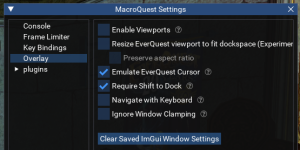
sounds like you moved them "out of bounds" and isboxer...

it sounds like you have your imgui windows set to allow "viewports" which lets you drag them off the screen. you can turn that off (or just drag it back on screen)Whenever, I load up my toons via ISBOXER , the CWTN window is not showing up on each character. However, the CWTN shows up outside of ISBOXER. Is there a setting I am missing. It use to work a couple of years ago. So more than likely user issue on my end. Thoughts and reccomendations appreciated
this is in your MQ settings (/mqsettings - or eq menu button) -> overlay -> Enable Viewports
if you wanted to start "fresh" with all your imgui windows you can click the "Clear Saved ImGui Window Settings"
sounds like you moved them "out of bounds" and isboxer is screwing you up
in your /mqsettings go to overlay
uncheck "Allow viewports" in MQsettings -> Overlay to be able to move an IMGui window outside the EQ window boundaries.
you might need instead or in addition to the "Ignore Window Clamping" specifically for isboxer issues
Last edited:
sounds like you moved them "out of bounds" and isboxer is screwing you upFollowed the steps above - still having issues with the MQ Setting Window(CWTN) not showing up when grouped using isboxer and have to believe it is the cause. Any ideas to correct would be appreciated.
in your /mqsettings go to overlay
uncheck "Allow viewports" in MQsettings -> Overlay to be able to move an IMGui window outside the EQ window boundaries.
you might need instead or in addition to the "Ignore Window Clamping" specifically for isboxer issues
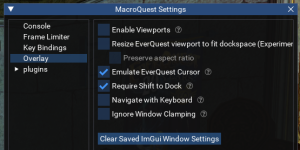
you probably want enable viewports off and "ignore window clamping" on and then hit the "Clear Saved ImGui Window Settings" button
Deleted ISBoxer and reinstalled - still same results. the CWTN window in not showing when logging char's in via isboxer/innerspace. Note macroquest settings are only able to changed outside of Isboxer program.
Open to try anything.
Open to try anything.
just for clarity sake, since i'm trying to help assuage confusion - the cwtn windows are just imgui windows. so this behavior assumedly would be happening with any of your imgui windows.Deleted ISBoxer and reinstalled - still same results. the CWTN window in not showing when logging char's in via isboxer/innerspace. Note macroquest settings are only able to changed outside of Isboxer program.
Open to try anything.
the window locations are stored by mq in your macroquest_overlay.ini --- the "Clear Saved ImGui Window Settings" clears that out so everything is default.
you said "deleted iboxer and reinstalled" but i have no idea if you did the things i've suggested a couple times.
did you do the things i mentioned?Open to try anything.
This is a bit confusing, as a couple times you have interchanged macroquest with CWTN. What do you mean by macroquest settings, and not being able to change them outside of ISB? Can you access the MQ settings for viewport and overlay as Sic mentioned when using ISB? Are all your other MQ windows showing up and only CWTN not showing?Note macroquest settings are only able to changed outside of Isboxer program.
Otherwise, I was going to ask if the CWTN (MQWar, MQxxx) window shows up without ISB. If not, have you simply tried /war show (or whatever CWTN you are using)?
Otherwise, I was going to ask if the CWTN (MQWar, MQxxx) window shows up without ISB. If not, have you simply tried /war show (or whatever CWTN you are using)? **The CWTN window shows up without ISB.***
while running MQ with isboxer -> /mqsettingsyou said "deleted iboxer and reinstalled" but i have no idea if you did the things i've suggested a couple times.
did you do the things i mentioned?
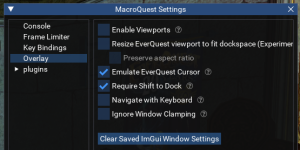
then go and click OFF "enable viewports
then go and click ON "Ignore Window Clamping"
then click "Clear Saved ImGui Window Settings"
then load or unload -> load the cwtn plugin you are running on that toon
*IF* /mqsettings doesn't show the MacroQuest Settings window, then you likely either a: don't have macroquest running (often due to a privilege issue) or b: something is causing a conflict with the imgui overlay system --- this is often due to *other overlays* so if you're utilizing settings in isboxer that is overlaying icons or images you might have that conflict preventing you from seeing the imgui windows


- Joined
- Dec 29, 2017
- RedCents
- 24,680¢
I tend to agree with Brain here. It's not CWTN plugin specific, instead it's all of your ImGui windows bsed on your response about MQ Settings window not pulling up.
Check for Nahemic, Overwolf, or anything else that overlays onto the game window, such as discord overlaying who's voice chatting currently. This is going to be something external to MQ that is causing the issue.
Check for Nahemic, Overwolf, or anything else that overlays onto the game window, such as discord overlaying who's voice chatting currently. This is going to be something external to MQ that is causing the issue.
Yep, so as we worked to, if all imgui windows aren't working, then you need to fix that.Sic per your last post above. I tried that first. Doing /mqsettings while in ISB does not pull up the MQ Settings Window.
I think your problem is other overlays are interfering with the mq overlay. Isboxer is one of them and that usually works but combine it with other overlay software and it can break things.
So, should work on turning off the overlays in isboxer - now we've established that mq overlays themselves are not working when running isboxer.*IF* /mqsettings doesn't show the MacroQuest Settings window, then you likely either a: don't have macroquest running (often due to a privilege issue) or b: something is causing a conflict with the imgui overlay system --- this is often due to *other overlays* so if you're utilizing settings in isboxer that is overlaying icons or images you might have that conflict preventing you from seeing the imgui windows
We spent a lot of time on other stuff due to the "outside of isboxer" part, but now we know what we're talking about
Let me start off by saying that I don't know if this will fix the issue for everyone!
I built a new gaming machine over the holidays, as well as reinstalled EQ, MQ, and Innerspace on a gaming laptop I had lying around.
After completing both, neither would allow me to use any IMGUI windows. Including CWTN plugins, MQsettings, and ButtonMaster to name a few. If I loaded the toons from MQ and not from InnerSpace, I could get those windows to work. This did get a little frustrating trying to troubleshoot, but I was able to get myself a workaround.
Let me also say that before building the new Desktop and redoing my Gaming Laptop, I was able to get this working on the latest versions of all applications involved, and now it's not working.
I was able to ultimately get everything working again by rolling back Innerspace to an older version.
The sweet spot for me was version 1.19, version 7242
If you are having similar issues, you can install the latest version of Innerspace and, from a command prompt (I ran it as Administrator), run the following command.
"%programdata%\Lavish Software\utils\lavishbuild" install innerspace live "1.19 Build 7242"
This will rollback the Innerspace version to the one I was able to get working on both my desktop and laptop.
Also, a note here: Even after getting it working on this version, if I updated to any version newer than this one, it would start with the issues again.
If someone comes up with a permanent solution to update to the latest version of Innerspace, I would be happy to try it out, too.
Hope this helps someone else out.
I built a new gaming machine over the holidays, as well as reinstalled EQ, MQ, and Innerspace on a gaming laptop I had lying around.
After completing both, neither would allow me to use any IMGUI windows. Including CWTN plugins, MQsettings, and ButtonMaster to name a few. If I loaded the toons from MQ and not from InnerSpace, I could get those windows to work. This did get a little frustrating trying to troubleshoot, but I was able to get myself a workaround.
Let me also say that before building the new Desktop and redoing my Gaming Laptop, I was able to get this working on the latest versions of all applications involved, and now it's not working.
I was able to ultimately get everything working again by rolling back Innerspace to an older version.
The sweet spot for me was version 1.19, version 7242
If you are having similar issues, you can install the latest version of Innerspace and, from a command prompt (I ran it as Administrator), run the following command.
"%programdata%\Lavish Software\utils\lavishbuild" install innerspace live "1.19 Build 7242"
This will rollback the Innerspace version to the one I was able to get working on both my desktop and laptop.
Also, a note here: Even after getting it working on this version, if I updated to any version newer than this one, it would start with the issues again.
If someone comes up with a permanent solution to update to the latest version of Innerspace, I would be happy to try it out, too.
Hope this helps someone else out.
Users who are viewing this thread
Total: 1 (members: 0, guests: 1)
Share: