Manual mode is a must. I switch to peeps every emote anyway because it only mostly works and I never figured out why it doesn't always work. I made a manual mode button and target clear for each toon and sometimes need to use them and manually kneel. I don't farm it, I only bring toons through who need it as I fully agree with Sic that the mission is stupid.

-
 Hail, we're RedGuides. We want you to play six (yes, 6!) EverQuest characters at once. We have scripts and a friendly community to help, please join our playstyle and say hello! 👋
You are using an out of date browser. It may not display this or other websites correctly.
You should upgrade or use an alternative browser.
You should upgrade or use an alternative browser.
Tip - Icebound Avatar - ToV Kael - Hero Mission
- Thread starter jimbob
- Start date

Test your mq2events by typing out the trigger lines and see if your characters react appropriately.So i made the mq2events and trying to get a successful Kael run but it wont duck i copied alot of what @Sic did for his my group makeup is War using plugin in manual mode Cleric bst Zerk zerk and bard i am even trying to tab to them to do it but mess up quite a bit

So i made the mq2events and trying to get a successful Kael run but it wont duck i copied alot of what @Sic did for his my group makeup is War using plugin in manual mode Cleric bst Zerk zerk and bard i am even trying to tab to them to do it but mess up quite a bit
So in your ..\MQ2\Release folder you should have a file for each character that looks like mq2events_charname.ini
These events work for my characters about 95% of the time. It's more perfect on casters, least perfect on bard for some reason...
Also note you must have configured a NAV waypoint for the /nav spawn command to work properly.
ToV event coding
INI:
[BendKnee]
trigger=#*# that MyCharName must bend the#*#
command=/multiline ; /mqp on ; /stopsong ; /stopcast ; /keypress d

[StandUp]
trigger=#*#Avatar of War nods, accepting the subservience of those that gave#*#
command=/multiline ; /stand ; /mqp off

[NeedRestlessIceCure]
trigger=#.#You have taken #*# damage from Restless Ice by #*#
command=/tell MyGroupCleric I need a cure for Restless Ice!

[avatarp2]
trigger=#*#The Avatar of War changes the rules and chooses a new field of battle!#*#
command=/nav spawn Icebound Avatar of War

[Narandi splits]
trigger=#*#Narandi appears to shatter#*#
command=/multiline ; /backoff on ; /pet regroup on

[Narandi reforms]
trigger=#*#A shell of restless ice falls away to reveal the true Narandi the Restless!#*#
command=/multiline ; /backoff off ; /pet regroup offDoes mq2log have be going too ?
Negative, MQ2Events is monitoring the normal Everquest text stream.

Double chek your events file is called .ini and not .ini.txt or ini.ini
Helped several folks recently who had that issue
Whoever it was at Microsoft that decided file extensions should be hidden by default needs to spend eternity in Hell doing Tech Support calls.

yeah 100% - I recently added this info to the mq2events thing since it happens more frequently - especially with mq2events since users have to generate the character file themselves. It is really stupid that the extention is hidden like that. its not like folks are TRYING to .ini.ini or .ini.txt i mean c'mon MicrosoftWhoever it was at Microsoft that decided file extensions should be hidden by default needs to spend eternity in Hell doing Tech Support calls.
2 Common Issues:
1. Ensure you have created your MQ2Events_ToonName.ini file in your RELEASE folder
2. Ensure the file is "MQ2Events_ToonName.ini" where ToonName is your dude like MQ2Events_Bob.ini --- you can't have MQ2Events_Bob.ini.ini or MQ2Events_Bob.ini.txt to verify your file type is correct:
open your release folder, Click the "View" tab

Move over to the right and select "File Name Extentions"
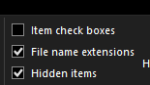
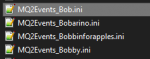
Then you should see your MQ2Events_ToonName.ini files
This is correct
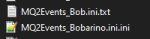
This is NOT Correct

I have exactly the same problem with my bardsThese events work for my characters about 95% of the time. It's more perfect on casters, least perfect on bard for some reason...

Me either, ended up just brute forcing the first part of the event and tanking all the adds with a dragon glyph, I'll never see those achievements lmao.I cant seem to get this to work at all.
If you guys are using KA or Melee it could be an issue. I had this problem and recommended the fix to others on the original thread. /stick off command added might fix your issues.
Otherwise I’d browse the original guid thread - lot of fixes/suggestions there.
Otherwise I’d browse the original guid thread - lot of fixes/suggestions there.
actual screen shots might be more helpful.Thing is.. On my main Toon ''Active Event'' blue, all good.. and I dont have an event for that toon..
Other toons in group.. I got events for, red text ''Could not Parse'' Que?!
actual screen shots might be more helpful.
No need, I gave up trying.. to many question marks.

Krujoeclipse81
Member
Im having so much trouble with this, adds spawn way to quick. and im not even sure everyone is ducking =/ CTWN cleric/shaman/sk/bst/mage MuleAssist=Bard
you absolutely can not dps the boss.Im having so much trouble with this, adds spawn way to quick. and im not even sure everyone is ducking =/ CTWN cleric/shaman/sk/bst/mage MuleAssist=Bard
in my vid (in signature) i have everyone in manual mode and i call them to dps on the adds - you can't go wailing on the boss, you will cross the thresholds too quickly and spawn adds and die a miserable death
you absolutely can not dps the boss.
in my vid (in signature) i have everyone in manual mode and i call them to dps on the adds - you can't go wailing on the boss, you will cross the thresholds too quickly and spawn adds and die a miserable death
This x100. This is especially true since they locked out avatar and you have to kill all the adds now.

Robban
Ultimate seasoned veteran member
Yeah, Tank DPS on the Boss, the rest should be resting and hyping up to DPS the adds.Im having so much trouble with this, adds spawn way to quick. and im not even sure everyone is ducking =/ CTWN cleric/shaman/sk/bst/mage MuleAssist=Bard
Krujoeclipse81
Member
Sic, whats your Assist key hotbuttons i im trying to read it from the video but think i wrote it out wrong.
Sic, whats your Assist key hotbuttons i im trying to read it from the video but think i wrote it out wrong.

Utility - Sic's Hotkeys
*** IMPORTANT*** (as of September 2023 we make the aliases for you if you dont already have them) To use the /cwtn and /cwtna etc ALIASES, please make sure you create them. There are instructions down below. Please don't listen to the "Chase...
 www.redguides.com

for Cwtn plugins, it will be more /(class shortname) mode 0 and then /keypress esc
I'm thinking about trying this with just simply tabbing over to a character and hitting a hot button. Would the following work? I'll have a BST/Mage/Bard/Pal I can put Bard on KA for this one.
Will /mqp work for toggling CWTN toons as well as Kissassist for Bard?
Or will I have to do something like
/bst mode0
/keypress d
then for standing back up
/bst mode 2
/keypress d
If I could just have a button for everyone like
/mqp
/keypress d
That would be easiest. Technically for the CWTN guys, I could just press my CHASE button to have them resume and stand back up. Am I thinking through this correctly?
My chase button:
/cwtn mode 2
/dgge /chaseon
To take it a bit further, I bet you could have a Key on your Tank for each person on your team.
When you see the emote, you hit the button for the corresponding person.
/dex character name /mqp
/dex character name /keypress d

Nope. You will want mq2boxr for this!Will /mqp work for toggling CWTN toons as well as Kissassist for Bard?
I find it easier to use one of the event files or Lua's folks have made and let them pause, duck, unpause all on their own but you're on the right track with the keys if you want to do it that way. Easy to test if you take your group to a lonely dark place and press keys all by yourself to see what works for you =)
Nope. You will want mq2boxr for this!
I find it easier to use one of the event files or lua's folks have made and let them pause, duck, unpause all on their own but you're on the right track with the keys if you want to do it that way. Easy to test if you take your group to a lonely dark place and press keys all by yourself to see what works for you =)
Would seem if I can send /dex commands to my characters to cast spells, then I should be able to pause them and /keypress D also. Might be easier with bard on the Lua mercs. Right now my chase button as an example also has the /rgl chaseon option in it so both cwtn and the Bard will chase.
So maybe for Bard the button on my tanks screen would be:
For kneeling:
/dex (bards name) /rgl pause on
/dex (bards name )/keypress d
For standing back up and resume:
/dex (bards name ) /rgl pause off
/dex (bards name) /keypress d
I find it easier to use one of the event files or lua's folks have made and let them pause, duck, unpause all on their own but you're on the right track with the keys if you want to do it that way. Easy to test if you take your group to a lonely dark place and press keys all by yourself to see what works for you =)
If I download Lua Event Manager. Is it just a drop down in the UI for choosing Ice bound avatar or do i have to go into the files and create something for each character going in?

If I download Lua Event Manager. Is it just a drop down in the UI for choosing Ice bound avatar or do i have to go into the files and create something for each character going in?
Oldman66 is right here imo. Since the event file works and the xpac is a bit older, it's a sure thing.Using MQ2Events made this mission a breeze!
The plus side to doing a Lua if you use lem is that you will get familiar with it. The lem library may have something for this event, you would need to check the thread. Once you watch and install lem you will be able to import the events listed in the library and it will allow you to access some for more current content as well if you so desire.
Oldman66 is right here imo. Since the event file works and the xpac is a bit older, it's a sure thing.
The plus side to doing a lua if you use lem is that you will get familiar with it. The lem library may have something for this event, you would need to check the thread. Once you watch and install lem you will be able to import the events listed in the library and it will allow you to access some for more current content as well if you so desire.
First, thank you for your help. I know this is an old issue, but the whole LEM thing has been confusing for me. I haven't been able to even teh find the command to pull up the LEM UI so I can see if its in there. I have no problem copying and pasting files if I can find a walk through that even a two year old can understand. LOL.
However, it sounds like If i can figure out how to use LEM, then there are options for dealing with other missions that have strange conditions. Might be a good idea for me.
A couple of weeks ago I ran this mission with a team of lvl 125 chars to help a guildy to get the flag for his alt. I ignored the mechanics. With actual chars it went smooth.
I would recommend giving it a shot. Watch the overview tab in the lem link I pasted and then install it via the launcher. Once it's installed, /Lua run lem and you're off and running. Aquietone put up some great images and instructions on the overview tab so it should be pretty straight forward.First, thank you for your help. I know this is an old issue, but the whole LEM thing has been confusing for me. I haven't been able to even teh find the command to pull up the LEM UI so I can see if its in there. I have no problem copying and pasting files if I can find a walk through that even a two year old can understand. LOL.
However, it sounds like If i can figure out how to use LEM, then there are options for dealing with other missions that have strange conditions. Might be a good idea for me.
I would recommend giving it a shot. Watch the overview tab in the lem link I pasted and then install it via the launcher. Once it's installed, /lua run lem and you're off and running. Aquietone put up some great images and instructions on the overview tab so it should be pretty straight forward.
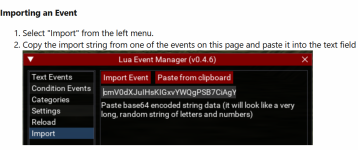
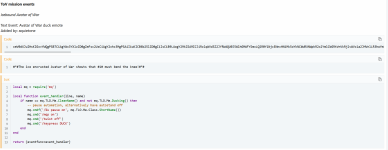
It appears there is an import event where you copy and paste his code. I attached an image. I'm assuming, it will let you import all 3 lines he has listed for the different things that will happen? I'm going to give this a shot when I'm home tomorrow. Maybe it wont be as complicated as I think. Again, appreciate your time and energy.
Attachments
A couple of weeks ago I ran this mission with a team of lvl 125 chars to help a guildy to get the flag for his alt. I ignored the mechanics. With actual chars it went smooth.
I ignored the mechanics too. Tried it 3 or 4 times. By doing so i can skip that phase of needing to kneel and whatnot, but there are just too many adds, even with my 122 Bard doing CC
Yup, you got it! Copy from the library and import into lem in game. The Lua will show up as a text or condition. Check the box for green and you're good to go.It appears there is an import event where you copy and paste his code. I attached an image. I'm assuming, it will let you import all 3 lines he has listed for the different things that will happen? I'm going to give this a shot when I'm home tomorrow. Maybe it wont be as complicated as I think. Again, appreciate your time and energy.
You can also go into the instance and use /ooc The ice encrusted Avatar of War shouts that TOONNAME must bend the knee! to test it.
Don't forget the punctuation at the end.
If I remember well, the adds don't appear all at once but in waves. I focused the dps at those hovering axes (don't remember their names) as I remembered that those have to be killed first, when the mission was actual content. Those are the mobs delivering the mayor part of the incoming damage. I remember I was able to kill those before the next axe arrived.I ignored the mechanics too. Tried it 3 or 4 times. By doing so i can skip that phase of needing to kneel and whatnot, but there are just too many adds, even with my 122 Bard doing CC
If I remember well, the adds don't appear all at once but in waves. I focused the dps at those hovering axes (don't remember their names) as I remembered that those have to be killed first, when the mission was actual content. Those are the mobs delivering the mayor part of the incoming damage. I remember I was able to kill those before the next axe arrived.
All comes in waves. You need like LS group gear level to reliably do it but I’ve run this mission a lot lately. And as long as you switch to the animated axes immediatel upon the port when you get up there. I find it very easy to just burn avatar. But there is a trick to it. Also helps to have dragon scale on tank if you need it but not neccessary.
Yup, you got it! Copy from the library and import into lem in game. The lua will show up as a text or condition. Check the box for green and you're good to go.
You can also go into the instance and use /ooc The ice encrusted Avatar of War shouts that TOONNAME must bend the knee! to test it.
Don't forget the punctuation at the end.
First attempt with the LEM was a win! thanks!!
Users who are viewing this thread
Total: 1 (members: 0, guests: 1)
Share: