Follow along with the video below to see how to install our site as a web app on your home screen.
Note: This feature may not be available in some browsers.
Hail, we're RedGuides. We want you to play six (yes, 6!) EverQuest characters at once. We have scripts and a friendly community to help, please join our playstyle and say hello! 👋
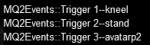
Are you referring to Events? Make sure you have /log on and /mlog on, as well as the MQLog plugin enabled. Turn on MQEvents, create an .ini for each character. I can’t post my events ini from work but someone will or I can later today. You can test it in /say before you go into the mission.
1. Ensure you have created your MQ2Events_ToonName.ini file in your RELEASE folder
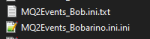
2. Ensure the file is "MQ2Events_ToonName.ini" where ToonName is your dude like MQ2Events_Bob.ini --- you can't have MQ2Events_Bob.ini.ini or MQ2Events_Bob.ini.txt to verify your file type is correct:
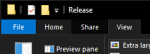
open your release folder, Click the "View" tab
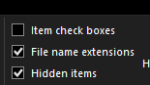
Move over to the right and select "File Name Extentions"
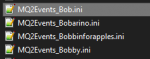
Then you should see your MQ2Events_ToonName.ini files
This is correct
This is NOT Correct
once you have correctly setup your mq2events file
and you have /events on
doing an /event list will display your "active events"
This is the universal control for CWTN plugins much better then doing what yall are doing
[kneel]
trigger=#1#The ice encrusted Avatar of War shouts that |${Me}| must bend the knee!#2#
command=/if (!${Me.Ducking}) /multiline ; /docommand /${Me.Class.ShortName} mode 0 ; /docommand /${Me.Class.ShortName} pause on; /attack off ; /target clear ; /keypress DUCK
[stand]
trigger=#1#The Avatar of War nods, accepting the subservience of those that gave it#2#
command=/if (${Me.Ducking}) /multiline ; /docommand /${Me.Class.ShortName} pause off ; /docommand /${Me.Class.ShortName} mode 1 ; /keypress DUCK
This site uses cookies to help personalise content, tailor your experience and to keep you logged in if you register.
By continuing to use this site, you are consenting to our use of cookies.