• You've discovered RedGuides, an EverQuest multi-boxing and scripting community 🧙‍♀️⚙️. We want you to play several EQ characters at once, come join us and say hello! 👋

  • A TLP without truebox has thawed (Very Vanilla ready)
    Frostreaver

How to fix the Update.exe "ah crap. Please login" issue

Now it says: The update failed to download: Error trying to save file: Error downloading "https://www.redguides.com/update/test/?update=veryvanilla(test.1.0.to.20170118).wyu&pkey=": The remote server returned an error: (400) Bad Request.
 
Error trying to save file: Error downloading "https://www.redguides.com/update/test/?update=veryvanilla(test.1.0.to.20170118).wyu The remote server returned an error: (400) Bad Request.

ran a new installer and tried to update and got this error message?
 
Last edited by a moderator:
Re: How to fix the Update.exe "ah crap. Please login" issue

Hi Cannot get this new updater to work today 1/23 . I did password reset. Downloaded the new installer and tried to unzip to my MQ2 Release folder (did this several times did not overwrite) cannot use new password on updater get "aww crap " message. like to get this sorted out quickly if possible. Thanks in advance for your support.

- - - Updated - - -

tried Deleting the old installer and zipping new one get message "Can not open file as archive"

- - - Updated - - -

just tried your "old user" file and unzipped to my MQ2 folder and it looked like it worked Ill keep you posted if any more problems Thanks

- - - Updated - - -

another problem sorry, Updater seemed successful but it added a new folder to my MQ2 folder on desktop which is "olduser.live " this folder has none of my ini from old macro folder. also if i try to click the "Plugin" button to look at my plugins i get an error "unhandled exception has occured in your application.If you click continue the application will ignore this error and attempt to continue...Value cannot be null Parameter name : iniFileName"
clicking continue does nothing

Details of this error are
See the end of this message for details on invoking
just-in-time (JIT) debugging instead of this dialog box.

************** Exception Text **************
System.ArgumentNullException: Value cannot be null.
Parameter name: iniFileName
at XAct.XLib.IO.XIni.GetSection(String iniFileName, String section, String[]& results)
at LoginChecker.RGSettings..ctor()
at LoginChecker.Form1.btn_Settings_Click(Object sender, EventArgs e)
at System.Windows.Forms.Control.OnClick(EventArgs e)
at System.Windows.Forms.Button.OnClick(EventArgs e)
at System.Windows.Forms.Button.OnMouseUp(MouseEventArgs mevent)
at System.Windows.Forms.Control.WmMouseUp(Message& m, MouseButtons button, Int32 clicks)
at System.Windows.Forms.Control.WndProc(Message& m)
at System.Windows.Forms.ButtonBase.WndProc(Message& m)
at System.Windows.Forms.Button.WndProc(Message& m)
at System.Windows.Forms.Control.ControlNativeWindow.OnMessage(Message& m)
at System.Windows.Forms.Control.ControlNativeWindow.WndProc(Message& m)
at System.Windows.Forms.NativeWindow.Callback(IntPtr hWnd, Int32 msg, IntPtr wparam, IntPtr lparam)


************** Loaded Assemblies **************
mscorlib
Assembly Version: 4.0.0.0
Win32 Version: 4.6.1586.0 built by: NETFXREL2
CodeBase: file:///C:/Windows/Microsoft.NET/Framework/v4.0.30319/mscorlib.dll
----------------------------------------
Update
Assembly Version: 1.0.0.0
Win32 Version: 1.0.0.0
CodeBase: file:///C:/Users/Sirviceman/Desktop/MQ2/Release/RedGuides_VeryVanilla%20(1)/RedGuides_VeryVanilla/RedGuides_VeryVanilla/RedGuides_VeryVanilla/olduser_live/Update.exe
----------------------------------------
System.Windows.Forms
Assembly Version: 4.0.0.0
Win32 Version: 4.6.1586.0 built by: NETFXREL2
CodeBase: file:///C:/WINDOWS/Microsoft.Net/assembly/GAC_MSIL/System.Windows.Forms/v4.0_4.0.0.0__b77a5c561934e089/System.Windows.Forms.dll
----------------------------------------
System
Assembly Version: 4.0.0.0
Win32 Version: 4.6.1586.0 built by: NETFXREL2
CodeBase: file:///C:/WINDOWS/Microsoft.Net/assembly/GAC_MSIL/System/v4.0_4.0.0.0__b77a5c561934e089/System.dll
----------------------------------------
System.Drawing
Assembly Version: 4.0.0.0
Win32 Version: 4.6.1586.0 built by: NETFXREL2
CodeBase: file:///C:/WINDOWS/Microsoft.Net/assembly/GAC_MSIL/System.Drawing/v4.0_4.0.0.0__b03f5f7f11d50a3a/System.Drawing.dll
----------------------------------------
System.Configuration
Assembly Version: 4.0.0.0
Win32 Version: 4.6.1586.0 built by: NETFXREL2
CodeBase: file:///C:/WINDOWS/Microsoft.Net/assembly/GAC_MSIL/System.Configuration/v4.0_4.0.0.0__b03f5f7f11d50a3a/System.Configuration.dll
----------------------------------------
System.Core
Assembly Version: 4.0.0.0
Win32 Version: 4.6.1586.0 built by: NETFXREL2
CodeBase: file:///C:/WINDOWS/Microsoft.Net/assembly/GAC_MSIL/System.Core/v4.0_4.0.0.0__b77a5c561934e089/System.Core.dll
----------------------------------------
System.Xml
Assembly Version: 4.0.0.0
Win32 Version: 4.6.1586.0 built by: NETFXREL2
CodeBase: file:///C:/WINDOWS/Microsoft.Net/assembly/GAC_MSIL/System.Xml/v4.0_4.0.0.0__b77a5c561934e089/System.Xml.dll
----------------------------------------

************** JIT Debugging **************
To enable just-in-time (JIT) debugging, the .config file for this
application or computer (machine.config) must have the
jitDebugging value set in the system.windows.forms section.
The application must also be compiled with debugging
enabled.

For example:

<configuration>
<system.windows.forms jitDebugging="true" />
</configuration>

When JIT debugging is enabled, any unhandled exception
will be sent to the JIT debugger registered on the computer
rather than be handled by this dialog box.

is there a fix or do i have to uninstall and reinstall the MQ2 application ?

- - - Updated - - -

Darn , tried to uninstall and reinstall MQ2 and not working at all getting message "Cannot open file as archive" im such a noob at this sorry again please help if possible
 
Re: How to fix the Update.exe &amp;quot;ah crap. Please login&amp;quot; issue

I downloaded the ZIP file directly... tried to update:

Using vyUpdate.exe:
Error trying to save file: Error downloading "https://www.redguides.com/update/live/?update=veryvanilla.20170118.to.20170121.wyu&pkey=": The remote server returned an error: (400) Bad Request.

using Update.exe:
.. Ah crap...

JJB

- - - Updated - - -

Ok, worked with the installer.
 
Re: How to fix the Update.exe &amp;quot;ah crap. Please login&amp;quot; issue

Potential fix here!!!!

ok used system restore, then tried again to update using the olduser_live file making sure the file was earmarked for the MACRO folder in MQ2 ...and it worked ! i can even access all the plugins,Fantastic !

I think the recent update to windows 10 has screwed over my system in several ways I noticed (one was video stuttering in game) and both times it took using system restore to set the system back to where it was before the update which has made things usable again (while probably opening up security gaps.. oy vey! )

Thanks to all who read this long post of mine and I do hope that some of my trial and error of noobness could help others to get back to the poisonous time obliterating game we all know and love Cheers fellow and gals !
 
system restore? what the!

one thing i have learned here is patience is a virtue.

i got the aw crap log in message...tried a few times but just forgot about it since mq2 is still running fine without the updater. Definately not going to do a system restore....:f5:
 
Any fix for this? I have tried all the above, clean install etc. and i am getting the Ah Crap wrong user or password
 
system restore? what the!

one thing i have learned here is patience is a virtue.

i got the aw crap log in message...tried a few times but just forgot about it since mq2 is still running fine without the updater. Definately not going to do a system restore....:f5:

Any fix for this? I have tried all the above, clean install etc. and i am getting the Ah Crap wrong user or password

There's no need for a "system restore" - this is a simple fix.

Overwrite the old update.exe with the new update.exe

I've attached the new update.exe for your convenience. It's the only thing that changed. Same file for test/live.
 
Last edited:
Have you tried copying the upate.exe file over your current update.exe file?
 
OK so I got it to update with your link but when I try to run it still says out of date:(
 
Daybreak just patched the game. If you ran the DBG patch at all this morning then you won't be able to load MQ2 until the new compile is released.

With that said if you've been in game all morning without patching, then don't log out and patch. What they released isn't required to load into EQ. Just don't patch EQ and you'll be fine. Otherwise you'll be sitting here waiting for the new MQ compile.
 
360 Total security is going crazy with all the plugins while loading the game...this didnt happen b4 0_o
 
ack! ok, when does the antivir trip? When updating, or when launching macroquest2.exe?

it went crazy after toon screen with mq2 loaded, seems when the game tried to load the plugins and it started to show up on antivirus...by mistake i clicked 1 thing to remove and mq2 stopped worked..had to do a clean install to make it work again =/
 
I was having the same problem but just downloaded the MQ2 installer, installed over the old MQ2 folder and everything worked.

Sent from my SM-G920W8 using Tapatalk
 
I did as REdbot said, I copied it OVER the old file. NOT the RGUupdate file. Copy it over the one in your release folder. It works like a camp.
 
So, yesterday evening i ran the updater and i got the Aw, crap message. So i entered my credentials and still didn't work. So i downloaded Very Vanilla download again i figured all good now. When i tried to click the very vanilla blue shield launcher i get a message saying "Windows cannot access the specified device, path, or file. you may not have the appropriate permissions to access the item." Which is crazy cause no other profiles set on this comp.
So then i try running just the update.exe and now i get a box after putting username and password it says " Unhandled exception has occurred in your application. If you click Continue, the application will ignore this error and attempt to continue. if you clock Quit, the application will close immediately."
this is the details that it allows me to copy
"See the end of this message for details on invoking
just-in-time (JIT) debugging instead of this dialog box.

************** Exception Text **************
System.ComponentModel.Win32Exception (0x80004005): The system cannot find the file specified
at System.Diagnostics.Process.StartWithShellExecuteEx(ProcessStartInfo startInfo)
at System.Diagnostics.Process.Start()
at System.Diagnostics.Process.Start(ProcessStartInfo startInfo)
at LoginChecker.Form1.button1_Click(Object sender, EventArgs e)
at System.Windows.Forms.Control.OnClick(EventArgs e)
at System.Windows.Forms.Button.OnClick(EventArgs e)
at System.Windows.Forms.Button.OnMouseUp(MouseEventArgs mevent)
at System.Windows.Forms.Control.WmMouseUp(Message& m, MouseButtons button, Int32 clicks)
at System.Windows.Forms.Control.WndProc(Message& m)
at System.Windows.Forms.ButtonBase.WndProc(Message& m)
at System.Windows.Forms.Button.WndProc(Message& m)
at System.Windows.Forms.Control.ControlNativeWindow.OnMessage(Message& m)
at System.Windows.Forms.Control.ControlNativeWindow.WndProc(Message& m)
at System.Windows.Forms.NativeWindow.Callback(IntPtr hWnd, Int32 msg, IntPtr wparam, IntPtr lparam)


************** Loaded Assemblies **************
mscorlib
Assembly Version: 4.0.0.0
Win32 Version: 4.6.1637.0 built by: NETFXREL3STAGE
CodeBase: file:///C:/Windows/Microsoft.NET/Framework/v4.0.30319/mscorlib.dll
----------------------------------------
Update
Assembly Version: 1.0.0.0
Win32 Version: 1.0.0.0
CodeBase: file:///C:/Users/Vdlar/Downloads/Update.exe
----------------------------------------
System.Windows.Forms
Assembly Version: 4.0.0.0
Win32 Version: 4.6.1586.0 built by: NETFXREL2
CodeBase: file:///C:/WINDOWS/Microsoft.Net/assembly/GAC_MSIL/System.Windows.Forms/v4.0_4.0.0.0__b77a5c561934e089/System.Windows.Forms.dll
----------------------------------------
System
Assembly Version: 4.0.0.0
Win32 Version: 4.6.1637.0 built by: NETFXREL3STAGE
CodeBase: file:///C:/WINDOWS/Microsoft.Net/assembly/GAC_MSIL/System/v4.0_4.0.0.0__b77a5c561934e089/System.dll
----------------------------------------
System.Drawing
Assembly Version: 4.0.0.0
Win32 Version: 4.6.1586.0 built by: NETFXREL2
CodeBase: file:///C:/WINDOWS/Microsoft.Net/assembly/GAC_MSIL/System.Drawing/v4.0_4.0.0.0__b03f5f7f11d50a3a/System.Drawing.dll
----------------------------------------
System.Configuration
Assembly Version: 4.0.0.0
Win32 Version: 4.6.1586.0 built by: NETFXREL2
CodeBase: file:///C:/WINDOWS/Microsoft.Net/assembly/GAC_MSIL/System.Configuration/v4.0_4.0.0.0__b03f5f7f11d50a3a/System.Configuration.dll
----------------------------------------
System.Core
Assembly Version: 4.0.0.0
Win32 Version: 4.6.1638.0 built by: NETFXREL3STAGE
CodeBase: file:///C:/WINDOWS/Microsoft.Net/assembly/GAC_MSIL/System.Core/v4.0_4.0.0.0__b77a5c561934e089/System.Core.dll
----------------------------------------
System.Xml
Assembly Version: 4.0.0.0
Win32 Version: 4.6.1586.0 built by: NETFXREL2
CodeBase: file:///C:/WINDOWS/Microsoft.Net/assembly/GAC_MSIL/System.Xml/v4.0_4.0.0.0__b77a5c561934e089/System.Xml.dll
----------------------------------------

************** JIT Debugging **************
To enable just-in-time (JIT) debugging, the .config file for this
application or computer (machine.config) must have the
jitDebugging value set in the system.windows.forms section.
The application must also be compiled with debugging
enabled.

For example:

<configuration>
<system.windows.forms jitDebugging="true" />
</configuration>

When JIT debugging is enabled, any unhandled exception
will be sent to the JIT debugger registered on the computer
rather than be handled by this dialog box. "

not sure what else to do.

I followed all directions to potential "fixes" listed on this thread nothing worked. i really don't want to do a System Restore.....
BTW i use KasperSky....found bunch of the MQ2 files on quarantine and deleted. i changed the values to allow but still have issues.
 
Last edited:
Does the Updater have an installation package? Have you installed it rather than just unzipping the very vanilla package?
 
dewry

Make sure you turn on windows update to get .NET Framework 3.5.

Disable your antivirus, and make sure you run update.exe as admin.
 
Replaced the Update.exe and still getting
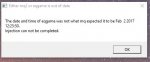
Either mq2 or eqgame is out of date

The date and timeof eq games was not what mq expected it to be 3 2018 14:46:59.
Injection can not be completed
 
Replaced the Update.exe and still getting
Either mq2 or eqgame is out of date

The date and timeof eq games was not what mq expected it to be 3 2018 14:46:59.
Injection can not be completed

that means your MQ2 is out of date. One possible reason is that we haven't released an update yet, this can sometimes take a day or two. What server are you on? If it's TEST, I'm uploading an update now.
 
How to fix the Update.exe "ah crap. Please login" issue

Users who are viewing this thread

Back
Top
Cart