• You've discovered RedGuides, an EverQuest multi-boxing and scripting community 🧙‍♀️⚙️. We want you to play several EQ characters at once, come join us and say hello! 👋

  • A TLP without truebox has thawed (Very Vanilla ready)
    Frostreaver

Question - How can I reset stdio, lost output at mqwindow and ctwplugin first tab

Joined
Oct 31, 2019
RedCents
1,695¢
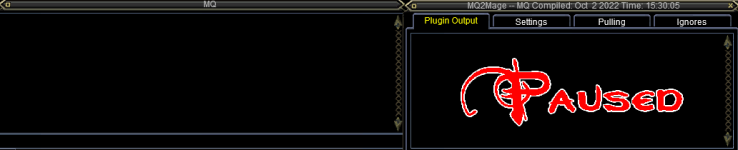
While testing a new event for lem I was creating, I was somehow able to cause a cc on one account. After I logged in, I noticed that the mqwindow and the first tab of the ctwplugin remained blank. At the mqwindow even the input line remains blank when I write a command here.
My suspection is, that erratic code has caused a deviation of the stdio pointer for this char.
I didn‘t care much yesterday as I hoped after a complete schutdown of the computer and a restart it would return to normal.
So I moved on and fixed the code. I am not able anymore to post the code which caused the issue.
Today, after relaunch of the pc, the „bug“ is still there.

Has anyone an Idea how to reset the stdio in order to get all running normal for this char?
As the other chars of the team do not show this behavior, the devistion of the stdio might have been saved in one of the inis of this char.
 
Last edited:
Solution
Anyone got an Idea how to reset the output in order to get the messages back which should arrove ad mq2Window and Plugin Output?
View attachment 42703

The issue is not only char-related but account-related.
I checked other chars on same account, all show the same behavior.
No output anymore to "mq2window" and "Plugin Output".
Only 1 of my accounts is affected.
the cwtn plugins automatically output to that window if it is visible. unless you click the X button in the cwtn plugin window - we output to that window when we do stuff. there is nothing to "reset" here with the class plugins specically.

are you just not seeing anything at all anywhere? i *guess* you could have technically just filtered out *everything* from mq. this...
you are probably running with your map open, close it, and it should be all good
 
There has no map been open. But opening and closing the map changed something. The input-Line of the MQwindow now shows, what I am typing.
So StdIn seems fixed, but Stdout still doesnt behave normal.
Tried other chars on same account, seems all chars on this account suffer the same issue.
 
Last edited:
Do what now? A lem shouldn't allow you to bork up write messages
 
Maybe it was just coincidence, but the only unusual was a cc which happened when I attempted to test a new event.
when the char was logged in again, I noticed that the mqwindow and the first tab of this mages ctwplugin remained blank and still remain blank. Not a single line of messages in those 2 windows anymore, whereas the other windows seem unaffected.
 
Anyone got an Idea how to reset the output in order to get the messages back which should arrove ad mq2Window and Plugin Output?
1665462743173.png

The issue is not only char-related but account-related.
I checked other chars on same account, all show the same behavior.
No output anymore to "mq2window" and "Plugin Output".
Only 1 of my accounts is affected.
 
Anyone got an Idea how to reset the output in order to get the messages back which should arrove ad mq2Window and Plugin Output?
View attachment 42703

The issue is not only char-related but account-related.
I checked other chars on same account, all show the same behavior.
No output anymore to "mq2window" and "Plugin Output".
Only 1 of my accounts is affected.
the cwtn plugins automatically output to that window if it is visible. unless you click the X button in the cwtn plugin window - we output to that window when we do stuff. there is nothing to "reset" here with the class plugins specically.

are you just not seeing anything at all anywhere? i *guess* you could have technically just filtered out *everything* from mq. this would be something you almost certainly DON'T want to do.

do a /filter mq off
 
Solution
@Sic you are my hero. I didn't filter anything on purpouse, but "/filter mq off" brought all back to normal.
Nice! Thanks for the followup. Glad you're back in business. Was really digging deep trying to figure what could cause that.
 
Is it possible that „/squelch“ activates temporarily a mq filter to surpress output? As lem fires events about 4 times per second, I use „/squelch /boxr ..“ commands to hold automation before doing my stuff and reactivate automation when done.
If that may be the case, I could avoid „/squelch“ unless the code fits my intensions and add it at the end of the development.
 
/squelch should only apply to the line of stuff following it.

/squelch /echo You will never see this
/echo Hello

if you put both of these in a hotkey or /macro for example, then only the /echo Hello should appear be output. While the other command is run, the squelch specifically means don't output any text from this command.
 
Is it possible that „/squelch“ activates temporarily a mq filter to surpress output? As lem fires events about 4 times per second, I use „/squelch /boxr ..“ commands to hold automation before doing my stuff and reactivate automation when done.
If that may be the case, I could avoid „/squelch“ unless the code fits my intensions and add it at the end of the development.
In this case, something did /filter mq on I don't believe there is any other way
 
@ChatWithThisName : If the "/squelch" command use the filter stuff to do its magic and I was able to concatenate strings and variables in a way, that I caused a cc within the execution of the line, squelch may was not able, to reset the filter to its origin state. Could that in your view be a plausible description of what happened. If that's the case, it will be easy for me to prevent. I just change the order of the things I do during developement of events.

I can do all coding and testing without any squelch and add the squelch command where needed after I am sadisfied with my event.

If /Squelch does not use mq-filter to do its magic, there is no need to pass the comfort of its feature while coding and testing.
 
@ChatWithThisName : If the "/squelch" command use the filter stuff to do its magic and I was able to concatenate strings and variables in a way, that I caused a cc within the execution of the line, squelch may was not able, to reset the filter to its origin state. Could that in your view be a plausible description of what happened. If that's the case, it will be easy for me to prevent. I just change the order of the things I do during developement of events.

I can do all coding and testing without any squelch and add the squelch command where needed after I am sadisfied with my event.

If /Squelch does not use mq-filter to do its magic, there is no need to pass the comfort of its feature while coding and testing.
i'm guessing it is pretty unlikely that squelch "was not able to reset the filter to the original state"

C++:
// ***************************************************************************
// Function:    SquelchCommand
// Description: Our '/squelch' command
// Usage:       /squelch <command>
// ***************************************************************************
void SquelchCommand(SPAWNINFO* pChar, char* szLine)
{
    if (!szLine[0])
    {
        SyntaxError("Usage: /squelch <command>");
        return;
    }

    bool Temp = gFilterMQ;
    gFilterMQ = true;
    DoCommand(pChar, szLine);
    gFilterMQ = Temp;
}

when squelch is used, this code creates a temporary bool value (true/false) of what "Global Filter MQ" is set to, then it changes "Global Filter MQ" to true, do the command, filtering it, and then sets the gFilterMQ back to the original state it was

the only place i saw where gFilterMQ is written in your MacroQuest.ini under FilterMQ is by using the /filter command

since you also exited to go to other characters, and presumably restarted/etc - those would be loaded from the MacroQuest.ini

it is most likely that you or a script simply did /filter mq on
 
After logging in first time after "/filter mq off" saved the issue, the mqWindow and Plugin output has been blank again.
A new "/filter mq off" fixed the issue again, the Message "Filtering of MQ changed to: off" appeard.
Is there a way to save this state in order to make it persistence?
 
After logging in first time after "/filter mq off" saved the issue, the mqWindow and Plugin output has been blank again.
A new "/filter mq off" fixed the issue again, the Message "Filtering of MQ changed to: off" appeard.
Is there a way to save this state in order to make it persistence?
That is.

This means you have something turning it on.

Check all your cfgs, check all your reacts, check all your LEMs.
 
I have a special search tool, able to search within all files of a whole folder-tree for a free definable search string.
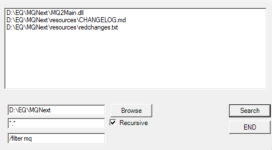
Here is the result. There are only 3 files in total containing "/filter mq" in the folder MQNext and all subfolders. None of this 3 files I touched ever to modify it.
1665564260428.png

redchanges.txt and CHANGELOG.md contain:
15 Mar 2004 by Lax (more)
- Added remaining, un-named EQ binds to the MQ2 bind system. Some are still unknown, and
some I'm surprised exist enabled in the client in the first place, and you should be
careful with those...
- Added /dumpbinds command. Example: "/dumpbinds bill" will dump all current binds to
Configs\bill.cfg to be loaded later.
- Added "/filter mq [on|off]", which prevents anything at all from being displayed by MQ2
- Added "/squelch <command>", which does the following:
* Step 1: turns mq filter off
* Step 2: executes the command
* Step 3: turns mq filter back to the state it was in before step 1
In other words, executes a command and prevents any output from the command

** It is recommended that you do this in your .CFG files that you dont want to see output from
/squelch /filter mq on
< do your stuff here>
/squelch /filter mq off
- I promise this is my last update for a few days at least!


the MQ2Main.dll Is not easy readable by Editors, butr likely therein is the implementation described in the other 2 files.

I added the following line as first line into ingame.cfg "/squelch /filter mq off" ... as a result I got the message: "Filtering of MQ changed to: off" at the mqwindow after login.
This brought me to the conclusion that after login the filter starts in mode on. Than squelch memorizes it, issues the command and set it back to the former state: filter is on again.
Manually I launched the command: "/filter mq off" and I got another output of: "Filtering of MQ changed to: off".

Finally I modified the line in ingame.cfg to "/filter mq off" and got my workaround. Many thanks @Sic for your help.
 
Last edited:
Question - How can I reset stdio, lost output at mqwindow and ctwplugin first tab

Users who are viewing this thread

Back
Top
Cart