• Hail, we're RedGuides. We want you to play six (yes, 6!) EverQuest characters at once. We have scripts and a friendly community to help, please join our playstyle and say hello! 👋
  • We've added LLM sections to our Terms & Rules and Resource Rules, for everyone's sanity & in-game safety.
    Read more
    a. Do not replace your voice with an LLM. This goes for your posts and your scripts. Drafting and editing with a tool is fine, but don't take you out of what you share.
    b. Do not replace your EQ character's voice with an LLM. We don't want scripts that speak over /ooc, /shout or other public channels. This has been an unwritten rule that's kept casino scripts off the site for decades, but we're now compelled to make it clear: keep automated communication private.

    Why Does RG Review Scripts?
    Nearly every LLM-written Lua script we see is making your character do impossible things, and rarely in a way that's beneficial to you. We've seen heavy server hammering, /target over impossible distances when /nav spawn would passively accomplish the same thing, a spawn search that fires 20+ times per second, and other pointless actions that are likely annoying GMs.

    You are welcome to use LLMs as a tool to structure, draft, and edit your work, but please read critically before hitting /lua run

Question - Help Getting Started

Bosko

New member
I apologize in advance for being a noob. Ive been searching old forums for hours trying to get a basic learners guide to using macroquest, to see what ive done wrong.I however cant figure out how to get it started. Ive unzipped it into a folder, and run the program. its currently active on my minitaskbar. so i know its working. However, when mq2 is running, i cannot normally open my everquest game. i have to run the launcher as the administrator. When i log into EQ, i have no MQ2 window with which to interact with. its as if im logging in normally.
What am i doing wrong?
 
Hi,
It is a little confusing. SOE added some spyware to detect MQ2 in the launcher so MQ2 does not let it run. You need fully patch EQ then set it up to bypass the launcher.

Using Patchme command to bypass the SOE Launcher

1. Use the Launcher to make sure your EverQuest is fully Patched.
2. Shut down EQ and the Launcher.
3. Create a shortcut of your eqgame.exe from your EverQuest folder. Right click on your eqgame.exe and Select Send To > Desktop (create shortcut)
4. Right click the shortcut and select properties
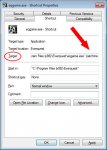
5. In the Target window type patchme. 1 space, 1 word after the eqgame.exe" (See Example 1)
6. Hit Apply the OK

Example 1

patchme.jpg

If your EverQuest folder was located in Program Files it would look like this
Rich (BB code):
"C:\Program Files\Everquest\eqgame.exe" patchme
Example of goldmund's post to login into a specific account IE bob
Rich (BB code):
"C:\Program Files\Everquest\eqgame.exe" patchme  /login:bob

Hope that clears things up for you
 
Last edited:
Pardon my imposition. I was attempting to set up mq2 on my Laptop so it could share some of the burden of boxing. I followed the same instructions, patched eq fully, used the same eqgame.exe shortcut, added in patchme. Every time i click on the shortcut it says "Run Everquest.exe" it would seem the shortcut should be exactly the same as the other one i made.. but this one isnt working. any idea why? or should i just wipe it and retry
 
Question - Help Getting Started

Users who are viewing this thread

Back
Top
Cart