

Here is something big from me for my 101st post here!
Gnome Pull Suite Beta
Now I'm a huge fan of KissAssist. 5 out of 6 of my characters run it all the time! The only exception being the puller. With the advancement of mq2melee I've found that I no longer require macros to control my tank character. With Holyshits and Downshits I can get a faster reaction time in my tanks automation then a macro. This is mostly due to the limited flow control available to macros. A plugin is able to constantly keep an eye on all variables at once, macros are only able to check them line by line as the macro runs.
So with this in mind I set out to create a pull macro that is focused completely on pulling, letting mq2melee handle the grunt work of combat. My journey has taken me from a purely macro driven solution, to a toolkit style that I am now willing to release to you guys to try out and give me feed back and suggestions. There is setup required, but I'll do my best to describe how to get everything up and running. Included is
GnomePullBeta.mac - This is the showcase macro. It utilizes all the tools listed below.
BuildCampBeta.mac - Creates the GnomePull.ini which gives you all the settings that you can adjust for your pull settings. It also allows you to setup waypoints and a safe spot in zone.
The .inc files information is for if people want to integrate my tools into their own macros. So if it's confusing don't worry, there won't be a test over it =) The prebuilt macro information is below!
GnomePull.inc - This is an include file that allows people to integrate my pulling system into their own macros by adding #include GnomePull.inc and a /call GnomePullSetup before their main loop.
GnomeLoot.inc - This is my trivial loot macro setup to integrate with other macros. Add #include GnomeLoot.inc to your macro, and /call GnomeLootSetup before your main loop.
The Setup!
First thing is first. There are a few requirements. You've got to download GnomePullBeta.mac , GnomePull.inc, and GnomeLoot.inc into your macros folder. Then you need a few plugins (all of them included in the vanilla compile) I've made the ones that require configuration aside from just loading them into links!
So now here is the only "tricky" part. It's building the mesh file that mq2navigation uses to navigate through zones.
Launch EQNavigation found in your macroquest folder.
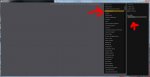
Select the zone you want to use. You only have to do this one per new zone.
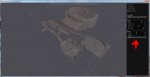
Click build, this can take awhile. With the default settings no zone should take more than 5 minutes. Default settings should be good enough for most zones. For zones that have a bunch of litter on the ground and tight hallways you should lower the cell size to .5 and the tile size to 64. This will make the zone take a much longer time to render, but will give you a cleaner navigation path.
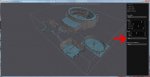
Click save, it's all for nothing if you don't save!
So you've got everything downloaded and your plugins all loaded and configured. Now it's time to find the zone you are going to be kicking ass in. Here is a spot I used in The Underquarry.
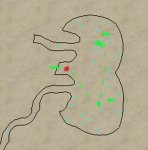
My leet ms paint skills show where I setup camp, and the two waypoints I setup while invis using /mac buildcampbeta. So once I have the waypoints setup, and my group ready in the camp running kiss. I goto the pull spot and /mac gnomepullbeta and bam you are done.
Ok I'm exhausted, making the post has been more stressful than debugging it! Anyhow if you use it please give me feed back, and suggestions.
Gnome Pull Suite Beta
Now I'm a huge fan of KissAssist. 5 out of 6 of my characters run it all the time! The only exception being the puller. With the advancement of mq2melee I've found that I no longer require macros to control my tank character. With Holyshits and Downshits I can get a faster reaction time in my tanks automation then a macro. This is mostly due to the limited flow control available to macros. A plugin is able to constantly keep an eye on all variables at once, macros are only able to check them line by line as the macro runs.
So with this in mind I set out to create a pull macro that is focused completely on pulling, letting mq2melee handle the grunt work of combat. My journey has taken me from a purely macro driven solution, to a toolkit style that I am now willing to release to you guys to try out and give me feed back and suggestions. There is setup required, but I'll do my best to describe how to get everything up and running. Included is
GnomePullBeta.mac - This is the showcase macro. It utilizes all the tools listed below.
- Pulls mobs to camp.
- Engages mobs in melee when they make it camp, turning on mq2melee
- Loots mobs after killing
- Keeps your character from drifting out of camp
- Posts updates on your groups progress to EQBC
- Total Number of Kills, Plat looted, Players in Zone, # of strangers within range, Distance from camp.
- Keeps an eye out for strangers using mq2posse.
- When a stranger enters your mq2posse threat distance the macro will return to camp, and protect the group for 10 minutes, making no active pulls, simply killing mobs that naturally agro. After the 10 minute timer if the stranger hasn't left it will send a command to move your group to a predesignated safe area and log them all off.
BuildCampBeta.mac - Creates the GnomePull.ini which gives you all the settings that you can adjust for your pull settings. It also allows you to setup waypoints and a safe spot in zone.
- /setsafe - Use this in a location that is near your camp, but is safe from mobs. This is where gnomepullbeta will direct your characters to move to and camp if something goes wrong.
- /setwaypoint - This builds a list of waypoints. Each time you use it, it will add another waypoint for the zone you are in.
The .inc files information is for if people want to integrate my tools into their own macros. So if it's confusing don't worry, there won't be a test over it =) The prebuilt macro information is below!
GnomePull.inc - This is an include file that allows people to integrate my pulling system into their own macros by adding #include GnomePull.inc and a /call GnomePullSetup before their main loop.
- Three different pulling methods
- /call GnomePull - this will use GnomePull.inc's built in pulling logic. It will pull all mobs that are in line of sight within your pull spells range with out moving. If it isn't able to find any mobs it will navigate through your preset waypoints one after another pulling mobs back to camp as it finds them.
- /call Gnomepull Close - This will tell it to pull mobs within line of sight with out moving.
- /call Gnomepull WP # - This will tell it to move to the specified waypoint number pulling mobs back to camp along the way. Once it reaches the Waypoint it will turn around and return to camp, without chaining to the next waypoints.
- /call ReturnHome - This is mostly used internally in the inc file to get your character back to your camp. But it can also be useful command to add after you call a loot function to insure you are back in camp before you go off pulling.
- Creates GnomePull.ini if it doesn't already exist. Below is the example of how mine is setup.
[Pull]
PullSpell=Terror Of Rerekalen rk. ii
CampRadius=20
CampZRadius=20
PullRange=175
PullZRadius=40
Debug=1 <--- This defaults to 0 (off) but I recommend leaving it on to get a better understanding of how the macro works. Besides who doesn't like watching macro /echo spam to see the inner workings.
PullSpell=Terror Of Rerekalen rk. ii
CampRadius=20
CampZRadius=20
PullRange=175
PullZRadius=40
Debug=1 <--- This defaults to 0 (off) but I recommend leaving it on to get a better understanding of how the macro works. Besides who doesn't like watching macro /echo spam to see the inner workings.
GnomeLoot.inc - This is my trivial loot macro setup to integrate with other macros. Add #include GnomeLoot.inc to your macro, and /call GnomeLootSetup before your main loop.
- Creates GnomeLoot.ini where you can add up to 20 items to ignore (ie those stupid holiday hats that clutter up your inventory!)
- /call GnomeLoot - Basicly fires off my triv loot macro where it will loot all corpses in camp, only looting things of value.
The Setup!
First thing is first. There are a few requirements. You've got to download GnomePullBeta.mac , GnomePull.inc, and GnomeLoot.inc into your macros folder. Then you need a few plugins (all of them included in the vanilla compile) I've made the ones that require configuration aside from just loading them into links!
- MQ2Melee-To control your tank once a mob is in camp
- MQ2Navigation - With out this you won't be moving anywhere. I'll include a good step by step for getting this all setup properly for the zone you want to use.
- MQ2Posse - you want to protect yourself right? You should already be using this!
- MQ2Cast - you like spells right? Me too!
- MQ2MoveUtils
- MQ2EQBC - If you aren't already using this you really really really really really really should be. It's very easy to setup, and cuts down on the chance of you getting caught by a ton!
So now here is the only "tricky" part. It's building the mesh file that mq2navigation uses to navigate through zones.
Launch EQNavigation found in your macroquest folder.
Select the zone you want to use. You only have to do this one per new zone.
Click build, this can take awhile. With the default settings no zone should take more than 5 minutes. Default settings should be good enough for most zones. For zones that have a bunch of litter on the ground and tight hallways you should lower the cell size to .5 and the tile size to 64. This will make the zone take a much longer time to render, but will give you a cleaner navigation path.
Click save, it's all for nothing if you don't save!
So you've got everything downloaded and your plugins all loaded and configured. Now it's time to find the zone you are going to be kicking ass in. Here is a spot I used in The Underquarry.
My leet ms paint skills show where I setup camp, and the two waypoints I setup while invis using /mac buildcampbeta. So once I have the waypoints setup, and my group ready in the camp running kiss. I goto the pull spot and /mac gnomepullbeta and bam you are done.
Ok I'm exhausted, making the post has been more stressful than debugging it! Anyhow if you use it please give me feed back, and suggestions.
Attachments
Last edited:
