
-
 Hail, we're RedGuides. We want you to play six (yes, 6!) EverQuest characters at once. We have scripts and a friendly community to help, please join our playstyle and say hello! 👋
You are using an out of date browser. It may not display this or other websites correctly.
You should upgrade or use an alternative browser.
You should upgrade or use an alternative browser.
Resource icon
Release Gearly - A Gear Management Tool 1.23
- Thread starter Lemons
- Start date

Download/unzip version worked just fine for me now.Give the latest a try (either through the launcher or download/unzip) and let me know.
However Im getting the "ERROR: No toon info for Server_character. Run /Lua run gearly once on all characters or click the update all gear button" which seems weird because there is a new file for each of my toons on the "Character Data" folder and they seem filled with gears individually. Dannet is also working just fine to send/receive other commands/macros that are not related to gearly
You have /dnet fullnames onDownload/unzip version worked just fine for me now.
However Im getting the "ERROR: No toon info for Server_character. Run /lua run gearly once on all characters or click the update all gear button" which seems weird because there is a new file for each of my toons on the "Character Data" folder and they seem filled with gears individually. Dannet is also working just fine to send/receive other commands/macros that are not related to gearly
Do /dnet fullnames off to fix it.
I'll add in a check to account for this.
now its working!!! thank you boss!You have /dnet fullnames on
Do /dnet fullnames off to fix it.
I'll add in a check to account for this.
Grpsmashin
Ranger Tank
Just installed from launcher. Any chance this is working correctly on Test? the GUI is not correct
Grpsmashin
Ranger Tank
Yes icons are weird but currently will not show list of gear when you choose a slot. Gives [ERROR] :: No toon info and checked the folder and each toon has a files with items listed.
Seems its updated but repeats the error and says no files exits.
Right clicks works and everyone connected will link gear
Seems its updated but repeats the error and says no files exits.
Right clicks works and everyone connected will link gear
Grpsmashin
Ranger Tank
Also, says its looking for test_toonname but it is saved as toonname_test Not sure if they need to be reversed or not
Try turning off fullnames
You have /dnet fullnames on
Do /dnet fullnames off to fix it.
I'll add in a check to account for this.
Grpsmashin
Ranger Tank
Try turning off fullnames
We are in business other than the icons! Thanks for the help


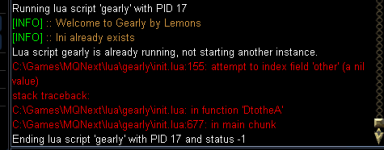
[2023/05/12 14:03:27] No Lua script 'gearly' to end
[2023/05/12 14:03:32] Running Lua script 'gearly' with PID 18
[2023/05/12 14:03:32] [INFO] :: Welcome to Gearly by Lemons
[2023/05/12 14:03:32] [INFO] :: Ini already exists
Then CTD no error on that.
[2023/05/12 14:03:32] Running Lua script 'gearly' with PID 18
[2023/05/12 14:03:32] [INFO] :: Welcome to Gearly by Lemons
[2023/05/12 14:03:32] [INFO] :: Ini already exists
Then CTD no error on that.


This is what I get on live. I tried deleting the Lua > gearly folder and redownloading. The second picture is the debug. I only run RedGuides, to answer a question for Lemons in private messaging. I removed my charm and now it works, the third picture is the item. Not sure what would cause it /shrug (edit: happening to alts on whatever charm they have also)


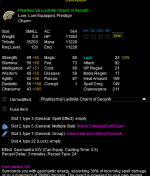
Do they all have the same charm or different charms?
For posterity:
Your slot comes up as nil, which it doesn't for everyone else. Are you on live? Do anything weird with your install like combine redguides+mmobugs?
Please move back to main thread since there's no character info.

For posterity:
Your slot comes up as nil, which it doesn't for everyone else. Are you on live? Do anything weird with your install like combine redguides+mmobugs?
Please move back to main thread since there's no character info.

Different charms, live, nothing wierd like two MQ installsDo they all have the same charm or different charms?
For posterity:
Your slot comes up as nil, which it doesn't for everyone else. Are you on live? Do anything weird with your install like combine redguides+mmobugs?
Please move back to main thread since there's no character info.
To answer Sic, yes Custom UI (AYAUI)
I've seen some custom UIs use incorrect slots in their XML which caused MQ issues with slot detection, might be worth looking at. I ran into this when I made mq2tstrophyDifferent charms, live, nothing wierd like two MQ installs
To answer Sic, yes Custom UI (AYAUI)
Gonna peep this out when I get the chance! Thanks homie!

SomeRandomDude
Well-known member
This plugin is amazing!!!
I am having a crash bug. When I go to "Update all gear" I get the following crash after it chugs for a bit and finishes pulling the data:
Done refreshing gear data
gearly\init.Lua:155: attempt to index field 'other' (a nil value)
stack traceback:
gearly\init.Lua: in function 'DtotheA'
gearly\init.Lua:682: in main chunk
I have two machines running MQ: One is running a test-server raid (12-char) and the other is running a live server group. I have only tried Gearly on the test server. I have chosen the "raid_test_[charname]" DanNet group from the pulldown list, however, I'm not sure if the "Update all gear" button is paying attention to that setting.
Note: This isn't a show-stopper bug for me since the Update actually completed--the next time I run Gearly the data is all up-to-date.
I am having a crash bug. When I go to "Update all gear" I get the following crash after it chugs for a bit and finishes pulling the data:
Done refreshing gear data
gearly\init.Lua:155: attempt to index field 'other' (a nil value)
stack traceback:
gearly\init.Lua: in function 'DtotheA'
gearly\init.Lua:682: in main chunk
I have two machines running MQ: One is running a test-server raid (12-char) and the other is running a live server group. I have only tried Gearly on the test server. I have chosen the "raid_test_[charname]" DanNet group from the pulldown list, however, I'm not sure if the "Update all gear" button is paying attention to that setting.
Note: This isn't a show-stopper bug for me since the Update actually completed--the next time I run Gearly the data is all up-to-date.
Can you run it in debug and post the output? If it has character names, you can PM me.This plugin is amazing!!!
I am having a crash bug. When I go to "Update all gear" I get the following crash after it chugs for a bit and finishes pulling the data:
Done refreshing gear data
gearly\init.lua:155: attempt to index field 'other' (a nil value)
stack traceback:
gearly\init.lua: in function 'DtotheA'
gearly\init.lua:682: in main chunk
I have two machines running MQ: One is running a test-server raid (12-char) and the other is running a live server group. I have only tried Gearly on the test server. I have chosen the "raid_test_[charname]" DanNet group from the pulldown list, however, I'm not sure if the "Update all gear" button is paying attention to that setting.
Note: This isn't a show-stopper bug for me since the Update actually completed--the next time I run Gearly the data is all up-to-date.
/Lua run gearly debug
Thanks.
Are you connecting toons from another computer and trying to show them on Gearly? If so, Gearly doesn't support that. It only supports local as the gear files are stored locally. You can always copy/paste the files over, but you'd need to do it every time you want to update the remote characters.
I'll add in some error handling so it doesn't crash though.
Are you connecting toons from another computer and trying to show them on Gearly? If so, Gearly doesn't support that. It only supports local as the gear files are stored locally. You can always copy/paste the files over, but you'd need to do it every time you want to update the remote characters.
I'll add in some error handling so it doesn't crash though.
SomeRandomDude
Well-known member
I am on two machines, however, I don't particularly care to share the gearly data across the two machines. I run my test-server guys on one machine and my live guys on another machine. They have no reason to share the data since they can't trade items or anything. In fact that could be a worthwhile filter option--to avoid showing characters on other servers. Anyway, thanks for the support Lemons.
Next release should just ignore themI am on two machines, however, I don't particularly care to share the gearly data across the two machines. I run my test-server guys on one machine and my live guys on another machine. They have no reason to share the data since they can't trade items or anything. In fact that could be a worthwhile filter option--to avoid showing characters on other servers. Anyway, thanks for the support Lemons.
Wut?How do you do items that aren't made yet? Like Ore raid items in Adv Loot window?
Click on the wrist slot

 www.redguides.com
General Use:
Gearly - A Gear Management Tool - Extra info
www.redguides.com
General Use:
- Auto Filter (Gearly2.gif)
- Check this box to automatically sort to characters who can use the item you're currently inspecting (long right click on an item)
- Left Click your gear (Gearly4.gif)
- Will sort the table to that slot
- EG: Left click your Chest piece in the UI
- It will display each connected character's chest piece in the table
- Right Click your gear
- Inspects your currently equipped gear
- All connected characters will link you their gear in that same slot through DanNet
- Clear Button
- Click the Clear button to clear all current filter settings and reset the view
- Sorting
- You can sort normally by clicking any column
- You can sort multiple columns by holding Shift + Left Click
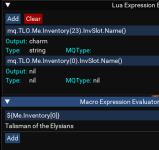
I guess no issue then, with no differences in XML code for inventory it just CTD once an ini is built and your not running default UI. I was showing that while running a custom ui and using Lua expression the Lua code is saying that that slot0 is not there but I can call that slot from a macro and it will pull the info just fine regardless of the UI. But pay no attention to me what do I know.
bitbreaker
Member
Problem #1
The plugin is not doing anything special when I long right click on an item.
I thought with auto filter on, it should be showing me which toon the item would be an upgrade for?
Also getting the following error anytime I "save settings" or try to press "update my gear" or "update all gear"
I've tried following those steps, but still no luck.
Nothing shows up in the dropdown as well when I inspect gear in my driver's inventory to see if it's an upgrade for any toons.
And if I select other toons' inventories from the dropdown under "all" it stays on "all" and returns the error above.
Inside my Gearly folder in
Problem #2
Additionally, when i type
C:/MQNext/Lua/gearly/init.Lua:645: attempt to index local 'args' (a nil alue) stack traceback:
C:/MQNext/Lua/gearly/init.Lua: in function <C:/MQNext/Lua/gearly/init.Lua:643>
The plugin is not doing anything special when I long right click on an item.
I thought with auto filter on, it should be showing me which toon the item would be an upgrade for?
Also getting the following error anytime I "save settings" or try to press "update my gear" or "update all gear"
No toon info for _____. Run/lua run gearlyonce on all characters or click the Update All Gear button.
I've tried following those steps, but still no luck.
Nothing shows up in the dropdown as well when I inspect gear in my driver's inventory to see if it's an upgrade for any toons.
And if I select other toons' inventories from the dropdown under "all" it stays on "all" and returns the error above.
Inside my Gearly folder in
/lua/gearly/character_data I can see all my toons .ini files being created when I first run the plugin, however.Problem #2
Additionally, when i type
/gear I get the following errors...C:/MQNext/Lua/gearly/init.Lua:645: attempt to index local 'args' (a nil alue) stack traceback:
C:/MQNext/Lua/gearly/init.Lua: in function <C:/MQNext/Lua/gearly/init.Lua:643>
Have you ensured you have Dannet working on all your toons? Check the Dannet instructions tab if you need helpProblem #1
The plugin is not doing anything special when I long right click on an item.
I thought with auto filter on, it should be showing me which toon the item would be an upgrade for?
Also getting the following error anytime I "save settings" or try to press "update my gear" or "update all gear"
I've tried following those steps, but still no luck.
Nothing shows up in the dropdown as well when I inspect gear in my driver's inventory to see if it's an upgrade for any toons.
And if I select other toons' inventories from the dropdown under "all" it stays on "all" and returns the error above.
Inside my Gearly folder in/lua/gearly/character_dataI can see all my toons .ini files being created when I first run the plugin, however.
Problem #2
Additionally, when i type/gearI get the following errors...
C:/MQNext/lua/gearly/init.lua:645: attempt to index local 'args' (a nil alue) stack traceback:
C:/MQNext/lua/gearly/init.lua: in function <C:/MQNext/lua/gearly/init.lua:643>
bitbreaker
Member
Have you ensured you have Dannet working on all your toons? Check the Dannet instructions tab if you need help
Yes and /dnet info spits out all my characters' <server_name> info as being connected.
Running /dgga and /dgge commands from my driver also are received by the other toons.
I do a /run Lua gearly on all my toons.
Hit "update all gear" and each time I either hit update all, or select one of the sub-classes in the dropdown right below it, it spits out the error in my chat window.
I'm looking at all the characters' individual .inis inside the gearly folder inside my Lua folder. Lua > Gearly > Character Data > individual .inis
Last edited:
Users who are viewing this thread
Total: 1 (members: 0, guests: 1)
Share: