
-
 Hail, we're RedGuides. We want you to play six (yes, 6!) EverQuest characters at once. We have scripts and a friendly community to help, please join our playstyle and say hello! 👋
You are using an out of date browser. It may not display this or other websites correctly.
You should upgrade or use an alternative browser.
You should upgrade or use an alternative browser.
UPDATE: I tried it - it works...I WOULD PAY FOR THIS.
This is amazing.
Possible suggestions:
1) Possibly add in a Item Type filter for collectables - On my team I picked up that Deep Cave Collector Case to try and keep collectables manageable and that helps a lot but if I don't have that on a character its a huge PITA to find them
2) If I am on my Healer, looking at my Tank's inventory of collectables I click "trade" and the window pops up defaulting to give it to the Tank. It's not a big deal to change to the current character but would it be possible to have a "Request" button in addition to the "Trade" button on the bags tab? Alternatively, in the "All Characters - PC" tab if you add a collectable filter, you already have a Give button. That would do the same thing.
3) Mega Ultra bonus points...if you add a collectable filter, can it determine if the character I am running the UI on has collected that collectable? Double XP weekend if it further allows a push button "Give to Char X and automatically collect the collectable"
This is amazing.
Possible suggestions:
1) Possibly add in a Item Type filter for collectables - On my team I picked up that Deep Cave Collector Case to try and keep collectables manageable and that helps a lot but if I don't have that on a character its a huge PITA to find them
2) If I am on my Healer, looking at my Tank's inventory of collectables I click "trade" and the window pops up defaulting to give it to the Tank. It's not a big deal to change to the current character but would it be possible to have a "Request" button in addition to the "Trade" button on the bags tab? Alternatively, in the "All Characters - PC" tab if you add a collectable filter, you already have a Give button. That would do the same thing.
3) Mega Ultra bonus points...if you add a collectable filter, can it determine if the character I am running the UI on has collected that collectable? Double XP weekend if it further allows a push button "Give to Char X and automatically collect the collectable"

I don't like this idea.UPDATE: I tried it - it works...I WOULD PAY FOR THIS.
This is amazing.
Possible suggestions:
1) Possibly add in a Item Type filter for collectables - On my team I picked up that Deep Cave Collector Case to try and keep collectables manageable and that helps a lot but if I don't have that on a character its a huge PITA to find them
2) If I am on my Healer, looking at my Tank's inventory of collectables I click "trade" and the window pops up defaulting to give it to the Tank. It's not a big deal to change to the current character but would it be possible to have a "Request" button in addition to the "Trade" button on the bags tab? Alternatively, in the "All Characters - PC" tab if you add a collectable filter, you already have a Give button. That would do the same thing.
3) Mega Ultra bonus points...if you add a collectable filter, can it determine if the character I am running the UI on has collected that collectable? Double XP weekend if it further allows a push button "Give to Char X and automatically collect the collectable"
Extra overhead for me.
Have you tried

Collector's Clearing House (CCH)
Collector's Clearing House (CCH) helps you collect, store, and retrieve collectible items. The drop down list will show all characters currently connected via dannet, and have them perform the selected action. --'Store All Collectibles' will...
 www.redguides.com
Polling your character for every item collectable to see if you have collected it and then possibly transmitting that information to every other peer sounds a little expensive to me, performance wise, when it's already doing 8000 other things.
One could argue that you could add a setting on whether to check it or not, but even those can have a cost when there is enough of them.
Ultimately it's up to the author to decide what is in scope, or not, of course.
As far as collections...
CCH is not the only script aimed at collections.
www.redguides.com
www.redguides.com
www.redguides.com
www.redguides.com
May be worth looking at. I have used a combination of giveitems and docollect before myself, but goco looks like it combines that usage. They aren't quite as smart as what you are describing, but they get the job done.
Edit: all of this was mainly aimed at your third request. Maybe I should've specified
One could argue that you could add a setting on whether to check it or not, but even those can have a cost when there is enough of them.
Ultimately it's up to the author to decide what is in scope, or not, of course.
As far as collections...
CCH is not the only script aimed at collections.
Release - GoCo - Give all your Collection items to target!
BobWeaver submitted a new resource: GoCo - Give all your Collection items to target! - Collection Inventory Helper There are other managers for collections, but this one has it's place. Read on for details. How to use GoCo: Target a player and run GoCo. Make sure the targeted player is...
www.redguides.com
Utility - Toon Collect Xtreme
One screen to rule them all! Be warned that the remote option may not be 'good' on your server. Meaning, the items may be no trade so you wouldn't be able to have another toon convert and bring you the item. Y'all better be in the RoF Era at...
www.redguides.com
Release - docollect.mac
fluffster submitted a new resource: docollect.mac - Collects all collection items from inventory This will go through your inventory and click on any Collectibles in your inventory and add them for you. Read more about this resource...
www.redguides.com
Trade / Skill - GiveItems.mac
My initial intent with this re-imagining was to take this very useful v1.2 macro that Sym wrote, and add some functionality to it for myself. The original allowed you to give all tradeskill/collection items to a targeted pc. The problem I had...
www.redguides.com
May be worth looking at. I have used a combination of giveitems and docollect before myself, but goco looks like it combines that usage. They aren't quite as smart as what you are describing, but they get the job done.
Edit: all of this was mainly aimed at your third request. Maybe I should've specified
A quick and dirty edit - when github syncs, you'll have a new button at the top right (Yellow Star), which will open a new UI that shows a list of all the collectible items that you and the connected toons have. Since it's already a super cumbersome "load" time on the script, I wanted to keep the Collectibles semi-separate, and not really part of the All Characters - PC tab.
Also, put some thought into the "check to see if I've collected this" concept. It's a fantastic idea, but honestly...I'm not smart enough to figure out how to do that. As Algar pointed out, there are several other Collectible options that exist - I'm on EMU so no idea how they work. This will at least give you the option to pull those collectibles into a new window!
Also, put some thought into the "check to see if I've collected this" concept. It's a fantastic idea, but honestly...I'm not smart enough to figure out how to do that. As Algar pointed out, there are several other Collectible options that exist - I'm on EMU so no idea how they work. This will at least give you the option to pull those collectibles into a new window!
psatty82 updated EZInventory with a new update entry:
08/28/2025
Read the rest of this update entry...
08/28/2025
Read the rest of this update entry...
Thank you sir, I will check that out at my next login. Very excited to see that!A quick and dirty edit - when github syncs, you'll have a new button at the top right (Yellow Star), which will open a new UI that shows a list of all the collectible items that you and the connected toons have. Since it's already a super cumbersome "load" time on the script, I wanted to keep the Collectibles semi-separate, and not really part of the All Characters - PC tab.
Also, put some thought into the "check to see if I've collected this" concept. It's a fantastic idea, but honestly...I'm not smart enough to figure out how to do that. As Algar pointed out, there are several other Collectible options that exist - I'm on EMU so no idea how they work. This will at least give you the option to pull those collectibles into a new window!
I can still see if the active room has collected the item by inspecting the collectable. So manual but possible. This is amazing QOL improvement thank you for the work.
One additional thought. When giving an item with the give/request buttons would it be possible to specify the amount of an item to give but have it default to "max quantity"?
For example, giving 100 blue diamonds out of a stack of 1000. Default is "give all" but you can specify less?
For example, giving 100 blue diamonds out of a stack of 1000. Default is "give all" but you can specify less?
Last edited:
Great news! Thanks for the feedback!Works wonderfully to show everything. Excellent UI. using the Collect window and the collectors box works well. Thank you!




Thanks for the bug find! I'll update that shortly.Just downloaded and tried this, looks awesome!
1 problem I'm seeing and 1 question...
View attachment 71503View attachment 71504
View attachment 71505
The menu selection pop-up is overlapping the existing menu.
And is there a way to move the UI on/off button?
For the UI button, there's an invisible border around the edge of the button. If you "hover" over the edge, and then click and drag it should work. (Note in the snip, even I have troubles getting the spot right!)
Attachments
psatty82 updated EZInventory with a new update entry:
09/01/2025
Read the rest of this update entry...
09/01/2025
Read the rest of this update entry...
psatty82 updated EZInventory with a new update entry:
09/05/2025
Read the rest of this update entry...
09/05/2025
Commits
Significant Improvements to Script Start up
-- Script Start Up should avoid heavy inventory calls, and staggers background refresh. You should notice a substantial difference in start up.
Added banking features
-- Right click an item on the All Characters - PC tab to flag for banking. New buttons for Bank, or Peer Banking. Peer Banking opens a new window where you can execute background banking per toon (they'll navigate to the banker, open the...
Read the rest of this update entry...
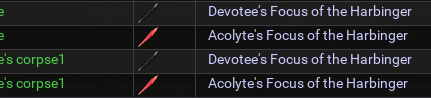
Need to call an exterminator! These pesky bugs keep sneaking back in.I see this has been previously addressed, but I think it's snuck back in...
View attachment 71636
Only way I've been able to clear it is shutting down and restarting.
So loving this lua for quick loot management!
I'll figure this out and squash it! Thanks for the feedback and bug hunting!!
psatty82 updated EZInventory with a new update entry:
09/07/2025
Read the rest of this update entry...
09/07/2025
(c58d236) ~andude2--Sanitizes names to ensure no Corpse's appear as owners of items
--Prevents publishing of data while we're hovering to avoid corpses appearing in display tab
Read the rest of this update entry...
psatty82 updated EZInventory with a new update entry:
09/25/2025
Read the rest of this update entry...
09/25/2025
Read the rest of this update entry...
psatty82 updated EZInventory with a new update entry:
09/25/2025
Read the rest of this update entry...
09/25/2025
Read the rest of this update entry...

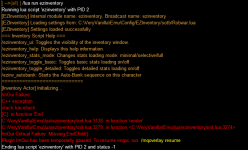
Eww!
Lemme have some coffee and I’ll dive in and fix! Apologies on the error!
psatty82 updated EZInventory with a new update entry:
09/25/2025
Read the rest of this update entry...
09/25/2025
(5c9382f) ~andude2Fixed C++ Stack Issues for imbalanced calls during window minimized states
Read the rest of this update entry...
psatty82 updated EZInventory with a new update entry:
09/27/2025
Read the rest of this update entry...
09/27/2025
Read the rest of this update entry...
psatty82 updated EZInventory with a new update entry:
09/28/2025
Read the rest of this update entry...
09/28/2025
Read the rest of this update entry...
psatty82 updated EZInventory with a new update entry:
10/09/2025
Read the rest of this update entry...
10/09/2025
(8461643) ~andude2Added Item Assignments - right click to assign items (from All Characters Tab) to specific peers. From there, "clean up inventory" or click the Assignments Tab to Execute trades. Will initiate and queue the trades across all peers for that item
Read the rest of this update entry...

Gykrossin
Well-known member
I have just ran into this issue of inventory management, and started poking around to see what solutions are available. Then after a quick search, bang I find this pot of gold.
I have to say that you’re a time savior, and my tab button savior. Now instead of spending money on a keyboard, I can get more RedGuides goodness.
I have to say that you’re a time savior, and my tab button savior. Now instead of spending money on a keyboard, I can get more RedGuides goodness.
We just want to ensure that you're showing as much skin as possible.When using the "Give Item" menu, when I have an item with multiple copies, it seems to be taking the item I have equipped first, which obv doesn't work :3
Thanks for the feedback. I'll update the logic and make sure we're literally not giving up the shirt off our backs!


is there a way for EZInventory to show what is available in the TradeSkill depot? A lot of times, I am searching through dozens of toons trying to find one particular TS item, and even if it can't pull it out and give it to me, if I at least know where it resides, that would be great. Maybe as an additional toggle or something, so it would not normally look there unless I wanted to let it take the time to rebuild that data.
Sorry for the delayed response! Unfortunately I haven't been on Live in several years, so I have zero knowledge of the TS Depot, nor would I even know where to begin on polling that data. If I had reliable access to it, I might be able to figure it out, but...unfortunately it's just beyond my scope of knowledge.is there a way for EZInventory to show what is available in the TradeSkill depot? A lot of times, I am searching through dozens of toons trying to find one particular TS item, and even if it can't pull it out and give it to me, if I at least know where it resides, that would be great. Maybe as an additional toggle or something, so it would not normally look there unless I wanted to let it take the time to rebuild that data.
I understand, it was just a wishlist thing. I may look to see if I can add it, and if so, I will send the code to you to use at your will. I tend to use this pretty much every day, especially for looking for TS items. Or those pesky TS containers I need to swap aroundSorry for the delayed response! Unfortunately I haven't been on Live in several years, so I have zero knowledge of the TS Depot, nor would I even know where to begin on polling that data. If I had reliable access to it, I might be able to figure it out, but...unfortunately it's just beyond my scope of knowledge.

TS depot, like Dragons hoard is stored as a separate, static file thats only pulled when its accessed in game. Thats how you can also store lore item in them~Sorry for the delayed response! Unfortunately I haven't been on Live in several years, so I have zero knowledge of the TS Depot, nor would I even know where to begin on polling that data. If I had reliable access to it, I might be able to figure it out, but...unfortunately it's just beyond my scope of knowledge.
psatty82 updated EZInventory with a new update entry:
11/08/2025
Read the rest of this update entry...
11/08/2025
Read the rest of this update entry...
One thing I noticed today, is that EZinventory will not find items that are in top level slots in the inventory. For instance, I have a top level slot that the item below dropped into, but if I search for it in EZinventory, it is not seen in the list. This is on the live servers.

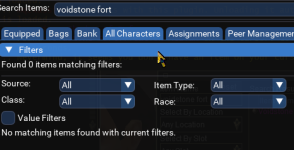
Thanks for the feedback! I'm not sure why/what would be different on live vs. emu for top level searching. Was the "no drop" box checked? It properly searches top level objects on my emu install, but I can delve a little further to see if there's a difference somewhere!One thing I noticed today, is that EZinventory will not find items that are in top level slots in the inventory. For instance, I have a top level slot that the item below dropped into, but if I search for it in EZinventory, it is not seen in the list. This is on the live servers.
View attachment 72881
View attachment 72882
The item I was looking for wasn't no drop, as I was able to trade it. I had seen it earlier, and the toon had pickd it up from inventory, but it dropped back into the top level slot since he was out of zone from the toon I wanted it on.
Users who are viewing this thread
Total: 2 (members: 0, guests: 2)
Share: