• You've discovered RedGuides, an EverQuest multi-boxing and scripting community 🧙‍♀️⚙️. We want you to play several EQ characters at once, come join us and say hello! 👋

  • A TLP without truebox has thawed (Very Vanilla ready)
    Frostreaver
Resource icon

Release EZInventory (1 Viewer) 2026-04-25

Download
This is the most amazing script. The worst part of boxing is inventory/gear management and this is.. just... <3

A couple small feature requests, if I should put this in github issues or something let me know:

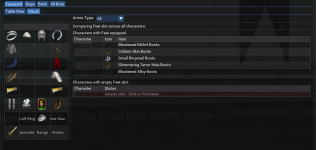
1) In table view list the inventory slot name, and show missing items.
2) In visual view when I click an item, show bots that are missing something in that slot.

Bonus points if I select something in my bag and it tells me who can use it. Crazy extra bonus points if it can figure out if the base item is an upgrade vs their existing base item (minus augs)... even if just by HP.
 
This is the most amazing script. The worst part of boxing is inventory/gear management and this is.. just... <3

A couple small feature requests, if I should put this in github issues or something let me know:

1) In table view list the inventory slot name, and show missing items.
2) In visual view when I click an item, show bots that are missing something in that slot.

Bonus points if I select something in my bag and it tells me who can use it. Crazy extra bonus points if it can figure out if the base item is an upgrade vs their existing base item (minus augs)... even if just by HP.
Feedback here is perfectly fine! Love the suggestions. I've been working on the upgrade/compare item concept, but haven't settled on a method that makes sense. Upgrades are subjective, but I think we can come up with a way to compare items and/or highlight differences. Stay tuned! :)
 
I'll be pushing out an update later tonight - need to error check, but...a little teaser of what I'm working on..

Better highlighting who's missing items - they're now sorted into a separate section and highlighted in red.

missingitems-png.69813


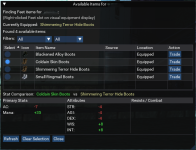
If you click on the row, you'll be presented with a new window to help you find items in your connected peers inventories that fit that slot & class.

comparison.png

This is only available in the Visual tab - that's where my focus was today. Haven't expanded it to per item logic, but for now...

Working to optimize the responsiveness on first load - be on the lookout for an updated Lua soon!
 

Attachments

  • missingitems.png
    missingitems.png
    339 KB · Views: 0
psatty82 updated EZInventory with a new update entry:

05/30/2025

〰️Commits​


Adjusted Table View (Slot Column)

Equipped Visual Tab - now right click on an item slot to search for available items on your connected characters

Available Items Screen - when searching for available items from the Visual Tab, you can now "compare" items - a new table will display below the available options and show you a net comparison to what you're currently wearing in that slot.
...

Read the rest of this update entry...
 
Nothing like seeing all of your alts run to the bank, pick up all of their "Velium Laced" items and then give them all to your Rogue. This is indeed an incredible tool! Thank you!
 
When attempting to get inventory data on a bot, the target [bot] command needs to be exact, as it targets the bot's pet more times than not and then the inventory command fails.

[CODE lang="Lua" title="Possible Fix?"]mq.cmdf("/target =\"%s\"", BotInventory.current_bot_request)[/CODE]
 
When attempting to get inventory data on a bot, the target [bot] command needs to be exact, as it targets the bot's pet more times than not and then the inventory command fails.

[CODE lang="lua" title="Possible Fix?"]mq.cmdf("/target =\"%s\"", BotInventory.current_bot_request)[/CODE]
^bot commands or "PC Bots"?


Want to make sure I'm looking in the right spot to solve/troubleshoot!

Edit - never mind - apparently quoting your message shows more than the message itself on the page.
 
On the overview it has the server type of Emu ... does this work only on emu servers or will it work on live as well?

I dont wanna try if it is doing something odd that might flag me on live.
 
On the overview it has the server type of Emu ... does this work only on emu servers or will it work on live as well?

I dont wanna try if it is doing something odd that might flag me on live.
It'll work on Live too. I just flagged for Emu, as I wasn't sure if the slot numbers still matched up for some of the trade functions, but from another post earlier in the thread, it works on Live just fine!
 
I am loving the script. I use it for tryign to figure out what uprising drops my toons have and then make their containers for them.

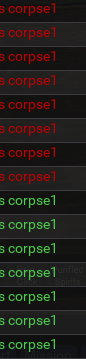
I did notice a bit of an issue. When I look after it has been running a while, it tends to have the character's corpse listed on a bunch of items, which tends to clutter up the list. I didn't know if there was a clean way to not have those show up in the list.
1751991925855.png
 
I am loving the script. I use it for tryign to figure out what uprising drops my toons have and then make their containers for them.

I did notice a bit of an issue. When I look after it has been running a while, it tends to have the character's corpse listed on a bunch of items, which tends to clutter up the list. I didn't know if there was a clean way to not have those show up in the list.
View attachment 70666
Ah! Darn corpses holding on to loot!

I'll clean that up this evening after work and push out an update. Thanks for catching that and providing feedback!
 
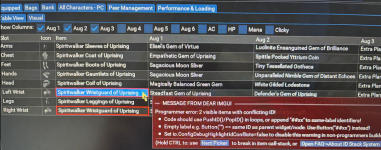
Nice job :-) thanks for your time, just report you this capture FYI
 

Attachments

  • Captura de pantalla 2025-07-30 123540.png
    Captura de pantalla 2025-07-30 123540.png
    1 MB · Views: 0
This has been a huge help when working on gearing out my group. Also great for quickly checking if everyone collected enough quest items for a task.

If you take feature requests, it would be handy if I could "destroy" an item, even for a boxed toon. Tell the character to delete the item somehow. When cleaning up a character's bags, I find old quest items that are no longer needed that I know other characters may have and need cleaning up as well.
 
This has been a huge help when working on gearing out my group. Also great for quickly checking if everyone collected enough quest items for a task.

If you take feature requests, it would be handy if I could "destroy" an item, even for a boxed toon. Tell the character to delete the item somehow. When cleaning up a character's bags, I find old quest items that are no longer needed that I know other characters may have and need cleaning up as well.
Thanks for the feedback! Glad you're finding the resource helpful! I've been offline for a bit...but maybe a new feature request will get me back online and figuring it out! (Safely of course - destroying this is so...terrifying! hah!). Stay tuned!
 
Release EZInventory

Users who are viewing this thread

Back
Top
Cart