Sorry in advance for those of you that do not like long answers and joking around. I am 63 y/o man and this is what I do to stay sane ...well with the little bit of sanity that I left.

I have a Top Secret Security Clearance but I don't think that EQ or Red Guides fall into that category. Seriously though,
Scanned For Irregular Files and then I deleted the following files and just rand the EQ Launcher to reinstall them and it still made my toons look like Brownies. It would be nice to be able to figure it out without all this trouble but, you gotta do what ya gotta do.
defaults.ini
eqclient.ini
eqgame.exe
EQGfx_Dx8.dll
EQGraphicsDX9.dll
eqlsClient.ini
eqmain.dll
You can go here for instructions on scanning your Everquest Game for any irregular or missing files:
Scanned For Irregular Files
This did not work for me so I went the route of just turning it off. Maybe I will play with the .ini file to see if I can get it to work like it was intended.
*** WARNING:
Also, you should back up the character configuration files by following these instructions:
<CharacterName>
<ServerName>.ini (example jack_bristlebane.ini)
UI<CharacterName>_<ServerName>.ini (example ui_jack_bristlebane.ini)
One or more of those files may be corrupt or missing, causing these issues.
If deleting these files does not resolve your issue, you can restore your backed up files and folders and retain your hotkeys, contact lists, and display settings.
If all else fails, you can do what others have suggested:
MQ2PluginManager - Quickly view loaded and unloaded plugins, and one click load and unload of them and just turn
MQ2AutoSize off.
P.S. I deleted my the autosize plugin and ran the launcher and it did not reinstall that MQ2AutoSize plugin so, I guess I don't have to worry about it anyway.



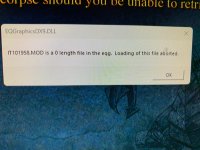





 I did search for the entire error and parts of the error and I didn't find anything. No one's perfect. Also, in no job I have ever during my Air Force Career or Civilian have I ever played Everquest nor did any of my clients! Peace Out!!