• You've discovered RedGuides, an EverQuest multi-boxing and scripting community 🧙‍♀️⚙️. We want you to play several EQ characters at once, come join us and say hello! 👋

  • A TLP without truebox has thawed (Very Vanilla ready)
    Frostreaver

Tip - EQBC Social Hotkey macros

runordie

Member
Joined
Jul 16, 2014
RedCents
239¢
Hey all. So last night I finally(after getting 4/6 of my toons up and running smooth on KissAssist) setup EQBC on my toons. I instantly realized that EQBC will allow me to do so much in controlling my bots from the 1 toon I play manually. This made me think that there might be others out there just like me who dont use EQBC or might not be using it as advanced as others.


EQBC RedGuides Link
- EQBC MacroQuest2 Link - List of EQ Commands Link

EQBC(everquest box chat) is a plugin that can connect all your toons to a local private chat room where you can send commands to other clients connected to the chat room

Useful EQBC Social Hotkey Macros:
1)Commanding the group to sit/stand -- /stand will make an already standing PC sit down, so /sit off is needed so a standing PC stays standing
Rich (BB code):
/bcg //sit on
Rich (BB code):
/bcg //sit off
2) Follow the PC issuing the command -- /afollow is a command from plugin MQ2AdvPath - I use this because /afollow will toggle follow/unfollow, making this 1 macro a start and stop for following
Rich (BB code):
/bcg //target id ${Me.ID}
/bcg //afollow
3)Switching targets -- I specifically use this when the mob I'm fighting gets around 15% hp and I'm ready to attack the next mob. I issue the /switch command to my shaman from my tank(I play the tank manually) so the shaman will start slowing the next mob as soon as I'm ready to fight the next mob.
Rich (BB code):
 /bct ToonName //switch
4)Starting KissAssist
Starts the whole group's KissAssist with the toon that is issuing the command as the assist for KissAssist. Can also start each toon individually by changing /bcg to /bct ToonName
Rich (BB code):
/bcg //target id ${Me.ID}
/bcg //mac kissassist
START INDIVIDUAL TOON
Rich (BB code):
/bct ToonName //target id ${Me.ID}
/bct ToonName //mac kissassist
5) Ending KissAssist -- same as starting, can command the whole group to stop or individual toons to stop
Rich (BB code):
/bcg //endmac


So please, share your macros! What clever tricks do you use EQBC for?
 
Last edited:
Re: EQBC Macros

I know I used to box and make my own macros and didn't realize how powerful eqbc could be. I would have everything run off events in group say or use ISboxer to type something in on all the boxes. Once I realized how easy it was to set up it changed the way I did things and made everything more efficient.
 
Re: EQBC Macros

im talking in game hotkey macros. press control+o opens social page where you can make in game macros like melody and ch chains...

your guide is good it shows how to use eqbc plugin. im trying to list reasons for using eqbc. functions for eqbc to command your other toons. for example auto following all of your toons at once. starting/ending kissassist...

what else could you use eqbc for? or am i so noob for just figuring this stuff out and i only use free wineq2
 
Re: EQBC Macros

Any Macro with the alias' written into can used with eqbc commands, along with any EQ native commands.

Examples to looks for in the macro itself would be near the top of the macro.

This is what the kissassist commands look like in the macro itself.

Rich (BB code):
        /squelch /alias /addfriend      /echo AddFriend
        /squelch /alias /addignore      /echo AddMobIgnore
        /squelch /alias /addimmune      /echo AddMezImmune
        /squelch /alias /addpull        /echo AddMobPull
        /squelch /alias /afktoolson     /echo Reset AFKTools AFKToolsOn
        /squelch /alias /assistat       /echo Reset Melee AssistAt
        /squelch /alias /autofireon     /echo toggle AutoFireOn
        /squelch /alias /autorezon      /echo toggle AutoRezOn
        /squelch /alias /backoff        /echo backoff
        /squelch /alias /dpsspam        /echo toggle DPSSpam
        /squelch /alias /buffson        /echo toggle BuffsOn
        /squelch /alias /campfire       /echo Summon Campfire
        /squelch /alias /camphere       /echo toggle ReturnToCamp
        /squelch /alias /campradius     /echo Reset General CampRadius
        /squelch /alias /chase          /echo toggle ChaseAssist
        /squelch /alias /chasedistance  /echo Reset General ChaseDistance
        /squelch /alias /chaseoff       /echo Reset General ChaseAssist 0        
        /squelch /alias /chaseon        /echo Reset General ChaseAssist 1 
        /squelch /alias /debug          /echo toggle Debug
        /squelch /alias /debugall       /echo DebugAll
        /squelch /alias /debugbuffs     /echo toggle DebugBuffs
        /squelch /alias /debugcombat    /echo toggle DebugCombat
        /squelch /alias /debugheal      /echo toggle DebugHeal
        /squelch /alias /debugmez       /echo toggle DebugMez
        /squelch /alias /debugmove      /echo toggle DebugMove
        /squelch /alias /debugpull      /echo toggle DebugPull
        /squelch /alias /dpsinterval    /echo Reset DPS DPSInterval
        /squelch /alias /dpson          /echo Reset DPS DPSOn
        /squelch /alias /dpsskip        /echo Reset DPS DPSSkip
        /squelch /alias /healson        /echo Reset Heals HealsOn   
        /squelch /alias /interrupton    /echo toggle CastingInterruptOn     
        /squelch /alias /kisscheck      /echo KissCheck
        /squelch /alias /kissedit       /echo kissedit
        /squelch /alias /looton         /echo Reset General LootOn
        /squelch /alias /maxradius      /echo Reset Pull MaxRadius
        /squelch /alias /maxzrange      /echo Reset Pull MaxZRange
        /squelch /alias /medcombat      /echo toggle MedCombat
        /squelch /alias /medstart       /echo Reset General MedStart
        /squelch /alias /meleedistance  /echo Reset Melee MeleeDistance
        /squelch /alias /meleeon        /echo toggle MeleeOn
        /squelch /alias /mercassistat   /echo Reset Merc MercAssistAt
        /squelch /alias /mezon          /echo Reset Mez MezOn
        /squelch /alias /movewhenhit    /echo toggle MoveWhenHit 
        /squelch /alias /peton          /echo toggle PetOn
        /squelch /alias /pettoyson      /echo toggle PetToysOn
        /squelch /alias /pettoysplz     /echo PetToysPlease
        /squelch /alias /rebuffon       /echo toggle RebuffOn
        /squelch /alias /setae          /echo Set AE
        /squelch /alias /setaggro       /echo Set Aggro
        /squelch /alias /setbuffs       /echo Set Buffs
        /squelch /alias /setburn        /echo Set Burn
        /squelch /alias /setcure        /echo Set Cure
        /squelch /alias /setdps         /echo Set DPS
        /squelch /alias /setheals       /echo Set Heals
        /squelch /alias /switch         /echo Switch Target
        /squelch /alias /writespells    /echo Write my spells

Everyone of those commands that can be written from the command line can be made into a social hotkey with a /bct /bcg ect.

If you are a macro writer you can use EQBC to have the macros that are running prompt events from one another.

Hope that helps.

Its extremely powerful and I wouldn't box without it.
 
Re: EQBC Macros

im talking in game hotkey macros. press control+o opens social page where you can make in game macros like melody and ch chains...

your guide is good it shows how to use eqbc plugin. im trying to list reasons for using eqbc. functions for eqbc to command your other toons. for example auto following all of your toons at once. starting/ending kissassist...

what else could you use eqbc for? or am i so noob for just figuring this stuff out and i only use free wineq2

Okay, first I'm glad to hear your using EQBC. There's tons of postings in various threads etc to use it. Examples would be slash commands to bot macro's or even just target and follow commands. I'm a paranoid one with chat boxes and do not use EQ's in game macro keys to do anything MQ2 related commands. Doing so put them through the regular EQ chat boxes that potentially could be in Daybreak's/SOE's logs. I do use an external hotkey called AHK to do regularly used commands. Then before I just hit the hotkey, I make sure I click in the MQ2 window in Everquest so it goes directly in there instead of through other chat windows.

As for the content of what you put in those, that's purely subjective to what you use particularly the most. I tend to type out a lot of the basic things such as /bcaa //target xxxx then /bcaa //follow or /bcaa //chase (when running Kiss and wanting to move a team following the MA that I'm manually controlling. I use the AHK to put in things like /bcaa //kissassist assist tankname.
 
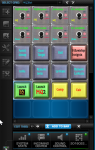
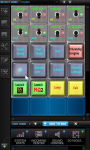
if you think eqbc alone is awesome, wait until you figure out how to do super cool information sharing with stuff like netbots or figure out that you can use Roccat Power Grids to use a tablet as an awesome graphical UI extension to maintain statuses of hotkeys. Like here is a thing i did for mq2bot and eqbc hotkeys that sends commands to a single toon or everyone in eqbc depending on which button you hit. fun times indeed. almost makes me want to play EQ again just to use it!
 

Attachments

  • mq2bot_grid.png
    mq2bot_grid.png
    150.1 KB · Views: 1,493
  • mq2bot_grid_toggles.png
    mq2bot_grid_toggles.png
    207.2 KB · Views: 1,487
ok thank you both for this info it was essentially what i was looking for.

i totally understand why you would use AHK. if you are issuing these social hotkeys from multiple toons in an army that would be necessary.

for me who only boxes 1 group and try to get away with only using free wineq2, as long as i click in my mq2 chat box before clicking my social hotkey macro i should be safe?
im only making the social hotkeys for my 1 puller/tank that i drive manually. all 5 other toons will only be receiving eqbc messages.

edit (just saw pete's post)

wow pete that is crazy awesome lol controlling all of that at once is amazing. i just started all this 2 months ago so im slowly getting there lol. im imagining you having like 3 50inch tvs connect to 2 pcs and youre just on your couch chilling controlling 30+ toons from a tablet

im also learning that the more time i put into setting all this up it pays off exponentially because it makes everything so much more efficient

- - - Updated - - -

oh wow i found this thread too that can be used with eqbc...

http://www.redguides.com/community/showthread.php/28019-old-info-but-some-might-use-eq-commands-and-such
 
Last edited:
Glad you found what you are looking for.

My setup is only built by 1 Character as my "Base" using things like

/bct Tonnname //target ${Me.Name}
/delay 1s
/bct Toonname //mac kissassist

or

/bcg //target ${Me.Name}
/delay 1s
/bcg //stick 12

This allows you to copy the UI and hotkey from 1 toon to another without having to change the names in the buttons. Which isn't super helpful until you are scrambling after an MA death or the likeness.

Run with your imagination :)

I have 6 Bars configured for controlling 3 groups and 90% of the keys are universal only having to edit a few for a new toon. As you said, initial config saves a ton of time and frustration down the road.
 
Last edited:
a few I use as hotkeys

/bcg //chase 1

/bcg //chase 0

And then the one I use most often is actually

/bcg //moveto loc ${Me.Y} ${Me.X} it just runs the characters to where you're standing I like it for if im crawling a zone and just moving my camp often like in degmar.
 
a few I use as hotkeys

/bcg //chase 1

/bcg //chase 0

And then the one I use most often is actually

/bcg //moveto loc ${Me.Y} ${Me.X} it just runs the characters to where you're standing I like it for if im crawling a zone and just moving my camp often like in degmar.

yes that moveto, perfect for dungeon cralws, is the cleverness im looking for.

- - - Updated - - -

I'm using the line , //target id ${Me.ID} , a lot...is there a place that explains all target id's I could use and more alike features? This seems to be syntax that mq2 uses? I'll look around
 
Kiss 9.0 has the basic frame work of the New KissTask System. These are all designed to be used with EQBC from the task leader that you are controlling.

Commands
Rich (BB code):
/kttarget - Target the NPC I am targeting
Syntax: /bcg //kttarget ${Target.ID}

/kthail - Target the NPC I am targeting and hail them for quest hails
Syntax: /bcg //kttarget ${Target.ID}

/ktsay - Target the NPC I am targeting and say text
Syntax: /bcg //kttarget ${Target.ID} I like butter

/ktdoor - Move to within 70' and click Door/Zone in # or closest Door/Zone in 
Syntax: /bcg //ktdoor DoorID or  /bcg //ktdoor
/bcg //ktdoor 1 - doorID #1
/bcg //ktdoor  - Closest Door/zone
 
anyway i can do mana check with this?

- - - Updated - - -

i found this :

Rich (BB code):
/bc Report Health Target:${Target.CleanName} - MyHPs:${Me.PctHPs} - MyMana:${Me.PctMana}}
turned it into this

Rich (BB code):
/bc Report Health Target:${Target.CleanName} - MyHPs:${Target.PctHPs} - MyMana:${Target.PctMana}}
so that from my main toon that im controlling manual i can target a box and get my target's hps/mana
 
anyway i can do mana check with this?

- - - Updated - - -

i found this :

/bc Report Health Target:${Target.CleanName} - MyHPs:${Me.PctHPs} - MyMana:${Me.PctMana}}

but whats the command to return my target's pct mana?
Target.PctMana doesn't work or is totally made up. If the person is in your group or on xtarget it might work. You just dont have access to a target's mana pool info (it may be in the data, but it isnt chipped out in mq2 properly if it is). Same reason Target.MaxHPs and Target.MaxMana doesnt work. It is a limitation of the system.
 
I use a HUD that has HPs, Mana, and how far away they are from me. Also if they are sitting or standing. I find it invaluable!

Rich (BB code):
[Group]
Me=3,2,1000,698,0,255,255,${Me.Name} ${Me.CurrentHPs}/${Me.MaxHPs} ${Me.PctMana}
G2=3,2,1000,710,0,255,255,${If[${Group}>0,G1:${Group.Member[1].Name} ${Group.Member[1].Class.ShortName} HP:${Group.Member[1].PctHPs}% M:${Group.Member[1].PctMana}% D:${Group.Member[1].Distance} ${Group.Member[1].State},]}
G3=3,2,1000,722,0,255,255,${If[${Group}>1,G2:${Group.Member[2].Name} ${Group.Member[2].Class.ShortName} HP:${Group.Member[2].PctHPs}% M:${Group.Member[2].PctMana}% D:${Group.Member[2].Distance} ${Group.Member[2].State},]}
G4=3,2,1300,698,0,255,255,${If[${Group}>2,G3:${Group.Member[3].Name} ${Group.Member[3].Class.ShortName} HP:${Group.Member[3].PctHPs}% M:${Group.Member[3].PctMana}% D:${Group.Member[3].Distance} ${Group.Member[3].State},]}
G5=3,2,1300,710,0,255,255,${If[${Group}>3,G4:${Group.Member[4].Name} ${Group.Member[4].Class.ShortName} HP:${Group.Member[4].PctHPs}% M:${Group.Member[4].PctMana}% D:${Group.Member[4].Distance} ${Group.Member[4].State},]}
G6=3,2,1300,722,0,255,255,${If[${Group}>4,G5:${Group.Member[5].Name} ${Group.Member[5].Class.ShortName} HP:${Group.Member[5].PctHPs}% M:${Group.Member[5].PctMana}% D:${Group.Member[5].Distance} ${Group.Member[5].State},]}}
 
any one have a command on eqbc to cast invi/invu synchro with 2 casters in group plz ? :)
 
kinda depends on your lag and how you are doing it

personally I switch to one of the toons and from it send a "/bct tooonname keypress 2" where 2 activates one of my invis AA, then immediatly hit the IVU AA on the toon I am on (or vice versa) I sometimes have to switch which toon I am on,again I suspect it has more to do with slight lag.
 
Ninalia, warlock is right lag plays a big factor here. Also sometimes it takes a few clicks. I use this. I send the first to my Mage and the second to my ench, but that will vary by your group composition.
Rich (BB code):
/bct <toon name>//alt activate (perfected invis aa#)
/bct <toon name> //alt activate (IVU aa#)
 
yea i play TLP so invis is a spell, but with all spells i always repeat the cast line in the macro. in case of fizz, lag, spam always good to send command twice especially if its a heal or something important

cast on my target
Rich (BB code):
/bct toonname //target id ${Target.ID}
/bct toonname //cast 1

cast on me
Rich (BB code):
/bct toonname //target id ${Me.ID}
/bct toonname //cast 1

//cast 1 is for spell gem 1, can change for any spell gem
 
Last edited:
I am using kissassist, but my toons wont follow. the MT starts to follow but then goes back to camp spot. My other toon sometimes follows me but it a hit and miss. I am using /bcg //target mytoons name, then the next command I use //follow. Is there another command I should be using? I just started the game again after 2 years. Thank you.
 
try using /afollow - if you want to follow while kissassist is running then your .ini has to be configured to ReturnToCamp=0. if you want to leave ReturnToCamp=1 then you have to end kissassist before you follow then start kissassist again after youre done following
 
My follow HOTKEY always does
Rich (BB code):
/bcg //end
/bcg //target id ${Me.ID}
/bcg //stick 5

Then when I get to where I want them
Rich (BB code):
/bcg //stick off
 
I find this works better for having group follow me, I have these 2 socials on each char basically.
If shit goes south I can have everyone in the group move to me quickly and get out of dodge if I cant succor or something.

Follow
/bcg //stick id ${Me.ID} 8 healer

Stop
/bcg //stick off
 
I use /bct to issue the command, but how it gets carried out is actually within the macro I use. Although I am sure you can just use EQBC to do the whole thing.

/bct coth

and my mage targets who said that to him and cast CoTH. I use that a lot for pulling.
 
I have 2 hotbars setup for buffs from my main toon. 1 hotbar is set with buffs targetted at me, the other with buffs set up for my target. For instance, I want to cast Bih Li on the group i'm in, I hit the button for me, the shaman regardless of group targets me and casts bih li. I'm using EQBC and MQ2cast to make this work, so make sure you have both of those in use. same goes for single target buffs. the "8" that's in there is the spell gem you want used if the spell isn't already memmed. I leave it as 8 like on kissassist, but if you need it to be something else that's all you. ONLY change the bold parts to fit your needs, throwing that out there for the new guys such as myself.

/bct charname //casting "spirit of bih`li"|8| -targetid|${Me.ID}

Now for the targetted one, lets say someone wonders by wanting sow, or i just need to buff one of the other groups in my horde, or an oog toon. all the same things apply just a different ID

/bct charname //casting "spirit of bih`li"|8| -targetid|${Target.ID}

Yes there is some setup time to get each hotbar put together and enter the caster toon name, and then the spell you want from them. but you'll only really have to change it once per expansion, and it's sooo nice.
Now from my main I can have any buff i want anytime i want, on any toon i need it. from 2 hotbars. and it's of course not limited to buffs, i have a couple emergency heal keys and some others setup with it to control other toons without having to tab over.

I'm still learning all this stuff, i've only had MQ2 for a few weeks now, and have only done enough tinkering to make things that fit my own needs as they arise. but i'm definitely loving it so far! even made a down/holy setup that swaps my bard to weapons when attack turns on and instruments between fights to help the casters
 
Someone mentioned the double invis earlier. This is another hotkey that should be right next to your double invis button.

/bcaa //makemevisible

This will remove IVU and regular Invis from all of your toons. I was so happy when I discovered it in the change logs when it came out.
 
love this thread! We need a thread like this that is a "cool things to do with EQBC" wiki!
 
here are the macros i am using, i have not tried the coth macro yet but the rest work great.

my SK drives the other toons.


mage targets who said that to him and cast CoTH
/bct coth

Double Invis from SK
/bcg mage //alt activate 1210
/bcg enchanter //alt activate 280

make all visable
/bcaa //makemevisible

Kissassist manual play macro
/bcga //end
/bcga //target ${Me}
/bcg //mac kissassist
/mac kissassist manual
/buffson

Kissassist automated play macro
/bcga //end
/bcga //target ${Me}
/bcg //mac kissassist
/mac kissassist pullertank
/bcga //camphere

KISS auto with Autocleric
/bcga //target ${Me}
/bct mage //mac kissassist
/bct enchanter //mac kissassist
/mac kissassist pullertank

Camp here
/bct mage //camphere
/bct enchanter //camphere
/camphere

start AUTOcleric with auto group or manual
/bct cleric //target ${Me}
/bct cleric //mac autocleric22

Kissassist manual with AUTOcleric
/bcga //target ${Me}
/bct mage //mac kissassist
/bct enchanter //mac kissassist
/mac kissassist manual
/buffson


End all running macros
/bcga //end

Have your bots follow you
/bcg //stick id ${Me.ID} 10 uw

Have your bots move to you. (Will also turn off /stick from the previous macro)
/bcg //moveto loc ${Me.Y} ${Me.X}


pause MQ2
/mqp


KISS MQ2EQBC

/kttarget - Target the NPC I am targeting
Syntax: /bcg //kttarget ${Target.ID}

/kthail - Target the NPC I am targeting and hail them for quest hails
Syntax: /bcg //kttarget ${Target.ID}

/ktsay - Target the NPC I am targeting and say text
Syntax: /bcg //kttarget ${Target.ID} I like butter

/ktdoor - Move to within 70' and click Door/Zone in # or closest Door/Zone in
Syntax: /bcg //ktdoor DoorID or /bcg //ktdoor
/bcg //ktdoor 1 - doorID #1
/bcg //ktdoor - Closest Door/zone
 
Last edited:
Borrowed a lot of good socials from this thread, thought I might try and give back

For talking to quest NPC's to get the task window to pop up I use
/bcga //say "trigger text"

then use:
/bcga //notify TaskSelectWnd TSEL_AcceptButton leftmouseup

to accept the task on all chars. Yes, I'm to lazy to tab and click!
Thanks!
 
random macros I found and wanted to keep... THESE are NOT my macros, I found them on some random forum, so I left the toon names in them cause they are not mine and they are on the open Googleness!

Rich (BB code):
All people with pets should have pet channel
All ppl with whom you wish to punch with should be in a dps channel
All tanks should be in a tank channel
All casters in caster channel.
All healers in a heal channel

/bccmd channels tank
/bccmd channels dps pet
/bccmd channels caster pet dps
/bccmd channels tank heal

So for BST he would be all 3 channels since he both casts, has a pet, and does dps
Clerics Paladins and Shaman are in /bccmd channels tank heal because I want them to attack from the beginning and for the occasional heal.

Attack:

/bca //Target ID ${Target.ID}
/bct tank //multiline ; /stick front 5 uw ; /attack on

Seperate button for non tank people:

/multiline ; /bct dps //target ID ${Target.ID} ; /bct pet //target ID ${Target.ID} ; /bct caster //target ID ${Target.ID} 
/bct dps // multiline ; /stick behind 5 uw ; /attack on
/bct pet //pet attack

Long Term Buffs:
/bca //keypress 0
/cast 5
/itemnotify 21 rightmouseup
(as an example for the main who also has things to click or cast)

on all toons I have a seperate macro that will do commands specific to the toons. Bard has /twist 10 1 2 3 4
warrior has /twist 10 11 12 for his SoA, epic 2hs, and exp pot
Things like that. all the major buffs you want, you can even do 
/multiline ; /cast 3 ; /delay 3s ; /cast 8

Specifically for the chanter I have 
/multiline ; /tar Anuli ; /cast 3 ; /delay 3s ; /cast 5 ; /delay 4s
/multiline ; /tar Ellone ; /cast 3 ; /delay 3s ; /cast 5 ; /delay 4s
/multiline ; /tar Stevphen ; /cast 3 ; /delay 3s ; /cast 5 ; /delay 4s
/multiline ; /tar Bubblesz ; /cast 3 ; /delay 3s ; /cast 5 ; /delay 4s

That way all of my teams have both the vampiric thunder and whatever the other buff is on all 4 groups. 
/tgb on makes it so you can target a group leader in another group and group buff them

Short Duration Buffs
key 9 is the short duration buffs that last 2 minutes or less, just a 
/bcaa //keypress 9
Useful for kraken and  Gift of Annhi

Nuke:
Now casters are in their own group because I have 
/bct casters //keypress 7

Wizard key 7 macro:
/cast "Yamakagis fiery inferno II"

and everyone else with good nukes like chanter and mage have their spells on key 7.

You may also be able to do 
/casting "Yamakagis yadayada" gem3 -kill
Though I'm not sure if that one is legal. Ill edit this if it is or isnt and say yay or neigh on which to use but for now just pressing your key  7 nuke should suffice.

Follow:
/bcaa //stick ID ${Me.ID}
/bct pet //multiline ; /pet hold ; /pet follow

Everyone will follow you whether or not they have you as a target. 

Heal:
/bct heal //keypress 5

for Cleric that would be /cast "Word of Vivication"
for everyone else they all have a heal spell

Another tip would be to save all of your spell gem sets to main. If anyone dies its a simple macro to keep on a second bar:
/bcaa //memspellset main

Loot:
/tar corpse
/stick 5
/pause 5
/loot

As for whom is in what channel is up to you. if you want your wizard to punch people, stick him(or her) in dps channel. After a while if you are all auged out on every toon you may just have everyone in the dps channel as well as their respective channel.

Tanks I keep in their own channel so that I may focus them on someone else like the main boss and have the other channels kill adds separately. To each his own and this is just one strategy. What you decide to do for your keys and separate toon macros is completely up to you! I hope this helps.

Rich (BB code):
my "loot" button
/target corpse
/stick 5
/loot


"attack" button
/bca //target id ${Target.ID}
/bca //stick 12 UW behind
/bcaa //attack on
/bcaa //pet attack

"lead"
/bca //target Main_Tank_Name
/bca //stick behind 15 UW
/bcaa //pet follow
/bcaa //pet hold

"grpinvite"
/multiline ; /invite toon1; /invite toon2; /invite toon3;
/bca //invite

"enterraid"
/bcaa /say enter raid
multiline ; /delay 3s; /say enter raid; /delay 9s;
/bca //notify largedialogwindow LDW_OkButton leftmouseup
 
Last edited:
Is anyone running ROCCAT with eqbc like pete was above?

I was trying to get it setup today and I couldnt get the commands to fire in eq. I have tried connecting it the macroquest.exe, eqbc.exe and eqgame.exe and none of them are sending commands to EQ. Is this a permissions issue or am I sending commands to the wrong .exe?
 
your eqbc needs to have the ability to be connected to from outside your computer, then just have it hook into the ip for the eqbc and should be good to go.
 
i use the below for my bots. i love mq2nav

Rich (BB code):
/bcg //nav locxyz  ${Me.X} ${Me.Y} ${Me.Z}
 
Borrowed a lot of good socials from this thread, thought I might try and give back

For talking to quest NPC's to get the task window to pop up I use
/bcga //say "trigger text"

then use:
/bcga //notify TaskSelectWnd TSEL_AcceptButton leftmouseup

to accept the task on all chars. Yes, I'm to lazy to tab and click!
Thanks!

whats the command to get all the toons to target my target?
 
Tip - EQBC Social Hotkey macros

Users who are viewing this thread

Back
Top
Cart