• You've discovered RedGuides, an EverQuest multi-boxing and scripting community 🧙‍♀️⚙️. We want you to play several EQ characters at once, come join us and say hello! 👋

  • A TLP without truebox has thawed (Very Vanilla ready)
    Frostreaver

Problem - Eq crash when clicking on Item link

Drygon

Active member
Joined
Jan 2, 2020
RedCents
456¢
Hiya,

My Toons have a strange issue when using Mq2 with Ctwn Plugins (shm, Bst, Zerk, sk) and bard KA. Every time on all Accounts when I want to inspect an Item or click on an Item Link the client crashes and I have to reload my Toon... when I unload Ctwn it works like always... I'll tried to reinstall VV and Plugins but still not working...
Anyone an Idea what is wrong?
 
in the latest patch eq added item comparison inspection, this means if you run custom eq ui, you need to either fix your equi_itemdisplay.xml and equi_Templates.xml, or if your ui can handle it just rdelete those two files, as not many ui writers customize those two specific files. but they still leave them in the folder.
 
as kaen said:

if you use a customUI EQUI_ItemDisplay.xml
EQUI_Templates.xml
those files either need to be updated or removed from your custom ui folder
 
in the latest patch eq added item comparison inspection, this means if you run custom eq ui, you need to either fix your equi_itemdisplay.xml and equi_Templates.xml, or if your ui can handle it just rdelete those two files, as not many ui writers customize those two specific files. but they still leave them in the folder.

Ty Kaen for the Info... will try it out today.
 
So my brother that is more up to date on mq and stuff, suggested the same thing and so i deleted those files, Re-log into my toon, Right click.... CRASH!!!!

2nd Crash is from re-downloading the Voktar UI... CRASH

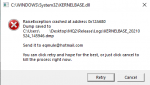
eqmqerror.png

WTB A TRANSLATION ON THAT.
 
Last edited:
Translation: Do what kaen and Sic said: delete the EQUI_ItemDisplay.xml and EQUI_Templates.xml from your custom UI.
 
Translation: Do what kaen and Sic said: delete the EQUI_ItemDisplay.xml and EQUI_Templates.xml from your custom UI.

So you missed the 1st line of my post saying
"so i deleted those files, Re-log into my toon, Right click.... CRASH!!!! "
 
no i had issues prior to my MQ days with multiple UI copies, so when i upgraded harddrives i reinstalled EQ and just the Voktar UI, all 6 of my toons run outta that directory.

After the 2nd crash i went to EQinterface and checked for updates on his skin. Noticed the Zip file was different from the one i previously saved back in Dec 18, 2020.
On his UI thread it reads "Changelog Fixed a bug in the inventory window (nothing major). Updated for Live."

only thing that comes to mind is not updated for THIS change but the other one where they added the ratio bs
 
I don't mean to come off as rude or anything like that, i've seen that crash before but not as commonly as it is now, lol
 
I didn't take it as rude, no worries.

From a testing standpoint -- test without MQ and with the default UI. Then test without MQ and with the custom UI. Then MQ and default UI. Then MQ and Custom UI. That will help narrow down where the issue is.
 
True enough, it's not an MQ issue never questioned that but MQ makes it blantly obvious when you crash, and i don't mind that.
As you suggested
Everything off, reset UI = everything is fine
Load Skin, no MQ = Straight Crash to Desktop, no error
Load MQ, Reset Default UI = No issues, meaning skin is not fully updated
Post from above was with MQ and Skin with files = Crash with error
Post from above with MQ and skin with EQUI_ItemDisplay & EQUI_Template both Deleted = Still crash with Error. and FeelsBadMan (for any of you Twitch users)
 
Use Examdiff on the new default ItemDisplay file to find the new bit of code that was inserted. Copy/paste that into your custom UI ItemDisplay file. Do the same for the Template file. If anyone still has pre-patch default ItemDisplay and Template file, that would make it even easier to identify the new code.

Any time that EQ makes updates to UI files that affect my custom UI (Zliz), I save off a copy of the pre-patch default file and compare it to the patched file after I update EQ. Then I mirror the changes into the custom UI file. Luckily, Zliz does not alter these 2 files from the last patch so they're already loading from default.
 
I use one of the Shakar Custom UI's.
I had the same problem after the last patch. When I deleted BOTH EQUI_ItemDisplay & EQUI_Template both Deleted and the reload the UI - It screwed up the entire UI. But when I just deleted just the EQUI_ItemDisplay and reloaded the UI it worked perfectly.
Not sure what they changed in the templates file, but its not much that I can see.
 
Problem - Eq crash when clicking on Item link

Users who are viewing this thread

Back
Top
Cart