• You've discovered RedGuides, an EverQuest multi-boxing and scripting community 🧙‍♀️⚙️. We want you to play several EQ characters at once, come join us and say hello! 👋

  • A TLP without truebox has thawed (Very Vanilla ready)
    Frostreaver

Problem - EMU (Project Lazarus) AutoLogin Profiles Not Found

Joined
Dec 21, 2020
RedCents
30¢
Current EMU Server version. Clean Install of MQNext and Project Lazarus.

Edited MQ2autologin.ini EQ Path to point to Project Lazarus directory. As directed by Redguides mq2autologin thread, Added
[Servers]
Project Lazarus=project lazarus
Project Lazarus=[] project lazarus

Ran Macroquest.exe

Entered a new profile (Account|Server|PW|Name) under Profiles>Create New... (new profile is listed and shown). Note that Autologin is: Enabled

Left clicked on the new profile.
-> EQ is Initialized EQ to login screen, but account name is filled in with Profile<concat>[] project lazarus. All other fields are empty. Autologin failed and entry data is clearly wrong
-> MQNext is initialized and AutoLogin Status window is open with "Autologin is shown as inactive"

Clicked on Select Profile, but error tooltip pops up with "No Profiles, Go create one!".


Subsequently, rebooted machine. Restarted Macroquest.exe, only this time the newly created profile is not shown, none are listed; however, using Notedpad I verified that the profile is indeed listed in MQautologin.ini file.
 
Solution
Common Problems
Code:
Server ShortName = Server Login Screen (Exact name including spaces and characters)`
1: Not moving past the server login screen:
a: AutoLogin is: disabled
b: Server login screen not exact to what is on your server login screen (Different EQEmu hosts use different nomenclature)
2: Log into character select but then instantly log back to the server login screen
a: Server ShortName is wrong, This must match (characters in server ${EverQuest.Server})

> Here is the MacroQuest Docs page for MQ2AutoLogin with some Emu Examples <
If you're using projecteq.net as your eqhost.txt login server, then here's a working ini

INI:
[Servers]
Project Lazarus=Project Lazarus
[Profiles]
DefaultEQPath=D:\Users\Redbot\gamez\EverQuest_EQEmu_RoF2
NumProfiles=1
Profile1=lazarus
[lazarus]
EQPath=D:\Users\Redbot\gamez\EverQuest_EQEmu_RoF2
project lazarus:<string redacted>
UseMQ2Login=1

If you're using eqemulator.net, then you'll want to use,
Project Lazarus=[] Project Lazarus

I'm not sure what's wrong with your server block. You may need to fix capital letters, or remove one of the Project Lazarus lines.

More examples here:

 
Common Problems
Code:
Server ShortName = Server Login Screen (Exact name including spaces and characters)`
1: Not moving past the server login screen:
a: AutoLogin is: disabled
b: Server login screen not exact to what is on your server login screen (Different EQEmu hosts use different nomenclature)
2: Log into character select but then instantly log back to the server login screen
a: Server ShortName is wrong, This must match (characters in server ${EverQuest.Server})

> Here is the MacroQuest Docs page for MQ2AutoLogin with some Emu Examples <
 
Solution
First off, super excited to get knee-deep in this. I have also done a bit of searching before raising my hand here for direction. This is for the the EMU server Project Lazarus, and from many posts from a user named @Sic , I need to get away from the ancient MQ2 stuff.
My autologin is not selecting the server.
my eqhost has been updated to Host=login.projecteq.net:5999
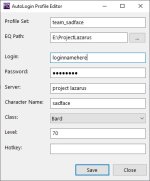
This is the profile I have made using a fresh install of Very Vanilla (emu servers).
servername_issue0.jpg
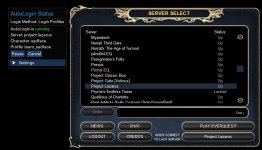
and this is the hang on the server select.
servername_issue1.jpg

Does anyone know what server name we use to connect to Project Lazarus? ((e3 used Project Lazarus and [] Project Lazarus )) not sure if it's cap sensitive or not.
 
Is that good news or bad news? I'm using the same thing it's saying. servername_issue3.jpg

1: Not moving past the server login screen:
: AutoLogin is: disabled : It is enabled
: Server ShortName is wrong, This must match (characters in server ${EverQuest.Server}) : ${EverQuest.Server} returns Project Lazarus.
 
Last edited by a moderator:
you should follow the lazarus wiki instructions and use the peq login server (the lazarus eq client download also is already set to this) and then use the
[Servers]
Project Lazarus=Project Lazarus

as the MQ documentation suggests.
 
actually from the server select ss it looks like you already are on the peq login server. so then as long as you have the appropriate servers section in your ini and your profiles have server set to project lazarus you should be all set. works fine for me every day
 
Close EQ, open your MQ2AutoLogin.ini file, under Settings, add "Debug=1" then launch your profile and see what's in Logs\MQ2AutoLogin_DBG.log

ini should look like this:
INI:
[Settings]
Debug=1
 
your screenshot of the ini above doesn't show the servers section in it, can you confirm that's actually there, and maybe restart mq before trying again too just in case? and you are editing the correct autologin ini? don't have another one somewhere? you can open it from the menu to be sure 1683601484068.png
 
your screenshot of the ini above doesn't show the servers section in it, can you confirm that's actually there, and maybe restart mq before trying again too just in case? and you are editing the correct autologin ini? don't have another one somewhere? you can open it from the menu to be sure View attachment 48453
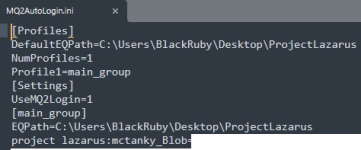
I'm just following the in the redguides.com/community/resources/multiboxing-everquest-the-red-guide-videos.1603/ and showing you what it looks like when I Open the INI. This is a fresh install of the RedGuides Launcher with Very Vanilla and EMu Servers selected. First time doing it, I don't know what the MQ2AutoLogin.ini is supposed to look like. I do know it looks different than the MQ2 E3 MQ2AutoLogin.ini that I'm used to.

Mod edit: don't post your blob.
 
Last edited by a moderator:
that screenshot still doesn't show a servers section, and based on that cutoff cursor at the bottom it looks like it definitely isn't there...

[Servers]
Project Lazarus=Project Lazarus

taken from that docs link that was shared earlier, and from the earlier posts, you need this in the INI or it isn't going to work.
 
Step By Step.
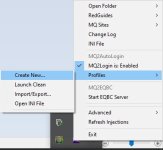
  • Installed RedGuides Launcher on PC
  • Installed Very Vanilla with the Emu Servers drop down.
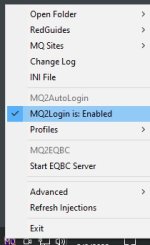
  • Checked the 'Launch EQBCS with MQ and pressed the Launch MQ button.
  • Enable MQ2Login1.jpg
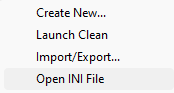
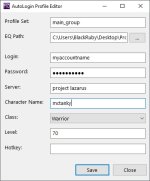
  • create a new profile2.jpg
  • 3.jpg
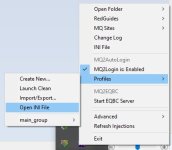
  • Open profile INI 4.jpg
  • 1683639016823.png
mod edit: please stop posting your blob, I don't care you're on emu - please stop.

Adding [Servers]Project Lazarus=Project Lazarus near the top or bottom makes no difference.
Is this normal, is this what you all see?
 
Last edited by a moderator:
per the docs, and other people on lazarus you do need to add the servers part. trying it without is ???

some stuff you need said:
; Host=login.projecteq.n
[Server]
Project Lazarus=Project Lazarus

redbot posted a working example here depending on your eqhosts.txt
 
Step By Step.
mod edit: please stop posting your blob, I don't care you're on emu - please stop.

Adding [Servers]Project Lazarus=Project Lazarus near the top or bottom makes no difference.
Is this normal, is this what you all see?
followed your steps exactly with a fresh install of emu vv and it loaded up the toon without issue. MQ2AutoLogin.ini ended up like this after i edited to add the servers section:

Code:
[Profiles]
DefaultEQPath=D:\Project Lazarus\Project Lazarus
NumProfiles=1
Profile1=laz
[Settings]
UseMQ2Login=1
[laz]
EQPath=D:\Project Lazarus\Project Lazarus
project lazarus:charname_Blob=...
[Servers]
Project Lazarus=Project Lazarus
 
Dont know why my formatting is different. Thank you @aquietone for all your help. I would give you more Red Cents if it would let me.
 
Problem - EMU (Project Lazarus) AutoLogin Profiles Not Found

Users who are viewing this thread

Back
Top
Cart