Current EMU Server version. Clean Install of MQNext and Project Lazarus.
Edited MQ2autologin.ini EQ Path to point to Project Lazarus directory. As directed by Redguides mq2autologin thread, Added
[Servers]
Project Lazarus=project lazarus
Project Lazarus=[] project lazarus
Ran Macroquest.exe
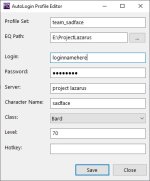
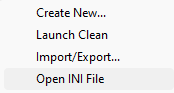
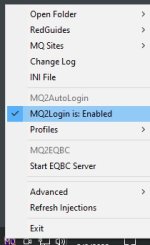
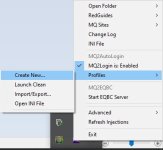
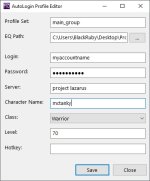
Entered a new profile (Account|Server|PW|Name) under Profiles>Create New... (new profile is listed and shown). Note that Autologin is: Enabled
Left clicked on the new profile.
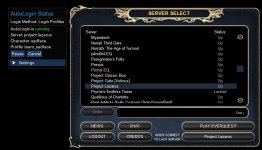
-> EQ is Initialized EQ to login screen, but account name is filled in with Profile<concat>[] project lazarus. All other fields are empty. Autologin failed and entry data is clearly wrong
-> MQNext is initialized and AutoLogin Status window is open with "Autologin is shown as inactive"
Clicked on Select Profile, but error tooltip pops up with "No Profiles, Go create one!".
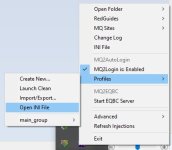
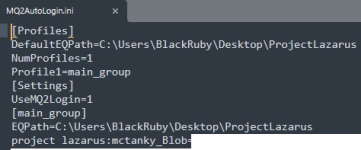
Subsequently, rebooted machine. Restarted Macroquest.exe, only this time the newly created profile is not shown, none are listed; however, using Notedpad I verified that the profile is indeed listed in MQautologin.ini file.
Edited MQ2autologin.ini EQ Path to point to Project Lazarus directory. As directed by Redguides mq2autologin thread, Added
[Servers]
Project Lazarus=project lazarus
Project Lazarus=[] project lazarus
Ran Macroquest.exe
Entered a new profile (Account|Server|PW|Name) under Profiles>Create New... (new profile is listed and shown). Note that Autologin is: Enabled
Left clicked on the new profile.
-> EQ is Initialized EQ to login screen, but account name is filled in with Profile<concat>[] project lazarus. All other fields are empty. Autologin failed and entry data is clearly wrong
-> MQNext is initialized and AutoLogin Status window is open with "Autologin is shown as inactive"
Clicked on Select Profile, but error tooltip pops up with "No Profiles, Go create one!".
Subsequently, rebooted machine. Restarted Macroquest.exe, only this time the newly created profile is not shown, none are listed; however, using Notedpad I verified that the profile is indeed listed in MQautologin.ini file.