
-
 Hail, we're RedGuides. We want you to play six (yes, 6!) EverQuest characters at once. We have scripts and a friendly community to help, please join our playstyle and say hello! 👋
-
 We've added LLM sections to our Terms & Rules and Resource Rules, for everyone's sanity & in-game safety.
Read more
a. Do not replace your voice with an LLM. This goes for your posts and your scripts. Drafting and editing with a tool is fine, but don't take you out of what you share.
b. Do not replace your EQ character's voice with an LLM. We don't want scripts that speak over/ooc,/shoutor other public channels. This has been an unwritten rule that's kept casino scripts off the site for decades, but we're now compelled to make it clear: keep automated communication private.
Why Does RG Review Scripts?
Nearly every LLM-written Lua script we see is making your character do impossible things, and rarely in a way that's beneficial to you. We've seen heavy server hammering,/targetover impossible distances when/nav spawnwould passively accomplish the same thing, a spawn search that fires 20+ times per second, and other pointless actions that are likely annoying GMs.
You are welcome to use LLMs as a tool to structure, draft, and edit your work, but please read critically before hitting/lua run
You are using an out of date browser. It may not display this or other websites correctly.
You should upgrade or use an alternative browser.
You should upgrade or use an alternative browser.
Question - Empowered Campfire
- Thread starter Ionis
- Start date


hell yeah - the next kiss version is going to have this option!Any way to get KA to drop an Empowered Campfire instead of the regular one?
Thanks!

Actually you can but require some change in kissassist.mac.
Search for the line where it drop campfire and change the campfire selection from 1 to 2
^ This is what I was looking for, to break it down you're going to want to open your kissassist.mac, then press CTRL + F and look for this line:
Line to Search for CF
INI:
/nomodkey /notify FellowshipWnd FP_CampsiteKitList listselect 1Which should be under this section:
Section for CF
INI:
| ----------------------------------------------------------------------------
| SUB: Campfire Section -  OriginalCode from toomanynames, wizbomb
| ----------------------------------------------------------------------------
Change the 1 at the end of the first line to a 2, save, restart your macro and boom! Your macro will drop Empowered Campfire.
Thanks again Patate!

Check out THIS thread (have some screenshots)Kind of off topic but not:
what does that camp fire do?
the buff you get from it is very nice
It's shared in the thread Sic just linked, but you can grab my Campfire snippet from that older KA code and it will do this:
- If you have the component, drop the Empowered Campfire for buff effects
- If you're out of them, drop a regular campfire
Code:
    Sub Bind_Campfire
    /if (${Select[${Zone.ID},33506]}) /return

        /windowstate FellowshipWnd open
        /delay 10
        /nomodkey /notify FellowshipWnd FP_Subwindows tabselect 2
        /if (!${Select[${Me.Fellowship.CampfireZone.ID},${Zone.ID}]}) {
            /nomodkey /notify FellowshipWnd FP_DestroyCampsite leftmouseup
            /delay 5s ${Window[ConfirmationDialogBox].Open}
            /if (${Window[ConfirmationDialogBox].Open}) {
                /nomodkey /notify ConfirmationDialogBox Yes_Button leftmouseup
            }
            /delay 5s !${Me.Fellowship.Campfire}
        }
        /nomodkey /notify FellowshipWnd FP_RefreshList leftmouseup
        /delay 1s
        /if (${FindItemCount[Fellowship Campfire Materials]} > 0) {
            /nomodkey /notify FellowshipWnd FP_CampsiteKitList listselect 2
            }
        /if (${FindItemCount[Fellowship Campfire Materials]} == 0) {
            /nomodkey /notify FellowshipWnd FP_CampsiteKitList listselect 1
            }
        /delay 1s
        /nomodkey /notify FellowshipWnd FP_CreateCampsite leftmouseup
        /delay 5s ${Me.Fellowship.Campfire}
        /windowstate FellowshipWnd close
        /if (${Me.Fellowship.Campfire}) /echo Campfire Dropped
/returnDidn't see any of these, ended up writing something up myself that can be found here: Empowered CF junk
I'll check that out as well!
I'll check that out as well!

Dobber123
Well-known member
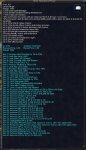
It gives you these buffs. Really nice if your short on buffs or about to do a boss fight. It lasts for about 5 hrs and has a range of 1000. Scroll down and look at the buff slot information.Kind of off topic but not:
what does that camp fire do?


Just set CampFireOn=2 and use this code:
@eqtrader74 you are so stealing my thunder..
Code:
    Sub Bind_Campfire
        /declare UseThisCampfire int local ${CampfireOn}
        /if (${Select[${Zone.ID},33506]}) /return
        /if (${UseThisCampfire}>1) {
            /if (${FindItemCount[Fellowship Campfire Materials]}<1) {
                /varset UseThisCampfire 1
                /echo Fellowship Campfire Materials Not Found. Setting to Regular Fellowship.
            }
        }
        /windowstate FellowshipWnd open
        /delay 10
        /nomodkey /notify FellowshipWnd FP_Subwindows tabselect 2
        /if (${Me.Fellowship.Campfire}) {
            /if (!${Select[${Me.Fellowship.CampfireZone.ID},${Zone.ID}]}) {
                /nomodkey /notify FellowshipWnd FP_DestroyCampsite leftmouseup
                /delay 5s ${Window[ConfirmationDialogBox].Open}
                /if (${Window[ConfirmationDialogBox].Open}) {
                    /nomodkey /notify ConfirmationDialogBox Yes_Button leftmouseup
                }
                /delay 5s !${Me.Fellowship.Campfire}
            }
        }
        /nomodkey /notify FellowshipWnd FP_RefreshList leftmouseup
        /delay 1s
        /nomodkey /notify FellowshipWnd FP_CampsiteKitList listselect ${UseThisCampfire}
        /delay 1s
        /nomodkey /notify FellowshipWnd FP_CreateCampsite leftmouseup
        /delay 5s ${Me.Fellowship.Campfire}
        /windowstate FellowshipWnd close
        /if (${Me.Fellowship.Campfire}) /echo Campfire Dropped
    /return
@eqtrader74 you are so stealing my thunder..
Thanks for the info!It gives you these buffs. Really nice if your short on buffs or about to do a boss fight. It lasts for about 5 hrs and has a range of 1000. Scroll down and look at the buff slot information.
View attachment 19395
good lord after all these years I only used the fellowship fire. I had no idea about the perks of the other ones.

lol... how do I make it? what parts?@mark805 dont worry, they upgraded it this summer. You haven’t missed that much
HERElol... how do I make it? what parts?
Users who are viewing this thread
Total: 1 (members: 0, guests: 1)
Share: