• You've discovered RedGuides, an EverQuest multi-boxing and scripting community 🧙‍♀️⚙️. We want you to play several EQ characters at once, come join us and say hello! 👋

  • A TLP without truebox has thawed (Very Vanilla ready)
    Frostreaver
DeleteItem.mac

Release DeleteItem.mac 0.3

No permission to download
It works well for me ... but: It does not open the bags. After launching the mac I have to manually open any bag once. When doing so, all "small Chunk of Velium" inside this bag are deleted automatically.
Thiy is way better than deleting all chunks manually. Is there an acutal piece of ui which allows to open all inventory-bags at once?
 
It works well for me ... but: It does not open the bags. After launching the mac I have to manually open any bag once. When doing so, all "small Chunk of Velium" inside this bag are deleted automatically.
Thiy is way better than deleting all chunks manually. Is there an acutal piece of ui which allows to open all inventory-bags at once?
There is a yes, think the default is shift b (at least mine is)
 
nice macro thanks for it... i was thinking about deleting all collectible itens, think there's a way for it?
 
I have a little bit of free time this weekend, I might see about something like /mac delete collectibles but honestly this was just something I put together in a few minutes for someone that asked in the discord. I'm open to adding stuff to the macro/taking input from anyone.
 
Just a suggestion but can you make it only delete exact matches rather then partial matches, for example Stalwart Recurve Bow vs Stalwart Recurve Bowstring.
 
Just a suggestion but can you make it only delete exact matches rather then partial matches, for example Stalwart Recurve Bow vs Stalwart Recurve Bowstring.

I can add something like /mac deleteitem exact "item name", partial names is too helpful to completely replace it imo.
 
Last edited:
This thing works -- FAST! But -- I wish it didn't end right after stuff was destroyed. Next time you're working on it, is there a way you could add a feature that makes it fire every couple minutes or something?
Cheers!
EQ_Fan
 
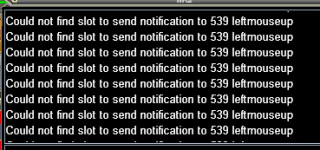
Seems to not be working for me. I get the following error
1626825561546.png

Used the open bags command above and /mac deleteitem "item name"
 
Seems to not be working for me. I get the following error
View attachment 31610

Used the open bags command above and /mac deleteitem "item name"
There was a patch about a month ago which broke this. With help from @Sic, here's an updated/working version of this macro for those who enjoy using it (I do often). Of course major thanks to v1ndi for writing it in the first place, it's quite helpful! 🙏 💕
 

Attachments

Hi, I am making othmir fur cap and I cannot sell them back to any npc. Is there a macro or way to delete these very quickly? Manually destroying hundreds is a crutch. Thanks in advance!


Edit: I tried using v1ndi1's but its giving me an error even after typing: /mac deleteitem "othmir fur cap"
 

Attachments

  • Capture.PNG
    Capture.PNG
    10.2 KB · Views: 1
Hi, I am making othmir fur cap and I cannot sell them back to any npc. Is there a macro or way to delete these very quickly? Manually destroying hundreds is a crutch. Thanks in advance!


Edit: I tried using v1ndi1's but its giving me an error even after typing: /mac deleteitem "othmir fur cap"
a couple posts up has the fix
 
Love this macro.
There are times I'd like to add and then remove items from the autodelete. I'm having trouble finding the information on how to do this?
 
Love this macro.
There are times I'd like to add and then remove items from the autodelete. I'm having trouble finding the information on how to do this?
There is no file to edit. This will delete all of the item selected in your bags.

Partial Match:
/mac deleteitem "item name"
Exact Match
/mac deleteitem exact "item name" OR /mac deleteitem e "item name"

or make a hotkey
/mac deleteitem ${Cursor.ID}
Then put the item on your cursor you want to delete and click the hotkey.
 
or make a hotkey
/mac deleteitem ${Cursor.ID}
Then put the item on your cursor you want to delete and click the hotkey.

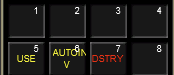
Tip for folks
I have 3 eq social hotkeys for this on a different hotkey bar in EQ that way you can quickly deal with inventory
  1. /usetarget
    • trade cursor item with your target
  2. /autoinv
    • auto-inventory cursor item
  3. /destroy
    • destroy cursor item
1720120813425.png
 
Very clean. But my old fingers are way too fat for that layout. I'd have to have the hotkeys in the 1-5 (use/autoinv) positions and the key of Death in the 8 position!
 
Tip for folks
I have 3 eq social hotkeys for this on a different hotkey bar in EQ that way you can quickly deal with inventory
  1. /usetarget
    • trade cursor item with your target
  2. /autoinv
    • auto-inventory cursor item
  3. /destroy
    • destroy cursor item
View attachment 63015
/destroy is good for the item on your cursor
or make a hotkey
/mac deleteitem ${Cursor.ID}
Then put the item on your cursor you want to delete and click the hotkey.
This will delete not only the cursor item, but every one of those items in your inventory.
 
Very clean. But my old fingers are way too fat for that layout. I'd have to have the hotkeys in the 1-5 (use/autoinv) positions and the key of Death in the 8 position!
nice thing about these buttons is you can mouseclick as well as hit the keyboard button =)
 
Release DeleteItem.mac

Users who are viewing this thread

Back
Top
Cart