Hello RG Community,
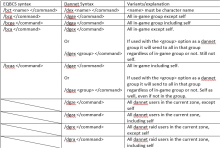
I'm hoping someone can help me with the proper format for DanNet for Confirmation Windows. Currently EQBC does have a command, but I've read that DanNet is the more efficient platform to use. So I would like to go that route if possible.
AllSayYes command for EQBC:
Using this Source: (/bcga / becomes /dggaexecute. Example, /dgga /camp desktop, or /dgga /nav spawn ${Spawn[banker].CleanName}) I attempted to make the change. I attempted the command with /if and //if as well
Attempts made:
/noparse /dggaexecute /if (${Window[ConfirmationDialogBox].Open}) /notify ConfirmationDialogBox CD_Yes_Button leftmouseup
/noparse /dgaexecute /if (${Window[ConfirmationDialogBox].Open}) /notify ConfirmationDialogBox CD_Yes_Button leftmouseup
/noparse /dge /if (${Window[ConfirmationDialogBox].Open}) /notify ConfirmationDialogBox CD_Yes_Button leftmouseup
/noparse /dgge /if (${Window[ConfirmationDialogBox].Open}) /notify ConfirmationDialogBox CD_Yes_Button leftmouseup
Does anyone know a good solution? I'm coming up empty on searches.
I'm hoping someone can help me with the proper format for DanNet for Confirmation Windows. Currently EQBC does have a command, but I've read that DanNet is the more efficient platform to use. So I would like to go that route if possible.
AllSayYes command for EQBC:
Using this Source: (/bcga / becomes /dggaexecute. Example, /dgga /camp desktop, or /dgga /nav spawn ${Spawn[banker].CleanName}) I attempted to make the change. I attempted the command with /if and //if as well
Attempts made:
/noparse /dggaexecute /if (${Window[ConfirmationDialogBox].Open}) /notify ConfirmationDialogBox CD_Yes_Button leftmouseup
/noparse /dgaexecute /if (${Window[ConfirmationDialogBox].Open}) /notify ConfirmationDialogBox CD_Yes_Button leftmouseup
/noparse /dge /if (${Window[ConfirmationDialogBox].Open}) /notify ConfirmationDialogBox CD_Yes_Button leftmouseup
/noparse /dgge /if (${Window[ConfirmationDialogBox].Open}) /notify ConfirmationDialogBox CD_Yes_Button leftmouseup
Does anyone know a good solution? I'm coming up empty on searches.