• You've discovered RedGuides, an EverQuest multi-boxing and scripting community 🧙‍♀️⚙️. We want you to play several EQ characters at once, come join us and say hello! 👋

  • A TLP without truebox has thawed (Very Vanilla ready)
    Frostreaver
CroakWatch

Release CroakWatch (1 Viewer) v0.42

No permission to download

Redfrog

Is now BlueFrog
Creator
Joined
Nov 29, 2017
RedCents
5,368¢
Redfrog submitted a new resource:

CroakWatch - Watching things croak, so you don't have to....and more.

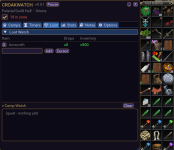
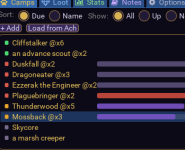
View attachment 77668CroakWatch is a mob camp manager for Live and EMU. Point it at a zone and it builds your hunt list, then watches every camp for you: who's up, when the next one's due, and what's been dropping. It also learns. Respawn timers self-correct to whatever server you're on by watching the real kill cycle.

  • Live "is it up?" detection + spawn-window...

Read more about this resource...
 
Redfrog updated CroakWatch with a new update entry:

v0.36

CroakWatch v0.36 - first public release 🐸

A named-mob camp manager for EQ (Live + EMU): builds your roster from the zone Hunter achievement (or add mobs manually), shows live UP status, learns each named's respawn timer per-server, tracks placeholder ratios, and tallies loot.

What you get in this first release:

  • Live UP / spawn-window alerts - hear the named's name spoken aloud (TTS) the moment it pops, plus a chime when a spawn window opens.
  • Self-learning...

Read the rest of this update entry...
 
Redfrog updated CroakWatch with a new update entry:

v0.37

CroakWatch v0.37 - Zone Watch 🐸

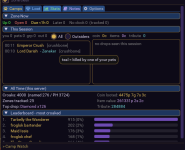
Know when your camp might get company. CroakWatch now keeps an eye on who else is in your zone.

  • Who's in your zone - a count of other players (not counting your group) right under the zone name, color-coded: grey when it's clear, amber when a few are around, red when it's crowded.
  • See exactly who - hover the count for the list: each player's name, level, class, and guild.
  • Heads-up on arrivals - the moment a new...

Read the rest of this update entry...
 
Sexy! Makes me want to play again.
Animated GIF
 
1782265850854.png
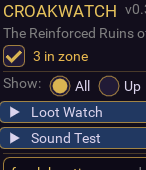
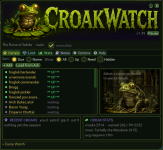
Everything minimized
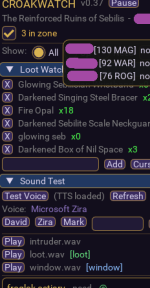
1782266035523.png
  • Hover over the in zone and a popup appears
  • Drop down the arrows for Loot Watch and you can add items and see amounts, items added trigger a alert sound
  • Sound Test drop down reveals choices for voice, a tester button
 
Redfrog updated CroakWatch with a new update entry:

v0.38

CroakWatch v0.38 - Camp Watch 🐸

Don't miss what matters while you camp - especially AFK. CroakWatch now keeps a running feed of what's happening around you.

  • One feed for everything - a new "Camp Watch" panel at the bottom logs, with timestamps: players entering your zone, all OOC, and tells sent to you. Color-coded so tells and OOC are easy to tell apart at a glance.
  • It blinks when something lands - the Camp Watch header pulses (even while...

Read the rest of this update entry...
 
Redfrog updated CroakWatch with a new update entry:

v0.41

CroakWatch v0.41 - Camp Watch tidy-up 🐸

  • Clear button - clear the Camp Watch feed any time (open the section and hit Clear). Handy if you leave CroakWatch running across camps.
  • Auto-clears when you change zones - the feed wipes itself on a zone change, so you're not staring at the last camp's chatter.
  • Under the hood: a more efficient player scan for Zone/Camp Watch (no visible change).

Read the rest of this update entry...
 
Redfrog updated CroakWatch with a new update entry:

v0.42

CroakWatch v0.42 - quality-of-life fixes 🐸

  • Remove a mob - the Edit window now has a Remove button, so you can delete a named you added (or no longer want to track).
  • Clearer when there's nothing to track - open CroakWatch in a zone with no Hunter achievement and it now tells you that's why the list is empty, instead of looking broken.
  • Cleaner first launch - no more harmless-but-confusing error message the first time you open the script.

Read the rest of this update entry...
 
1782349508104.png
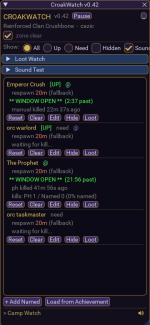
  • I made a few changes as I had missed some things, in this example I have Emperor Crush, who is NOT in ACH status, so must be manually added. Clicking Edit, you can Remove, add a PH manually or play with timing if you wish. It will eventually learn the PH on its own.​
  • The X button Closes the script (and window), under the X you can see a _ button, this is the minimizer to a mini icon. The script still runs and gives you info on nameds up in MQ console and in the Mini Icon.​
  • By Camp Watch section you see a speaker at the end and a Sounds checkbox at the top, those are separate sound choices. The speaker is a button for Camp Watch.​
  • The script is meant to be used (and started) in a zone with Hunter Named mobs to get them on your list, if you open it in PoK for example, it will be empty. I fixed a error saying failed to execute a config creation. It was a non-error that showed on first time use, if you downloaded before and saw it, not a 'real' error, but it should be gone now.​
Please feel free to tell me if i screwed up somewhere..happy to try to improve it. Still have some ideas I haven't figured out how to implement.
 
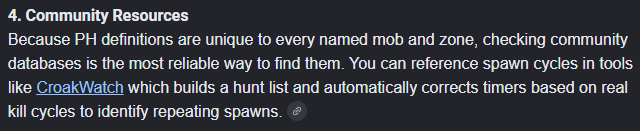
LOL, CW came up on a Google help thing.. I was doing some random searching for some things, haha:
1782532251701.pngThe little link is to RG of course. Look Ma, I'm famous!
 
Release CroakWatch

Users who are viewing this thread

  • D
Back
Top
Cart