• You've discovered RedGuides, an EverQuest multi-boxing and scripting community 🧙‍♀️⚙️. We want you to play several EQ characters at once, come join us and say hello! 👋

  • A TLP without truebox has thawed (Very Vanilla ready)
    Frostreaver

Problem - Crashing, injection errors

Joined
Sep 25, 2017
RedCents
3,230¢
I seem to have run into an issue not of my doing.

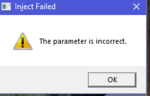
1) I get repeated errors saying Injection Failure, the parameter is incorrect
2) Repeated crashes. The client just blinks out of existence. It comes and goes. One night I had five crashes in a row. Then it behaved. Now, three times my SK has crashed before I could even load him
3) For some reason KA11 keeps restarting on one toon but not the others, which causes another macro to hang. the enchanater for some reason targets a quest giver rather then the tank, causing KA to fail

I am using the latest VVC with EQBCS. 16GB machine, Core i7 8770 processor, Nvidia 970. This should not be a resource problem

EDIT: I closed everything and rebooted the computer. My Wise 365 memory meter put used memory at 50%, meaning 8GB was used evern though I had closed out EQ. Restart. Just start the SK. Loads fine. Load VVC? Injection Failure, the parameter is incorrect, poof, there goes the SK client.

Unload VVC. Restart the SK. Load MMOBugs build. Works like a charm.

So it appears VV isn't vanilla enough.

Second update: I cannot use my SK at all with VVC, which is odd because it was working earlier today. But now, no way at all. I loaded the SK without VVC and he loaded up fine. Loaded VVC, injection failure, CTD on the SK. The other toons work just fine and don't crash. I have other characters on the SK account and they load just fine.

I thought it might be a memory issue but Memtest 5 cleared the RAM, and I have no other instability in the system except with EQ. I don't use a custom UI, either.
 
Last edited:
[Plugins]
mq2ic=1
mq2autologin=1
mq2autoaccept=1
mq2bzsrch=1
mq2cast=1
mq2chatwnd=1
mq2cpuload=1
mq2custombinds=1
mq2debuffs=1
mq2easyfind=1
mq2eqbugfix=1
mq2eqbc=1
mq2exchange=1
mq2hud=1
mq2itemdisplay=1
mq2labels=1
mq2map=1
mq2melee=1
mq2moveutils=1
mq2nonagwindows=1
mq2rez=1
mq2portalsetter=1
mq2targetinfo=1
MQ2LOG=1
MQ2Posse=1
mq2cursor=1
MQ2Twist=1
MQ2Nav=1
mq2autoloot=1
mq2advpath=1
 
No go. Crash every time. But the necro and ranger on that account load just fine.

I reinstalled VV fresh and it seems to be working. Something must have gotten fucked up along the way.
 
Last edited:
I have the same issue, I tried getting a dmp file but fails to produce a dmp that has any valuable information. I do notice that I get it more often when I am zoning. A restart of my machine fixes the issue for a while.

[Plugins]
mq2aaspend=0
mq2advpath=0
mq2afnuke=0
mq2autoaccept=1
mq2autocamp=0
mq2autoforage=0
mq2autogroup=0
mq2autologin=1
mq2autoloot=1
mq2autosize=0
mq2bandolier=0
mq2bardswap=0
mq2bucles=0
mq2bufftool=0
mq2bzsrch=1
mq2camera=0
mq2cast=1
mq2charnotes=0
mq2chat=0
mq2chatwnd=1
mq2clipboard=0
mq2combat=0
mq2cpuload=0
mq2cursor=0
mq2custombinds=1
mq2damageparser=0
mq2dannet=0
mq2debuffs=1
mq2discord=0
mq2dpsadv=0
mq2easyfind=0
mq2eqbc=0
mq2eqbugfix=1
mq2events=1
mq2exchange=1
mq2fearrunner=0
mq2feedme=0
mq2finditem=0
mq2fps=0
mq2gmail=1
mq2gmcheck=0
mq2headshot=0
mq2heals=0
mq2hud=1
mq2hudmove=0
mq2ic=1
mq2irc=0
mq2itemdisplay=1
mq2killtracker=0
mq2kisstemplate=0
mq2labels=1
mq2linkdb=0
mq2log=0
mq2map=1
mq2medley=0
mq2melee=1
mq2missing=0
mq2moveutils=1
mq2mybuttons=0
mq2nav=1
mq2netbots=0
mq2netheal=0
mq2nonagwindows=0
mq2notepad=0
mq2paranoid=0
mq2plattracker=0
mq2portalsetter=0
mq2posse=1
mq2pvpalert=0
mq2radar=0
mq2raidutils=0
mq2randomstuff=0
mq2relaytells=0
mq2reward=0
mq2rez=1
mq2search=0
mq2slave=0
mq2spawnmaster=0
mq2spawns=0
mq2spawnsort=0
mq2speaker=0
mq2spellhotkeys=0
mq2spellsearch=0
mq2sqlite=0
mq2targetinfo=0
mq2targets=0
mq2telnet=0
mq2tooltip=0
mq2tracking=0
mq2tributemanager=0
mq2twist=0
mq2vendors=0
mq2viewport=0
mq2worsthurt=0
mq2xptracker=1
 
I’m getting intermittent crashes when modifying items in the advloot window.
Also getting crashes on some (not all) toons when camping to server select.
Will post plugins when I get home.
 
I’m getting intermittent crashes when modifying items in the advloot window.
Also getting crashes on some (not all) toons when camping to server select.
Will post plugins when I get home.

The advloot issue is an EQ bug. Get more than 10 items in your window without MQ2 loaded and click options too quick going down the list and you will crash.
 
Please follow this guide for crashes. Most folks with the injection issue have compatibility settings turned on for Very Vanilla, I don't know why.

https://www.redguides.com/community...ing-heres-how-to-fix-it-90-of-the-time.41950/

Capturing a minidump would be extremely valuable to us in finding this bug. Here's how to do it 100% every time:
https://www.redguides.com/community/threads/crashing-and-minidumps.65489/


Here are the plugins the two users have in common:

Rich (BB code):
*mq2autoaccept=1
mq2autologin=1
*mq2autoloot=1
mq2bzsrch=1
mq2cast=1
mq2chatwnd=1
mq2custombinds=1
mq2debuffs=1
mq2eqbugfix=1
mq2exchange=1
mq2hud=1
mq2ic=1
mq2itemdisplay=1
mq2labels=1
mq2map=1
mq2melee=1
mq2moveutils=1
MQ2Nav=1
*MQ2Posse=1
mq2rez=1

*plugins unique to RedGuides
 
Last edited:
[Plugins]
mq2aaspend=0
mq2advpath=1
mq2afnuke=0
mq2autoaccept=1
mq2autocamp=0
mq2autoforage=0
mq2autogroup=1
mq2autologin=1
mq2autoloot=0
mq2autosize=0
mq2bandolier=0
mq2bardswap=0
mq2bucles=0
mq2bufftool=0
mq2bzsrch=1
mq2camera=0
mq2cast=1
mq2charnotes=0
mq2chat=0
mq2chatwnd=1
mq2clipboard=0
mq2combat=0
mq2cpuload=0
mq2cursor=1
mq2custombinds=1
mq2damageparser=1
mq2dannet=0
mq2debuffs=1
mq2discord=0
mq2dpsadv=0
mq2easyfind=1
mq2eqbc=1
mq2eqbugfix=1
mq2eqwire=1
mq2events=0
mq2exchange=1
mq2fearrunner=1
mq2feedme=1
mq2finditem=0
mq2fps=0
mq2gmail=1
mq2gmcheck=0
mq2headshot=0
mq2heals=0
mq2hud=1
mq2hudmove=0
mq2ic=1
mq2irc=0
mq2itemdisplay=1
mq2killtracker=0
mq2kisstemplate=1
mq2labels=1
mq2linkdb=0
mq2log=0
mq2map=1
mq2medley=0
mq2melee=1
mq2missing=0
mq2moveutils=1
mq2mybuttons=0
mq2nav=1
mq2netbots=0
mq2netheal=0
mq2nonagwindows=0
mq2notepad=0
mq2paranoid=0
mq2plattracker=0
mq2portalsetter=1
mq2posse=1
mq2pvpalert=0
mq2radar=0
mq2raidutils=0
mq2randomstuff=0
mq2relaytells=0
mq2reward=0
mq2rez=1
mq2search=0
mq2slave=0
mq2spawnmaster=1
mq2spawns=0
mq2spawnsort=0
mq2speaker=0
mq2spellhotkeys=0
mq2spellsearch=0
mq2sqlite=0
mq2targetinfo=1
mq2targets=0
mq2telnet=0
mq2tooltip=0
mq2tracking=0
mq2tributemanager=1
mq2twist=0
mq2vendors=0
mq2viewport=0
mq2worsthurt=0
mq2xassist=0
mq2xptracker=0
 
List of plugins in common with the others, eliminated autoloot.

mq2autoaccept=1
mq2autologin=1
mq2bzsrch=1
mq2cast=1
mq2chatwnd=1
mq2custombinds=1
mq2debuffs=1
mq2eqbugfix=1
mq2exchange=1
mq2hud=1
mq2ic=1
mq2itemdisplay=1
mq2labels=1
mq2map=1
mq2melee=1
mq2moveutils=1
mq2nav=1
mq2posse=1
mq2rez=1
 
@davewilson @zuesizgod

May be a longshot, but can you try today's update? Our buildserver was running an outdated version of Visual Studio which I updated this morning, and I'm hoping it's fixed the problem.
 
Well I actually said fk it and tried it remoted into my pc.. I got the inject error when trying to zone in to PoK, and it was an immediate crash of the client, but my other 2 accounts are up and working. I'll try tonight to see if I can get a crash dump from those, but I doubt I will.

I'll also try a fresh install of VV
 
The behavior is weird. If I zone with the debugger on/running it locks up (might be MQ2Nav that is the issue there, but I'll dbl check that later), if I stop the debugger, the client crashes w/ no inject message. Defiantely gonna look at this more this evening when I get home.
 
Oh and just as a FYI, I do not run in compatibility mode, but I do run everything as Administrator.
 
Well, I've unloaded MQ2Nav, and I have not had a crash since.

What I could get as dmp files have been forwarded to EQmule. I hope that something helpful can come from them.
 
Last edited:
Well, I've unloaded MQ2Nav, and I have not had a crash since.

What I could get as dmp files have been forwarded to EQmule. I hope that something helpful can come from them.
thank you so much for the effort!
 
edit: brainiac's default mq2nav now included in all compiles.

Here's an MQ2Nav built straight from brainiac's repo, no modifications, updated 10 hours ago. You can try this if you've had issues with crashing, let me know of any results.
 
Last edited:
I am having the same problem out of the blue (and first day back ..sigh ).
Using innerspace to launch.. i launch 7 toons in a set and out of those 5 crash as soon as they enter the game from the character select screen. Eq Crashes and immediately after i get this window.

mq2crash.PNG

which tells me a whole lot of nothing . I do not have mq2nav (from above) loaded on any of those and i seems pretty random .....like will be one charactor one time and another the next. All of them do load fine with just innerspace launch and if i launch them as separate apps. I also have also tried loading toons then starting mq2 ..same deal. the funny part to me is mq2 shows and loads just fine up to the char. select screen which I thought was "Done with injection" but apparently not.

I dont see a good way to dump my plugin list ..any help there ?
 
Last edited:
FYI for those folks who are crashing out and then finding they are unable to reload that exact character again through the auto log in...

The eqgame.exe probably got shifted to a background service.

You can either log in a different character, and then switch to the one you want or;

pull up taskmanager and scroll down looking for eqgame.exe in the background services and end-task it.

You may also try a cold reboot, I tend to have less issues after that. but seem to get a crashed toon after the tower has been up a few days/weeks.

Just as a general thing, you might also make sure your windows is up to date. As I understand it (and I am no developer so might be way off here) some of the plugins (like MQ2Nav) and MQ2 will use windows services. Might as well make sure windows is working and up to date to give you the best chances of things working =)
 
I dont see a good way to dump my plugin list ..any help there ?

right click on the MQ2 icon and select "INI file"
Then scroll down to the plugins section and simply copy and past that.
make sure you put code brackets around it in your post (one of the post clickies up top)
 
@davewilson @zuesizgod

May be a longshot, but can you try today's update? Our buildserver was running an outdated version of Visual Studio which I updated this morning, and I'm hoping it's fixed the problem.

Haven't crashed since that update. Fingers crossed!
 
Well I got it working as of yesterday. I basically re-downloaded the installer and re-installed over the top of my extant mq2 folder ran the update and it worked. No idea what was making the error here is my plugin list if it helps anyone.
Code:
mq2afnuke=1
mq2autoaccept=1
mq2autologin=1
mq2bzsrch=1
mq2cast=1
mq2chatwnd=1
mq2cpuload=1
mq2cursor=1
mq2custombinds=1
mq2debuffs=1
mq2easyfind=1
mq2eqbc=1
mq2eqbugfix=1
mq2exchange=1
mq2feedme=1
mq2heals=1
mq2hud=1
mq2ic=1
mq2itemdisplay=1
mq2labels=1
mq2map=1
mq2melee=1
mq2moveutils=1
mq2nav=1
mq2portalsetter=1
mq2rez=1
 
I seem to crash with this error, mostly when in raid instances. But when I log back in and start mq2 while in the raid, I am fine /shrug
 
Unfortunately, even with the new mq2nav that was provided (and the one in the patcher) I am still crashing. I've unloaded the mq2nav plugin again and no issues.
 
Sounds like multiple plugins cause this. I think we should let the devs fix things from the patch/expansion launch and then move the the plugins that are causing the issues.
 
Fresh install of Everquest and MQ2. Injection error still happens when I try to resize/maximize the window. Fix was to disable the mq2nav + portsetter.
 
I never crash if I load up MQ prior to loading EQ. Not sure if that helps, but I can echo all the above posters with the same issue.
Code:
[Plugins]
mq2autologin=1
mq2autoaccept=1
mq2bzsrch=1
mq2cast=1
mq2chatwnd=1
mq2cpuload=1
mq2custombinds=1
mq2debuffs=1
mq2eqbugfix=1
mq2eqbc=1
mq2events=1
mq2exchange=1
mq2hud=1
mq2ic=1
mq2itemdisplay=1
mq2labels=1
mq2map=1
mq2melee=1
mq2moveutils=1
mq2nonagwindows=0
mq2rez=1
MQ2Posse=1
MQ2DamageParser=0
mq2nav=1
MQ2TargetInfo=1
mq2advpath=0
mq2autoforage=1
 
Problem - Crashing, injection errors

Users who are viewing this thread

Back
Top
Cart